Social Media Virtual Assistant Job Description: A Free Template You Can Copy
A copy-ready social media virtual assistant job description, with the duties, approval rules, tools and 90-day KPIs most templates leave out.

On this page
- What Is a Social Media Virtual Assistant Job Description?
- Key Social Media VA Job Description Terms You Should Know
- Why Does a Detailed Job Description Matter for a Social Media VA?
- The Social Media Virtual Assistant Job Description Template
- How Do You Adapt the Template to Your Business?
- What Types of Social Media VA Roles Can the Template Describe?
- How Is a Social Media VA Different From Related Roles?
- The Benefits of a Detailed Social Media VA Job Description
- The Drawbacks of a Detailed Social Media VA Job Description
- Who Needs a Social Media Virtual Assistant Job Description?
- Social Media VA Job Description Examples
- Which Tools Should the Job Description Mention?
- 9 Proven Tips for Writing a Social Media VA Job Description
- Overcoming Common Social Media VA Job Description Challenges
- How to Measure Social Media VA Job Description Success
- How Long Does a Social Media VA Hire Take to Work?
- How Much Does a Social Media Virtual Assistant Cost?
- Is a Social Media Virtual Assistant Worth It?
- How to Choose a Social Media VA Agency
- Where Is the Social Media VA Role Heading?
- Should a Social Media VA Job Description Mention AI?
- FAQs
💡 Key Takeaways:
1) A social media virtual assistant job description lists the platforms, weekly output, tools, working hours and 90-day KPIs for a remote hire who creates posts, moderates comments and reports on results.
2) Numbers filter candidates better than adjectives: "12 posts and 3 Reels a week on Instagram and LinkedIn" tells an applicant far more than "creative self-starter who loves social media."
3) The most useful job descriptions split duties from approval rules, so the assistant knows what they can publish alone and what needs a sign-off first.
A sharper brief turns posts into paying customers
Hyperstaff has placed 70+ virtual assistants with 30+ clients, and every good placement starts with a clear brief. Copy the template below, or send it to us and our social media virtual assistant services team will match you with a pre-vetted specialist in 5 business days, at rates from $3/hour.
What Is a Social Media Virtual Assistant Job Description?
A social media virtual assistant job description is the document that says what a remote social media hire will publish, monitor, answer and report on, and which platforms they own. It works as a hiring filter first and then as page one of their training.
Most free templates stop at a list of duties. The version below adds weekly output targets, approval rules, a tool list and 90-day KPIs, because candidates ask about those four things first and managers argue about them later.
Still deciding whether the role fits your business? Read what a social media virtual assistant does, then come back once the scope is clear.
Key Social Media VA Job Description Terms You Should Know
- Content calendar = the dated plan of what goes live, on which platform, and when.
- Community management = replying to comments, DMs and mentions in the brand's voice.
- Approval workflow = the rule for which posts need a sign-off before they're published.
- Brand voice guide = written rules for tone, words to use and words to avoid.
- Scheduling tool = software such as Buffer or Later that queues posts across accounts.
- Engagement rate = interactions divided by reach or followers, depending on the platform.
- UGC = user-generated content, such as customer photos reposted with permission.
- Escalation path = who the assistant hands a complaint, refund or press question to.
- Access level = the account permission the assistant gets, from editor up to admin.
- KPI = the number the assistant is judged on, such as reply time or posts shipped.
- Operations Vault = Hyperstaff's maintained record of your SOPs, tools and context.
Why Does a Detailed Job Description Matter for a Social Media VA?
A detailed job description decides who applies, how fast the new assistant ramps up, and whether you both agree on performance after month one. Vague briefs pull in generalists who say yes to everything, while strong specialists quietly skip them.
Social media work is easy to under-specify. "Manage our socials" can mean 4 Facebook posts a month or 40 short-form videos across TikTok, Instagram and YouTube Shorts, and those are two different jobs at two different pay levels.
The second reason is account risk. A social assistant logs into accounts your customers see in public, so the description has to say what they may post, reply to and delete without asking.
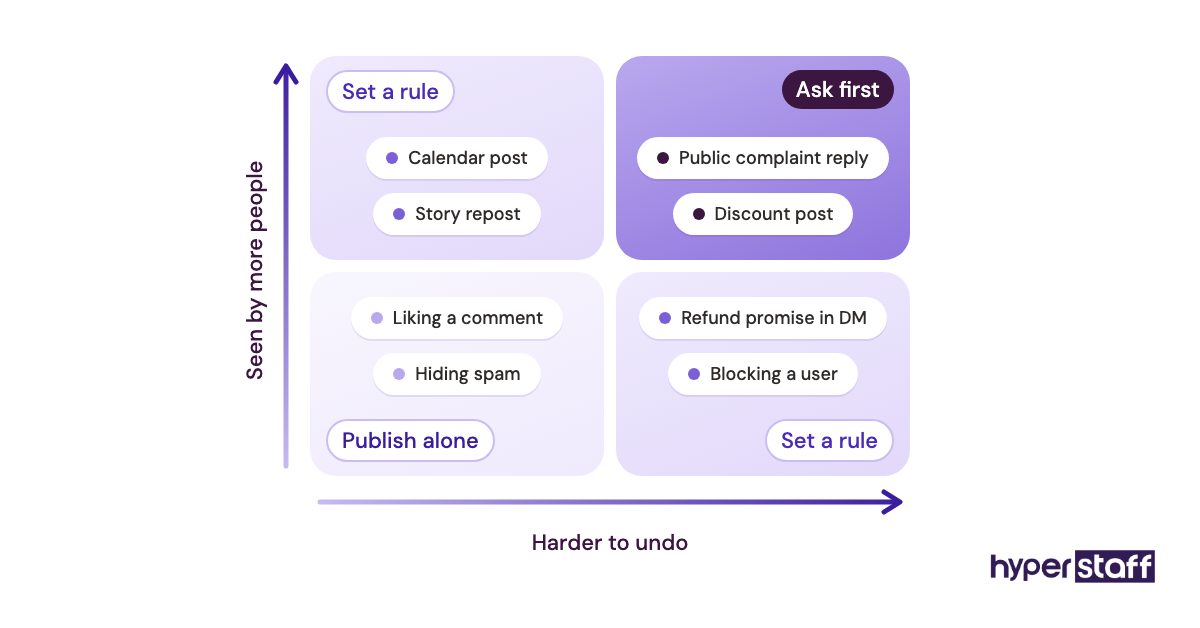
Worth knowing: Social media hires tend to stumble on approval rules far more often than on the duties themselves, because nobody writes down who signs off on a reply to an angry customer until one shows up on a Saturday night.
The Social Media Virtual Assistant Job Description Template
Copy the template into your own doc, fill every bracketed field, and delete any line that doesn't match your business. Each block is there because a candidate or a manager will ask about it within the first two weeks.
Job title: Social Media Virtual Assistant ([part-time / full-time], remote)
About us: [Business name] is a [type of business] serving [customer type] in [market]. We post on [platforms] and want a steady, on-brand presence there every week.
Role summary: You'll plan, create, schedule and report on our social content, and you'll be the first person to answer comments and messages on our accounts. You'll report to [name, title].
Schedule: [40 / 80 / 160] hours a month, with at least [X] hours a day of overlap with [time zone] for approvals and replies.
Weekly output:
- [X] feed posts on [platform]
- [X] short videos (Reels, TikTok or Shorts)
- [X] stories or carousels
- One performance summary every [day]
Responsibilities:
- Build a monthly content calendar and share it for review by [date each month]
- Write captions in our brand voice and resize each post for its platform
- Design graphics in Canva from our brand templates
- Edit short videos from raw clips we supply
- Schedule approved posts in [scheduling tool]
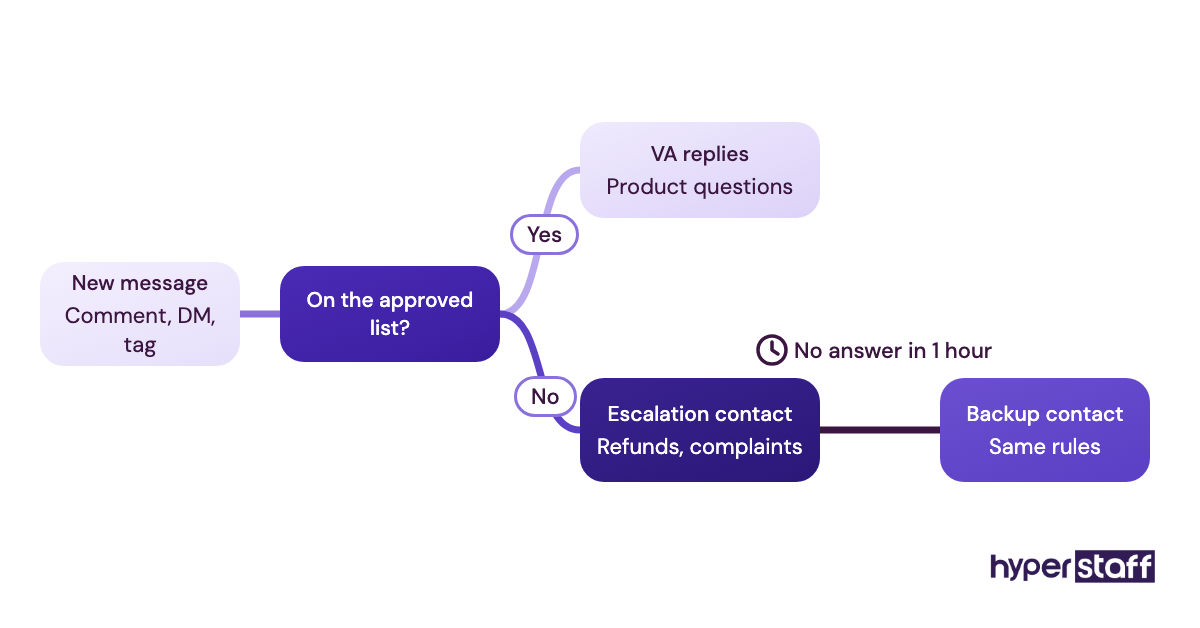
- Reply to comments and DMs within [X] business hours, and pass complaints, refund requests and press questions to [name]
- Track mentions, hashtags and [3 to 5] competitor accounts, and flag post ideas weekly
- Collect and repost customer content once the customer has agreed in writing
- Pull monthly analytics and suggest two changes for the next month
You can publish without approval: [e.g., posts from the approved calendar, replies to general product questions, reposts of approved customer content].
Needs approval first: [e.g., anything about pricing, discounts, competitors, news events or a customer complaint].
Tools: [Meta Business Suite, Canva, CapCut, Buffer or Later, Google Analytics, Slack, Notion or Trello]. Experience with [tool] is required, and we'll train you on the rest.
Requirements:
- [0 to 2 / 2 to 5 / 5+] years running business accounts on [platforms]
- Clear written English with no grammar slips in public posts
- Live accounts or a portfolio you've run, with numbers you can explain
- Comfort working from written SOPs and asking when a case isn't covered
How we'll measure the first 90 days: the calendar arrives on time each month, replies go out within [X] hours, at least [X]% of drafts publish without major edits, and each monthly report names what worked and what didn't.
How to apply: Send links to two accounts you've managed. Shortlisted applicants complete a paid test task: one week of captions for [platform], written from our brand voice guide.
How Do You Adapt the Template to Your Business?
Adapt the template by fixing scope first, then hours, approval rules and tools, and write the test task last. Each step below changes one specific block of the template.
Step #1: Pick the platforms and the weekly output
Start with the platforms that already bring you customers, and set a weekly output you have time to review. Two platforms done well will outperform five done thinly.
Check the full list of social media VA tasks to decide what stays out of scope, such as paid ads or influencer outreach.
Step #2: Match the hours to the output
A designed feed post usually takes 30 to 60 minutes from caption to schedule, and a short edited video takes 1 to 2 hours. Three posts and two videos a week lands near 25 to 40 hours a month before any community work.
Pick the hours block from that math. A 40-hour month suits one or two platforms with light DMs, while 80 hours fits daily replies across several accounts.
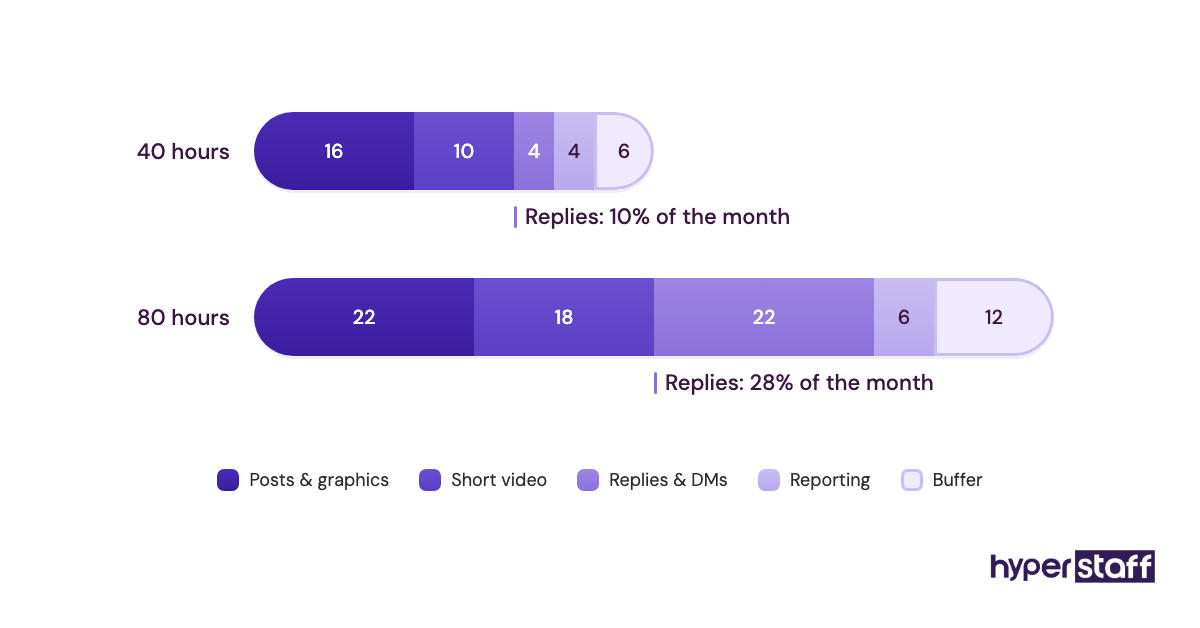
Keep in mind: Community management eats hours unevenly, since one viral post or product issue can triple a week's comment volume, so leave a buffer of roughly 15 to 20 percent of the monthly hours for replies you can't predict.
Step #3: Write the approval rules
List two buckets: what the assistant publishes alone and what needs your sign-off. Pricing, discounts, competitor mentions and public complaints belong in the second bucket for almost every business.
Name one person for escalations, with a backup. A rule that says "check with the team" leaves the assistant waiting while the comment sits unanswered.
Step #4: List the tools and access levels
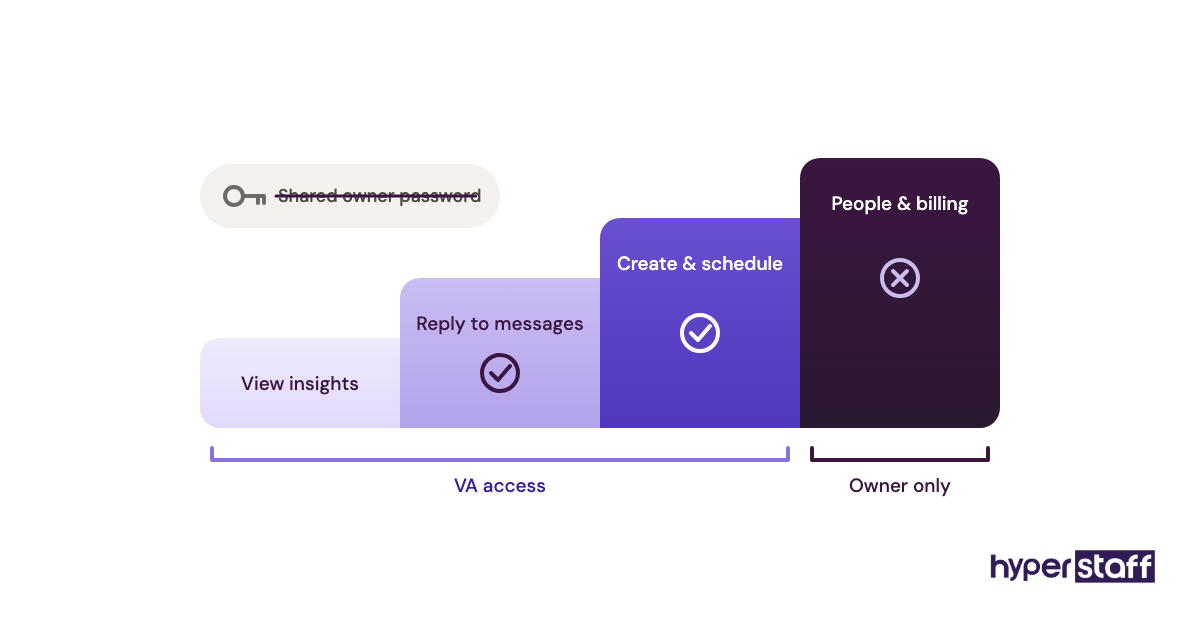
Name only the tools you already pay for, and mark which ones are must-haves. Give editor or partner access through Meta Business Suite and your scheduler instead of sharing the owner's password.
Step #5: Set the test task and the interview
A paid test task of 2 to 3 hours shows writing quality and brand sense faster than any CV. Pair it with these interview questions for social media VAs so every candidate gets the same review.
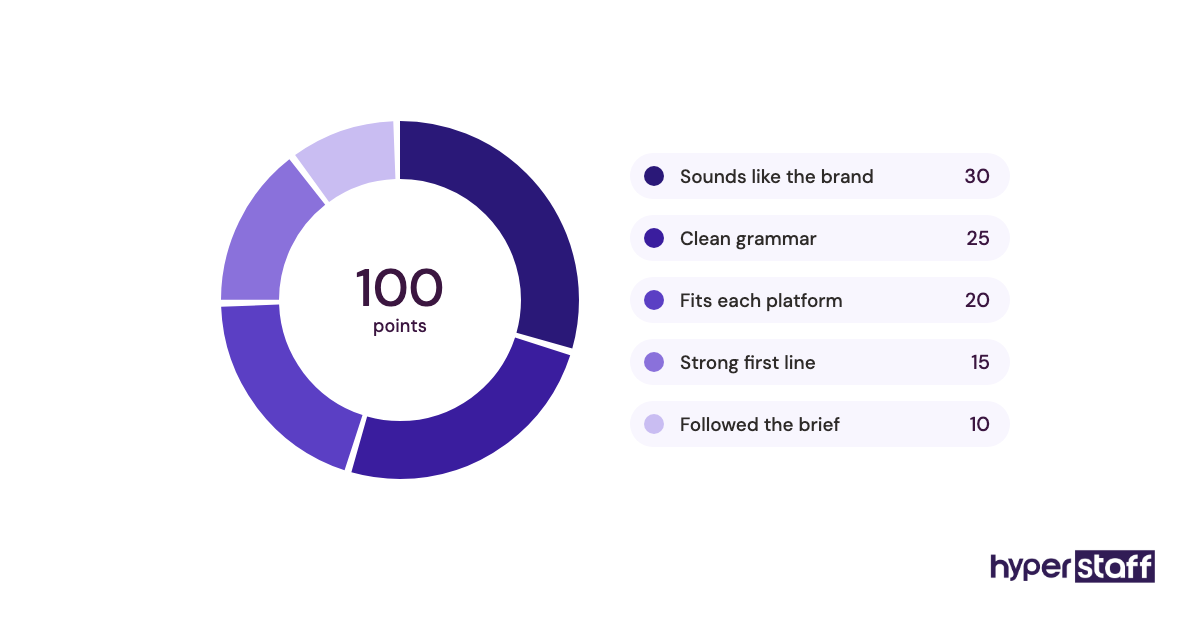
The full process, from shortlist to offer, is laid out in our guide to hiring a social media VA.
What Types of Social Media VA Roles Can the Template Describe?
The same template covers several role types once you swap the weekly output, tool list and experience tier. Pick the row closest to your needs and edit those three blocks.
| Role type | Main output | Tools to name in the JD | Suggested tier |
|---|---|---|---|
| Content scheduler | Calendar, captions, queued posts | Buffer or Later, Canva | Essential |
| Community manager | Comment and DM replies, moderation | Meta Business Suite, shared inbox | Essential or Professional |
| Short-form video editor | Reels, TikToks, Shorts | CapCut, Premiere Pro | Professional |
| Graphic content creator | Carousels, stories, templates | Canva, Figma | Professional |
| LinkedIn post assistant | Founder posts, comment replies | LinkedIn, Notion | Professional |
| Reporting assistant | Monthly reports, dashboards | Google Analytics, Looker Studio | Professional |
| Paid social assistant | Ad uploads, audiences, spend reports | Meta Ads Manager, TikTok Ads Manager | Expert |
| Full-stack social VA | All of the above for 1 or 2 platforms | Mixed | Professional or Expert |
How Is a Social Media VA Different From Related Roles?
A social media VA carries out a plan, while related roles either set the plan or work outside social channels. The differences matter because the job title shapes who applies.
Social Media VA vs. Social Media Manager
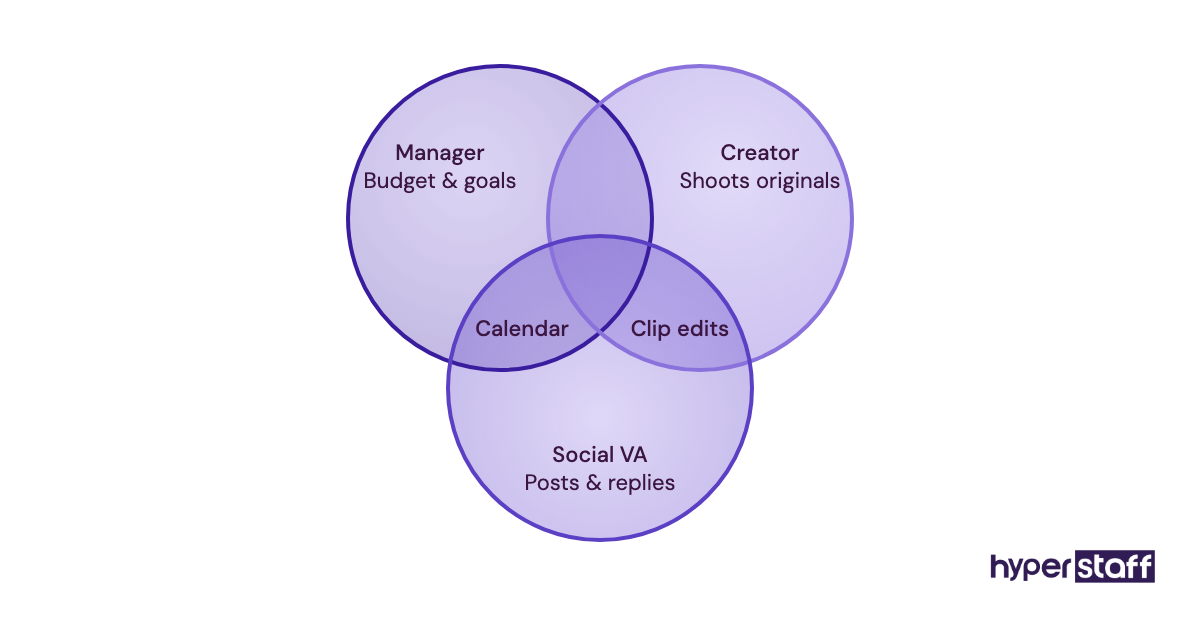
A social media manager owns the strategy, budget and goals, and a social media VA executes the calendar inside that strategy. If nobody on your side sets direction, hire at the Expert tier or plan to own the strategy yourself.
Social Media VA vs. Content Creator
Content creators produce original photos, video shoots and on-camera work. A VA edits, formats and posts from material you supply, so the job description should say where the raw footage comes from.
Social Media VA vs. General Virtual Assistant
A general VA splits time across inbox, calendar, data entry and customer support. Social work needs platform judgment and design skill, so a separate description gets you a better match.
If the real choice is location and employment type, compare a VA versus an in-house hire first.
The Benefits of a Detailed Social Media VA Job Description
- Fewer unqualified applicants, because the platforms and output are spelled out
- A faster first month, since the description doubles as a training brief
- Clear grounds for feedback, tied to KPIs both sides agreed on
- Safer accounts, with approval rules written before anything goes wrong
- Easy reuse when you add a second assistant or replace the first one
The Drawbacks of a Detailed Social Media VA Job Description
- It takes 1 to 2 hours to write well, and output numbers need a real decision from you
- Rigid duty lists can stop an assistant from suggesting better ideas
- It goes out of date when you add a platform, so it needs a review every quarter
Who Needs a Social Media Virtual Assistant Job Description?
Anyone hiring for social work needs one, though owners and marketing teams use it differently. A solo owner needs the approval rules most, because they're the only person who can sign off.
A marketing team with a manager in place needs the output and tool blocks most. Strategy already exists there, and the description's job is to define execution capacity.
Social Media VA Job Description Examples
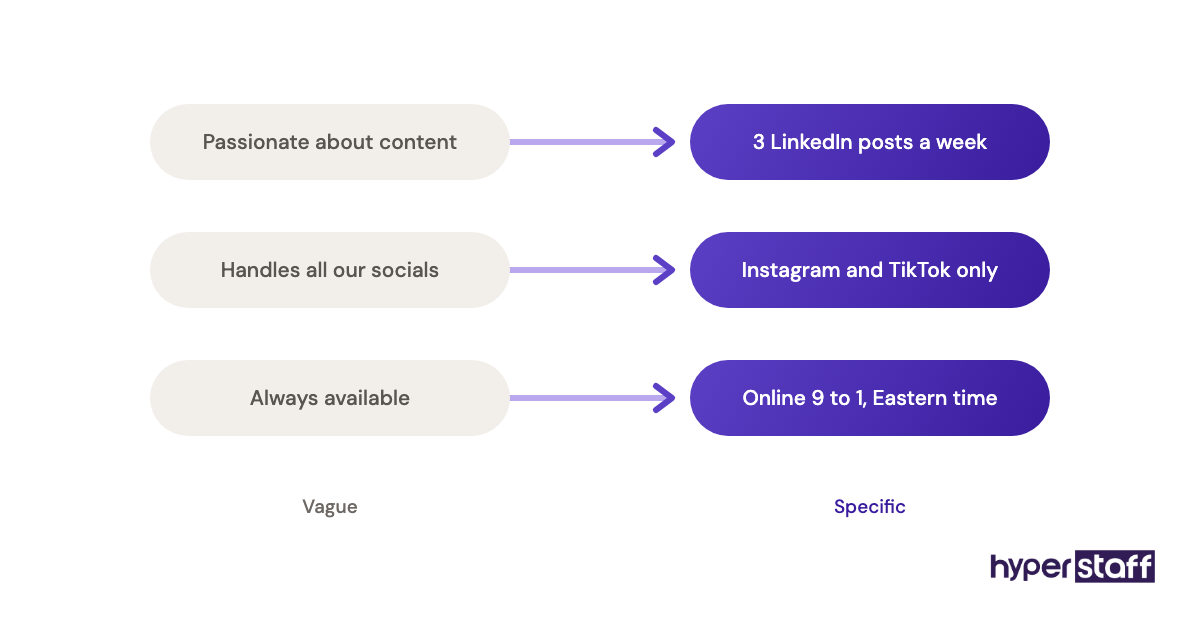
Good job description lines give a number, a limit or a name. Weak lines describe a personality or promise results the assistant can't control.
Social Media VA Job Description Good Examples
A duty line with numbers
"Publish 4 Instagram posts and 2 Reels each week from the approved calendar." A candidate can price their time against that line in seconds.
An escalation rule with a name
"Send any refund request or complaint to Priya within one hour, and don't reply publicly until she confirms." The assistant knows who, how fast, and what to hold back.
A KPI that fits the hours
"Reply to all DMs within 4 business hours, Monday to Friday." The target is measurable and matches a part-time schedule.
Social Media VA Job Description Bad Examples
The everything list
Twenty-five duties across ads, SEO, email and video for a 40-hour month. Strong applicants read it as a sign the role will never be finished.
Personality language
"We need a social media ninja who lives and breathes content." Phrases like this tell a candidate nothing about the work and attract people who match the tone instead of the job.
Results the assistant can't control
"Grow followers by 10,000 in three months." Reach depends on budget, product and algorithm changes, so tie KPIs to output and response time. More of these traps sit in our list of common social media VA mistakes.
Red flag: If your draft has more adjectives than numbers, rewrite it before posting, because experienced social assistants skim for platforms, hours and output and move on when they can't find them.
Which Tools Should the Job Description Mention?
Name the tools your business already uses, and mark one or two as required. Canva and Meta Business Suite appear in most social VA roles, so ask for them by default.
For scheduling, Buffer is simple for small accounts and Later is strong for visual planning on Instagram and TikTok. Sprout Social and Hootsuite suit teams with several brands and shared inboxes, though they're heavier to learn.
CapCut is the common pick for short video, while Premiere Pro matters only if your editor already works in Adobe. Our social media VA tool stack guide compares the options in depth.
9 Proven Tips for Writing a Social Media VA Job Description
These tips come from what candidates ask and what tends to break after a hire starts.
- Put platforms and weekly output in the first five lines.
- State hours per month and the overlap you need with your time zone.
- Write approval rules as two short lists: publish alone, and ask first.
- Name one escalation contact and one backup.
- List required tools apart from nice-to-have tools.
- Ask for live accounts the applicant has run, with real numbers.
- Pay for the test task and keep it under 3 hours.
- Set 90-day KPIs on output and reply time, and leave follower growth out.
- Review the description every quarter or whenever you add a platform.
Overcoming Common Social Media VA Job Description Challenges
The most common challenge is scope creep: the role starts as posting and slowly picks up ads, email and customer support. Fix it by adding an "out of scope" line and revisiting hours before adding any task.
Time zones are the second problem. Set a daily overlap window of 2 to 4 hours for approvals and leave the rest of the schedule flexible.
Brand voice is the third. Attach a one-page voice guide with five sample captions you liked, which beats any adjective list.
How to Measure Social Media VA Job Description Success
Measure the job description by the quality of applicants and the first 90 days of work. A good description produces a shortlist where most candidates match the platforms and tools you named.
After the hire, track four numbers: calendar delivered on time, drafts published without major edits, average DM reply time, and whether monthly reports name clear next steps. If the KPIs keep getting missed, check whether the hours in the description were ever realistic for the output.
How Long Does a Social Media VA Hire Take to Work?
Writing the job description takes 1 to 2 hours, and Hyperstaff places a matched assistant within 5 business days. A 30-minute kickoff call follows, and work starts that day or the next morning.
Expect 3 to 4 weeks before captions sound like your brand without heavy edits. A written onboarding plan for your new VA shortens that window more than anything else.
How Much Does a Social Media Virtual Assistant Cost?
A social media virtual assistant costs about $3 to $40 per hour depending on experience and hiring route. The table compares Hyperstaff's published rates with typical freelance and in-house costs.
| Experience level | Hyperstaff (from) | Freelance marketplace (typical) | In-house US hire (typical, with overheads) |
|---|---|---|---|
| Essential (0 to 2 years) | $3/hour | $10 to $20/hour | $25 to $32/hour |
| Professional (2 to 5 years) | $6/hour | $20 to $30/hour | $30 to $40/hour |
| Expert (5+ years) | $12/hour | $30 to $40+/hour | $40 to $55/hour |
| Professional, 80 hours/month | $480/month | $1,600 to $2,400/month | Usually hired full-time only |
| Professional, 160 hours/month | $960/month | $3,200 to $4,800/month | $4,800 to $6,400/month |
Paying quarterly with Hyperstaff saves 10%. For a full breakdown by region and tier, see the social media VA cost breakdown.
Important: Hyperstaff prices shown are starting rates and averages, not fixed quotes. Your final cost depends on the experience tier, hours, platforms and scope your business needs.
Is a Social Media Virtual Assistant Worth It?
Yes, for most small businesses a social media VA is one of the most rewarding hires they can make, as long as the job description is clear. Consistent posting and fast replies compound over months, and the owner gets back hours that carry a higher value elsewhere.
Here's a simple calculation. An owner spending 10 hours a week on social media puts about 43 hours a month into it, which is $3,225 of time at a $75/hour value.
An 80-hour Professional bundle costs $480 a month and doubles the hours available for social work. Even with 5 hours a week of owner review, the trade is clearly positive, though it depends on using the freed time on sales or delivery. Our full take on whether a social media VA pays off goes through the cases where it doesn't.
How to Choose a Social Media VA Agency
Choose an agency by asking four things: how candidates are vetted, whether the assistant is dedicated to you, how replacements work, and who manages the relationship. Shared pools rotate people, and each rotation resets brand voice to zero.
Ask what happens to your SOPs if the assistant leaves. At Hyperstaff, replacements arrive in 5 to 7 business days, briefed from your Operations Vault, and every client has a dedicated account manager.
Book a free discovery call with any agency on your shortlist, and bring your filled-in job description. The questions they ask about it tell you how carefully they'll match.
Where Is the Social Media VA Role Heading?
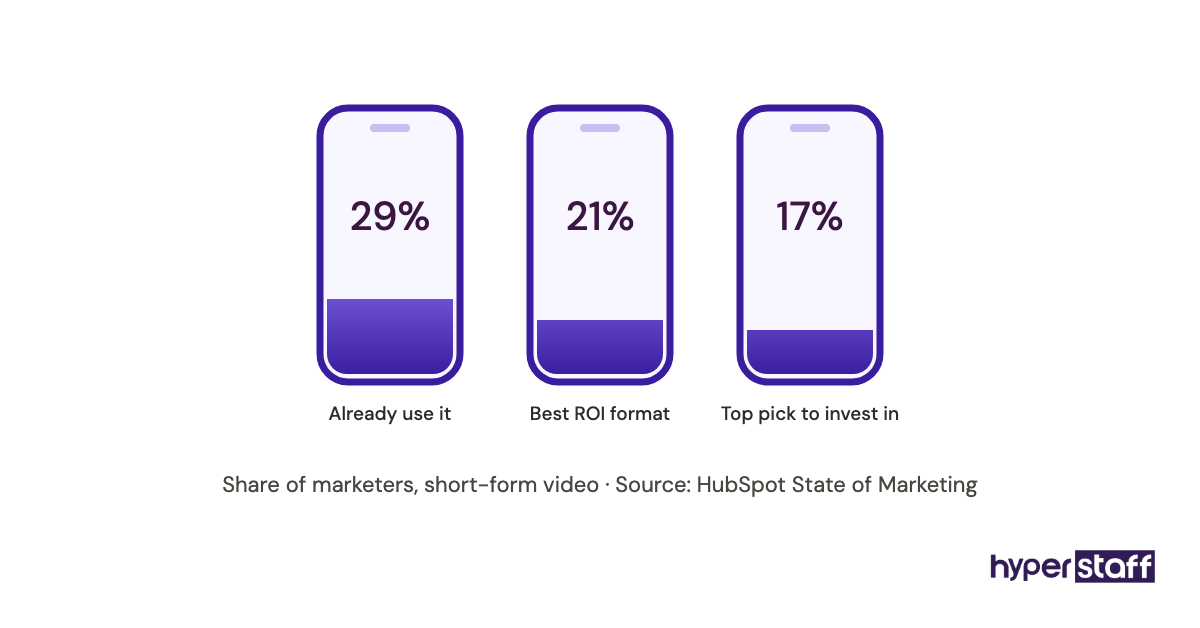
The social media VA role is moving toward short video and community work. Most platforms now push vertical video to the top of feeds, so editing skill appears in more job descriptions than design skill once did.
DM volume is rising too, as customers use Instagram and Facebook messages as a support channel. Expect more descriptions to include reply-time KPIs and escalation rules.
Practitioners disagree on generalist versus specialist hires. A full-stack VA is cheaper to coordinate, while separate video and community specialists tend to produce better work once a brand posts daily on three or more platforms.
Should a Social Media VA Job Description Mention AI?
Yes, the job description should say which AI tools the assistant may use and for what. Caption drafts, idea lists and subtitle generation are common uses that save real time.
Set limits too. Ban AI-written replies to complaints, require a human edit on every caption, and state whether AI images are allowed on your accounts.
Practical note: Ask candidates to show one AI-drafted caption next to their edited version during the test task, since the gap between the two shows their judgment far better than a yes-or-no question about AI skills.
Disclaimer : This article is for general information only and isn't legal, tax or employment advice. Pay ranges, tool features and platform rules change, so check current details and local employment law before hiring. Hyperstaff rates shown are starting rates and don't constitute a quote.
Common questions
Should I put pay in a social media VA job description?
Yes, a pay range gets more qualified applicants and fewer wasted interviews. List an hourly range and the monthly hours so candidates can judge the role quickly.
How long should a social media VA job description be?
Aim for 400 to 700 words. Shorter versions skip the approval rules and KPIs, and longer ones usually repeat duties.
Should I give my social media VA my passwords?
No. Add them as an editor or partner through Meta Business Suite and your scheduling tool, and use a password manager for any account that has no role-based access.
Does a social media VA need to run paid ads?
Only if the job description says so. Paid social is a separate skill, so hire at the Expert tier or list it as out of scope.
Should the test task for a social media VA be paid?
Yes, pay for it. A paid 2 to 3 hour task attracts experienced applicants and keeps the process fair, since the work could appear on your accounts.
Book a free 15 min call
We place a pre-vetted specialist in 5 business days, fully managed, from $3/hour.