Onboarding a Data Entry Virtual Assistant: A Practical Plan
A step-by-step plan for onboarding a data entry virtual assistant so accuracy settles in the first two weeks and your review time drops fast.
On this page
- What Does Onboarding a Data Entry Virtual Assistant Involve?
- Key Data Entry VA Onboarding Terms You Should Know
- Why Does Onboarding a Data Entry VA Matter So Much?
- How Does Data Entry VA Onboarding Work?
- Types and Forms of Data Entry VA Onboarding
- How Data Entry VA Onboarding Differs From Related Processes
- Data Entry VA Onboarding vs. Employee Onboarding
- Data Entry VA Onboarding vs. Data Entry Training
- Data Entry VA Onboarding vs. Outsourcing to a BPO
- What Are the Benefits of Onboarding a Data Entry VA Properly?
- What Are the Drawbacks of Onboarding a Data Entry VA?
- Who Needs a Structured Data Entry VA Onboarding?
- Data Entry VA Onboarding Examples
- Good Examples of Data Entry VA Onboarding
- Bad Examples of Data Entry VA Onboarding
- Creating a Data Entry VA Onboarding Plan, Step by Step
- Step #1
- Step #2
- Step #3
- Step #4
- Step #5
- What Does an Effective Data Entry VA Onboarding Strategy Look Like?
- Data Entry VA Onboarding Tools and Software
- 9 Proven Data Entry VA Onboarding Tips and Best Practices
- How Do You Overcome Common Onboarding Challenges?
- How Do You Measure Data Entry VA Onboarding Success?
- How Long Does Onboarding a Data Entry VA Take?
- How Much Does Onboarding a Data Entry VA Cost?
- Is Onboarding a Data Entry VA Properly Worth It?
- How Do You Choose a Data Entry VA Agency That Onboards Well?
- Data Entry VA Statistics, Trends and Future Predictions
- Data Entry VA Onboarding and AI
- FAQs
Clean Records Mean Faster Invoices, Fewer Lost Leads
Hyperstaff has placed 70+ virtual assistants with 30+ clients, and our data entry virtual assistant services come with an Operations Vault that holds your SOPs, tools and context from day one. You get a pre-vetted specialist in 5 business days, a dedicated account manager and a 30-minute kickoff call, with work starting that day or the next morning.
What Does Onboarding a Data Entry Virtual Assistant Involve?
Onboarding a data entry virtual assistant is the setup period where a remote hire gets system access, written procedures and supervised practice on your real records before working alone. It usually runs one to three weeks and ends when their error rate holds steady without daily review.
The role covers far more than typing. If you're still pinning down what a data entry virtual assistant does day to day, the list includes CRM updates, invoice capture, product catalog edits, lead list building and cleanup of records that drifted out of format.
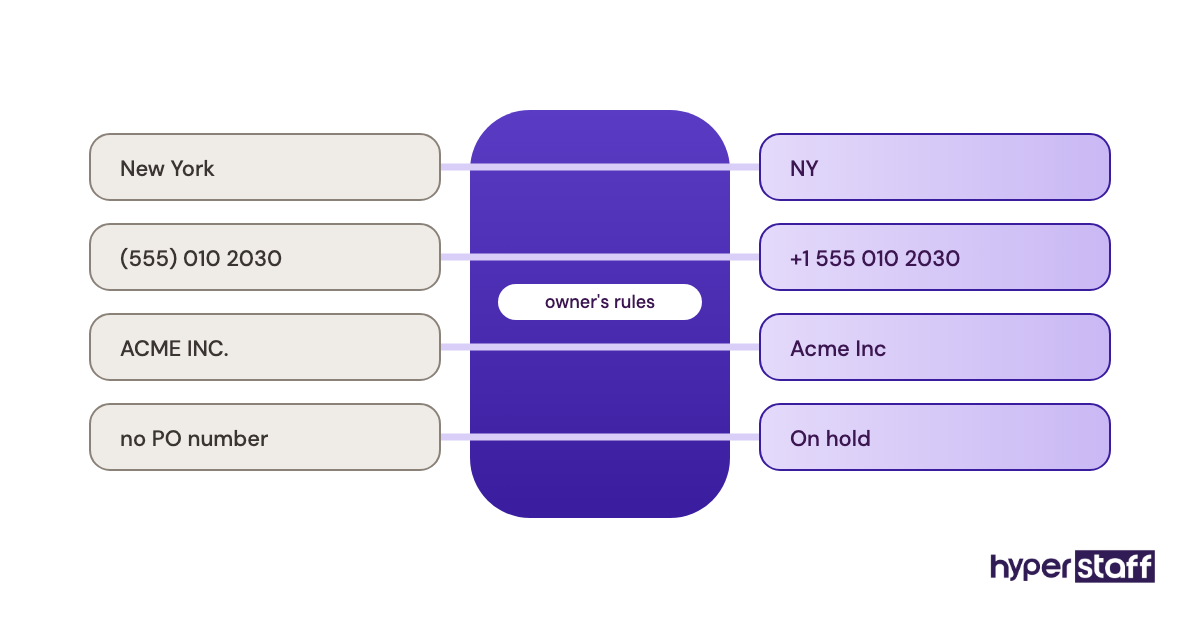
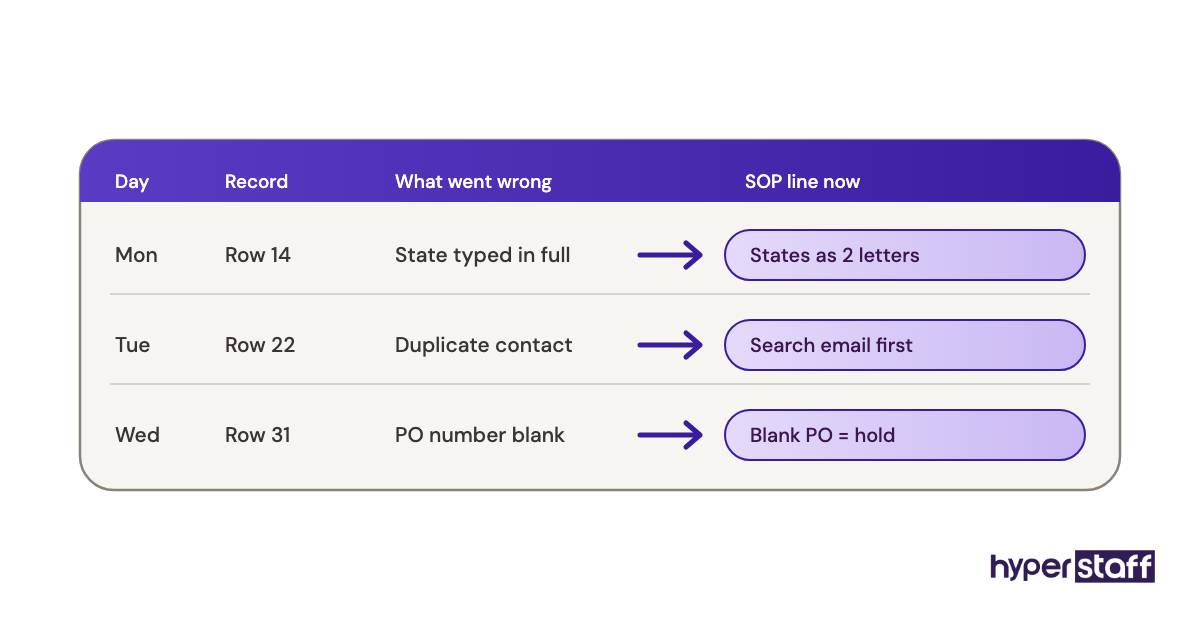
Onboarding is where each of those tasks gets defined for your business. A VA who knows Excel inside out still doesn't know that your team writes states as two-letter codes, or that an invoice with no PO number goes on hold.
Key Data Entry VA Onboarding Terms You Should Know
- SOP = a written, step-by-step procedure for one recurring task, with screenshots where the screen matters.
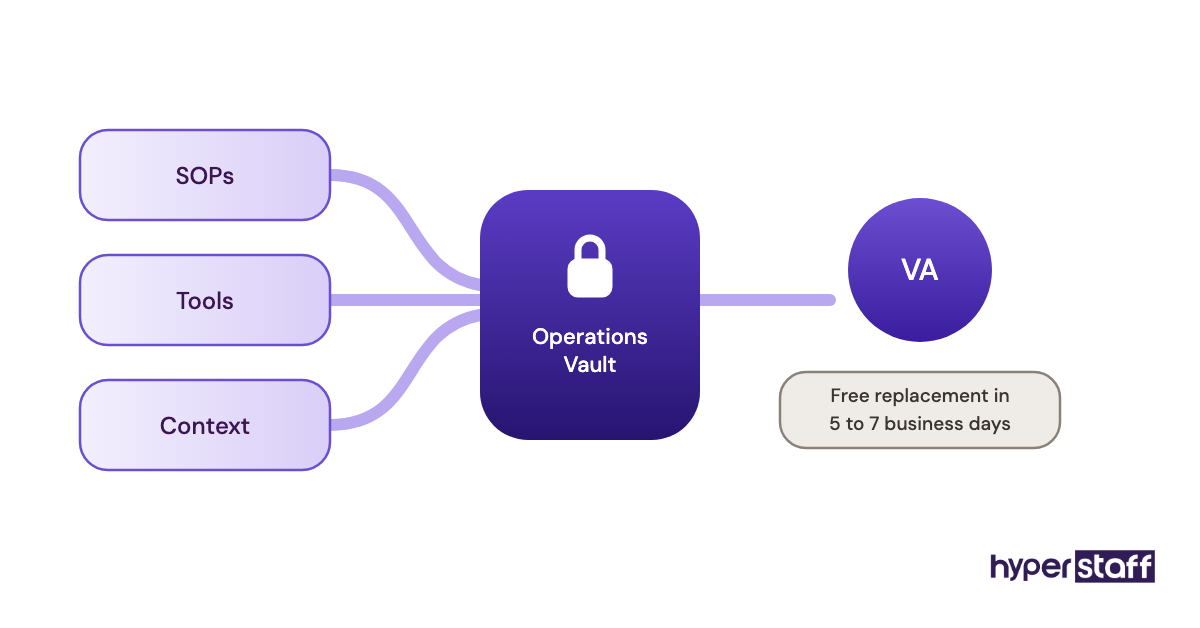
- Operations Vault = Hyperstaff's maintained record of your SOPs, tools and business context, used to brief any VA.
- Source document = the original the data comes from, such as a PDF invoice, a web form or a scanned receipt.
- Field mapping = the rule for which value in the source goes into which field in your system.
- Validation rule = a check that blocks bad input, like a date in the wrong format or a blank required field.
- Sample batch = a small set of real records the VA processes first so you can review every entry.
- Accuracy rate = correct entries divided by total entries checked, tracked per batch.
- Double-key verification = two passes over the same data, with mismatches flagged for review.
- Least-privilege access = giving the VA only the logins and permissions the task needs.
- Escalation path = the agreed route for questions the SOP doesn't answer, including who replies and how fast.
- Throughput = records completed per hour, worth tracking only after accuracy is stable.
- OCR = software that reads text from scans and PDFs, which the VA then checks and corrects.
Why Does Onboarding a Data Entry VA Matter So Much?
Onboarding sets the error rate you'll live with for as long as the VA stays. Data entry mistakes compound without anyone noticing: a duplicate contact gets two sales emails, and a mistyped SKU sells stock you don't have.
Fixing bad data later costs more than preventing it. Cleaning a few hundred wrong rows means finding them first, and most errors don't announce themselves.
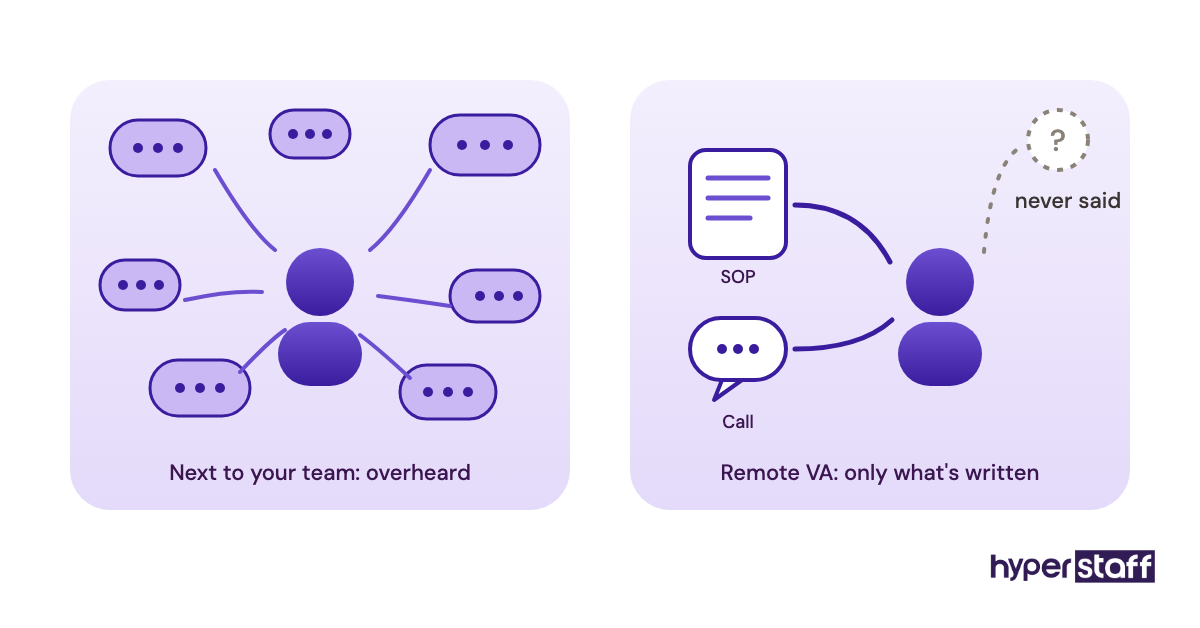
Remote work adds one specific gap. A hire sitting next to your team picks up the unwritten rules by overhearing them, while a remote VA only knows what was written down or said on a call.
How Does Data Entry VA Onboarding Work?
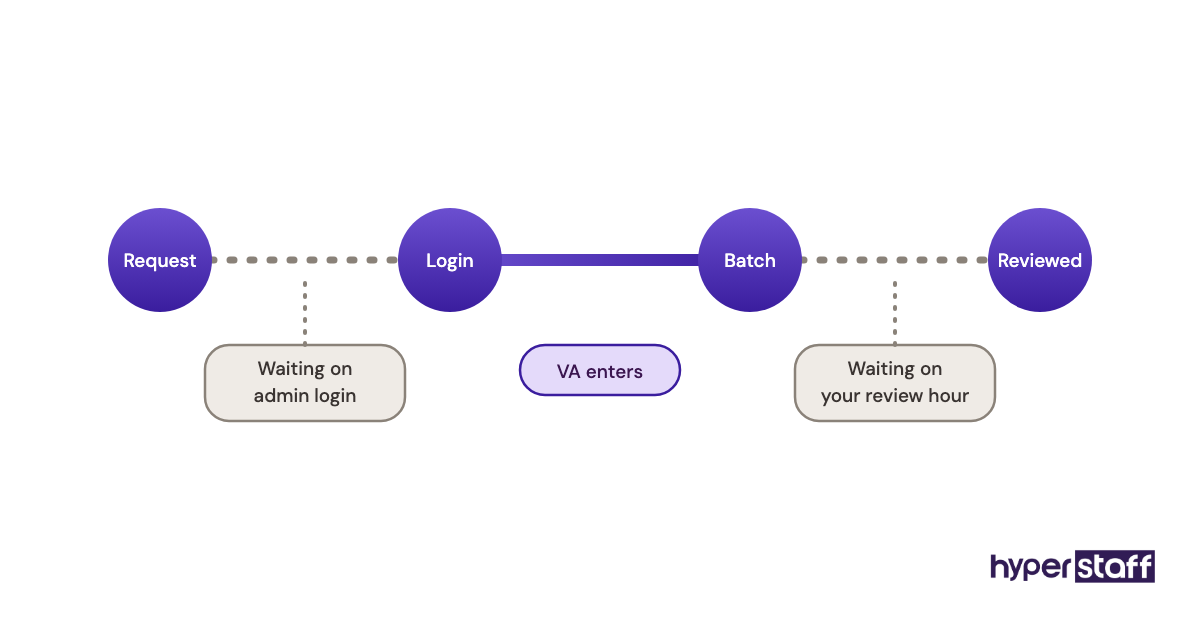
Data entry VA onboarding runs in phases: access and documents first, then supervised practice on a sample batch, then a gradual cut in review as accuracy holds. Getting the order right matters more than going fast.
Most delays sit in the gaps between phases. Access requests wait on whoever owns the admin login, and the first sample batch waits on you finding an hour to review it.
| Phase | Typical timing | Owner | Done when |
|---|---|---|---|
| Access and accounts | Day 0 to 1 | You or your tool admin | VA logs into every tool with own credentials |
| Documents and SOPs | Day 0 to 2 | You, or the agency via its documentation | Each recurring task has a written procedure |
| Kickoff call | Day 1 | You, the VA, the account manager | VA can repeat back the top priorities |
| Sample batch | Days 1 to 3 | VA enters, you review 100% | Errors are logged and the SOP is updated |
| Supervised live work | Weeks 1 to 2 | VA, with daily spot checks | Accuracy holds across several batches |
| Spot-check mode | Week 3 onward | You or a reviewer, weekly | Review drops to a sample of each batch |
Types and Forms of Data Entry VA Onboarding
Data entry VA onboarding varies by who writes the documentation, who reviews early work and how sensitive the records are. Most businesses end up combining two or three of the setups below.
| Onboarding type | Who prepares it | Best fit | Main risk | Typical ramp |
|---|---|---|---|---|
| Owner-led | Business owner | One VA, simple tasks | Rules stay in the owner's head | 2 to 4 weeks |
| Agency-assisted | Agency plus owner | Most small businesses | Docs stay generic if the owner skips input | 1 to 2 weeks |
| Shadowing first | Existing team member | Complex CRMs or ERPs | Sessions go unrecorded | 1 to 3 weeks |
| Documentation-first | Owner or ops lead | High-volume, repeated tasks | Docs drift out of date | 1 to 2 weeks |
| Sandbox practice | Tool admin | Financial or medical records | Many tools offer no test environment | 1 to 2 weeks |
| Phased access | Owner plus IT | Sensitive client data | Slow when approvals stall | 2 to 3 weeks |
| Replacement onboarding | Agency, from existing docs | Covering a departed VA | Gaps in old SOPs carry over | Days, if docs are current |
| Project-based | Owner | One-off backlog or migration | No lasting SOP gets written | Under a week |
How Data Entry VA Onboarding Differs From Related Processes
Data entry VA onboarding gets mixed up with employee onboarding, skills training and outsourcing to a BPO. The difference comes down to scope: one remote person learning your records, your systems and your rules.
Data Entry VA Onboarding vs. Employee Onboarding
Employee onboarding covers payroll setup, benefits, equipment and company culture. When you hire through an agency, much of that paperwork sits on their side, so your share of the work is task procedures and access.
Data Entry VA Onboarding vs. Data Entry Training
Training teaches a skill, like touch typing, spreadsheet formulas or OCR software. Onboarding teaches your version of the work: your fields, your naming conventions, your exceptions.
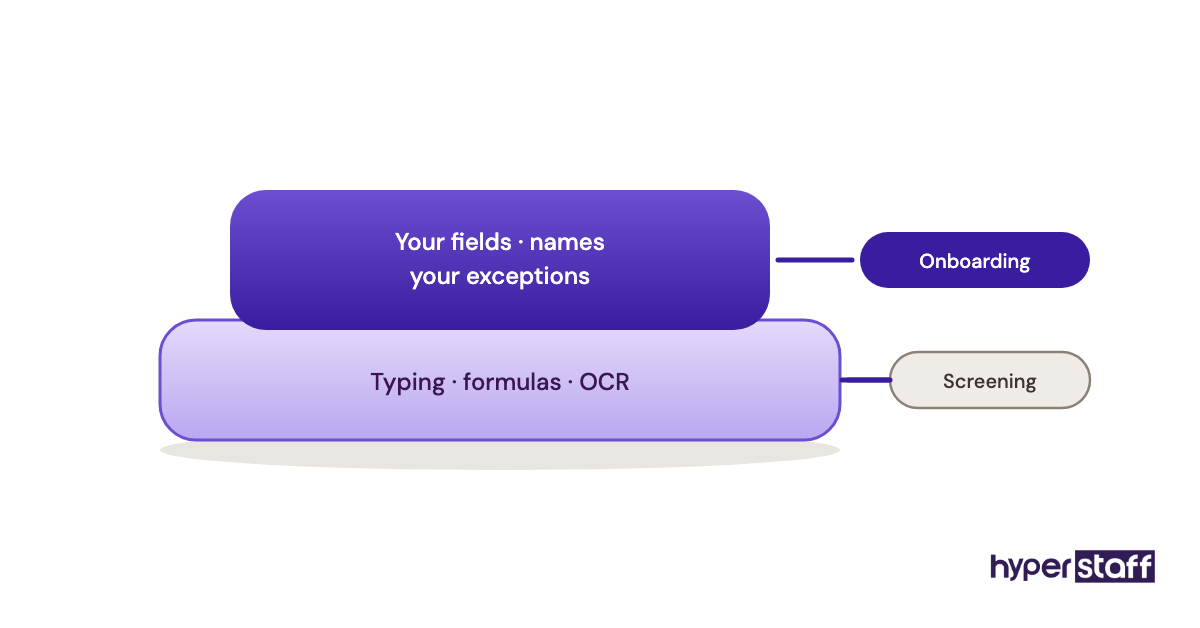
A pre-vetted VA should arrive with the skills already. If you find yourself teaching VLOOKUP during week one, the gap started at screening, and the data entry interview questions stage is where to close it.
Data Entry VA Onboarding vs. Outsourcing to a BPO
A BPO typically takes a defined data job, runs it with its own team and process, and hands back output. A dedicated VA works inside your tools and learns your business over time, which suits ongoing work that changes month to month.
What Are the Benefits of Onboarding a Data Entry VA Properly?
Structured onboarding gets you a VA who works alone sooner and leaves fewer errors to clean up later.
- Accuracy settles in the first two weeks instead of drifting for months.
- Your review time drops from every entry to a weekly sample.
- Written SOPs survive turnover, so a replacement starts from documents.
- Scoped access limits the damage from one mistake or one leaked password.
- Repeat questions fade because exceptions are written down.
What Are the Drawbacks of Onboarding a Data Entry VA?
The costs are real, and they land on you at the start.
- Expect 5 to 10 hours of your own time across the first two weeks.
- Writing an SOP feels slower than doing the task yourself, at least the first time.
- Early output is slower because every batch gets reviewed.
- Access setup can stall on two-factor codes tied to your phone.
Who Needs a Structured Data Entry VA Onboarding?
Any business handing a VA records that feed money decisions needs structured onboarding, from invoices and orders to inventory counts and CRM pipelines. The higher the cost of one wrong entry, the more structure you need.
Ecommerce sellers editing product listings, accounting firms capturing receipts and real estate teams logging leads all fit. A solo consultant moving business cards into a spreadsheet can get by with a 20-minute screen share.
Before planning anything, list the data entry tasks you'll hand over. Every task on that list needs its own SOP and its own sample batch.
Data Entry VA Onboarding Examples
The examples below are composite patterns of how onboarding tends to go in common setups. They're described by situation rather than by client, since the same patterns repeat across industries.
Good Examples of Data Entry VA Onboarding
Ecommerce Catalog Updates With a Sample Batch
A Shopify store owner hands over 25 product listings as the first batch, along with a one-page SOP for title format, variant naming and image alt text. Every listing gets reviewed, each correction becomes a new SOP line, and review drops to one listing in five by week two.
Invoice Capture With a Written Exception List
An accounting team onboarding a VA for QuickBooks entry writes down the oddballs before day one: missing PO numbers, foreign currency, credit notes and vendors with two spellings. Anything outside that list gets flagged in a shared channel, never guessed.
CRM Cleanup With Phased Access
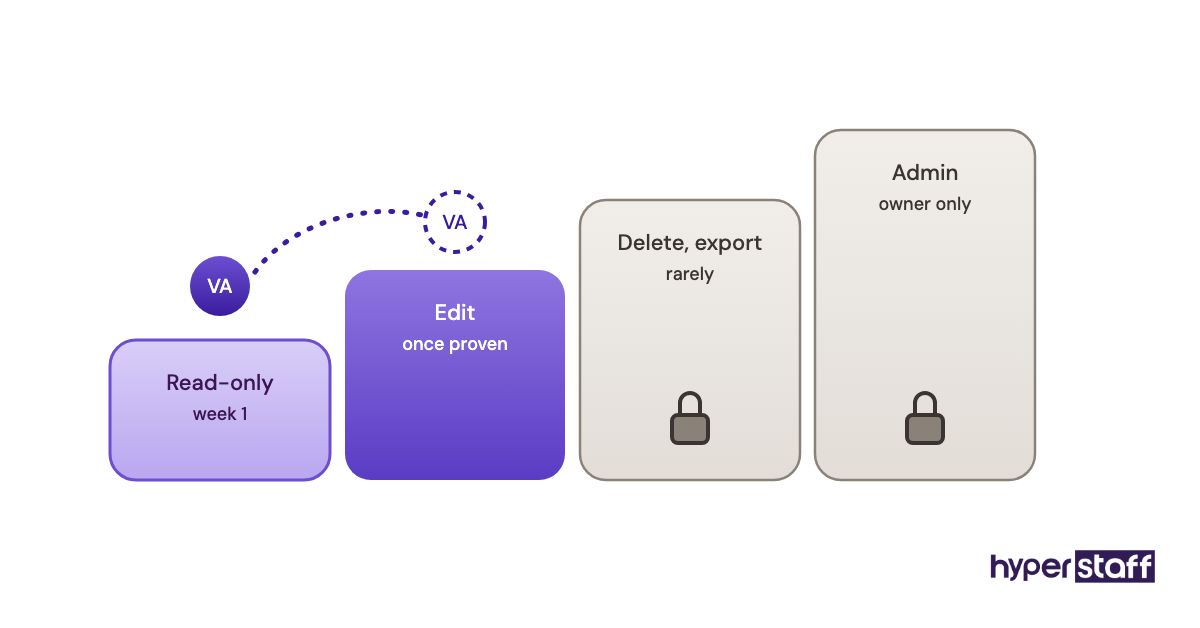
A sales team gives the VA read-only HubSpot access for the first week to tag likely duplicates in a spreadsheet. Edit rights come only once the tagging matches the sales lead's own calls, so the live pipeline stays untouched until the VA's judgment is proven.
Bad Examples of Data Entry VA Onboarding
The Shared Master Password
An owner sends one admin login for every tool over chat on day one. The VA can now delete the whole CRM by accident, and when the VA leaves, every password has to change.
Training From Memory
The owner explains the process on a 45-minute call that nobody records, and the VA is expected to remember field rules for six different forms. Errors show up two weeks later, after a few hundred records need rechecking.
Going Live on Day One
The VA starts on the live order sheet with no sample batch and no review. The first mistakes surface only when a customer complains about a wrong shipping address.
Our breakdown of common data entry VA mistakes traces many of them back to setups like these.
Creating a Data Entry VA Onboarding Plan, Step by Step
A data entry VA onboarding plan has five steps, and most of the work happens before the VA's first login.
Step #1: Write Down the Tasks and the Rules Behind Them
List every recurring task and, for each one, the source, the destination and the field rules. Your data entry job description makes a good first draft, since it already names the tasks.
Record a short Loom video of yourself doing each task once. Talking out loud captures the small decisions you'd never think to write.
Step #2: Set Up Access Before Day One
Create individual logins for every tool, at the lowest permission level that still lets the VA do the job. Share credentials through a password manager so nothing travels through email or chat.
Step #3: Run the Kickoff Call and a Sample Batch
Use the kickoff call to cover priorities, the escalation path and the first batch. Keep that batch small, around 20 to 50 records, and review every one within a day.
Write each correction into the SOP as well as telling the VA. The document has to be right, because the next person will learn from it.
Step #4: Move to Supervised Live Work
Once the sample batch comes back clean, open up live records with daily spot checks of 10 to 20 percent. Keep a simple error log with the date, the record, what went wrong and which SOP line changed.
Step #5: Hand Over and Shift to Weekly Review
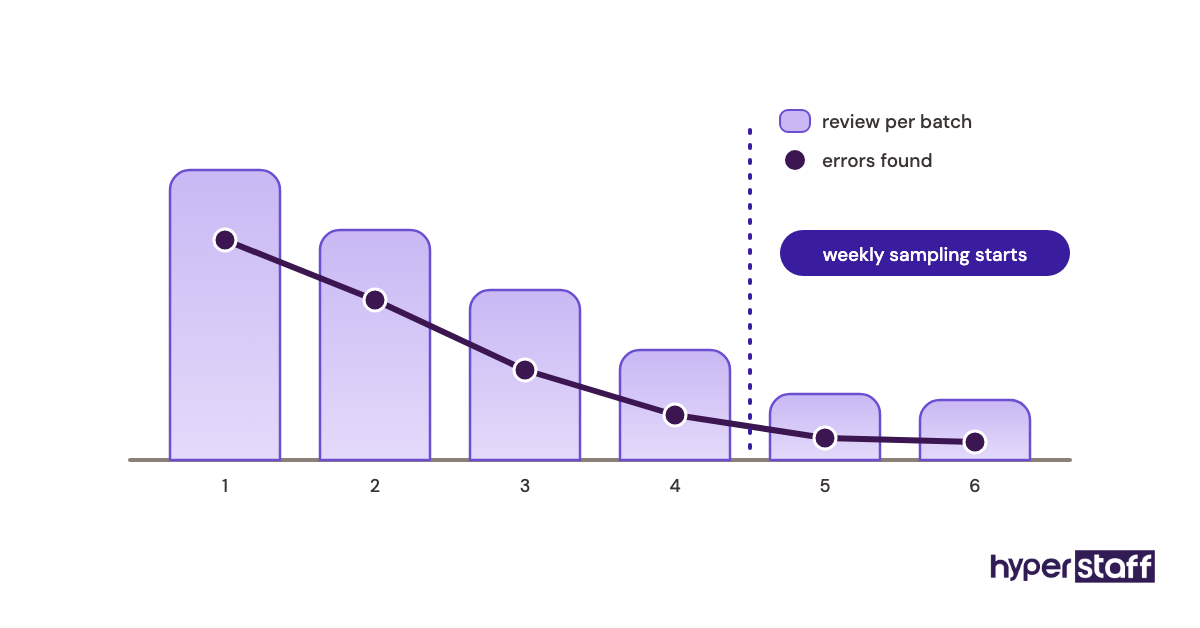
When accuracy holds across several batches, drop to weekly sampling and a short weekly check-in. Set a throughput target only at this point, since pushing speed early buys errors.
What Does an Effective Data Entry VA Onboarding Strategy Look Like?
An effective onboarding strategy puts accuracy before speed, writes every rule down and cuts review on a schedule tied to measured error rates. It also plans for the day the VA leaves.
Planning for departure gets skipped most often. The SOPs, access list and error log you build now are what let a replacement start in days instead of weeks.
Practitioners split on how much to document upfront. Some owners write full SOPs before the start date, while others record live work and write the doc after the first batch shows where the questions are.
For data entry, we lean toward the second approach. A first batch exposes gaps that a desk-written SOP misses, and you only write the rules that turned out to matter.
Data Entry VA Onboarding Tools and Software
Data entry VA onboarding needs a small set of tools: a place for SOPs, a safe way to share logins, a screen recorder and the systems where the work lives. Our guide to data entry virtual assistant tools covers the wider stack.
- Loom: short screen recordings for each task. Pair every video with a written checklist, since nobody rewatches a nine-minute recording to find one rule.
- 1Password or Bitwarden: shared vaults so the VA never sees a password in plain text, and you can revoke access in one click.
- Google Docs or Notion: the SOP library. Notion handles linked pages better, while Docs is simpler and your team probably uses it already.
- Google Sheets or Airtable: sample batches, error logs and built-in data validation to catch bad formats at entry.
- Slack or Microsoft Teams: one channel for questions, so answers stay searchable.
- Hubstaff or Toggl Track: time tracking that shows how long each task really takes in the first weeks.
9 Proven Data Entry VA Onboarding Tips and Best Practices
These tips target the parts of onboarding that most often go wrong.
- Give the VA a handful of finished, correct records to copy the format from.
- Write field rules as examples, such as "Phone: +1 555 010 2030".
- Name one person who answers questions, and agree on a reply window.
- Ask the VA to flag anything outside the SOP instead of guessing.
- Review the first batch within 24 hours, while the VA still remembers their choices.
- Update the SOP every time you correct something.
- Keep test work and live data apart until the sample batch passes.
- Hold off on speed targets until accuracy is steady.
- Put a short "known weird cases" list at the top of each SOP.
How Do You Overcome Common Onboarding Challenges?
The most common data entry VA onboarding challenges are slow access, unwritten rules and time zone gaps. Each one has a plain fix.
Request every login a week before the start date and share them through a password manager. For unwritten rules, treat each question as a missing SOP line and add it the same day.
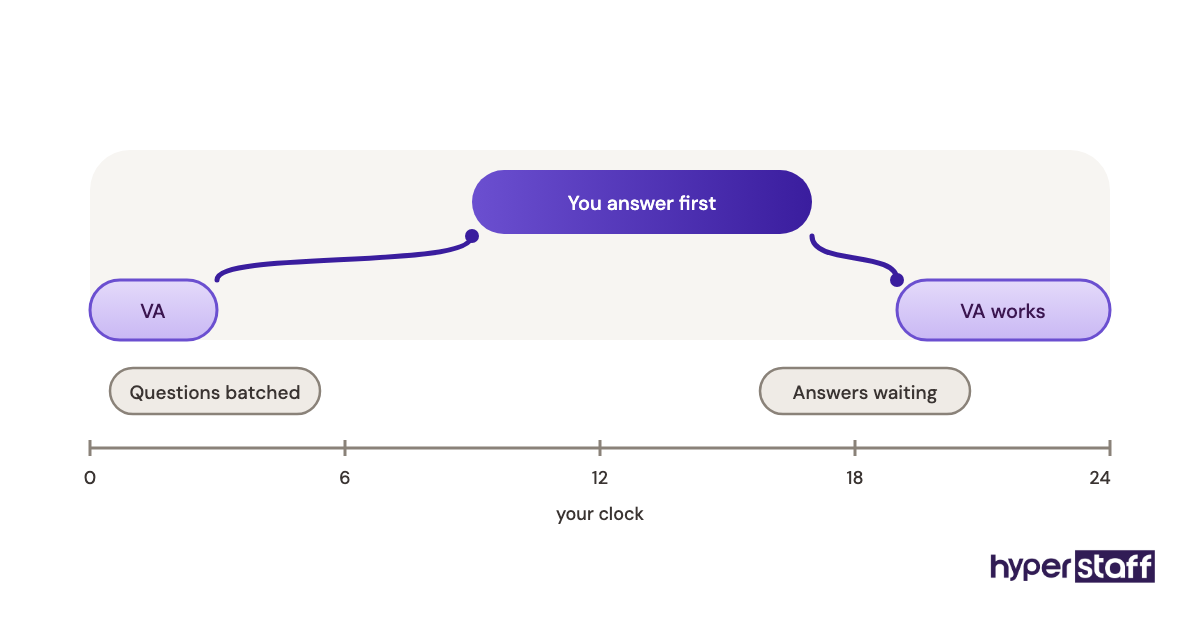
Time zones can work in your favor once the escalation path is clear. The VA batches questions, you answer them first thing in your morning, and blocked tasks get swapped for unblocked ones overnight.
How Do You Measure Data Entry VA Onboarding Success?
Measure onboarding success by accuracy rate per batch, the review hours you spend each week and the number of new questions per day. Throughput comes last.
Accuracy should climb across the first few batches and then flatten, often at 98 to 99 percent or higher for financial records. New questions should fall week over week as the SOPs fill in.
Your own review hours tell the real story. If you're still checking every entry in week four, onboarding hasn't finished.
How Long Does Onboarding a Data Entry VA Take?
Onboarding a data entry virtual assistant usually takes one to three weeks before the VA works with light review. Single-system tasks sit at the short end, and multi-system work with financial data takes longer.
With Hyperstaff, placement takes 5 business days and work starts the day of the 30-minute kickoff call or the next morning. The remaining wait is usually access approvals and your first batch review.
Handling rare exceptions confidently can take a month or two, depending on how often those cases show up.
How Much Does Onboarding a Data Entry VA Cost?
Onboarding a data entry VA costs mostly your time, about 5 to 10 hours in the first two weeks, plus the VA's paid hours during slower, reviewed work. For the full picture, see our guide to data entry virtual assistant cost.
The table compares Hyperstaff's published rates with a typical in-house hire. Our data entry VA vs in-house comparison goes deeper on that choice.
| Cost item | Hyperstaff data entry VA | Typical in-house hire (US) |
|---|---|---|
| Hourly rate | From $3 (Essential), $6 (Professional), $12 (Expert) | Roughly $17 to $22 base wage, before payroll costs |
| Hours | Bundles of 40, 80 or 160 a month | Usually full time |
| Time to place | 5 business days | Several weeks of ads and interviews |
| Onboarding docs | Operations Vault, maintained for you | Written by you or HR |
| If it doesn't work out | Free replacement in 5 to 7 business days | New search from scratch |
| Ongoing support | Dedicated account manager | Your own management time |
| Discount | 10% off when paying quarterly | None |
Important: Hyperstaff prices shown are starting rates and averages, not fixed quotes. Your actual cost depends on the experience tier, the hours bundle and the work involved.
Is Onboarding a Data Entry VA Properly Worth It?
Yes. A few hours of careful onboarding is one of the highest-return uses of your time in any VA hire, because the payback repeats every month the VA stays.
Here's an example calculation with stated assumptions. Proper onboarding takes about 8 hours of your time, and if your hour is worth $50, that's $400, paid once.
Now assume you skip it, and 10 percent of a Professional-tier VA's 160-hour month ($960) goes to redoing work. That's 16 hours or $96 of VA time, plus perhaps 4 of your hours ($200) finding the errors, so about $296 lost every month, or over $3,500 a year.
The math only holds if the VA stays. Onboarding is wasted on a hire who leaves in week three, so screening matters as much as setup, and our piece on whether a data entry VA is worth it covers the hire itself.
How Do You Choose a Data Entry VA Agency That Onboards Well?
Pick a data entry VA agency by how it handles the first two weeks: who writes the documentation, how fast a replacement starts and who is accountable for your account. Ask to walk through their onboarding before you sign.
A good answer names specific steps and timings. A vague promise of "smooth onboarding" with no detail is a warning sign.
Ask what happens when a VA leaves. At Hyperstaff, a replacement arrives free in 5 to 7 business days and gets briefed from your Operations Vault, so the documents you built stay with your business.
Published rates and a choice of regions help too. We place pre-vetted talent from the Philippines, Latin America, India, Eastern Europe and the United States, and our guide to hiring a data entry VA covers the screening that comes before onboarding.
Data Entry VA Statistics, Trends and Future Predictions
Routine clerical jobs are shrinking in the US. The U.S. Bureau of Labor Statistics projects a 6 percent decline in employment for general office clerks, whose duties often include data entry, over its current ten-year projection period, with a median wage of $21.64 an hour.
The work is shifting toward checking what software captures. OCR and AI extraction now pull fields from invoices and forms, and a person reviews the low-confidence results.
We expect onboarding to move the same way. Teaching a VA to judge a doubtful extraction will matter more than teaching them to key in a form.
How fast that happens is much less certain. Handwritten forms and inconsistent supplier PDFs still trip up extraction tools, and those make up a large share of small-business data entry.
Data Entry VA Onboarding and AI
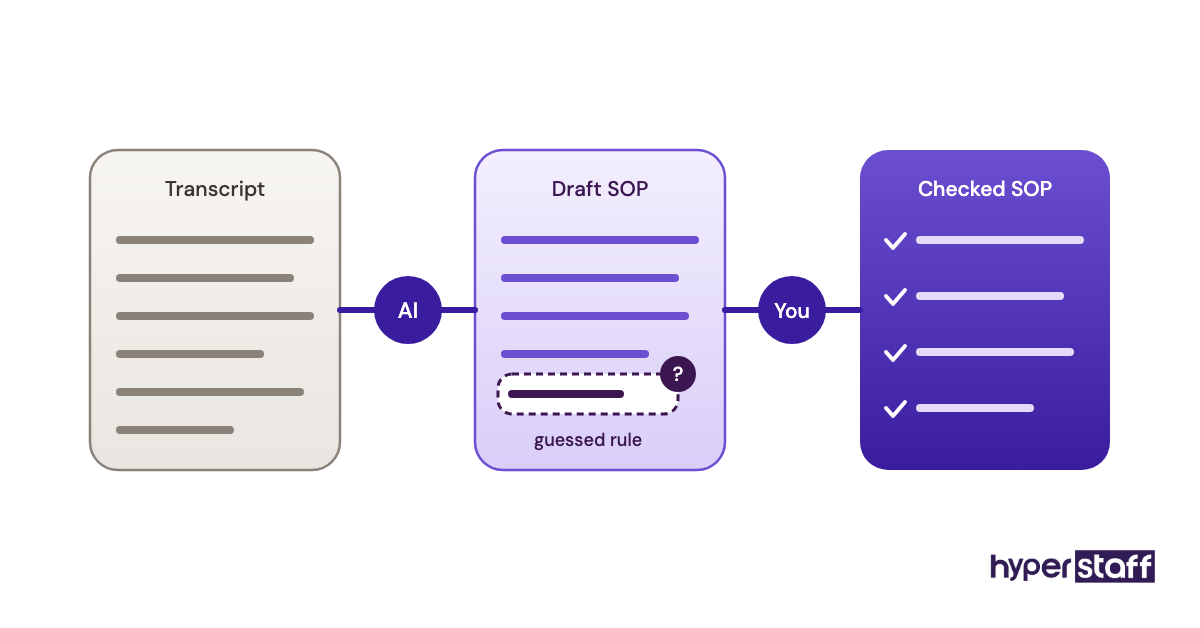
AI changes data entry VA onboarding in two places: what the VA learns to do, and how fast SOPs get written. A tool like ChatGPT or Claude can turn a recorded walkthrough transcript into a first-draft SOP in minutes.
The draft still needs your review. AI writes plausible steps for rules it guessed at, and a guessed field rule is exactly the error onboarding exists to prevent.
Where an extraction tool does the first pass, onboard the VA on the review step: confidence scores, which fields fail most and when to send a document back. Agree up front that client data never goes into a public AI tool without your approval.
Disclaimer: This article is general information, not legal, financial or tax advice. Rates, figures and tool features can change, so confirm current details and get professional advice before making decisions.
Common questions
What should I give a data entry VA on their first day?
Give them individual logins through a password manager, the SOP for their first task and a few correct finished records to copy. Add the name of the person who answers questions and a short recorded walkthrough of each task.
How many hours a week does onboarding a data entry VA take from me?
Plan on 3 to 5 hours a week for the first two weeks, mostly reviewing batches and updating SOPs. It should fall to under an hour a week once accuracy holds.
Can a data entry VA start before all the SOPs are written?
Yes, as long as the first tasks are documented. Start with one well-written task and let the VA's questions shape the next SOPs.
Should my data entry VA get admin access?
No. Give the lowest access level that covers the task and raise it only when the work needs it, since admin rights make accidental deletions and offboarding far riskier.
What if my data entry VA keeps making the same mistake after onboarding?
Check the SOP first, because repeat errors usually trace back to a rule that's unclear or missing. If the SOP is clear and the error continues, raise it with your account manager, and Hyperstaff can place a free replacement in 5 to 7 business days.
Book a free 15 min call
We place a pre-vetted specialist in 5 business days, fully managed, from $3/hour.