HIPAA Compliant Virtual Assistant: What It Takes to Get Right
A virtual assistant handles patient data safely only when the contract, the access rights and the tools are all set up correctly, and this guide covers each one.
On this page
- What Is a HIPAA Compliant Virtual Assistant?
- Key HIPAA Virtual Assistant Terms You Should Know
- Why Does HIPAA Compliance Matter for a Virtual Assistant?
- How Does a HIPAA Compliant Virtual Assistant Work?
- Types and Forms of HIPAA Compliant Virtual Assistants
- How a HIPAA Compliant Virtual Assistant Differs From Related Roles
- The Benefits of a HIPAA Compliant Virtual Assistant
- The Drawbacks of a HIPAA Compliant Virtual Assistant
- Who Needs a HIPAA Compliant Virtual Assistant?
- HIPAA Compliant Virtual Assistant Examples
- Creating a HIPAA Compliant Virtual Assistant Plan, Step-by-Step
- What Does an Effective HIPAA Virtual Assistant Strategy Look Like?
- HIPAA Compliant Virtual Assistant Tools and Software
- 8 Proven HIPAA Compliant Virtual Assistant Tips and Best Practices
- Overcoming Common HIPAA Virtual Assistant Challenges
- How to Measure HIPAA Virtual Assistant Success
- How Long Does a HIPAA Compliant Virtual Assistant Take to Work?
- How Much Does a HIPAA Compliant Virtual Assistant Cost?
- Is a HIPAA Compliant Virtual Assistant Worth It?
- How Do You Choose a HIPAA Compliant Virtual Assistant Agency?
- HIPAA Virtual Assistant Statistics, Trends and Future Predictions
- HIPAA Compliant Virtual Assistants and AI
- FAQs
💡 Key Takeaways:
1) A HIPAA compliant virtual assistant is a remote worker who handles protected health information under a signed business associate agreement, with access limited to the minimum data each task needs.
2) No government body certifies a virtual assistant as "HIPAA compliant," so compliance comes from the contract, the training, the tools and the access controls around the person.
3) The most common failures happen outside the EHR, in personal phones, free chat apps, shared logins and screenshots, so setup work should focus there first.
Keep Revenue Moving Without Risking Patient Data
Hyperstaff places pre-vetted remote specialists who learn one practice, and our medical virtual assistant services start from $3 an hour across 3 experience tiers. We've placed 70+ virtual assistants for 30+ clients, with placement in 5 business days and a dedicated account manager on every account.
What Is a HIPAA Compliant Virtual Assistant?
A HIPAA compliant virtual assistant is a remote staff member who works with patient data under a business associate agreement, uses only BAA-covered tools, and sees only the protected health information a task requires. The person, the contract and the setup all have to meet HIPAA's Privacy and Security Rules.
Most practices hire one for front-desk calls, scheduling, insurance verification, billing follow-up and patient intake. If you're new to the role itself, our guide to what a medical virtual assistant does covers the job before the compliance layer.
Key HIPAA Virtual Assistant Terms You Should Know
- PHI = protected health information, any health data tied to an identifiable patient, including names on an appointment list.
- ePHI = PHI that's created, stored or sent electronically, which brings in the Security Rule.
- Covered entity = a provider, health plan or clearinghouse that HIPAA applies to directly.
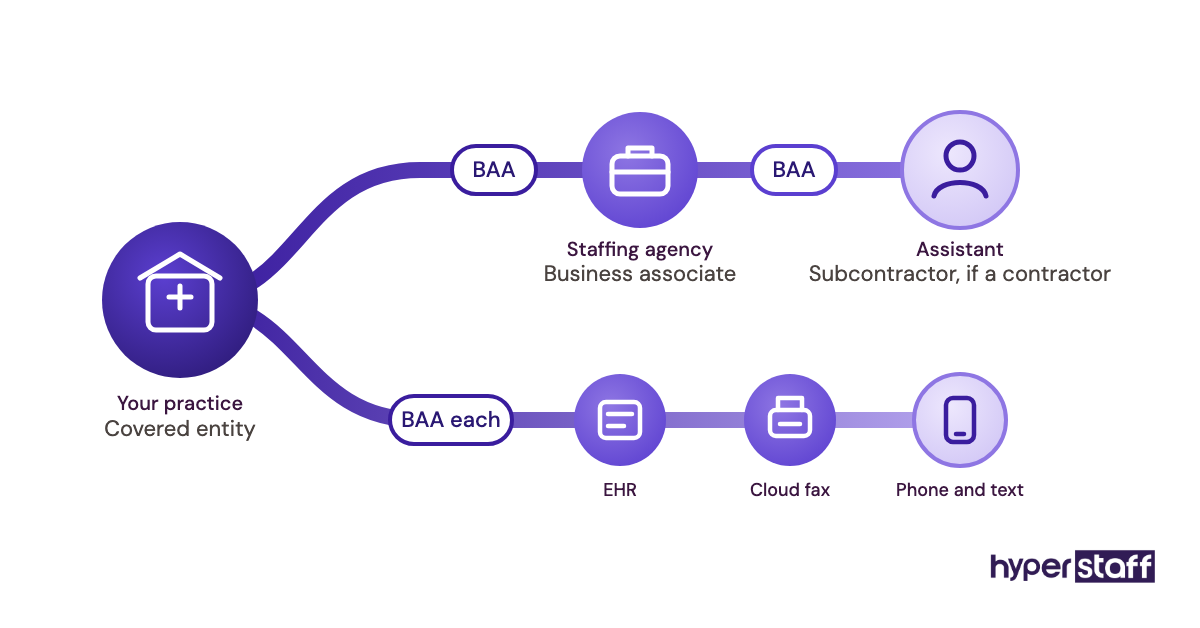
- Business associate = an outside person or company that handles PHI on a covered entity's behalf.
- BAA = business associate agreement, the written contract that limits how a business associate may use PHI.
- Subcontractor = a business associate's own vendor that touches PHI, which needs its own BAA down the chain.
- Minimum necessary = the rule that access and disclosures stay limited to what the task requires.
- Role-based access = user permissions set by job function inside the EHR or practice system.
- Risk analysis = the required, documented review of threats to ePHI and how they're controlled.
- Audit log = the system record of who opened which patient record and when.
- Breach notification = the duty to tell patients, HHS and sometimes media after unsecured PHI is exposed.
- De-identified data = health data stripped of identifiers so HIPAA no longer applies to it.
Why Does HIPAA Compliance Matter for a Virtual Assistant?
HIPAA compliance matters because a remote assistant who touches patient data makes your practice liable for how that data is handled. Under HHS rules, using a vendor that handles PHI without a BAA is itself a violation, even if nothing leaks.
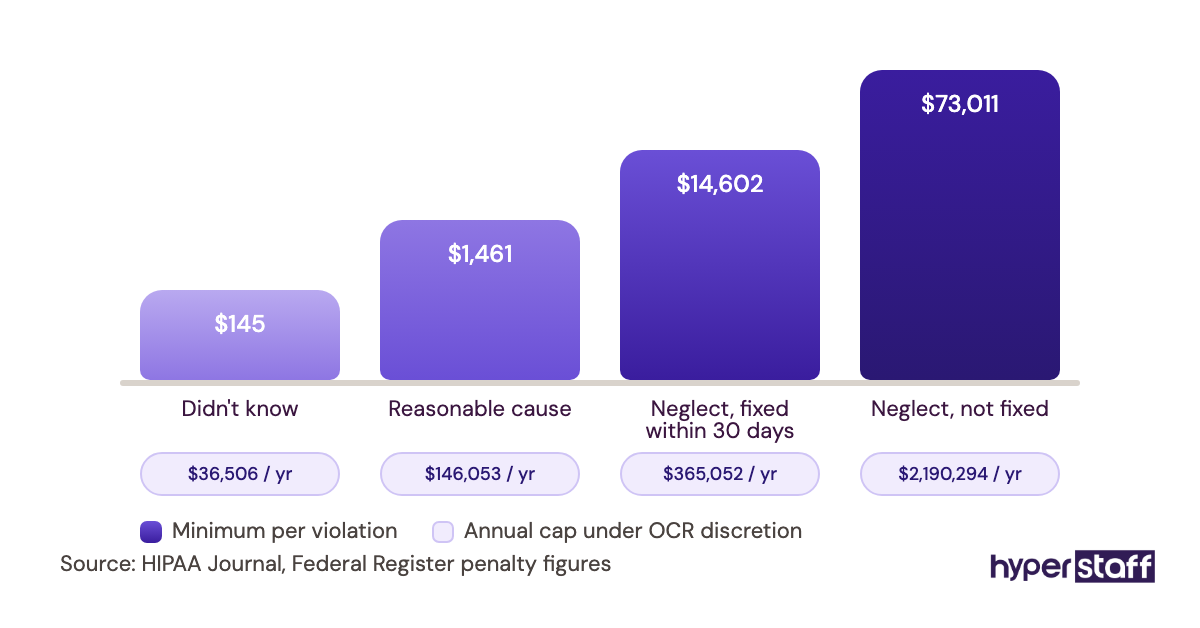
Penalties scale with culpability. After the latest inflation adjustment, published in the Federal Register, the per-violation minimum runs from $145 to $73,011 depending on the tier, with a calendar-year cap of $2,190,294 for identical violations.
Business associates carry direct liability too, so a VA provider that mishandles PHI faces its own exposure. HHS spells this out in its business associates FAQ, which is worth reading before any contract conversation.
How Does a HIPAA Compliant Virtual Assistant Work?
A HIPAA compliant virtual assistant works inside your systems through named, scoped logins, under a signed BAA, using only tools that carry their own BAA. Every patient record they open shows up in your EHR's audit log.
The usual sequence runs like this. The BAA gets signed, then a risk analysis is updated to include the remote worker, then accounts are created with role-based permissions.
Training and a written SOP come next. The onboarding a medical virtual assistant guide walks through the first two weeks in detail.
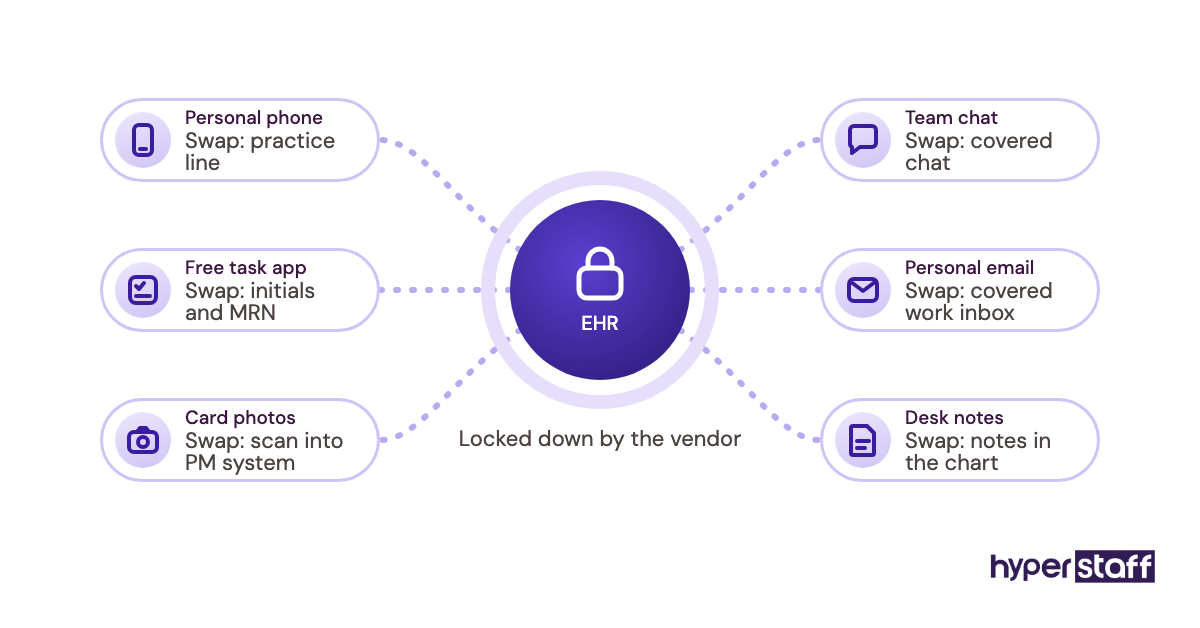
Where it bends in practice: the EHR is rarely the weak point, because vendors lock it down well. Leaks happen in the workarounds, a patient name typed into a free task app, a phone photo of an insurance card, a Slack message with a date of birth.
Types and Forms of HIPAA Compliant Virtual Assistants
HIPAA compliant virtual assistants fall into types defined by how much PHI they handle and which systems they need. The full range of medical virtual assistant tasks maps onto these roles.
| Type | Typical tasks | PHI exposure | Access needed | Best fit |
|---|---|---|---|---|
| Virtual medical receptionist | Calls, scheduling, reminders | Moderate | Scheduling module, phone system | Busy front desks |
| Insurance verification assistant | Eligibility checks, benefits lookup | High | Payer portals, demographics | Practices with high denial rates |
| Prior authorization assistant | Auth packets, payer follow-up | High | Clinical notes, fax, portals | Specialty clinics |
| Medical billing assistant | Claims follow-up, A/R, posting | High | PM system, clearinghouse | Practices with aging A/R |
| Remote medical scribe | Visit documentation | Very high | Live visit audio, EHR notes | Provider-heavy clinics |
| Patient intake assistant | Forms, records requests, referrals | High | Intake forms, document inbox | Growing new-patient volume |
| Practice admin and marketing VA | Reviews, social posts, vendor admin | Low to none | No clinical systems | Owners wanting admin relief |
How a HIPAA Compliant Virtual Assistant Differs From Related Roles
The compliance burden changes sharply depending on which role you compare against. Three comparisons come up most often when practices plan headcount.
HIPAA Compliant Virtual Assistant vs. General Virtual Assistant
A general virtual assistant can work across any tool the client picks. A HIPAA compliant one works only inside BAA-covered systems, with documented access limits and training on PHI handling.
The skill set overlaps heavily, so the difference is mostly in setup and discipline. A general VA hired into a practice without that setup becomes a compliance gap on day one.
HIPAA Compliant Virtual Assistant vs. In-House Medical Receptionist
An in-house receptionist is part of your workforce, so no BAA is needed for them, while a remote assistant from an agency usually needs one. Both need training, scoped access and sanctions policies.
Cost and coverage are the bigger split, and the medical virtual assistant vs in-house comparison breaks down where each wins.
HIPAA Compliant Virtual Assistant vs. Remote Medical Scribe
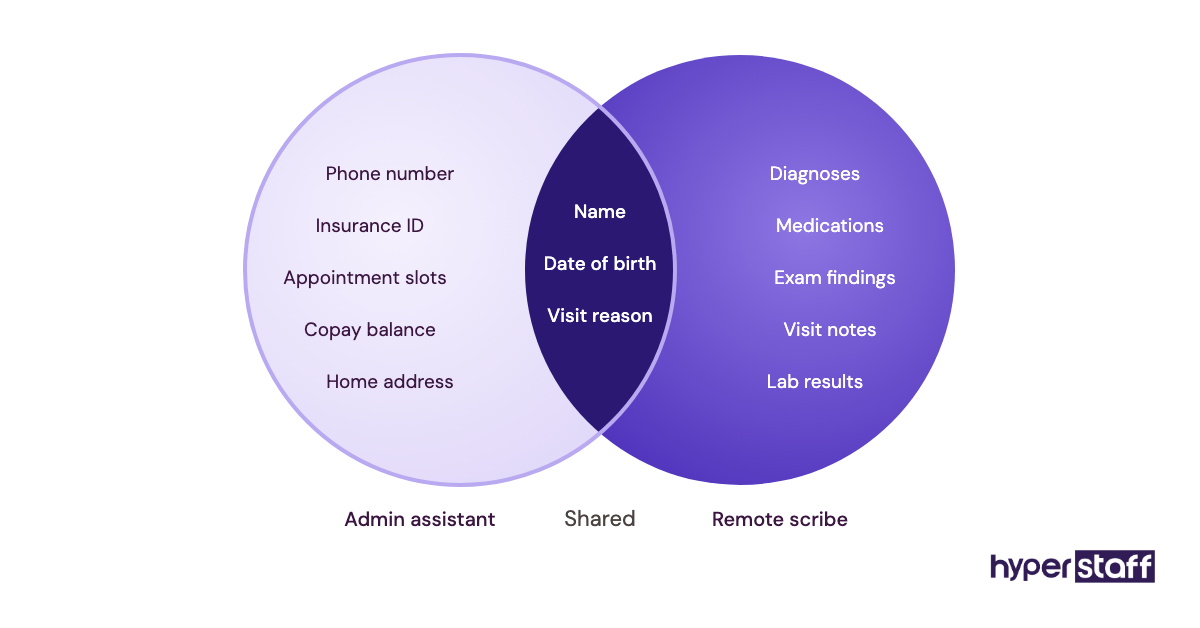
A scribe documents clinical encounters, so they see the most sensitive PHI a practice holds. A virtual assistant usually handles administrative data like demographics, insurance and schedules.
Practitioners disagree on whether one person should do both. Combining roles saves money, but it widens one person's access far past the minimum necessary standard.
The Benefits of a HIPAA Compliant Virtual Assistant
The main benefit is lower staffing cost without adding legal exposure, as long as the setup is done properly.
- Front-desk and billing coverage at a fraction of a local hire's cost.
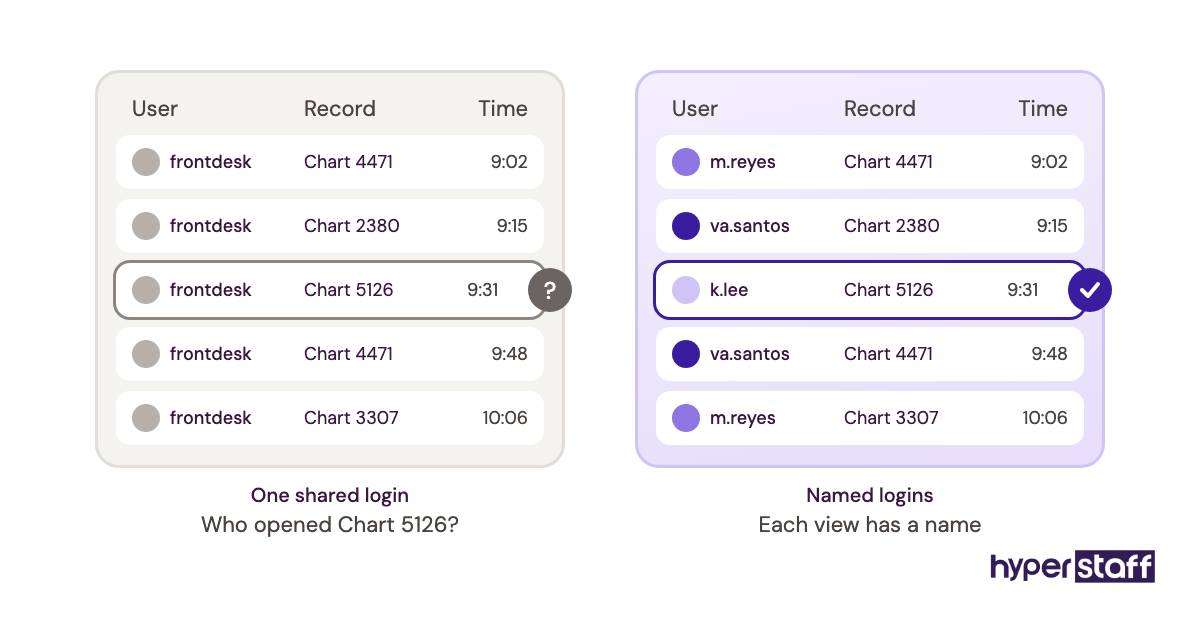
- A named person with a named login, so the audit trail stays clean.
- Written SOPs, which most practices lack until a remote hire forces them.
- Extended hours for calls and reminders across time zones.
- A cleaner tool stack, because the review strips out unprotected apps.
The Drawbacks of a HIPAA Compliant Virtual Assistant
The drawbacks are real but mostly front-loaded into the first month.
- BAA-covered tools often cost more than free versions.
- Setup takes owner time for access mapping and SOPs.
- Some payer and Medicaid contracts restrict offshore access to PHI.
- Monitoring the audit log is an ongoing task someone must own.
Who Needs a HIPAA Compliant Virtual Assistant?
Any covered entity that wants remote help with tasks touching patient data needs a HIPAA compliant virtual assistant. That includes physician practices, dental and chiropractic offices, physical therapy clinics, behavioral health groups and billing companies working for providers.
Small practices feel the gain fastest, since one remote hire can absorb an entire front-desk overflow. Larger groups tend to use assistants for single functions like prior auth, where volume justifies a specialist.
Practices with no PHI-facing need, like a med spa wanting only social posts, can skip the compliance layer for that role. Keep that VA out of clinical systems entirely.
HIPAA Compliant Virtual Assistant Examples
The difference between a safe setup and a risky one usually comes down to a few small workflow choices. These patterns repeat across practices of every size.
HIPAA Compliant Virtual Assistant Good Examples
Eligibility Checks Through a Named Payer Portal Login
The assistant has their own payer portal credentials and logs results directly into the PM system. Nothing gets copied into spreadsheets or email, so the only record lives where it belongs.
Recall Calls From a Scoped Scheduling Role
The EHR role lets the assistant see names, phone numbers and due dates, and nothing clinical. That's the minimum necessary standard applied the way HHS describes it.
Prior Auth Packets Through a BAA-Covered Fax Line
Clinical notes go from the EHR to the payer through a cloud fax service with a signed BAA. The assistant never downloads files to a personal device.
HIPAA Compliant Virtual Assistant Bad Examples
These mistakes look harmless in the moment, and the medical virtual assistant mistakes guide covers more of them.
A Shared Front-Desk Login
Three people use one EHR account, so the audit log can't show who opened which chart. When a complaint comes in, there's no way to investigate it.
Patient Names in a Free Project Board
A to-do list with "call back Maria G., MRI denial" sits in a free task tool with no BAA. That single card is PHI stored with an unauthorized vendor.
Appointment Texts From a Personal Phone
Reminders go out from the assistant's own number. The practice loses the message history and has no BAA with the carrier or app.
Creating a HIPAA Compliant Virtual Assistant Plan, Step-by-Step
A HIPAA compliant virtual assistant plan moves from contract to access to training before the assistant sees a single patient record. Expect waiting periods between steps, mostly on vendor BAAs and account provisioning.
Step #1: Define the Role and Its PHI Footprint
Write down each task and the exact data it needs. A precise medical virtual assistant job description does double duty here, as a hiring brief and an access map.
Step #2: Sign the BAA Before Any Access
The BAA comes first, always. HHS's sample BAA provisions list what the contract must cover, including reporting duties and returning PHI at termination.
Step #3: Audit Your Tool Stack
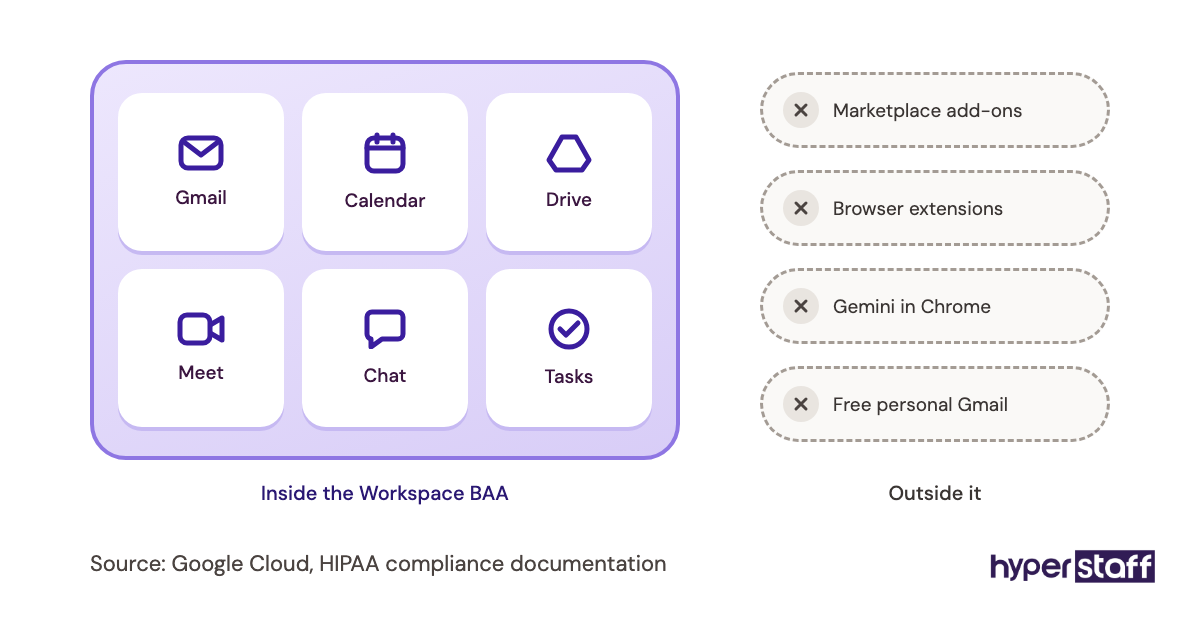
Check every tool the assistant will touch for a BAA. Free tiers and add-ons are the usual gaps, and replacing them can take one to three weeks if a vendor needs a plan upgrade.
Step #4: Provision Scoped Accounts and Update the Risk Analysis
Create named accounts with role-based permissions and multi-factor login. Then add the remote worker to your Security Rule risk analysis, since a new access point is exactly what it's meant to capture.
Step #5: Train, Shadow, Then Release
Run HIPAA training on your own policies, then have the assistant shadow live work for a few days before handling calls solo. The full hiring sequence is in how to hire a medical virtual assistant.
What Does an Effective HIPAA Virtual Assistant Strategy Look Like?
An effective HIPAA virtual assistant strategy limits access by role, keeps every patient detail inside BAA-covered systems, and reviews access on a schedule. It treats compliance as an operating habit, with an owner and a calendar.
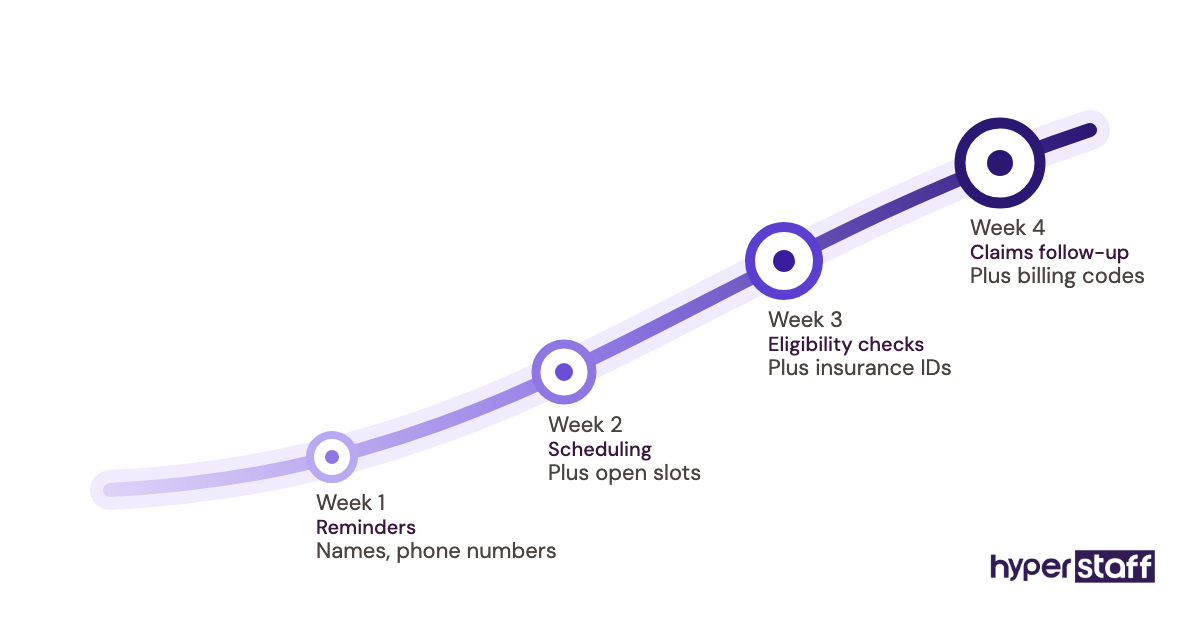
Start with the lowest-risk tasks and expand. A new assistant handling reminders in week one and claims follow-up in week four gives you time to watch the audit log before access widens.
The written SOP is the backbone. When procedures live in a maintained document, a replacement assistant learns the same safe habits instead of inventing new workarounds, which is where most drift begins.
Keep the SOP itself free of PHI. Screenshots used for training should use test patients or blurred records.
HIPAA Compliant Virtual Assistant Tools and Software
HIPAA compliant virtual assistant tools are the systems that will sign a BAA and give you access controls and logs. The medical virtual assistant tools roundup goes deeper on each category.
| Tool | Used for | BAA | Price signal |
|---|---|---|---|
| Google Workspace | Email, docs, calendar | Yes, for listed services; add-ons excluded | Business plans roughly $7 to $22 per user/month |
| Microsoft 365 | Email, Teams, OneDrive | Yes, via its Data Protection Addendum for business tenants | Varies by plan |
| Paubox | Encrypted email | Included with all accounts | Tiered plans, 14-day trial |
| Spruce Health | Phone, text, fax, chat | Included on all plans | $24 to $49 per user/month |
| Doxy.me | Telehealth visits | Included on Premium | Free plan; Premium per user |
| Your EHR or PM system | Scheduling, charts, billing | Through the vendor contract | Extra seat fees vary |
Our earned opinion: an all-in-one patient communication tool like Spruce removes more risk than any single policy, because it kills the personal-phone problem outright. Prices change often, so confirm on each vendor's site before you buy.
8 Proven HIPAA Compliant Virtual Assistant Tips and Best Practices
These practices prevent the failures we see most often in remote healthcare setups.
- Give every assistant a named login, never a shared one.
- Turn on multi-factor authentication for every system with PHI.
- Ban personal phones for patient calls and texts.
- Keep task lists in BAA-covered tools, or use initials and record numbers only.
- Review the EHR audit log weekly for the first month, then monthly.
- Require a work device or a managed virtual desktop.
- Write the offboarding checklist before onboarding starts.
- Re-check BAA coverage whenever a new tool or add-on is introduced.
Overcoming Common HIPAA Virtual Assistant Challenges
The hardest challenge is tool sprawl. A new assistant brings habits from past jobs, and a free app slips in within weeks unless the approved list is written down.
Offshore restrictions are the second. HIPAA itself doesn't ban offshore business associates, but some Medicaid and payer contracts do, so check yours before placing someone outside the US.
Offboarding is the quiet one. Disable access the same day the assistant leaves, and confirm in writing that no PHI remains on their devices.
How to Measure HIPAA Virtual Assistant Success
Measure success on two tracks: operational output and compliance health. Output means calls answered, claims worked, authorizations submitted and turnaround times against your baseline.
Compliance health means zero unapproved tools, clean audit log reviews and completed training records. A quarterly access review that finds nothing to remove is a good sign.
Watch for slow drift. If your audit log shows charts opened outside the assistant's task list, tighten the role before it becomes a reportable incident.
How Long Does a HIPAA Compliant Virtual Assistant Take to Work?
Most practices see a HIPAA compliant virtual assistant working productively within two to four weeks. Contract and placement can happen in days, while vendor BAAs and account setup take longer.
The dead zone sits between signing and access. EHR vendors sometimes take a week or more to add a seat, and nothing useful happens until they do.
Full independence on complex work like prior auth usually takes 30 to 60 days.
How Much Does a HIPAA Compliant Virtual Assistant Cost?
A HIPAA compliant virtual assistant from Hyperstaff costs from $3 to $12+ an hour depending on experience, against roughly $17 to $32 an hour in wages for comparable in-house US staff before benefits. The medical virtual assistant cost breakdown covers regional differences.
| Experience level | Hyperstaff (from) | In-house US hire (typical wage) | Hyperstaff at 160 hours/month | In-house at 160 hours, plus 20 to 30% overhead |
|---|---|---|---|---|
| Essential (0 to 2 years) | $3/hour | $17 to $21/hour | From $480 | About $3,260 to $4,370 |
| Professional (2 to 5 years) | $6/hour | $20 to $25/hour | From $960 | About $3,840 to $5,200 |
| Expert (5+ years) | $12/hour | $25 to $32/hour | From $1,920 | About $4,800 to $6,660 |
| Bundles | 40, 80 or 160 hours | Full-time salary | Quarterly billing saves 10% | Fixed payroll |
Budget separately for BAA-covered tools, which often add $20 to $50 per user per month.
Important: Hyperstaff prices shown are starting averages, not fixed quotes. Your final cost depends on the hours, experience tier and type of work your practice needs.
Is a HIPAA Compliant Virtual Assistant Worth It?
Yes, a HIPAA compliant virtual assistant is one of the highest-return hires a practice can make when the setup is done right. The savings show up on the first invoice, and a clean setup keeps the legal exposure no higher than an in-house hire's.
Here's an example calculation. A full-time in-house receptionist at $20 an hour costs about $3,200 a month in wages, or roughly $3,900 to $4,200 with taxes and benefits.
A Professional-tier assistant at 160 hours starts from $960 a month. Add a $49 communication seat and you're near $1,010, a gap of roughly $2,900 a month, or about $35,000 a year.
The honest catch is owner time in the first month and real discipline after that. For the full case, see whether a medical VA pays off.
How Do You Choose a HIPAA Compliant Virtual Assistant Agency?
Choose a HIPAA compliant virtual assistant agency by checking whether it will sign a BAA, how it trains staff on PHI, and how it handles replacements and offboarding. Ask for the BAA draft before any pricing talk.
Ask where the assistant will work and on what device. Ask how the agency confirms access is removed when someone leaves, and what happens to your SOPs.
Replacement speed matters more than most buyers expect. At Hyperstaff, a free replacement arrives in 5 to 7 business days, briefed from your Operations Vault, the written record of your SOPs, tools and context that we maintain for you.
Interview the candidate yourself on PHI scenarios. Our list of medical VA interview questions includes several on data handling.
HIPAA Virtual Assistant Statistics, Trends and Future Predictions
HIPAA enforcement figures move every time HHS applies an inflation adjustment. The current Tier 4 penalty for uncorrected willful neglect is $73,011 per violation, up to $2,190,294 a year, per the HHS Federal Register notice.
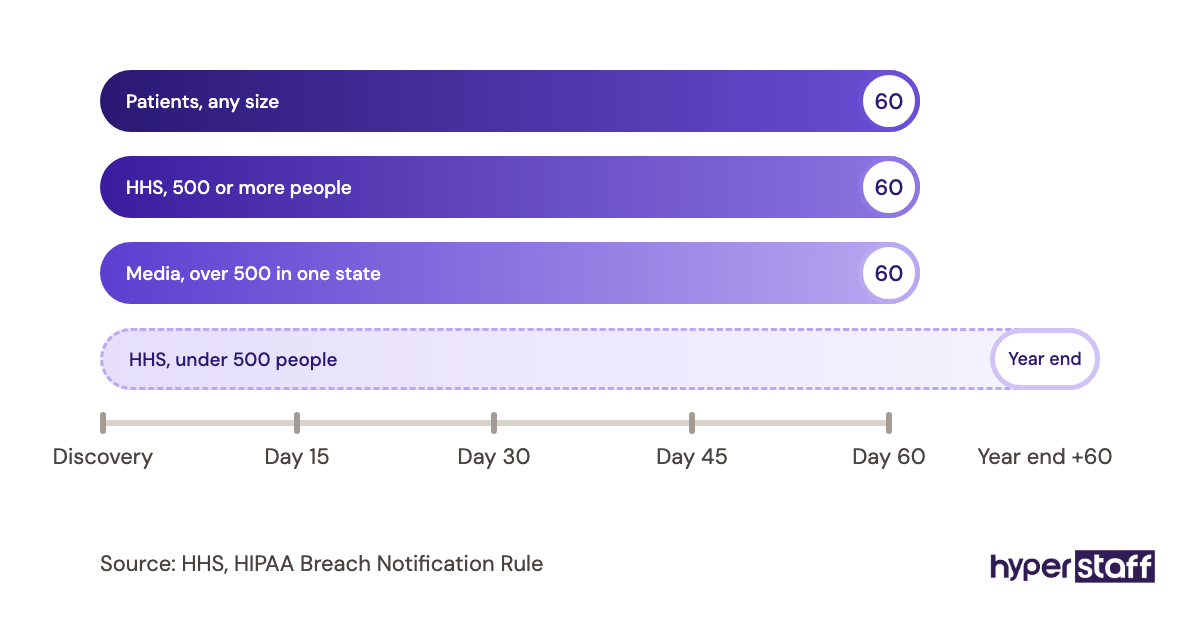
Breaches affecting 500 or more people are posted publicly on HHS's breach portal, and notices must go out within 60 days of discovery. That public listing is often more damaging to a small practice than the fine.
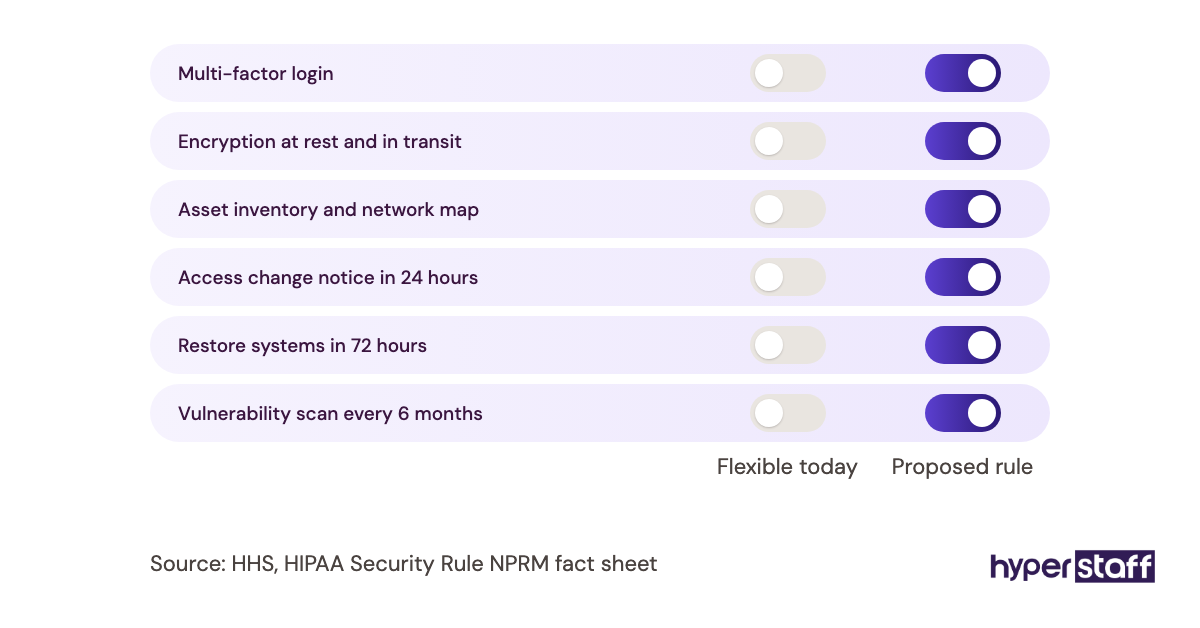
The biggest pending change is HHS's proposed Security Rule overhaul, which would make multi-factor authentication, encryption and an asset inventory explicit requirements. It isn't final yet, but setting up remote staff to those standards now avoids rework later.
Our prediction, stated with moderate confidence: agencies and practices that already run named logins and MFA for remote staff will absorb the final rule with little change. Those relying on shared accounts will face the heaviest lift.
HIPAA Compliant Virtual Assistants and AI
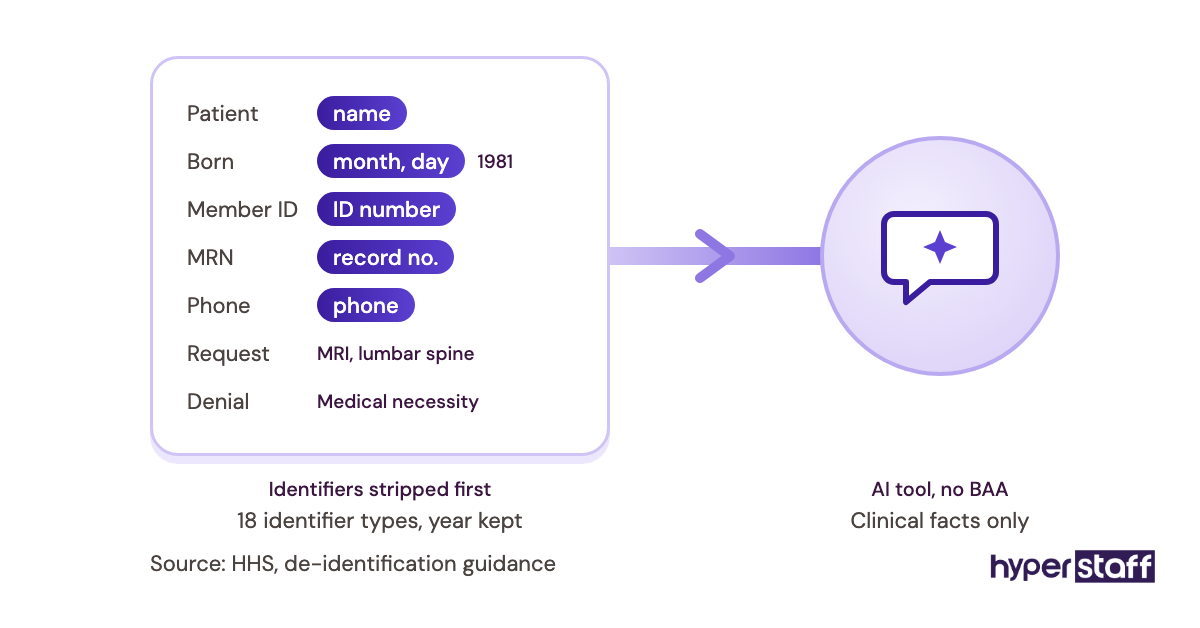
AI tools fall under HIPAA the same way any other vendor does: if the tool receives PHI, it needs a BAA. Google, for example, lists some Gemini features in Gmail as covered under its Workspace BAA, while consumer chatbots carry no such coverage.
The risk is copy-paste. An assistant who drops a denial letter into a free AI tool to draft an appeal has just disclosed PHI to an unauthorized vendor.
We're less certain where AI phone agents land long term. They handle simple scheduling well, but practices we talk to still want a human for insurance questions and upset patients, which keeps a trained assistant in the loop.
Disclaimer: This article is for general information only and is not legal advice. HIPAA requirements, penalties and vendor terms change, so consult a qualified healthcare attorney or compliance professional before making decisions for your practice.
Common questions
Can a virtual assistant outside the US be HIPAA compliant?
Yes. HIPAA doesn't prohibit offshore business associates, but the BAA, access controls and training must still be in place. Check your payer and Medicaid contracts, since some restrict offshore access to PHI.
Do I need a BAA with my virtual assistant or the agency?
You need one with whoever is your business associate, usually the agency. The agency then needs its own agreement with the assistant if they're a subcontractor. Freelancers you contract directly sign the BAA themselves.
Is there a HIPAA certification for virtual assistants?
No official one exists. HHS doesn't certify people or vendors. Training certificates show completed coursework, which is useful, but they don't make the setup compliant.
Can a HIPAA compliant virtual assistant use Gmail?
Only through a paid Google Workspace account with the BAA accepted. Free Gmail accounts have no BAA, so they can't be used for PHI.
What happens if my virtual assistant causes a HIPAA breach?
Your practice remains responsible for reporting it to patients and HHS, and the business associate can face penalties too. Investigate fast, document everything, and send notices within 60 days of discovery.
Book a free 15 min call
We place a pre-vetted specialist in 5 business days, fully managed, from $3/hour.