Medical virtual assistant tasks: an 8-point checklist for your practice
Eight checks that show whether your medical virtual assistant's tasks are set up to protect revenue, patients and compliance.
On this page
- Checkbox 1: Is insurance eligibility verified before the patient arrives?
- Checkbox 2: Who is chasing your pending prior authorizations?
- Checkbox 3: Does anyone work the recall and no-show list?
- Checkbox 4: Does your VA's EHR access match the tasks they do?
- Checkbox 5: Where does admin work stop and clinical judgment start?
- Checkbox 6: Who follows up on denied and aging claims?
- Checkbox 7: Closing the referral and records loop
- Checkbox 8: Is every task written down so a replacement can pick it up?
- FAQs
💡 Key Takeaways:
1) Medical virtual assistant tasks pay off most when they run on a schedule: eligibility checks days before the visit, prior authorization follow-ups every few days, and recall calls every morning.
2) Every task needs a written boundary, including which EHR screens the VA can open and which patient messages go straight to a clinician.
3) A task counts as delegated once it has a documented SOP, a named escalation contact and a "done" state you can check in a report.
Recover the revenue your front desk leaves behind
Hyperstaff has placed 70+ virtual assistants with 30+ clients, and our medical virtual assistant services start from $3/hour. You get a dedicated specialist who learns your practice, placed in 5 business days and backed by an account manager, so eligibility checks, auth follow-ups and recall calls start getting done this month.
Checkbox 1: Is insurance eligibility verified before the patient arrives?
Insurance eligibility verification sits at the top of most lists of medical virtual assistant tasks, and its timing matters more than the task itself. A VA who checks coverage one to three business days before each appointment catches inactive plans, changed copays and missing referrals while there's still time to fix them.
If you're still working out the role itself, our explainer on what a medical virtual assistant is covers the wider scope. The checks below assume you've already decided to delegate.
What to check on the eligibility run
Pull up tomorrow's schedule and look for these:
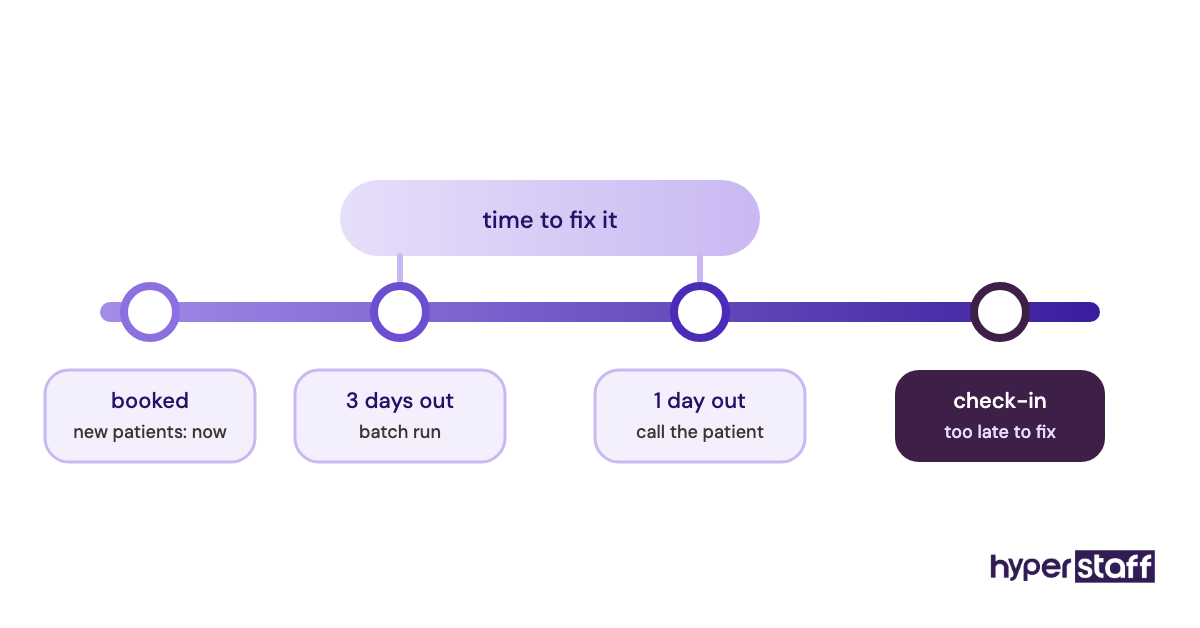
- Verification runs 1 to 3 business days ahead for every booked visit
- Plan status, copay, remaining deductible and coinsurance are logged in the chart
- Referral or authorization requirements are flagged per visit type
- New patients are checked the day they book
- Failed checks go to a named person, who calls the patient before the visit
Why checking early protects the visit
Same-day verification at check-in leaves the front desk two poor options: see the patient and risk a denied claim, or reschedule and lose the slot. A day or two of lead time lets your VA reach the patient about a lapsed plan and get new insurance details on file.
Payer portals go down, and some plans still need a phone call with a long hold. A VA who batches checks in one morning block absorbs that wait without anyone at the front desk stuck on the phone.
Done when the schedule is clean
Every appointment on tomorrow's schedule shows a verified status and a date stamp in the practice management system. Any exception carries a note naming who's calling the patient and when.
Checkbox 2: Who is chasing your pending prior authorizations?
Prior authorization follow-up is the medical virtual assistant task that slips most often, because submitting the request feels like finishing it. Payers can sit on a request for days, ask for extra clinical notes, or deny it through a portal message nobody opens.
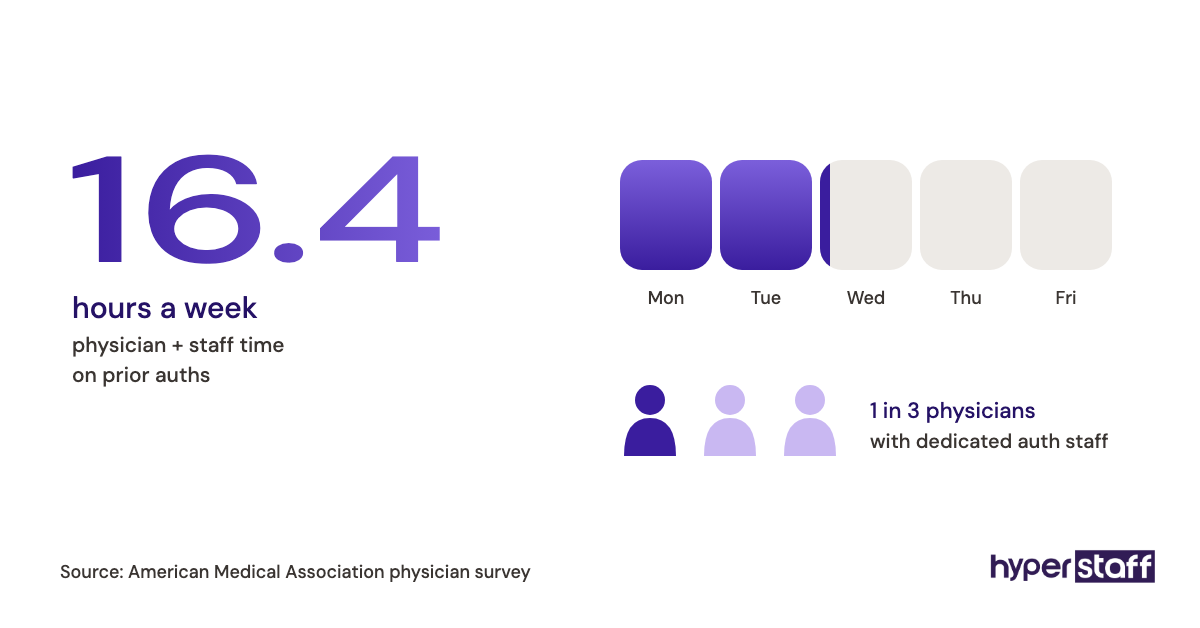
The submission is the easy half. The tracking afterwards is where approvals get won or lost.
What to look for in the auth tracker
Open whatever tracker your team uses and confirm:
- One list holds every open request with payer, submission date and procedure date
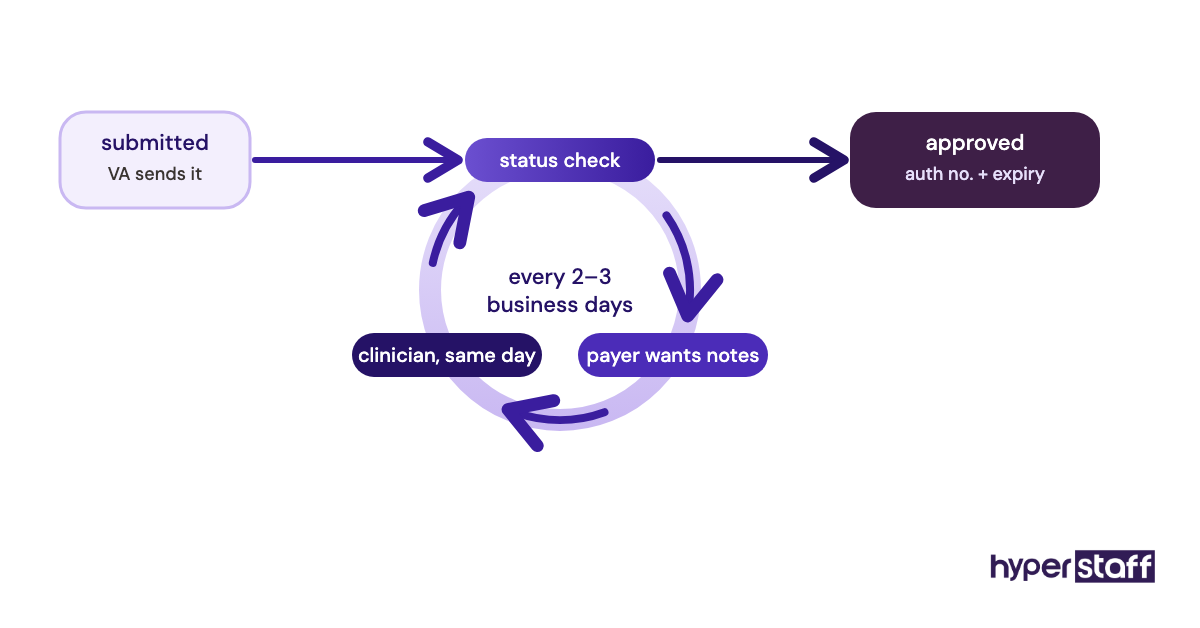
- Each request gets a status check every 2 to 3 business days
- Requests for more documentation reach the clinician the same day
- Approvals are logged with the auth number and its expiry date
Why the follow-up beats the submission
A missing or expired authorization usually means the claim is denied after the service is already delivered, and that money is hard to recover. A procedure rescheduled because the approval never came back costs the slot as well.
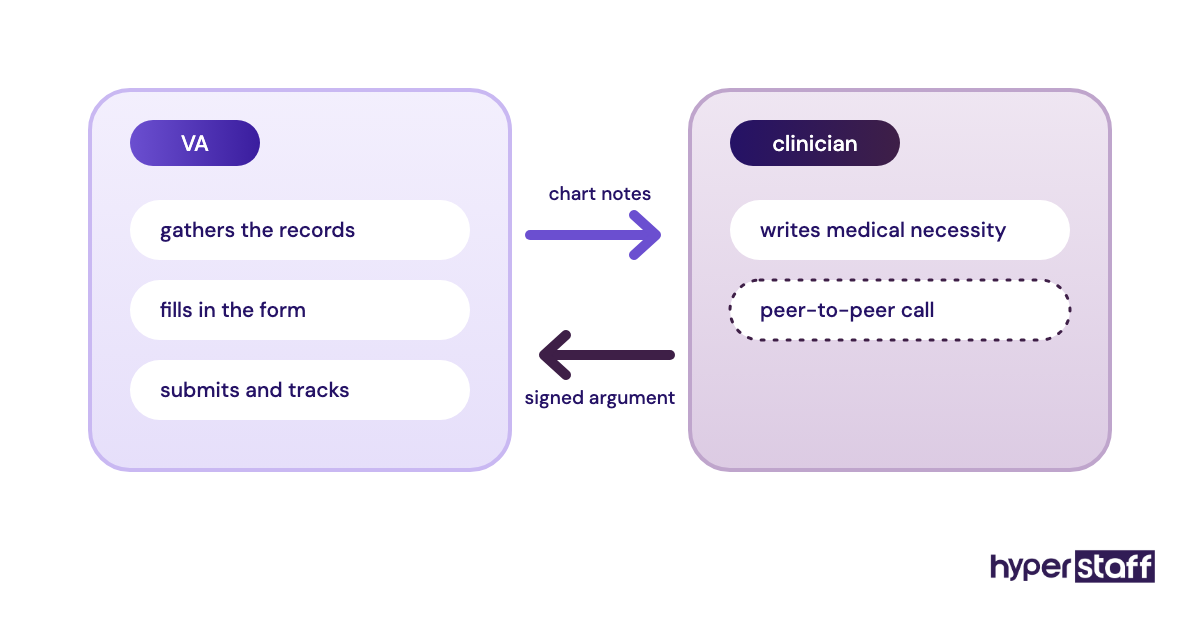
One split matters here: the VA assembles and submits, while the clinician writes the medical necessity argument. Practices that let the VA paraphrase clinical notes end up with weaker requests and more peer-to-peer calls.
Most practices run auths from payer portals plus a shared tracker, and our roundup of medical virtual assistant tools compares the software options.
Finished when nothing is aging unnoticed
No open request is older than its next scheduled check. Every procedure in the next two weeks has an approval number or a flagged escalation.
Checkbox 3: Does anyone work the recall and no-show list?
Patient recall and no-show follow-up are revenue tasks most practices know they should do and rarely reach. A medical virtual assistant can call, text and rebook overdue patients every day, because nobody's pulling them back to the check-in window.
What to review in the recall workflow
Five things tell you whether recall is actually happening:
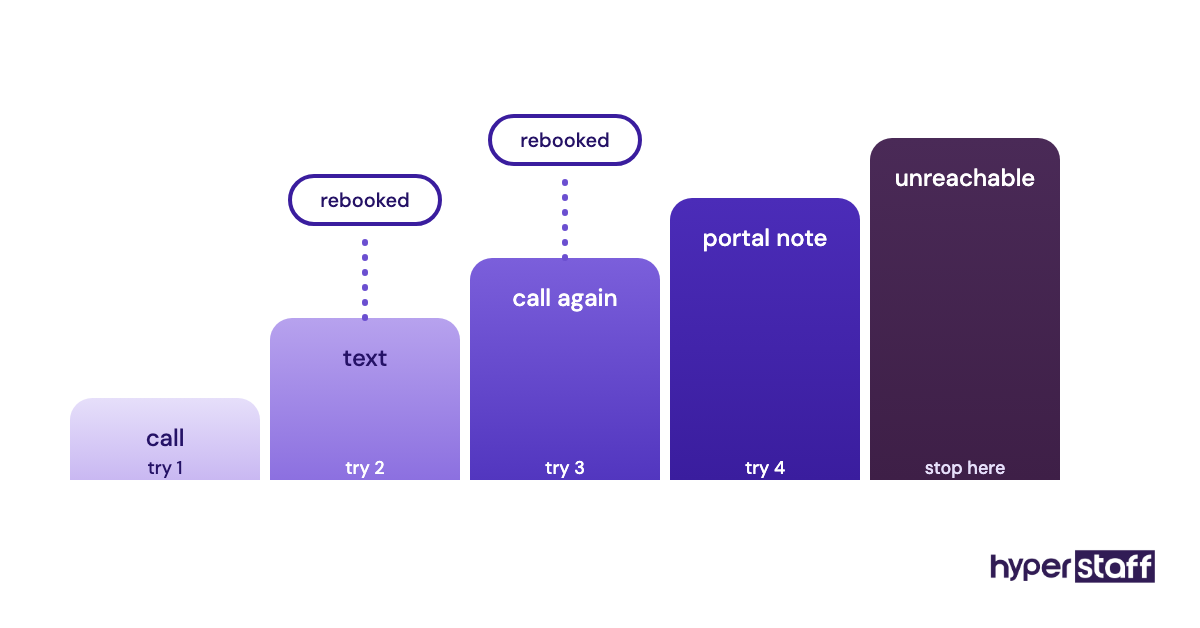
- No-shows and same-day cancellations are contacted within one business day
- Overdue recalls (annual exams, follow-ups, chronic care visits) are worked in priority order
- Each contact attempt is logged with the channel and the outcome
- A fixed number of attempts happens before a patient is marked unreachable
- Waitlist patients are offered slots that open up
Why recall work earns its hours
Each rebooked visit is revenue from a patient who already chose your practice, with no ad spend behind it. Chronic care patients who drift off the schedule are also the ones clinicians most want back.
When owners work through medical virtual assistant cost, we'd start the math with recall, since rebooked visits are easy to count. An in-house hire could make the same calls, and our medical VA vs in-house comparison lays out where each option wins.
Complete when the backlog shrinks
Every no-show from the last business day has a logged contact attempt. The overdue recall count drops week over week, and a report shows it.
Checkbox 4: Does your VA's EHR access match the tasks they do?
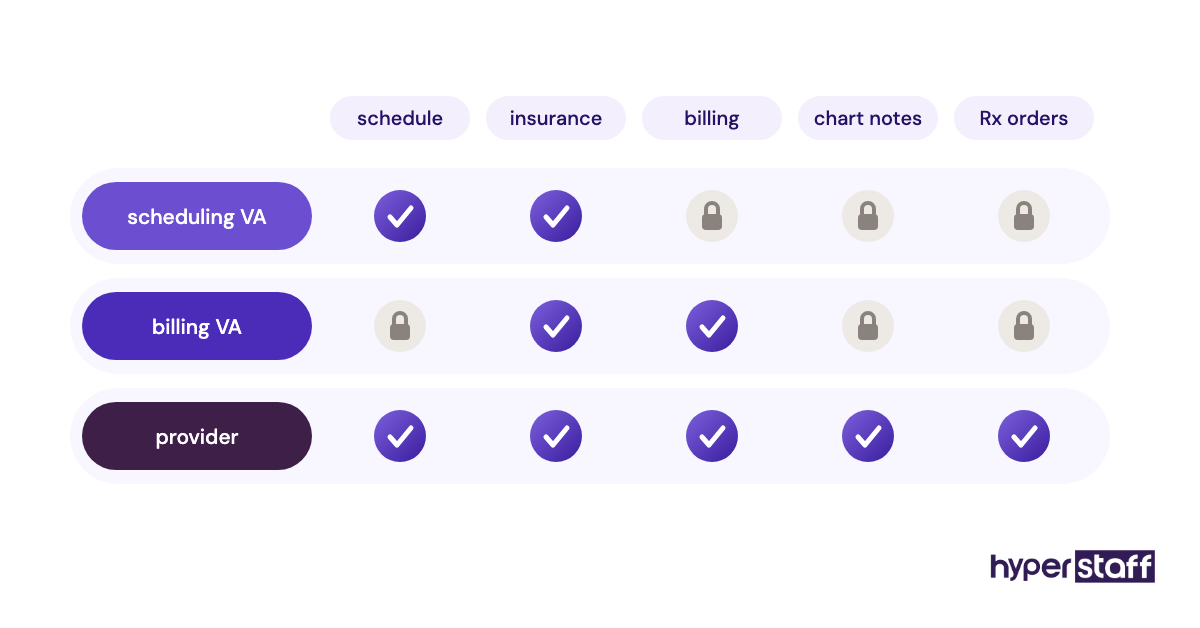
EHR access for a medical virtual assistant should cover the tasks on their list and nothing wider. HIPAA's minimum necessary standard expects workforce members and business associates to use only the protected health information their job requires.
What to audit in system access
Sit down with whoever manages your EHR and confirm each point:
- The VA has a unique login, never a shared front-desk account
- Their role or permission set matches scheduling, billing or intake work
- Multi-factor authentication is on for the EHR, email and payer portals
- A signed business associate agreement (BAA) is on file where one applies
- Audit logging is switched on and reviewed from time to time
- Offboarding removes every login the same day
Why access scope is a compliance task
Shared logins are a common shortcut in small practices, and they make it impossible to tell who opened a record. A unique login with a narrow role protects the practice in an audit and protects the VA as well.
Our guide to a HIPAA compliant virtual assistant covers BAAs, device rules and workspace requirements in more depth.
Signed off when a test login proves it
The VA's role opens only the screens their tasks need, and a test session confirms it. MFA is on, the BAA is filed, and the offboarding checklist names who revokes access.
Checkbox 5: Where does admin work stop and clinical judgment start?
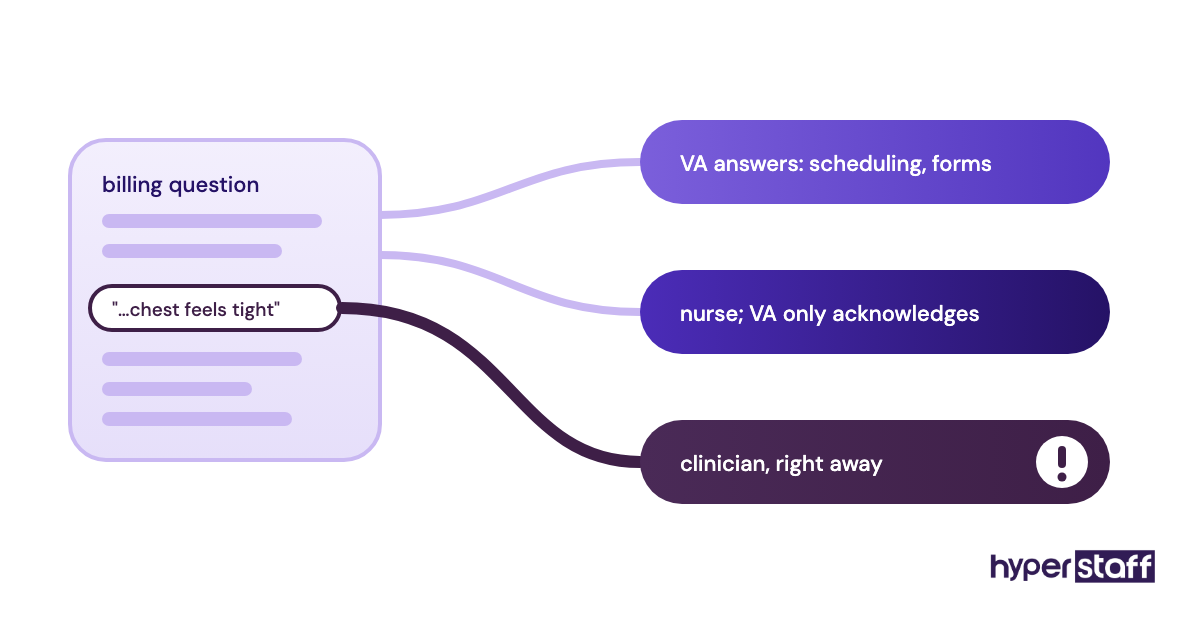
Patient message triage belongs on the medical virtual assistant task list only up to a written line. A VA can sort portal messages, answer scheduling and billing questions, and route anything about symptoms or medication to a clinician.
That line needs to exist before the first message arrives. Drawing it after a mistake is much harder.
What to define in the triage rules
A one-page triage sheet should settle four things:
- Message types the VA answers alone, such as scheduling, directions, billing and forms
- Message types routed to a nurse or provider with only an acknowledgment reply
- Red-flag words that trigger an immediate escalation, including chest pain, trouble breathing and self-harm
- A response-time target for each category
Why the boundary has to be explicit
A helpful VA will want to answer a refill question or calm a worried patient, and scope creep starts right there. Written rules protect the patient first and the VA second.
Practices genuinely disagree on refill requests. Some let the VA queue refills under a standing protocol the provider approved, while others send every refill to a nurse.
We lean toward routing all of them at the start and widening scope after a few weeks of clean handoffs. Blurred scope shows up among the common medical virtual assistant mistakes practices make early, and it's cheap to prevent.
Settled when the VA can recite it
The triage sheet exists and the clinical team has approved it. Ask the VA which messages they never answer, and they can tell you without looking.
Checkbox 6: Who follows up on denied and aging claims?
Claim denial follow-up and aging accounts receivable work connect a medical virtual assistant straight to cash flow. Someone has to read each denial reason, fix what's fixable and resubmit before the payer's timely filing window closes.
What to check in the A/R report
Run the aging report and look for these signs of an owner:
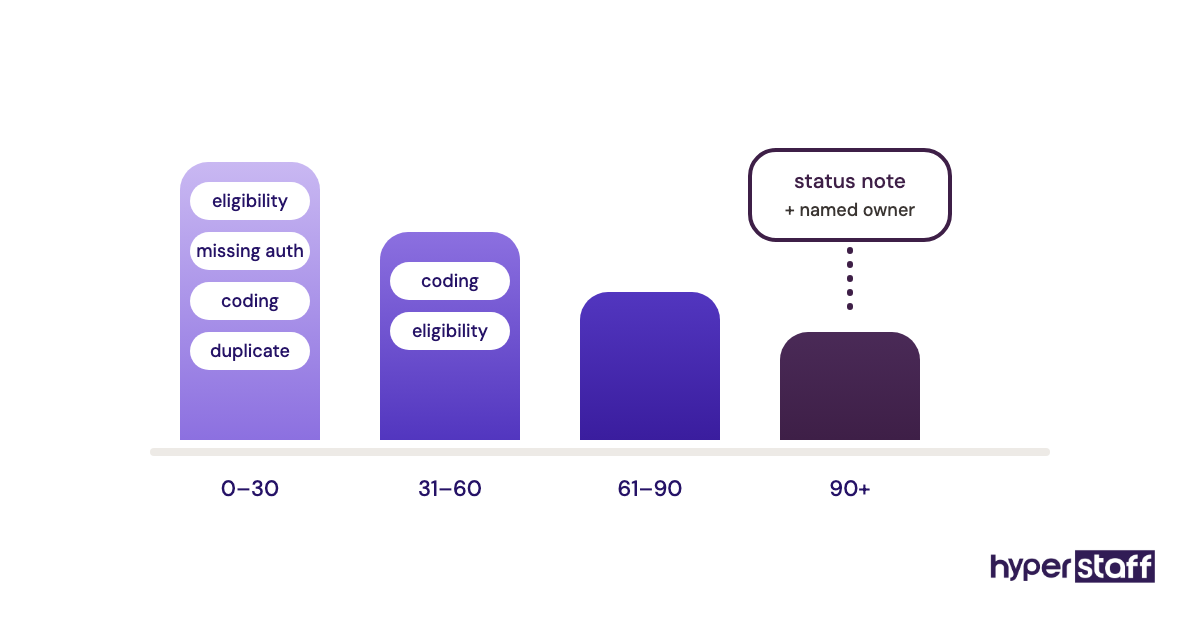
- The report is reviewed weekly in 0–30, 31–60, 61–90 and 90+ day buckets
- Each denial is tagged by reason (eligibility, missing auth, coding, duplicate)
- Corrected claims are resubmitted with a note on the account
- Timely filing deadlines are tracked per payer
- Patient balances get statements on a fixed cycle
Why denials pile up without an owner
Timely filing limits vary by payer, often anywhere from 90 days to a year from the date of service, and an unworked denial simply expires. Denial reasons also show where the front-end process is breaking, though only if someone reads them in aggregate.
Coding is a separate skill. A VA with billing experience can correct demographic and eligibility errors, but coding changes should stay with a certified coder.
Whether this work justifies a dedicated hire depends on claim volume, and our breakdown of whether a medical VA is worth it walks through that math.
Wrapped up when the 90+ bucket has notes
No claim sits in the 90+ bucket without a note explaining its status. This month's top denial reason has a fix assigned to a named person.
Checkbox 7: Closing the referral and records loop
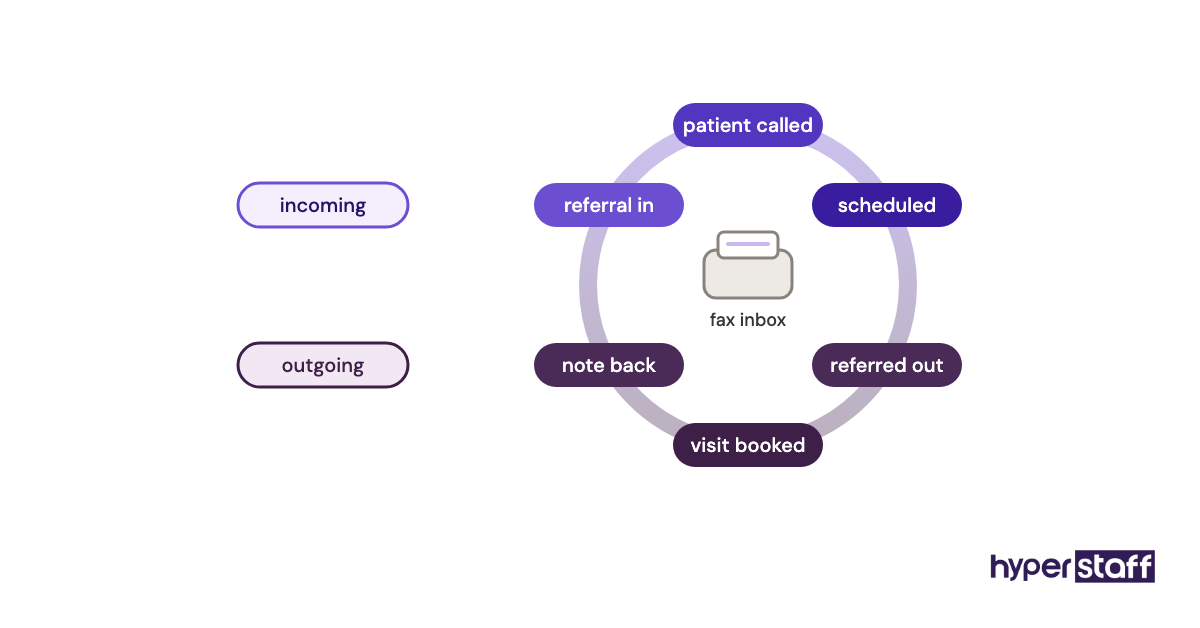
Referral management runs in two directions: incoming referrals that need scheduling and outgoing ones that need proof the patient was seen. A medical virtual assistant can own both queues, plus the records requests arriving by fax, portal and email.
What to track in the referral queue
Check the queue against this list:
- Incoming referrals are contacted and scheduled within a set number of business days
- Outgoing referrals are checked for a booked appointment and a returned consult note
- Records requests are logged with requester, authorization on file and send date
- The fax inbox is cleared daily, each page attached to the right chart
Why an open loop costs more than one visit
An incoming referral that waits a week can easily book with another practice. On the outgoing side, a missing consult note leaves the referring provider without information they asked for.
Referral work rewards a detail-minded VA. Add a scenario about a consult note that never came back to your medical virtual assistant interview questions and listen for how the candidate would chase it.
Closed out when the fax inbox is empty
Every referral older than your target window has a recorded status. The fax inbox is empty at the end of each business day.
Checkbox 8: Is every task written down so a replacement can pick it up?
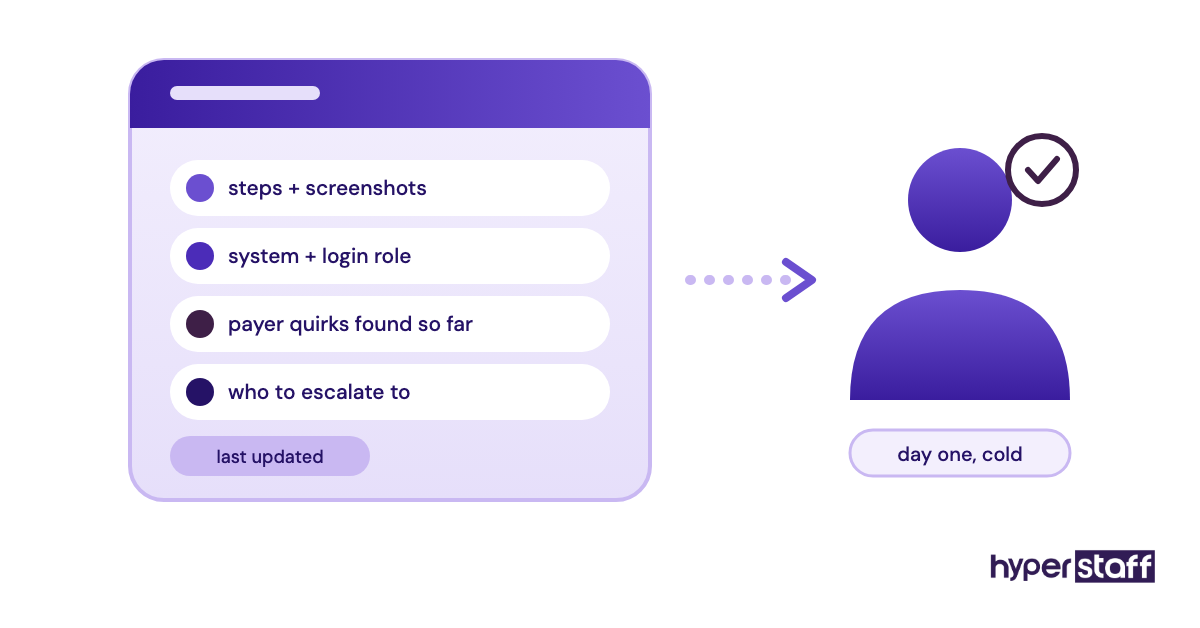
Task documentation decides whether your medical virtual assistant setup survives a sick week, a resignation or a replacement. Each recurring task needs a written SOP with the steps, the systems, the login role and the escalation contact.
What to confirm in the SOP library
Open the shared folder and look for:
- One SOP per recurring task, with screenshots of each system step
- Payer quirks and phone-tree shortcuts recorded as they're found
- Named escalation contacts per task
- A last-updated date on every document
- A medical virtual assistant job description that matches the tasks the SOPs describe
Why documentation protects revenue
Undocumented work lives in one person's head and leaves with them. Practices that skip this step tend to find out their recall list and auth tracker were never written down on the day the VA is out.
The first two weeks of onboarding a medical virtual assistant are the cheapest time to write these SOPs, because every question the VA asks becomes a line in one. Writing the task list first also speeds up how you hire a medical virtual assistant, since you know exactly what to screen for.
At Hyperstaff, this lives in your Operations Vault: your SOPs, tools and context, written down and maintained for you. If a placement doesn't work out, a free replacement starts in 5 to 7 business days, briefed from that Vault.
Ready when a stranger could follow it
Someone who has never seen your practice could read any SOP and do the task correctly on their first day. Test it by having a colleague or your account manager walk through one SOP cold.
Disclaimer: This article is general information about administrative practice operations and is not legal, compliance, billing or medical advice. Payer rules and HIPAA obligations vary, so confirm requirements with qualified advisors before changing your processes.
Common questions
What tasks can a medical virtual assistant do?
The core list covers scheduling, insurance verification, prior authorizations, patient messages, recall calls, referral coordination, billing follow-up and records requests. Some practices add remote medical scribing when the VA has that training.
Can a medical virtual assistant give medical advice?
No. A VA handles administrative work and routes any symptom or medication question to a licensed clinician under written triage rules.
How many hours a week do medical VA tasks take?
It depends on patient volume and how many tasks you hand over. Smaller practices often start part-time and move to full-time once billing and recall work shift over, which is why Hyperstaff offers monthly bundles of 40, 80 or 160 hours.
Can a medical VA do scribing remotely?
Yes, with the right setup. Virtual scribing works inside the EHR during or after visits, and it needs a VA trained in medical terminology plus a note template the provider has approved.
Which medical virtual assistant tasks should I delegate first?
Start with insurance verification and appointment reminders. Both follow fixed steps, show results within weeks, and teach the VA your systems before they touch billing or patient messages.
Book a free 15 min call
We place a pre-vetted specialist in 5 business days, fully managed, from $3/hour.