10 Medical Virtual Assistant Mistakes That Cost Practices Money
Ten setup mistakes that turn a medical virtual assistant from a revenue win into a compliance and cash-flow problem, with the fix for each.
On this page
- Mistake #1: Letting the VA work under someone else's EHR login
- Mistake #2: Opening the whole chart when the job needs one screen
- Mistake #3: Letting patient details travel over WhatsApp and screenshots
- Mistake #4: Treating the signed BAA as the whole compliance plan
- Mistake #5: Letting the VA improvise when a patient describes symptoms
- Mistake #6: Handing over insurance verification with no payer notes
- Mistake #7: Hiring from a generic virtual assistant job description
- Mistake #8: Scheduling the VA's shift around the VA instead of your phones
- Mistake #9: Measuring logged hours instead of practice outcomes
- Mistake #10: Keeping the whole playbook in one person's head
- FAQs
💡 Key Takeaways:
1) The costliest medical virtual assistant mistakes are setup mistakes, like shared EHR logins and unrestricted chart access, and HIPAA treats several of them as violations whether or not a breach ever happens.
2) A remote assistant should work only inside your approved systems, see only the patient data each task needs, and send anything clinical to a licensed staff member through a written triage script.
3) Judge a medical virtual assistant by practice outcomes, such as returned voicemails, verified insurance before visits and aging claims worked, and write every workflow down so one resignation can't wipe it out.
Your Front Desk Is Where Revenue Leaks
Hyperstaff matches practices with a dedicated medical virtual assistant who learns one practice's payers, scripts and systems. We've placed 70+ assistants across 30+ clients, at rates from $3/hour, with placement in 5 business days and a dedicated account manager on every account. Get the setup right and the calls you used to miss start turning into booked visits.
Mistake #1: Letting the VA work under someone else's EHR login
Giving a new virtual assistant the office manager's password gets them working within the hour. It also skips a safeguard that HIPAA marks as required, with no flexibility on it.
Why practices fall into it
- An extra user seat costs money
- The vendor's support ticket takes days
- Nobody in a small practice owns user setup
- The VA's start date comes before IT is ready
- It works, so nobody goes back and fixes it
The price of a shared password
The HIPAA Security Rule lists unique user identification as a required specification under 45 CFR 164.312: every user gets their own name or number so their activity can be tracked. With one shared login, the audit log says the office manager opened every chart, sent every message and changed every appointment.
If a patient complains that someone looked at their record, you can't show who did it. When the assistant leaves, the password everyone uses has to change the same day, and in practice it usually doesn't.
The fix: a named account before day one
Create the VA's own login, with multi-factor authentication, at least a week before the kickoff call. Most cloud EHR and practice management systems let an admin copy an existing role, so the work is mostly picking the right template.
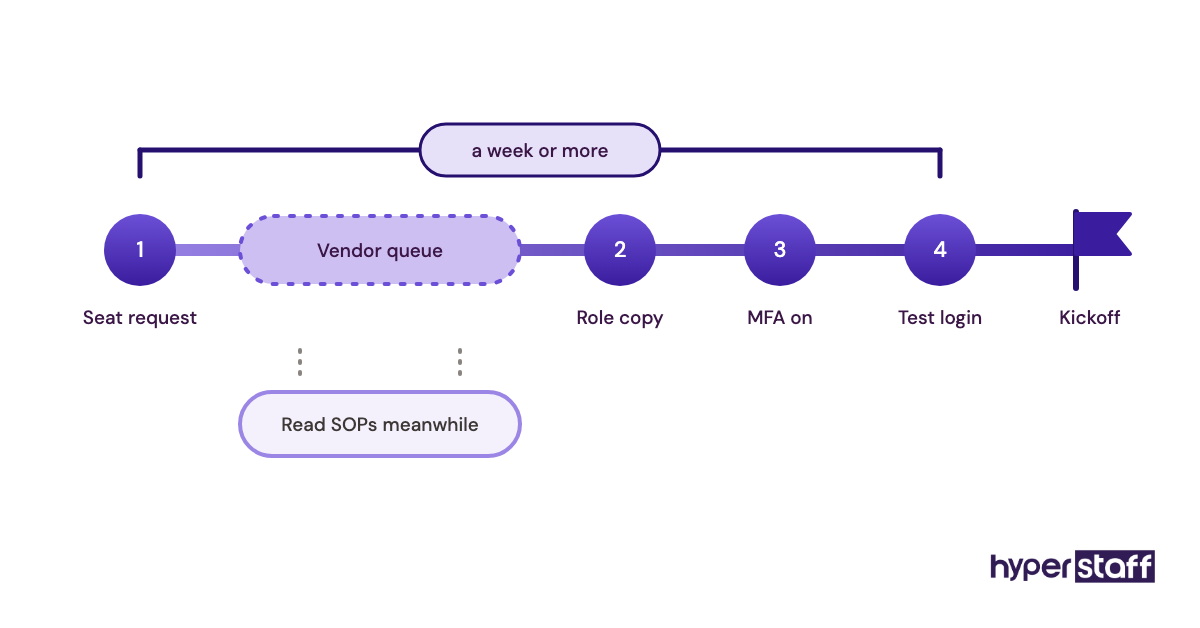
Budget the wait into your timeline. A seat request can sit in a vendor queue for days, and that dead time is better spent on reading SOPs than on a borrowed password.
Mistake #2: Opening the whole chart when the job needs one screen
Medical virtual assistants who schedule appointments or chase claims rarely need clinical notes, yet many practices give them the same role as a nurse. Full access feels simpler. It also breaks the HIPAA minimum necessary standard.
Where the over-sharing comes from
- Role templates in the EHR are too broad
- Nobody mapped which tasks need which data
- Restricting access later feels like an accusation
- Owners worry the VA will get stuck and ask questions
What open access costs you
Under 45 CFR 164.502(b), covered entities and business associates must make reasonable efforts to limit protected health information to the minimum necessary for the purpose. A scheduler who can read psychiatric notes is a finding waiting for an audit.
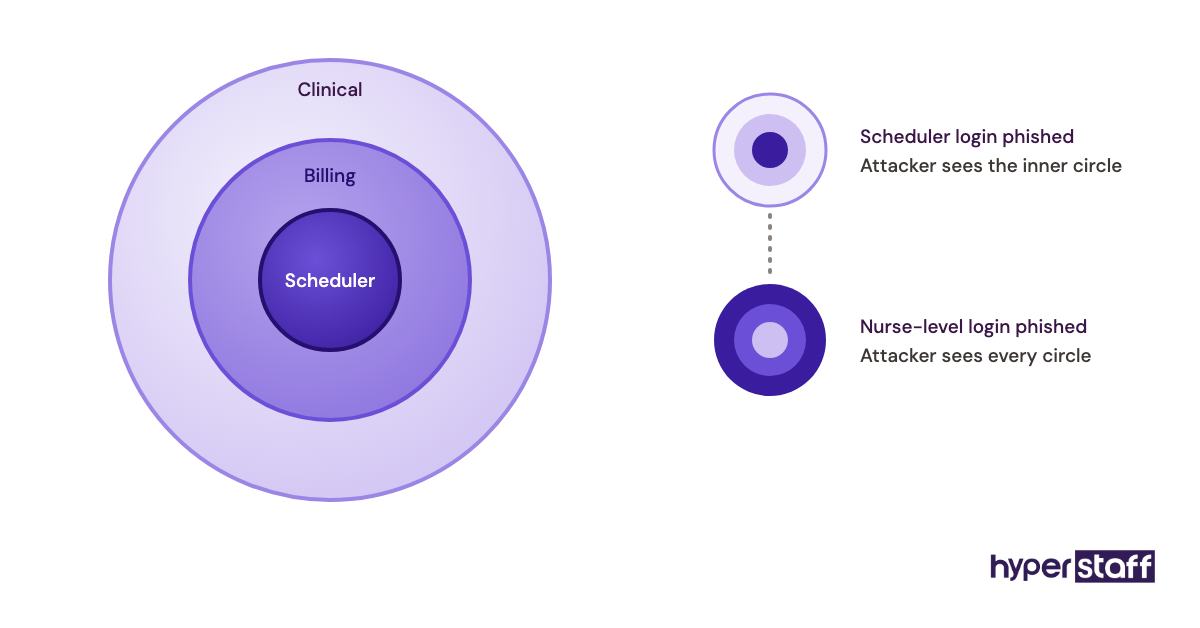
Broad access also widens the blast radius. If the account is phished, the attacker gets everything the role can see.
Map access to tasks instead
Match permissions to the actual task list. Here's a starting map we'd adjust per practice and per EHR:
| VA task | Access the task needs | Access to hold back |
|---|---|---|
| Scheduling and reminders | Calendar, demographics, contact details | Clinical notes, billing history |
| Insurance verification | Demographics, insurance cards, payer portals | Progress notes, results |
| Claims follow-up | Claims, EOBs, patient ledger | Full chart notes |
| Recall outreach | Recall list, phone system | Lab and imaging results |
| Refill request routing | Message queue, medication list | Any approve or sign rights |
Expand access when a new task is added, with a note in the user log. Narrowing it later is the conversation owners avoid.
Mistake #3: Letting patient details travel over WhatsApp and screenshots
Protected health information leaks most often through side channels, the quick text or screenshot sent to "just ask about this one patient." The EHR can be locked down perfectly while PHI flows through a personal phone.
How side channels creep in
- The EHR's internal messaging is clunky
- The doctor already texts the office manager
- Time zones push questions to after hours
- A screenshot feels faster than describing a screen
- Nobody said which channel to use
The damage from a stray message
Consumer apps on personal phones sit outside your business associate agreements, your audit logs and your device controls. A screenshot of a schedule saved to a camera roll stays there after the assistant leaves.
Recovering those copies is close to impossible. You'd be relying on someone deleting files on a phone you've never seen.
Pick one approved channel and name it
Write down a single channel for patient-specific questions, usually the EHR's task or message feature, or a HIPAA-eligible chat tool covered by a BAA. Our breakdown of medical virtual assistant tools covers which ones sign BAAs and on which plans.
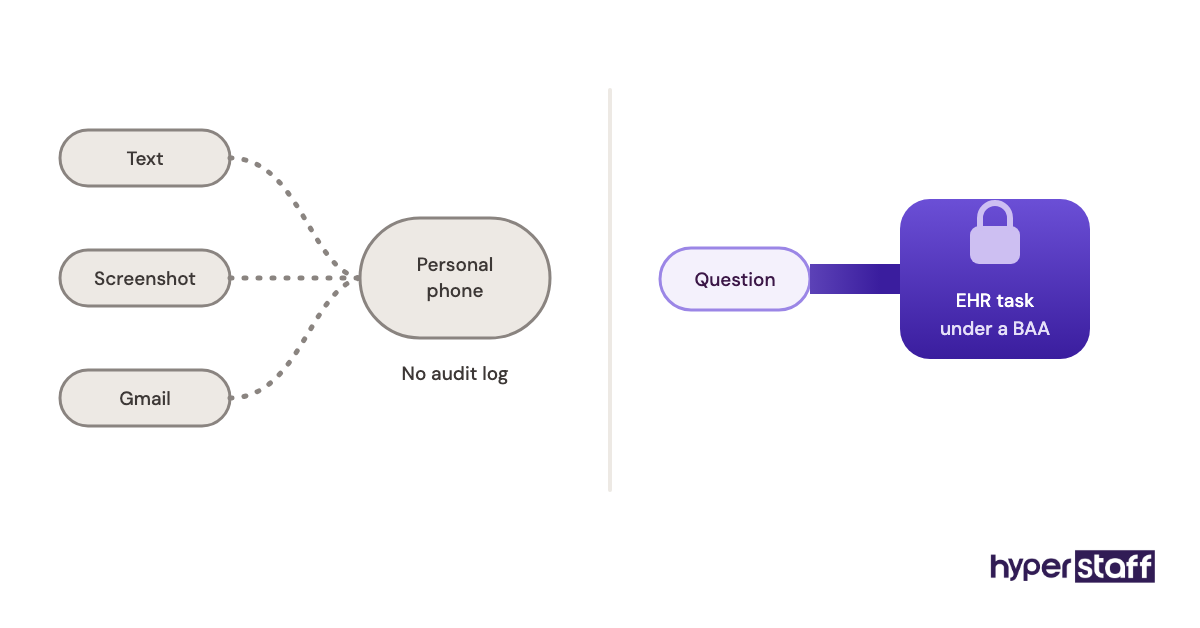
For non-PHI chatter, any team chat works. The rule is about where patient identifiers go, so make the line easy to follow: names, dates of birth and MRNs live in one place only.
Mistake #4: Treating the signed BAA as the whole compliance plan
A business associate agreement is a contract. It gives you assurances on paper, and it does nothing to secure the laptop, network or room where the virtual assistant works.
Why the paperwork feels like enough
- "HIPAA compliant" on a vendor's site sounds final
- Owners assume the agency handles devices
- Security training feels like overkill for a scheduler
- Nobody asks to see the actual workspace setup
The gap the contract leaves open
HIPAA's Security Rule at 45 CFR 164.308 lets a business associate handle ePHI only with "satisfactory assurances," and separately requires a security awareness and training program for all workforce members. The BAA covers the first part. Training, device controls and workstation rules are still on you and your vendor to carry out.
When a breach happens on an unencrypted personal laptop, the signed agreement tells you who to blame. It won't stop the breach notification process.
Check the setup behind the signature
Ask four practical questions: is the device encrypted, does it auto-lock, is PHI ever stored locally, and has the assistant completed HIPAA training you can see a record of? Our guide to choosing a HIPAA compliant virtual assistant goes through the full checklist.
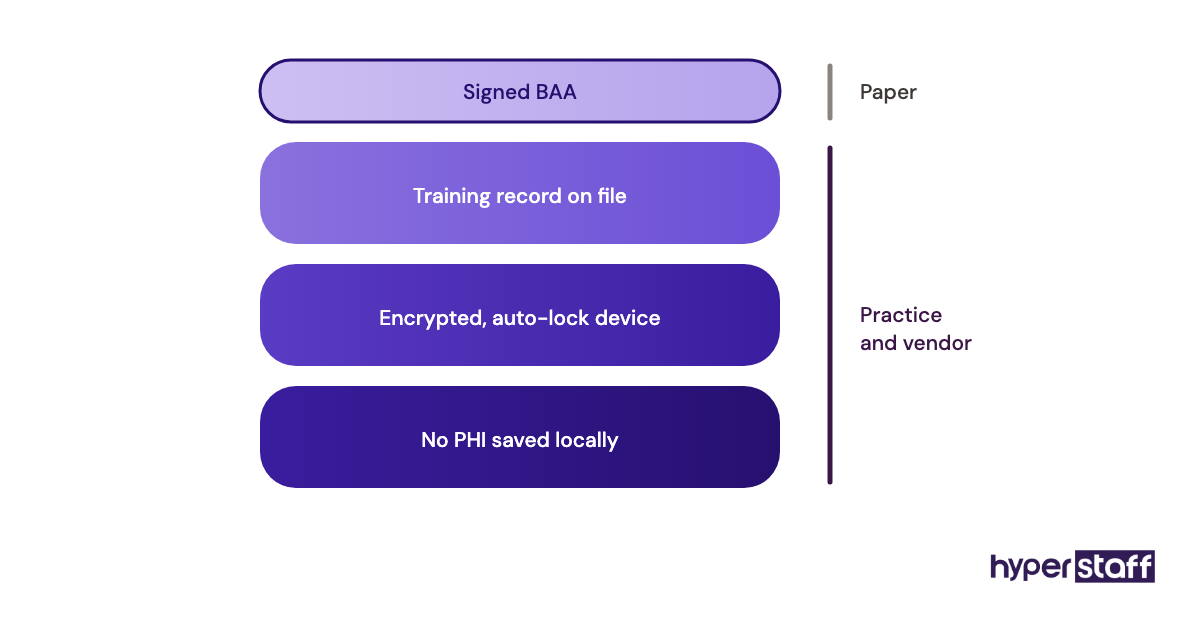
Practitioners genuinely split on the device question. Some practices require every remote user to work through a virtual desktop so no data touches the local machine; others accept a managed, encrypted laptop because virtual desktops lag and frustrate staff on slow connections. Both can pass a risk analysis, so pick one, document why, and apply it to everyone.
Mistake #5: Letting the VA improvise when a patient describes symptoms
Patients don't sort their calls by job title. A remote assistant booking a follow-up will hear "my chest has felt tight since yesterday," and without a script, they'll try to help.
How the scope drifts
- The assistant wants to be useful on the call
- No escalation script was written
- Clinical staff are busy, so routing feels like a burden
- Patients push for an answer before they'll hang up
- Earlier calls went fine, so the habit sets
The cost of a well-meant answer
A non-licensed assistant giving clinical advice, even "that sounds like it can wait until Monday," creates liability for the practice and real risk for the patient. One delayed emergency can outweigh years of saved payroll.
The less obvious cost is trust. Clinicians who hear about one improvised answer often pull the assistant off phones entirely, and the role shrinks to back-office work.
Write the triage script before the phones go live
Give the assistant a short list of red-flag words that trigger an immediate warm transfer or a 911 instruction, plus a standard line for everything clinical: "I'll get this to the nurse now, and they'll call you back today." Our explainer on what a medical virtual assistant does draws the scope line clearly.
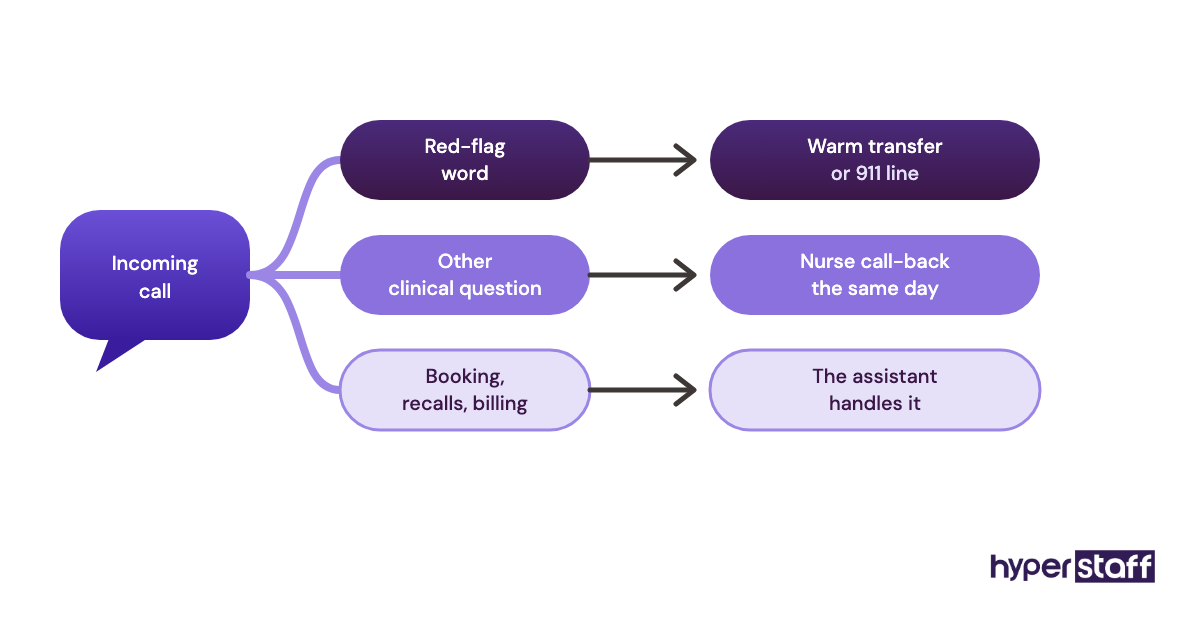
Review the script against real calls in the first two weeks. Patients phrase symptoms in ways no script anticipates, and the list should grow from what actually comes in.
Mistake #6: Handing over insurance verification with no payer notes
Insurance verification looks like a simple portal task until the first Medicare Advantage plan with a different referral rule shows up. Assistants handed this work cold will verify eligibility and miss the detail that triggers a denial.
Why it gets handed over too early
- Verification is tedious, so it's the first task owners want gone
- Payer quirks live in the biller's memory
- Portal logins were set up but not explained
- The practice wants a quick win in week one
Where the money slips out
Eligibility is only part of the check. Missed prior authorization requirements, out-of-network secondary plans and visit limits show up weeks later as denials, after the patient has left and the appointment slot is gone.
Reworking a denied claim takes far longer than checking correctly upfront. Some never get paid at all.
Sequence the handoff over a few weeks
Start the assistant on scheduling and reminder calls, where errors are cheap and visible. Move verification over next, with your biller spot-checking every record for the first week or two, and leave prior authorizations until payer-specific notes exist for your top plans.
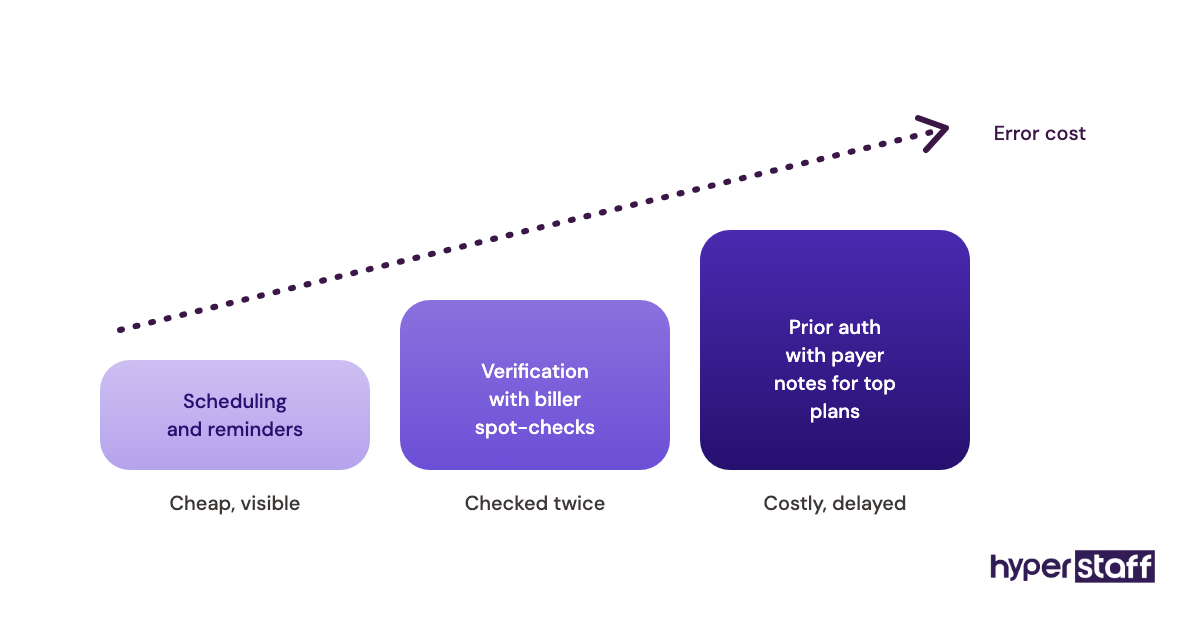
Those notes take a few hours to write and save months of denials. The full sequence is in our guide to onboarding a medical virtual assistant, and our list of medical virtual assistant tasks shows which ones are safe to hand off first.
Mistake #7: Hiring from a generic virtual assistant job description
A general VA job post brings in candidates who are great at inboxes and calendars and have never opened a payer portal. Medical front-office work needs different screening, and the job description is where that starts.
Why the generic version gets used
- It's the template that comes up first
- Owners describe hours and tools, not workflows
- "Healthcare experience" feels specific enough
- Nobody lists the EHR or billing system by name
- Pay is set before the skills are defined
The cost of a mismatched hire
A strong generalist can take weeks to learn medical terminology, CPT and ICD-10 basics and how EOBs read. You pay for that ramp, and patients feel it on the phone.
If the fit is wrong, you start over, and the time spent training gets lost with them.
Write the role around your workflows
Name your EHR, your top payers and the exact tasks in the post. Our medical VA job description template lays this out, and the guide on how to hire a medical virtual assistant covers the screening steps.
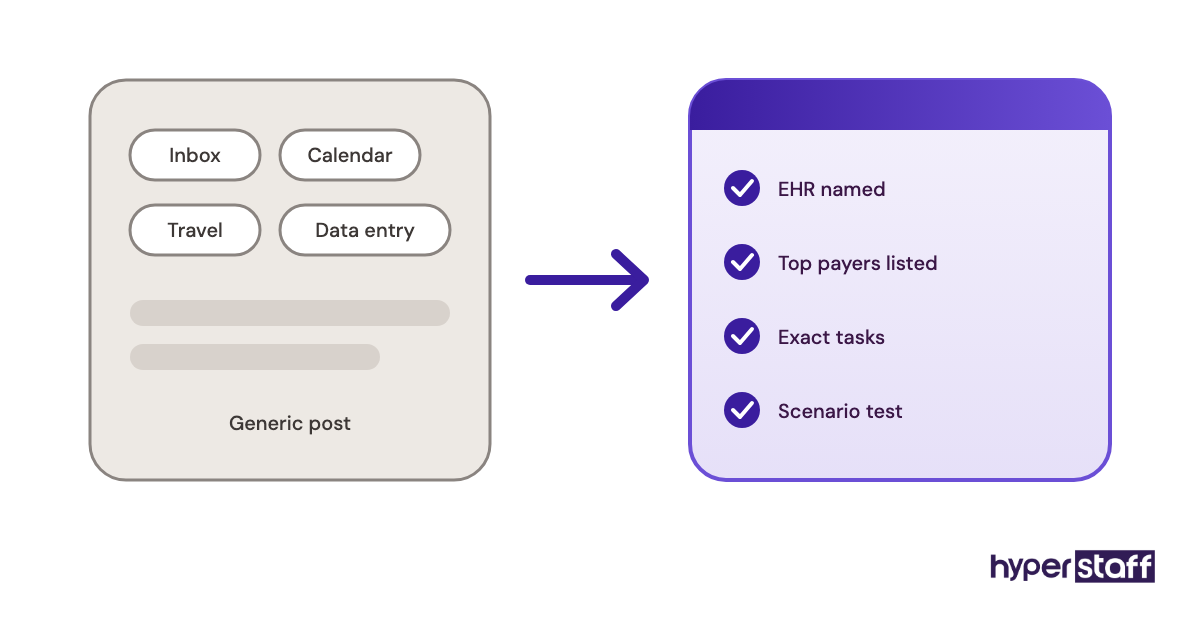
Test with a scenario, such as "a patient's secondary insurance changed last month, walk me through the call." Our set of medical VA interview questions includes more like it. For billing follow-up, a Professional-tier assistant with 2 to 5 years of experience usually makes more sense than an entry-level hire; for reminder calls and scheduling, an Essential-tier assistant often does the job well.
Mistake #8: Scheduling the VA's shift around the VA instead of your phones
Offshore virtual assistant shifts often get set by what suits the time zone. Patient calls follow your clinic's day, and they bunch up at predictable hours.
Why the shift drifts off your peak
- Night shifts are harder to fill abroad
- Owners assume back-office work can happen anytime
- Nobody pulled the phone system's call-volume report
- Part-time hours get spread evenly across the week
What a mistimed shift costs
Most practices see call spikes when the office opens, around lunch and late afternoon, with Monday mornings the heaviest. An assistant who logs on after the morning rush leaves your front desk buried at the exact hour voicemails pile up.
Patients who hit voicemail often book elsewhere. You keep paying for the hours either way.
Build the shift from your call data
Pull a few weeks of call volume by hour from your phone system before you set the schedule. Put live-call coverage on the peaks and save claims follow-up or recall lists for slower hours.
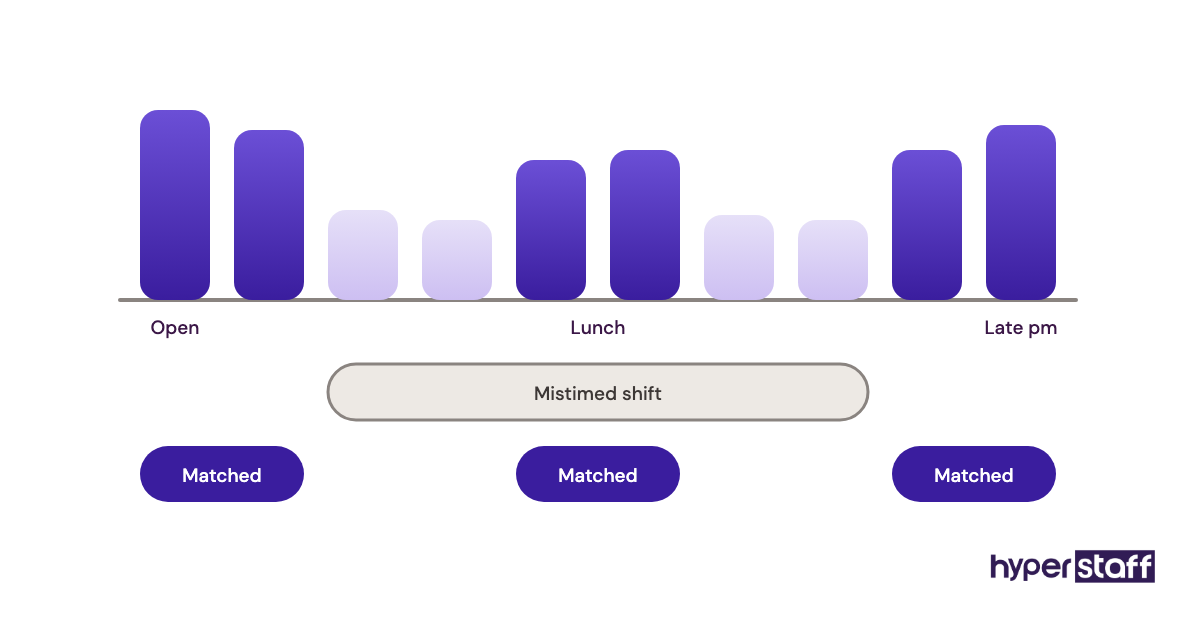
With a part-time bundle of 40 or 80 hours a month, concentrate hours on your two or three heaviest days rather than spreading them thin. Assistants in the Philippines and India who cover US clinic hours are working a night shift, so confirm that up front during hiring and plan the overlap with your clinical team.
Mistake #9: Measuring logged hours instead of practice outcomes
Time-tracking screenshots show that a medical virtual assistant was online. They say nothing about whether patients got called back or claims got paid.
Why hours become the scoreboard
- Hours are easy to count
- Owners worry about remote staff slacking
- Nobody defined what "done" looks like
- Outcome data sits in reports no one opens
- Tracking software comes bundled and on by default
The blind spot it creates
A busy assistant can log a full week while the recall list sits untouched and claims over 90 days keep aging. You won't notice until cash flow tightens a quarter later.
Hour-tracking also pushes good assistants to look busy. The work that matters, like a 20-minute call that saves a denied claim, looks slow on a screenshot log.
Pick three or four outcome numbers
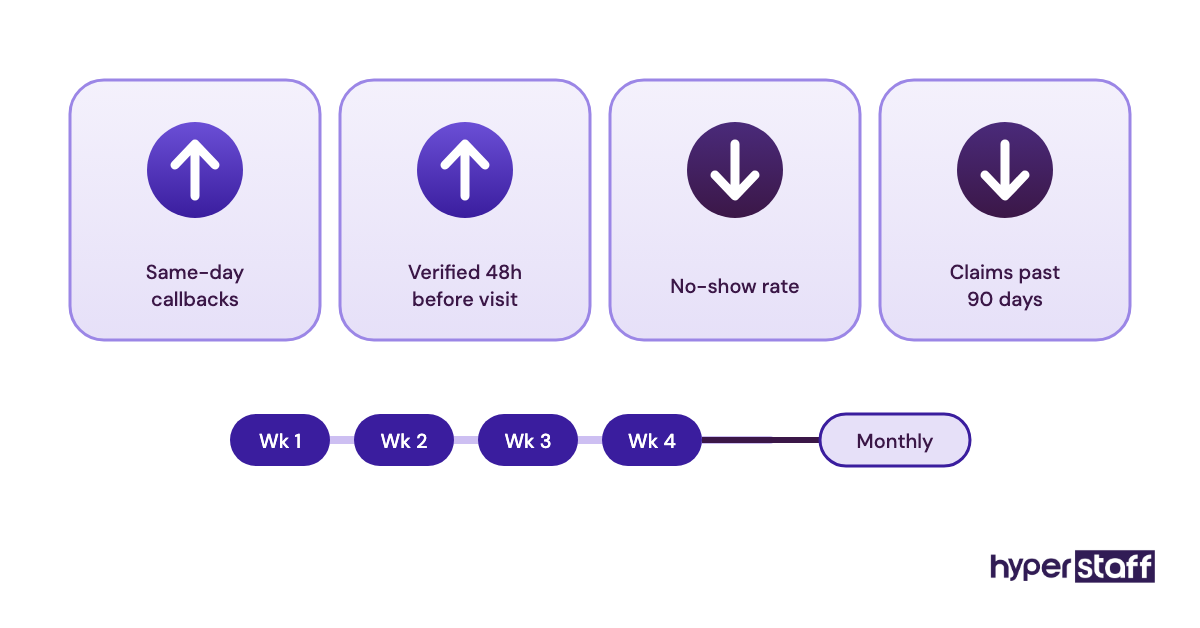
Choose metrics tied to the tasks you delegated: voicemails returned the same day, appointments verified 48 hours before the visit, no-show rate, and dollars in claims over 90 days. Review them weekly for the first month, then monthly.
The right numbers depend on practice size. A solo practitioner mostly cares whether the phones get answered, while a multi-location group usually cares more about claims aging and consistency across sites. Our medical virtual assistant cost breakdown and the guide on whether a medical VA is worth it show how to set those numbers against the monthly spend.
Mistake #10: Keeping the whole playbook in one person's head
Most practices train their first virtual assistant by voice, over screen shares, with nothing written down. It works until that assistant leaves, and then the practice is training from zero.
Why nobody writes it down
- Training live feels faster
- The office manager is the only one who knows the quirks
- Processes change too often to document
- Everyone assumes the hire will stay for years
The cost when that person walks
Turnover happens in every front office, in-house and remote alike. Without written SOPs, a replacement repeats the learning curve, and the same payer mistakes come back because the fixes lived in someone's memory.
The office manager carries the cost twice: once training the first assistant, then again training the next.
Turn training into documents you own
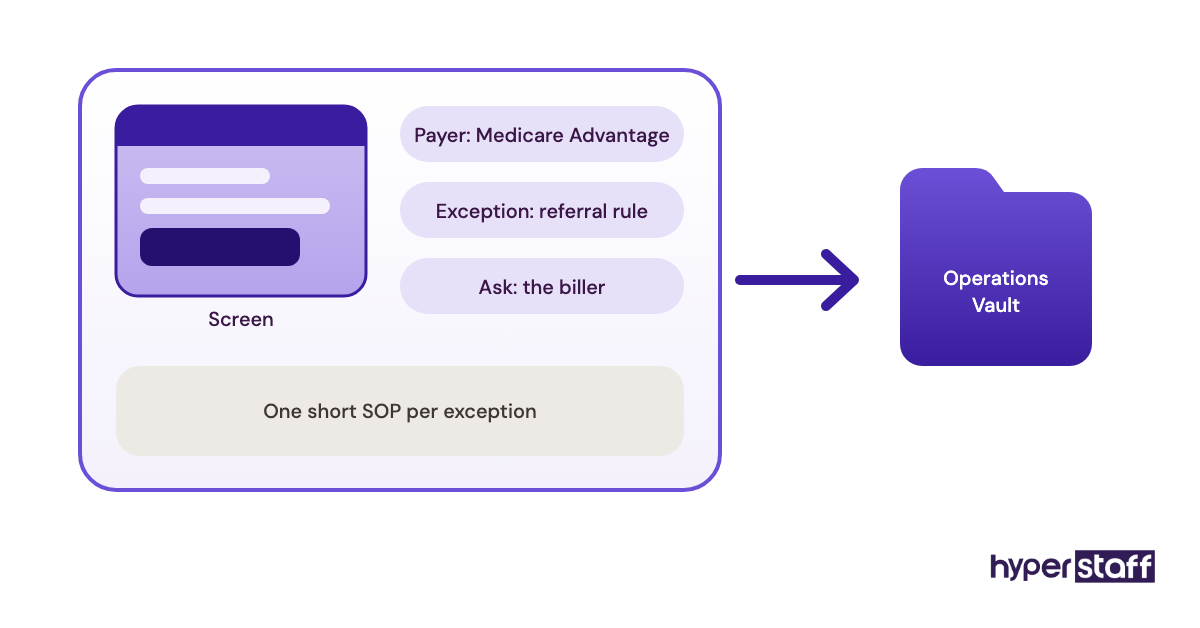
Record each workflow as it's taught: the screen, the payer, the exception and who to ask. At Hyperstaff, we keep this in an Operations Vault for every client, holding SOPs, tools and context, and if an assistant ever needs replacing, the new one is briefed from it within 5 to 7 business days at no cost.
Keep ownership with the practice, whichever way you staff. The same documentation question comes up when comparing a medical VA vs in-house staff, since in-house turnover wipes out unwritten knowledge just as fast.
Disclaimer: This article is general information only and is not legal, compliance or medical advice. HIPAA obligations depend on your practice's circumstances, so consult a qualified healthcare compliance professional or attorney before making decisions based on it. Hyperstaff makes no warranty as to the completeness of this content.
Common questions
Can an offshore medical virtual assistant be HIPAA compliant?
Yes. HIPAA doesn't ban offshore work, but the practice still needs a business associate agreement, unique logins, minimum necessary access and documented safeguards on the assistant's device. Some payer contracts restrict offshore access to data, so check yours first.
How long before a medical VA stops making beginner mistakes?
Scheduling and reminder calls usually settle within the first couple of weeks. Insurance verification and claims follow-up take longer, often a month or more, because payer rules vary so much. Written SOPs shorten both.
Does a medical virtual assistant need a medical certification?
Not for most front-office work. Experience with your EHR, medical terminology and payer portals matters more for scheduling and verification. For coding work, look for a recognized coding credential.
What should I do if my medical VA sends PHI to the wrong place?
Treat it as a possible breach right away. Document what was sent, to whom and when, then run a risk assessment under HIPAA's Breach Notification Rule, which sets deadlines for notifying patients when required. Fix the channel rule that allowed it.
Is it a mistake to give a medical VA billing work?
No, if the assistant has billing experience and the right access. Claims follow-up and denial work suit remote assistants well. Start with spot-checks by your biller and add payer-specific notes before handing over the harder accounts.
Book a free 15 min call
We place a pre-vetted specialist in 5 business days, fully managed, from $3/hour.