Medical Virtual Assistant vs In-House Staff: Which Fits Your Practice?
A side-by-side look at remote medical assistants and in-house front-office staff, with the real cost of each and when each one wins.
On this page
- What is the difference between a medical virtual assistant and an in-house hire?
- Medical virtual assistant vs in-house: side-by-side comparison
- Key medical staffing terms you should know
- How does each model work day to day?
- Which front-office tasks fit remote, and which need someone in the building?
- How the remote model differs from related options
- The benefits of a medical virtual assistant over in-house staff
- The drawbacks of a medical virtual assistant
- Who should choose a medical virtual assistant, and who should stay in-house?
- Medical virtual assistant vs in-house: setup examples
- How do you plan a move from in-house to a remote assistant, step by step?
- What does a strong hybrid front office look like?
- Medical virtual assistant tools and software
- 9 proven tips for running a medical virtual assistant alongside in-house staff
- Overcoming common medical virtual assistant challenges
- How to measure medical virtual assistant success
- How long does a medical virtual assistant take to work?
- How much does a medical virtual assistant cost compared with in-house?
- Is a medical virtual assistant worth it compared with in-house staff?
- How to choose a medical virtual assistant agency
- Medical virtual assistant statistics and trends
- Medical virtual assistants and AI
- FAQs
💡 Key Takeaways:
1) A medical virtual assistant works remotely on phone, scheduling, insurance and billing tasks, while an in-house hire covers those plus anything that needs a person physically in the practice.
2) An in-house medical secretary costs far more than the paycheck once benefits, recruiting and turnover are added, so a remote assistant usually wins on cost for desk-based work.
3) Most practices get the best result from a hybrid: keep check-in, rooming and anything hands-on local, and move the remote-friendly admin to a dedicated virtual assistant.
Put Your Payroll Savings Back Into Patient Care
Hyperstaff places dedicated, pre-vetted remote staff who learn one practice and stay with it. Our medical virtual assistant services start from $3 an hour, with placement in 5 business days and a dedicated account manager for every client. We've placed 70+ virtual assistants across 30+ clients, and a free discovery call is all it takes to start.
What is the difference between a medical virtual assistant and an in-house hire?
A medical virtual assistant is a trained remote worker who logs into your practice's systems from another location to answer calls, book appointments, verify insurance and work billing queues. An in-house hire does similar desk work from your front office and can also greet patients, scan cards and help in the building.
The real split is location, and it decides almost everything else: cost, coverage hours, who manages the person and which tasks they can touch. Our guide on what a medical virtual assistant is covers the role on its own.
Medical virtual assistant vs in-house: side-by-side comparison
Here's how the two models compare on the factors practice managers ask about first.
| Factor | Medical virtual assistant | In-house staff |
|---|---|---|
| Typical hourly cost | From $3 to $12+ per hour (Hyperstaff tiers) | About $22 per hour in wages before benefits |
| Benefits and payroll tax | Built into the rate | Roughly 30% on top of total pay |
| Time to start | About 5 business days | Often several weeks to a few months |
| Physical tasks | None | Yes |
| Extended-hours coverage | Easy with time zone overlap | Overtime or extra shifts |
| Office space and equipment | Not needed | Desk, computer, phone |
| Replacement if it doesn't work | Free, in 5 to 7 business days | Restart the hiring process |
| HIPAA setup | BAA plus remote access controls | Workforce training and policies |
Key medical staffing terms you should know
- PHI = protected health information, any patient data tied to identity that HIPAA covers.
- BAA = business associate agreement, the contract required when an outside party handles PHI for a practice.
- Fully loaded cost = wages plus benefits, payroll taxes, equipment, space and hiring costs.
- Eligibility verification = checking a patient's insurance coverage and benefits before the visit.
- Prior authorization = payer approval needed before certain tests, drugs or procedures.
- Denial management = finding why claims were rejected and getting them resubmitted.
- EHR = electronic health record, the system where charts, schedules and often billing live.
- Least-privilege access = giving each user only the system permissions their tasks require.
- Hybrid front office = in-house staff for physical work, remote staff for desk-based work.
How does each model work day to day?
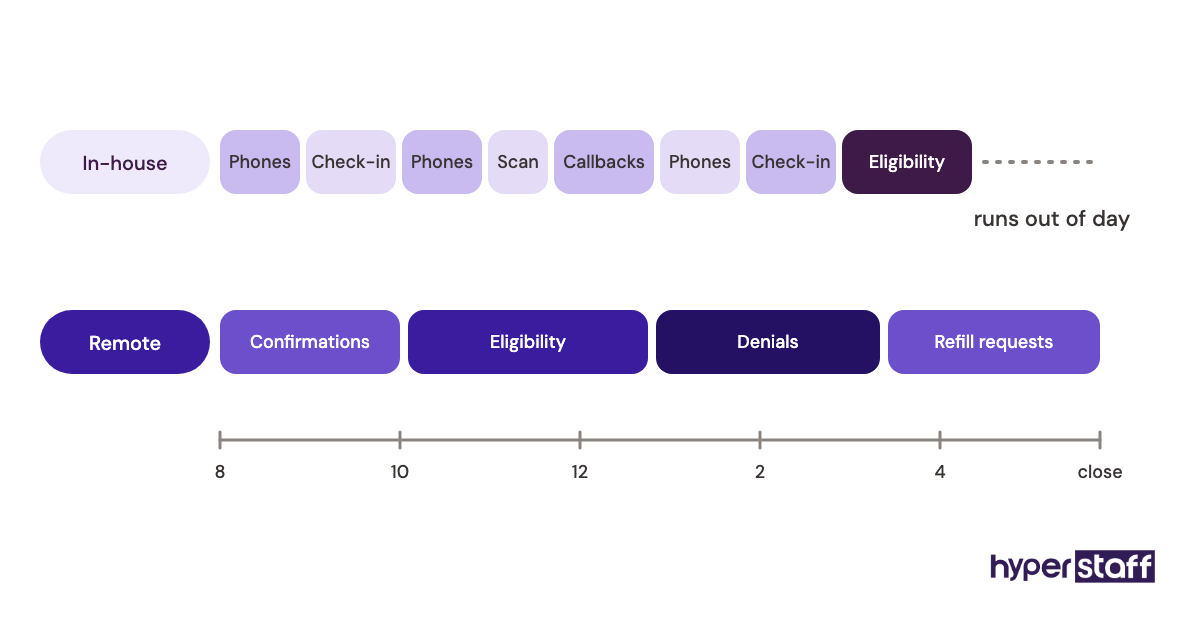
An in-house assistant clocks in at the front desk, works the phones between patients and switches between check-in, scanning and callbacks as the day dictates. Interruptions are constant, so queue work such as eligibility checks often slips to the end of the day.
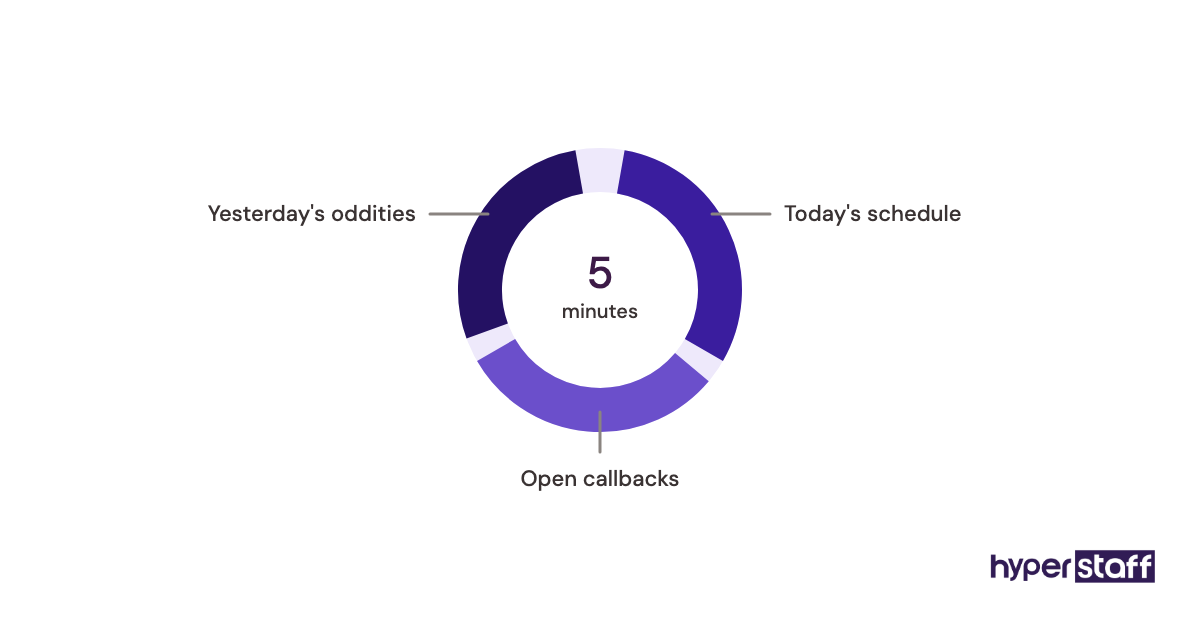
A remote medical assistant logs into the EHR, phone system and practice management software through accounts you control. Because nobody walks up to their desk, they can work a queue straight through: confirmations at 8, eligibility for tomorrow's schedule by 10, then denials and refill requests.
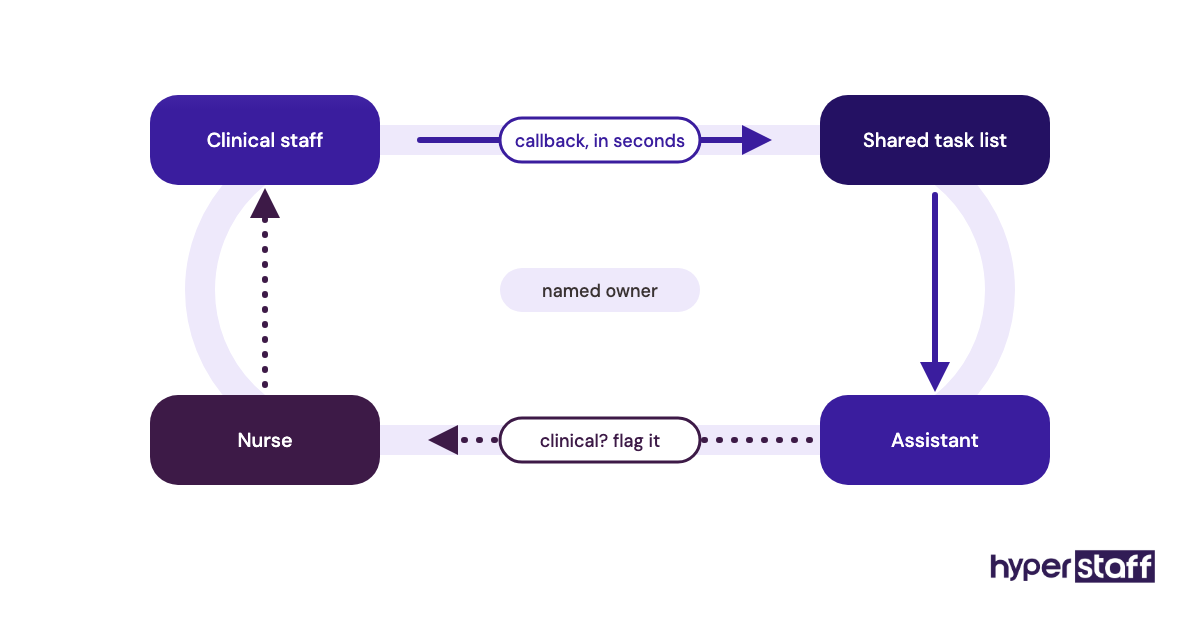
Handoffs are where the remote model either works or breaks. A shared task list or a dedicated chat channel lets clinical staff push a callback to the assistant in seconds, and the assistant flags anything clinical straight back.
Which front-office tasks fit remote, and which need someone in the building?
Most phone, scheduling, insurance and billing work fits a remote assistant. Anything that involves touching a patient, a document or the building stays in-house. The table below shows how common tasks split, and our list of medical virtual assistant tasks goes deeper.
| Task | Best fit | Why | Access needed |
|---|---|---|---|
| Appointment scheduling and reminders | Remote | Phone and screen work only | Scheduler, phone |
| Insurance eligibility checks | Remote | Payer portals and phone | Payer portals, EHR |
| Prior authorizations | Remote | Forms, faxes and follow-up calls | EHR, e-fax |
| Claims follow-up and denials | Remote | Queue-based, needs focus | Billing system |
| Patient intake forms | Remote or hybrid | Digital intake works remotely | Intake tool, EHR |
| Medical scribing | Remote | Live or recorded visit audio | EHR notes |
| Check-in and copay collection | In-house | Patient is physically present | Front desk |
| Rooming and vitals | In-house | Hands-on clinical support | Clinic floor |
| Mail, scanning, supplies | In-house | Physical items | Office |
How the remote model differs from related options
Practices weighing a virtual assistant against in-house staff usually look at three other options too. Each covers a slice of the work.
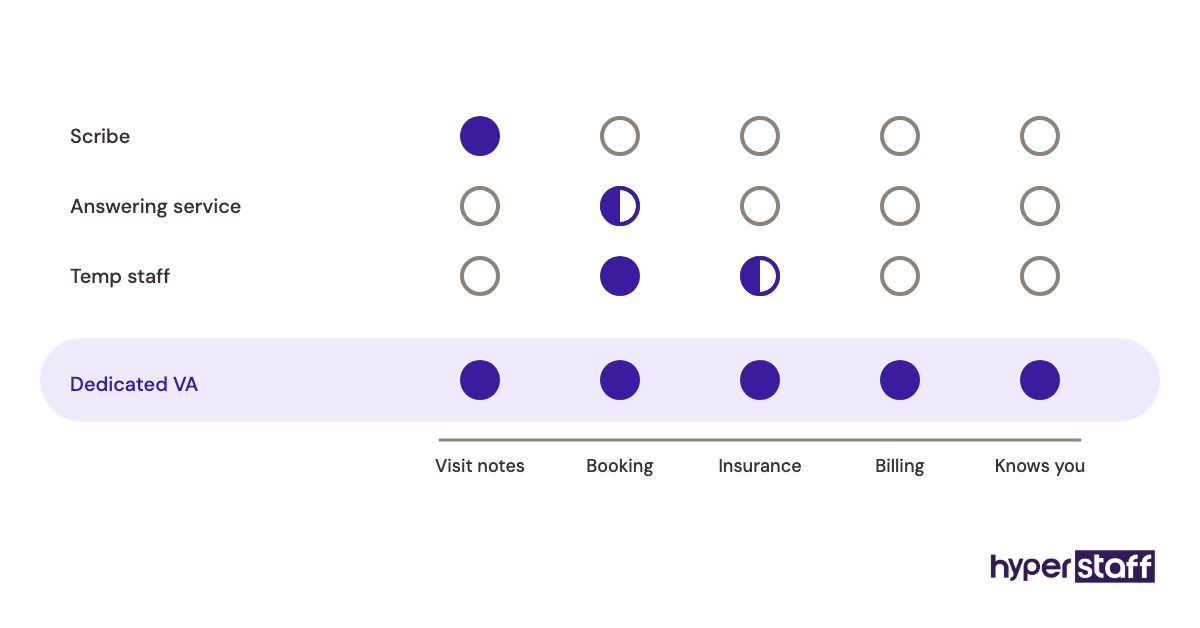
Medical virtual assistant vs medical scribe
A medical scribe documents the visit and little else. A dedicated virtual assistant can scribe, then spend the rest of the day on scheduling, refills and billing, which suits smaller practices that can't fill a full scribe schedule.
Medical virtual assistant vs answering service
An answering service takes messages from a rotating pool of operators who don't know your patients. A dedicated assistant books the appointment, checks the insurance and closes the loop, because they work inside your systems every day.
Medical virtual assistant vs temp agency staff
Temp staff fill a gap at the front desk for a few days or weeks. They help with physical coverage, but the learning curve restarts with every new person, which is the exact cost a long-term remote placement avoids.
The benefits of a medical virtual assistant over in-house staff
- Lower fully loaded cost, with benefits and payroll taxes already inside the hourly rate.
- Faster start, often within a week, compared with a typical local hiring cycle.
- Uninterrupted queue time for eligibility, prior auths and denials.
- Longer phone coverage without paying overtime.
- No added desk, computer or parking space.
- Free replacement when the fit is wrong, so one bad hire doesn't set you back months.
The drawbacks of a medical virtual assistant
- No physical work: check-in, scanning, rooming and supplies still need local staff.
- HIPAA setup takes more upfront work, including a BAA and tighter access controls.
- Time zone gaps can leave early-morning or late-day calls uncovered if shifts aren't planned.
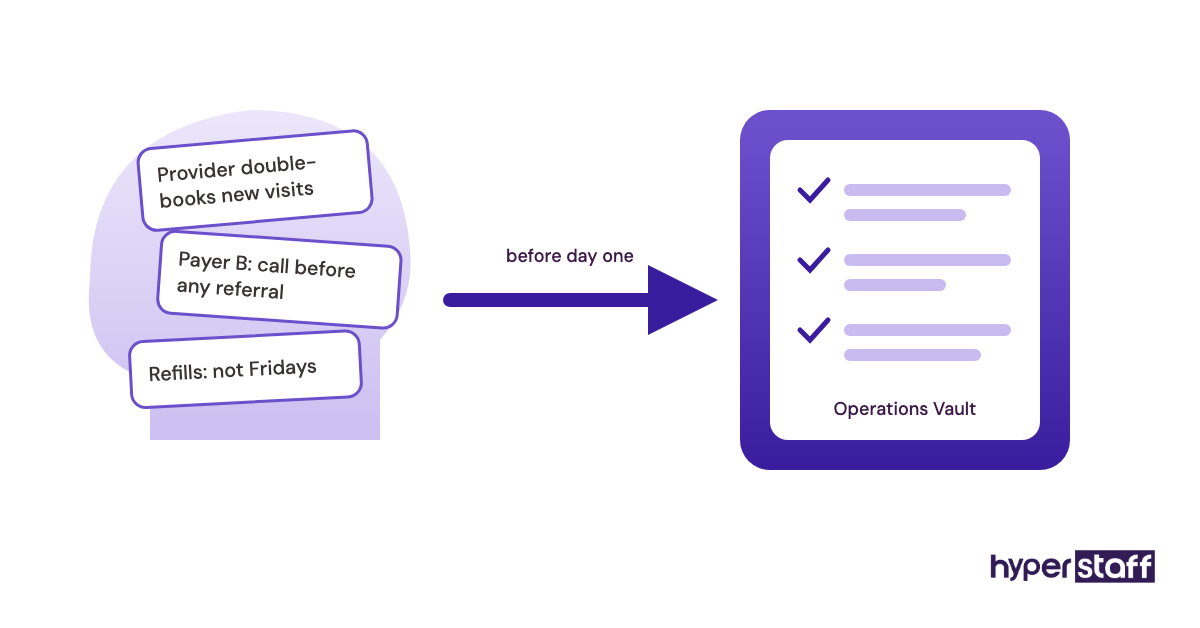
- Your team has to write down processes that used to live in someone's head.
Who should choose a medical virtual assistant, and who should stay in-house?
Practices drowning in phone volume, insurance checks or billing backlogs get the most from a remote assistant. Solo and small group practices feel it quickest, since one remote hire can absorb work that otherwise pulls a medical assistant off the clinic floor.
In-house still wins when the job is mostly physical. A walk-in urgent care with heavy same-day check-in needs bodies at the counter, and a remote hire there would only cover a small share of the workload.
Larger groups see it differently. For them, the case is less about cost and more about centralizing queue work, like denials across several locations, that local staff never get to.
Medical virtual assistant vs in-house: setup examples
The setups below show how the split plays out. They describe common role designs rather than specific clients.
Good setups
Remote insurance desk for a dental or specialty practice
One remote assistant verifies every patient on tomorrow's schedule and chases prior auths, while the front desk keeps check-in. The in-house staff stop making payer calls between patients.
Extended phone hours for a family practice
A remote assistant takes calls from 7 a.m. and through lunch, when the local team is short. Missed calls drop without anyone working overtime.
Remote billing follow-up for a multi-location group
A single remote biller works denials for every location from one queue. Each office keeps its local front desk.
Bad setups
Replacing the whole front desk with a remote hire
Patients still walk in with cards, forms and copays. Without someone local, providers end up doing check-in themselves.
Sharing one login with the remote assistant
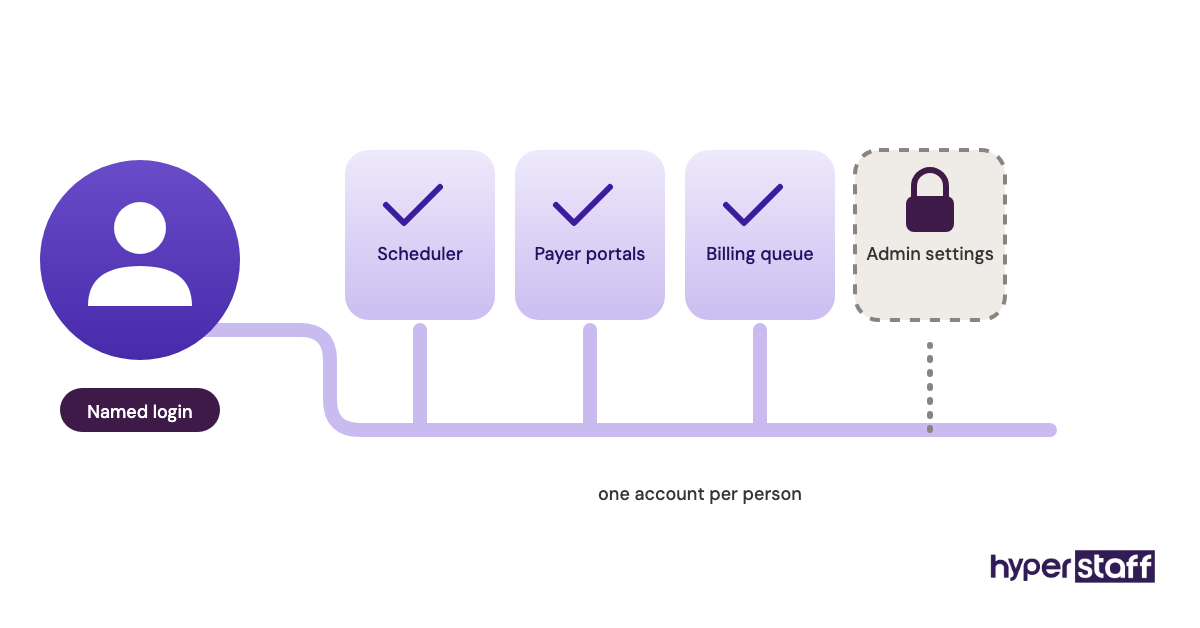
Shared credentials break audit trails and put the practice out of step with HIPAA's access rules. Every user needs their own account.
Hiring remote with no written processes
When the rules live only in the office manager's head, the assistant guesses. Most of the common medical virtual assistant mistakes trace back to this one.
How do you plan a move from in-house to a remote assistant, step by step?
Start with the work, then the access, then the person. Rushing straight to hiring is the usual reason a remote placement stalls in week two.
Step #1: Audit a week of front-office work
Have your team log every task for five days. Tag each one as physical or desk-based, and estimate hours.
Step #2: Write the role around the desk-based tasks
Turn the desk-based list into a role with clear hours and a tier of experience. A ready medical virtual assistant job description saves time here.
Step #3: Lock down HIPAA and access
Sign a BAA before any PHI is shared, then create named accounts with least-privilege access. Our HIPAA compliant virtual assistant guide covers the checklist.
Step #4: Hire and test
Screen for payer experience and phone manner, not just typing speed. These medical VA interview questions help, and the wider hiring process for a medical VA sets the order.
Step #5: Onboard in phases
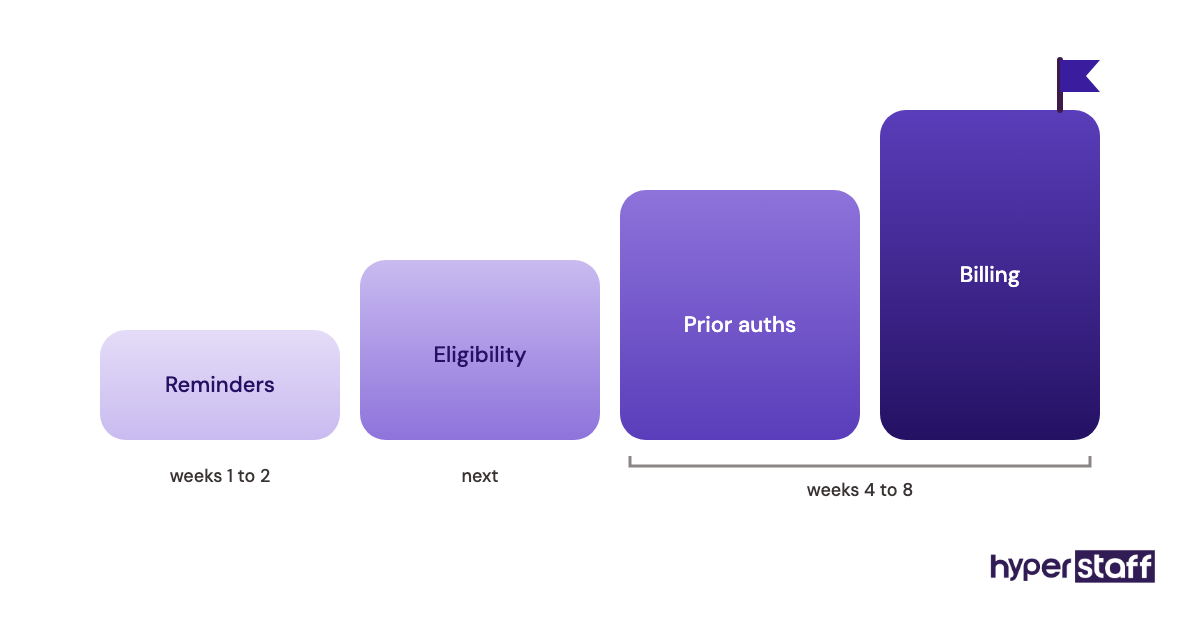
Start with one queue, like reminders, then add eligibility and billing over the next few weeks. A phased medical VA onboarding plan keeps errors low while trust builds.
What does a strong hybrid front office look like?
A strong hybrid front office keeps one or two people local for patient-facing work and moves every desk queue to a remote assistant. The local team owns the lobby. The remote assistant owns the phones, the schedule and the payer work.
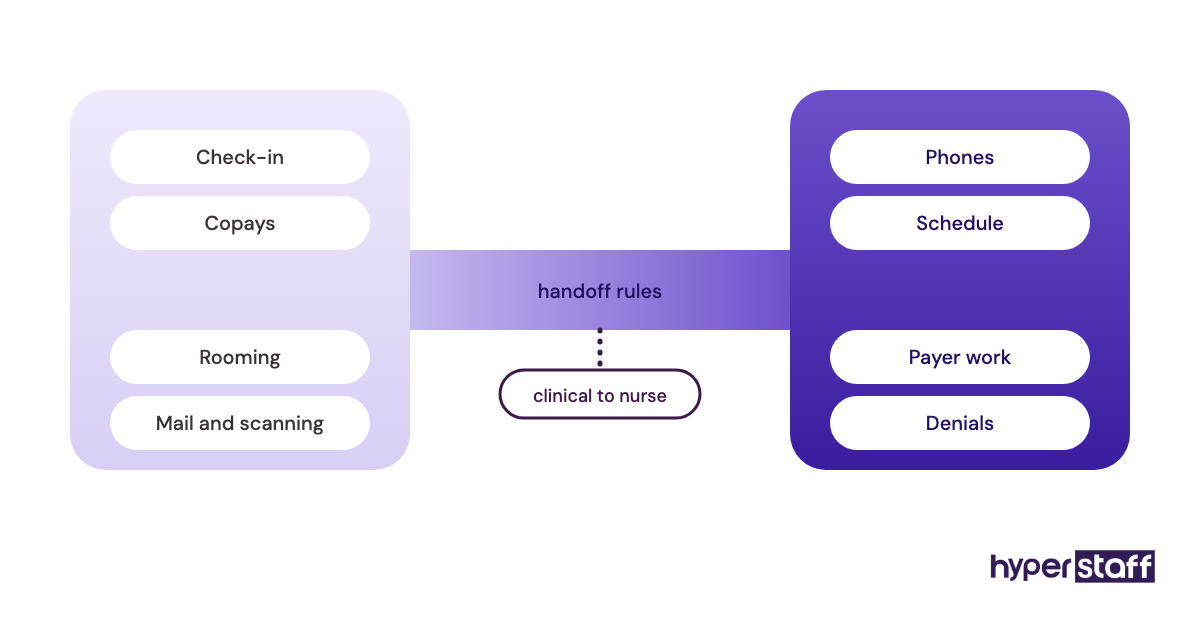
The handoff rules matter more than the headcount. Clinical questions go to a nurse within a set window, and anything the assistant can't resolve gets a named owner in the shared task list.
Practitioners disagree on one point: whether the remote assistant should answer the main line or only overflow. Main-line coverage gives patients one consistent voice, while overflow keeps the local team in charge of the first impression. We lean toward main-line once the assistant knows the providers' schedules, usually after the first month.
Medical virtual assistant tools and software
A remote assistant uses the same core stack as in-house staff: your EHR, practice management system, payer portals and phone system. The additions are a cloud phone or softphone, a password manager, secure messaging and screen-level access controls.
Pick tools that let you remove access in one step when someone leaves. Our roundup of medical virtual assistant tools compares the options.
9 proven tips for running a medical virtual assistant alongside in-house staff
These tips come from what breaks most often in hybrid front offices.
- Move one queue at a time instead of a whole job.
- Give every remote user a named login, never a shared one.
- Write the top 20 call types and how each should be handled.
- Set shift hours that overlap your busiest phone window.
- Route clinical questions to a nurse with a response time target.
- Track missed calls and eligibility errors weekly for the first two months.
- Keep one local person trained on every remote task as backup.
- Review access rights every quarter.
- Include the remote assistant in staff meetings so they hear about changes when everyone else does.
Overcoming common medical virtual assistant challenges
Communication gaps are the most common problem. A daily check-in and a single shared task list fix most of them.
Payer knowledge is the next hurdle. Each insurer has quirks, and the assistant learns them faster when your team records them in one place as they come up.
Patient trust is less of an issue than practices expect. Patients mostly care that the call is answered and the appointment is right.
How to measure medical virtual assistant success
Compare the same numbers before and after the switch. Useful ones include missed or abandoned calls, no-show rate, claims denied for eligibility errors and days in accounts receivable.
Watch staff-side numbers too, like overtime hours and how often clinical staff answer phones. A remote assistant that lowers cost but pulls your nurses back into admin isn't working.
How long does a medical virtual assistant take to work?
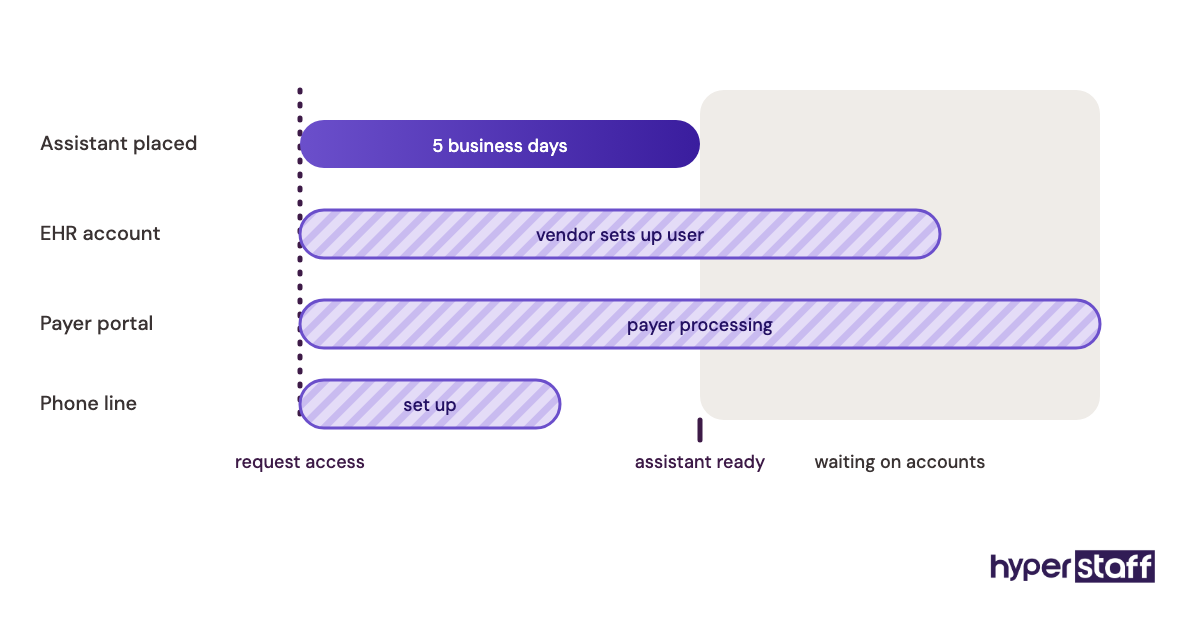
Placement takes about 5 business days with Hyperstaff, and work can begin the day after a 30-minute kickoff call. That's the start, not full speed.
Expect simple queues such as reminders to run well in the first week or two. Eligibility, prior auths and billing usually take four to eight weeks, depending on how many payers and providers the assistant has to learn.
How much does a medical virtual assistant cost compared with in-house?
An in-house medical secretary earns a median of $45,930 a year according to the U.S. Bureau of Labor Statistics. Benefits make up 30.0% of private-industry compensation per BLS, which puts the fully loaded figure near $65,600 before recruiting, equipment and space. More detail sits in our medical virtual assistant cost breakdown.
| Option | Hourly rate | Monthly (160 hours) | Yearly |
|---|---|---|---|
| In-house medical secretary (wages only) | About $22 | About $3,830 | $45,930 |
| In-house, with benefits | About $31.50 | About $5,470 | About $65,600 |
| Hyperstaff Essential (0 to 2 years) | From $3 | From $480 | From $5,760 |
| Hyperstaff Professional (2 to 5 years) | From $6 | From $960 | From $11,520 |
| Hyperstaff Expert (5+ years) | From $12 | From $1,920 | From $23,040 |
Important: Hyperstaff prices above are typical starting points, not fixed quotes. Your final cost depends on the tier, hours and the work your practice needs, and paying quarterly saves 10%.
Is a medical virtual assistant worth it compared with in-house staff?
For desk-based front-office work, a medical virtual assistant is one of the best-paying staffing decisions a practice can make, as long as the processes are written down and the HIPAA setup is done properly.
Here's a simple calculation. A full-time Professional-tier assistant at $6 an hour for 160 hours costs about $960 a month, or $11,520 a year. Set that against roughly $65,600 for a loaded in-house salary, and the difference is about $54,000 a year, before recruiting costs.
That number assumes the remote hire replaces a full desk role. If you still need one person local for check-in, the saving comes from not adding a second in-house hire. For a deeper look at the trade-offs, read whether a medical VA is worth it.
How to choose a medical virtual assistant agency
Ask four things before you sign: will the agency sign a BAA, does the assistant work only for your practice, how fast is a replacement and who writes down your processes. A rotating pool of assistants defeats the purpose of hiring remote.
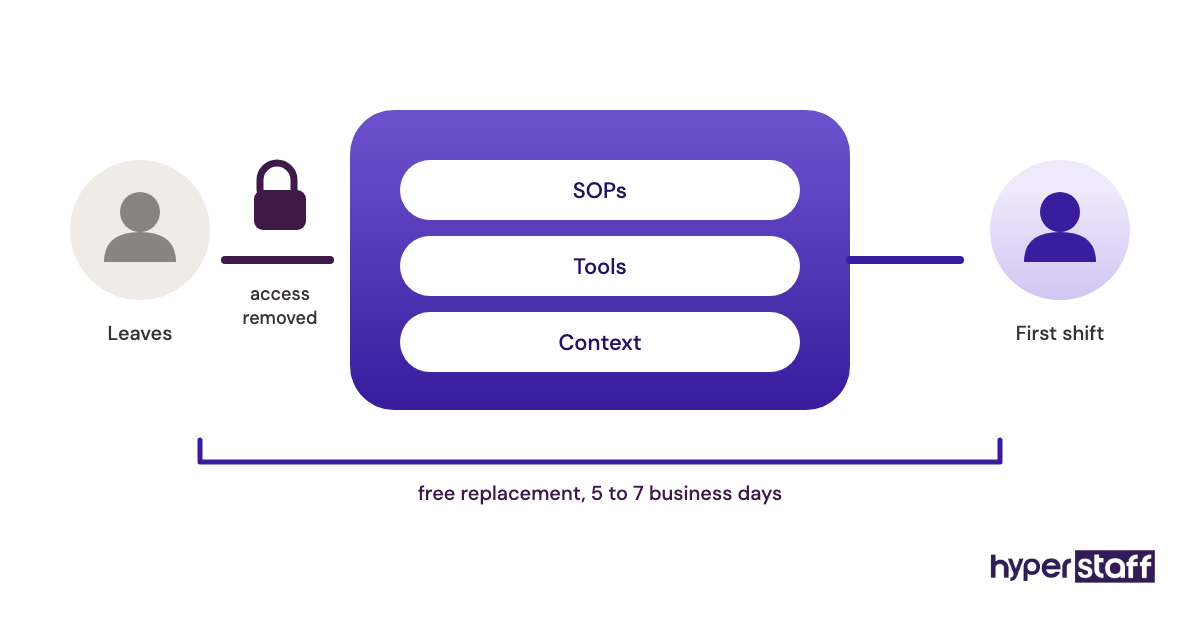
Look for a dedicated account manager and a clear replacement window. Hyperstaff replaces an assistant free in 5 to 7 business days, and the new person is briefed from your Operations Vault, where your SOPs, tools and context are kept up to date for you.
Medical virtual assistant statistics and trends
The BLS projects that employment of secretaries and administrative assistants overall will decline in the coming decade, though medical secretaries are the exception in its outlook. That gap shows up in practices as hard-to-fill front-desk roles and rising wages for experienced billing staff.
Remote front-office work has grown alongside cloud EHRs, which made remote access normal rather than a special project. Expect more practices to run hybrid front offices as the default, with physical roles kept local and queue work moved out.
Medical virtual assistants and AI
AI tools now draft visit notes, sort inbound messages and send automated reminders. They speed up parts of the job, but they still need a person to fix errors, call payers and talk to patients who don't fit a script.
Our view: AI makes one remote assistant more productive rather than replacing them. A trained assistant reviewing AI-drafted notes or AI-sorted messages gets through far more work than either one alone.
Disclaimer: This article is for general information only and isn't legal, financial or compliance advice. Costs, wages and regulations change, so confirm HIPAA requirements and staffing decisions with qualified professionals before acting.
Common questions
Can a medical virtual assistant access my EHR legally?
Yes, with a signed BAA and proper access controls. HHS publishes sample business associate agreement provisions you can review. Each remote user should have their own login.
Will patients know they're talking to a remote assistant?
Usually not, and most don't ask. The assistant uses your practice's phone line and scripts. What patients notice is whether calls get answered and appointments are right.
Is a medical virtual assistant cheaper than a part-time in-house hire?
In most cases, yes. Hyperstaff offers 40 and 80 hour monthly bundles, and even a part-time in-house hire carries payroll taxes, some benefits and recruiting costs on top of wages.
What if my remote medical assistant quits?
With Hyperstaff, you get a free replacement in 5 to 7 business days. The new assistant is briefed from your Operations Vault, so the learning curve is shorter.
Should I keep any in-house staff if I hire a medical VA?
Yes, for anything physical. Check-in, copays, scanning and rooming need someone in the building, so most practices keep at least one local front-desk person.
Book a free 15 min call
We place a pre-vetted specialist in 5 business days, fully managed, from $3/hour.