How to Hire a Medical Virtual Assistant Who Stays and Gets It Right
How to scope, vet, hire and onboard a medical virtual assistant so the role works in month one and still works in month twelve.
On this page
- What Does Hiring a Medical Virtual Assistant Involve?
- Key Medical Virtual Assistant Hiring Terms You Should Know
- Why Is Hiring a Medical Virtual Assistant the Right Way Important?
- How Does the Medical VA Hiring Process Work?
- Types and Forms of Medical Virtual Assistant Hires
- How Hiring a Medical VA Differs From Related Options
- What Are the Benefits of Hiring a Medical Virtual Assistant?
- What Are the Drawbacks of Hiring a Medical Virtual Assistant?
- Who Needs to Hire a Medical Virtual Assistant?
- Medical Virtual Assistant Hiring Examples
- Creating a Medical VA Hiring Plan, Step-by-Step
- What Does an Effective Medical VA Hiring Strategy Look Like?
- Which Tools and Software Does a Medical VA Need?
- 9 Proven Tips for Hiring a Medical Virtual Assistant
- Overcoming Common Medical VA Hiring Challenges
- How to Measure Medical VA Hiring Success
- How Long Does a Medical VA Hire Take to Work?
- How Much Does It Cost to Hire a Medical Virtual Assistant?
- Is Hiring a Medical Virtual Assistant Worth It?
- How Do You Choose a Medical Virtual Assistant Agency?
- Medical VA Hiring Statistics, Trends and Future Predictions
- How Does AI Change Hiring a Medical Virtual Assistant?
- FAQs
💡 Key Takeaways:
1) To hire a medical virtual assistant, scope the exact tasks first, confirm a signed business associate agreement before any patient data is shared, then test candidates on your own EHR or scheduling workflow.
2) The biggest hiring failures come from vague job scopes and missing documentation, so a written SOP set matters more than the candidate's résumé.
3) Offshore medical virtual assistants cost a fraction of an in-house hire, but the savings only hold when access controls, call scripts and quality checks are in place from week one.
Every missed call is a booked visit lost
Hyperstaff places pre-vetted remote specialists with clinics that want their phones answered and their schedules full, and our dedicated medical virtual assistant team starts from $3/hour. We've placed 70+ virtual assistants across 30+ clients, matched within 5 business days, with a dedicated account manager guiding your practice from the first 30-minute kickoff call.
What Does Hiring a Medical Virtual Assistant Involve?
Hiring a medical virtual assistant means bringing on a remote team member who works inside your practice's systems on scheduling, insurance verification, patient communication, billing follow-up or records admin. The process has four parts: scoping the role, checking HIPAA readiness, testing skills, and onboarding with written procedures.
If you're still deciding what the role should include, our guide on what a medical virtual assistant does sets out the scope before you write a single job post. Hiring gets easier once the role is narrow enough to describe in five lines.
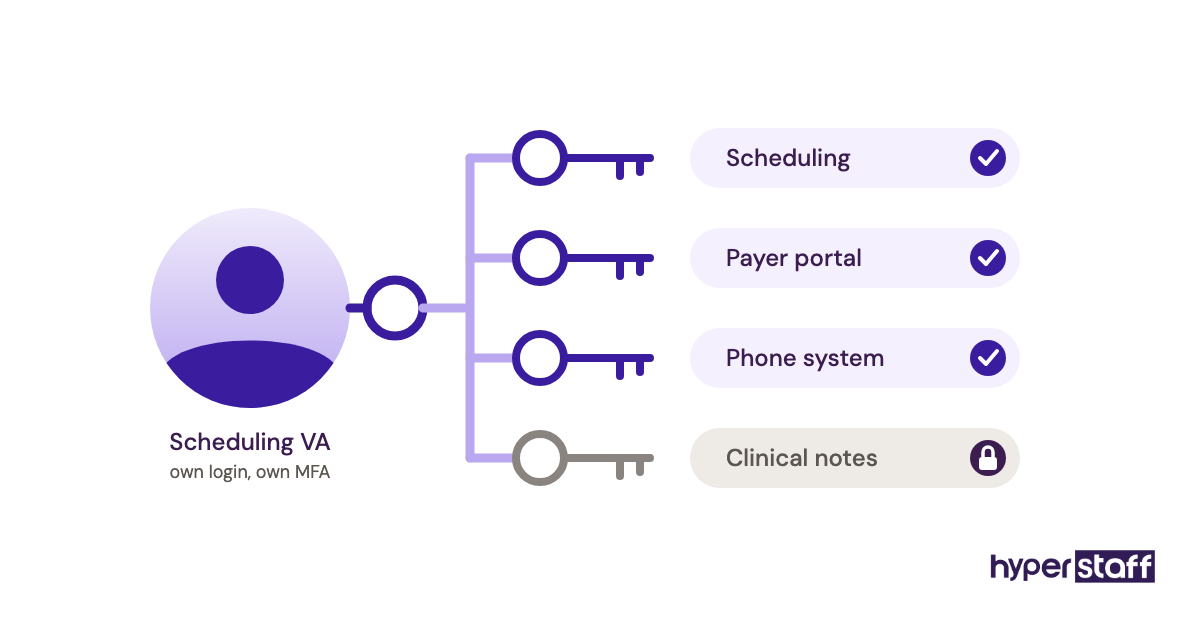
The part most practices underestimate is access. A VA can't confirm a prior authorization without a login to the payer portal, and that login needs its own credentials, its own audit trail, and an offboarding plan.
Key Medical Virtual Assistant Hiring Terms You Should Know
- PHI = Protected health information, any patient data tied to an identity that HIPAA governs.
- BAA = Business associate agreement, the contract a practice signs with any vendor that touches PHI.
- Minimum necessary = The HIPAA standard that limits a VA's access to only the data their tasks require.
- EHR / EMR = Electronic health or medical record system where charts, notes and orders live.
- Practice management system = Software for scheduling, registration and billing, often bundled with the EHR.
- Eligibility verification = Checking a patient's active coverage and benefits before the visit.
- Prior authorization = Payer approval required before certain procedures, drugs or imaging.
- Denial management = Working rejected claims back to payment through correction and appeal.
- SOP = Standard operating procedure, the written steps a VA follows for each task.
- Role-based access = User permissions set by job function so each login sees only what it should.
Why Is Hiring a Medical Virtual Assistant the Right Way Important?
A careful medical virtual assistant hire matters because the role touches patient data, revenue and the first impression a patient gets on the phone. A rushed hire creates compliance exposure and rework that can outlast any savings.
Front-desk roles are also hard to staff locally. The U.S. Bureau of Labor Statistics puts the median pay for medical secretaries and administrative assistants at $45,930 a year, before benefits, payroll tax and turnover costs.
The HIPAA side is the piece you can't skip. Before reading anything else, look at our explainer on what makes a HIPAA compliant virtual assistant, because a skilled hire without a signed BAA is still a liability.
How Does the Medical VA Hiring Process Work?
The medical VA hiring process runs from scoping to a supervised first week, and through an agency it usually takes one to three weeks end to end. A direct hire on a freelance marketplace often takes longer because screening and HIPAA paperwork fall on you.
| Phase | What happens | Typical duration |
|---|---|---|
| Scope | List tasks, systems, hours, time zone | 1–3 days |
| Compliance | BAA signed, access plan drafted | 2–7 days |
| Match and screen | Shortlist, skills test, interview | 3–10 days |
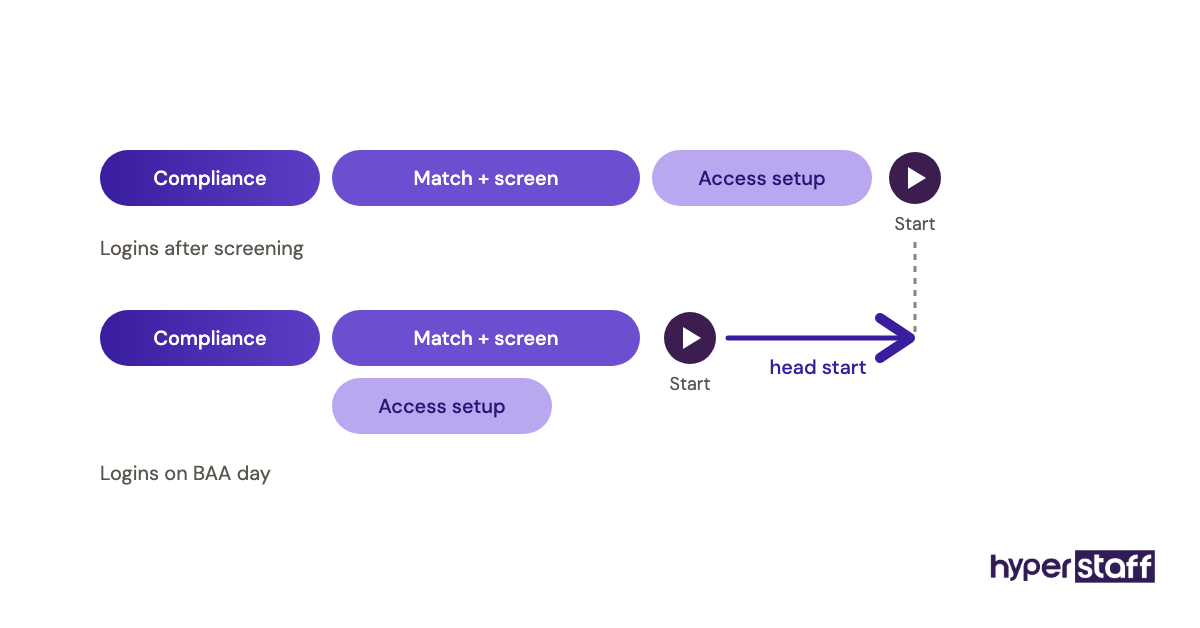
| Access setup | Individual logins, MFA, role permissions | 1–5 days |
| Supervised start | Shadowing, then owned tasks | 1–2 weeks |
Access setup is the usual dead zone. EHR vendors and payer portals sometimes take several business days to issue a new user, so request logins the day the BAA is signed.
Types and Forms of Medical Virtual Assistant Hires
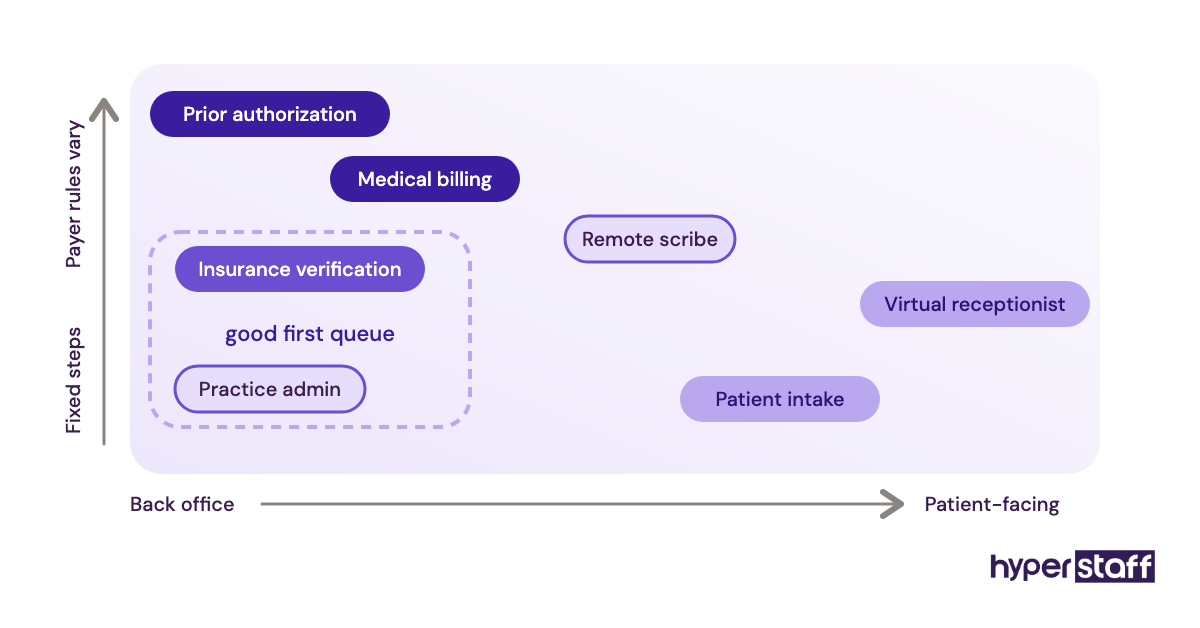
Medical virtual assistants fall into a handful of role types, and each one needs a different skills test. Our list of medical virtual assistant tasks breaks the daily work down further.
| Role type | Core tasks | Skills to test | Best fit |
|---|---|---|---|
| Virtual receptionist | Calls, scheduling, reminders | Phone manner, scheduling software | High call-volume clinics |
| Insurance verification VA | Eligibility, benefits checks | Payer portals, coverage terms | Specialty and multi-payer practices |
| Prior authorization VA | Submissions, follow-up, tracking | Payer rules, documentation | Imaging, surgery, specialty pharmacy |
| Medical billing VA | Charge entry, AR follow-up, denials | CPT/ICD-10 basics, claim status | Practices billing in-house |
| Medical scribe (remote) | Charting during or after visits | Medical terminology, typing accuracy | Physicians behind on notes |
| Patient intake VA | Forms, registration, records requests | Data entry accuracy, EHR navigation | New-patient-heavy practices |
| Practice admin VA | Inbox, vendor follow-up, reporting | Organization, spreadsheets | Owner-led small practices |
How Hiring a Medical VA Differs From Related Options
A medical VA sits between a full in-house employee and an outsourced service company, and the trade-offs come down to control, cost and continuity.
Medical VA vs. In-House Medical Receptionist
An in-house receptionist can check patients in at the desk, which a remote VA can't. The VA costs far less and can be scaled by the hour, and our full breakdown of a medical virtual assistant vs in-house staff runs the numbers side by side.
Medical VA vs. Medical Billing Company
Billing companies usually charge a percentage of collections and run their own process. A dedicated billing VA works inside your system on your rules, so you keep visibility into every claim, but you also own the oversight.
Medical VA vs. General Virtual Assistant
A general VA may be excellent at inbox and calendar work yet freeze on a payer call about deductibles. Medical roles need terminology and HIPAA training, so screen for healthcare experience even if it narrows the pool.
What Are the Benefits of Hiring a Medical Virtual Assistant?
- Lower cost per hour than a local hire, with no benefits or equipment to fund.
- Extended coverage for early-morning or evening calls through time-zone differences.
- Clinical staff get admin hours back for patient care.
- Flexible hours, from part-time blocks to full-time.
- Faster follow-up on claims and authorizations that would otherwise sit.
What Are the Drawbacks of Hiring a Medical Virtual Assistant?
- No in-person tasks such as check-in, payments at the desk or faxing by hand.
- HIPAA paperwork and access controls add setup work.
- Call quality depends on internet stability and accent fit for your patient base.
- Training takes real time from someone on your team in the first weeks.
Who Needs to Hire a Medical Virtual Assistant?
Practices that need a medical virtual assistant usually show the same signs: phones going to voicemail during peak hours, a growing backlog of authorizations, or physicians charting at night. Solo and small group practices feel it first, since one absent front-desk staffer can stall the day.
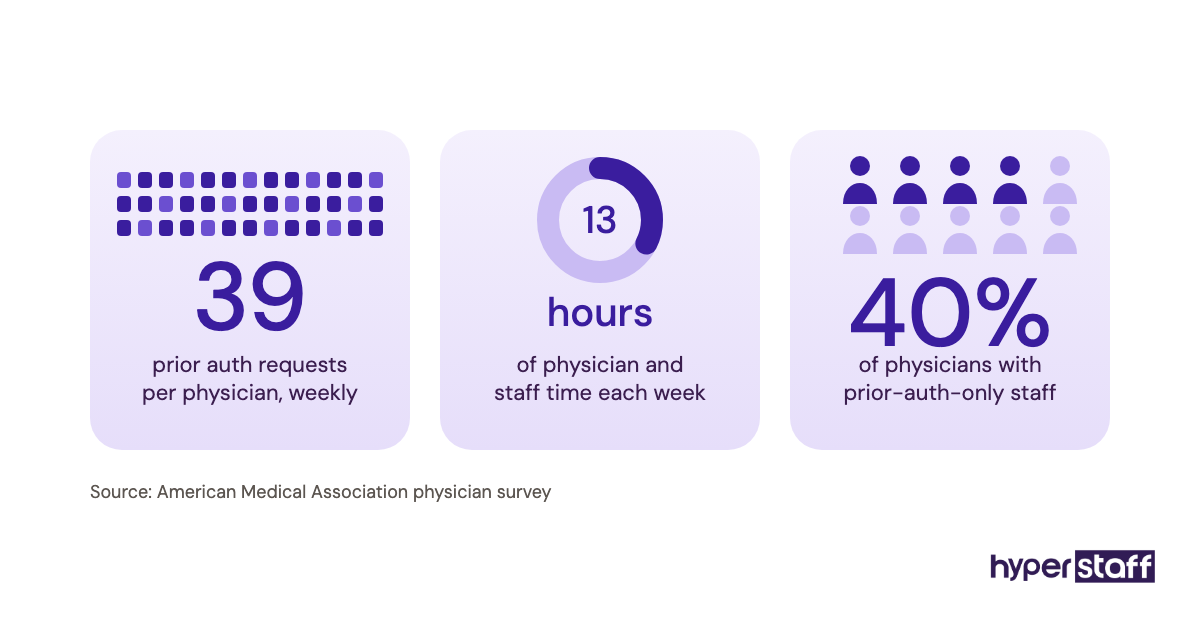
Larger groups hire VAs differently. They tend to use them for one narrow queue, such as eligibility checks for next week's schedule, and keep patient-facing calls local.
Medical Virtual Assistant Hiring Examples
The hires that work and the ones that fail tend to differ in scope and setup more than in the candidate.
Good Medical VA Hiring Examples
A Single-Queue Insurance Verification Hire
The practice gives the VA one job: verify eligibility for every appointment 48 hours out and flag gaps. Success is easy to measure, and the role can expand once accuracy holds.
A Scripted Overflow Receptionist
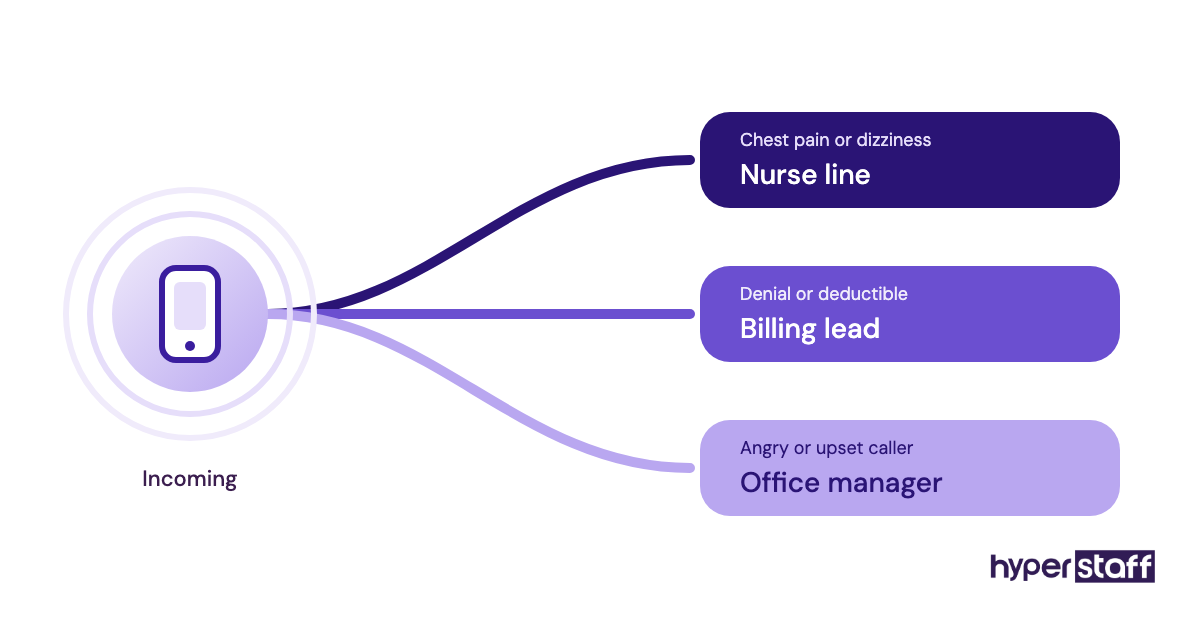
Calls roll to the VA after the third ring, with a written script for scheduling, refills and urgent symptoms. Clinical questions always go to a nurse line, so the VA never gives medical advice.
A Phased Billing Follow-Up Role
The VA starts with claim status checks only, then takes denials after two weeks of reviewed work. Access to payment posting comes last.
Bad Medical VA Hiring Examples
The "Do Everything" Job Post
A listing that asks for scheduling, billing, scribing, marketing and IT support attracts generalists and sets them up to fail. It's the first item in our list of common medical virtual assistant mistakes.
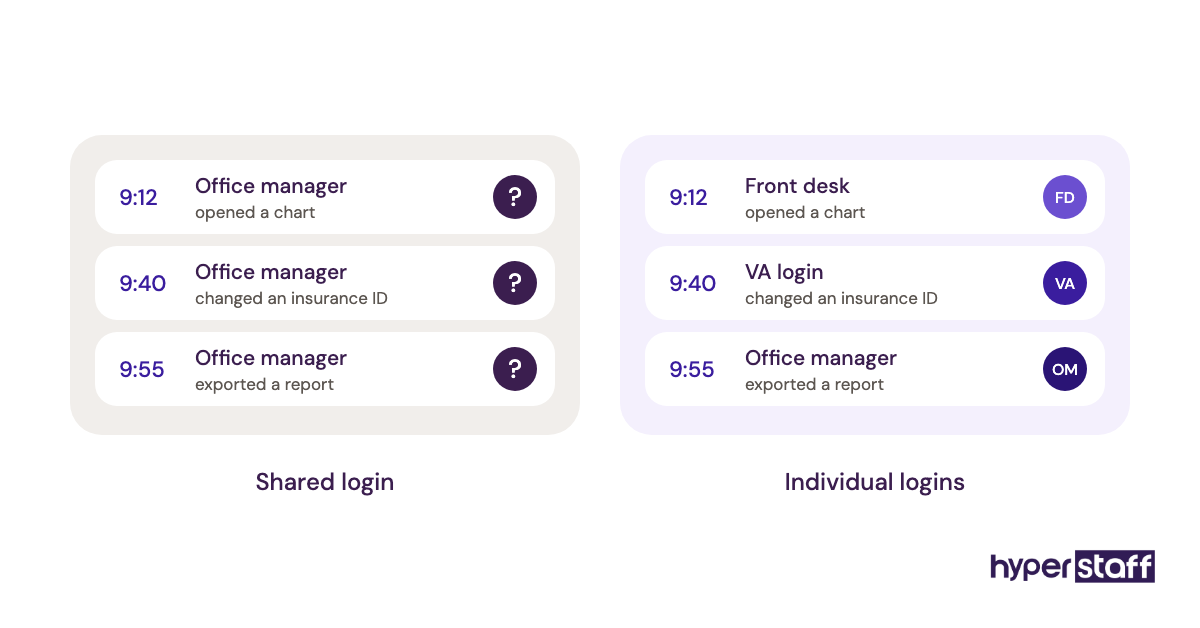
The Shared-Login Shortcut
Handing the VA the office manager's EHR password breaks HIPAA audit trails. When something goes wrong, nobody can tell who did what.
The Unwritten Process
Training by screen share with no notes means the knowledge leaves when the VA does. The next hire starts from zero.
Creating a Medical VA Hiring Plan, Step-by-Step
A medical VA hiring plan works best in five steps, done in order, because each one feeds the next.
Step #1: Define the Tasks and Systems
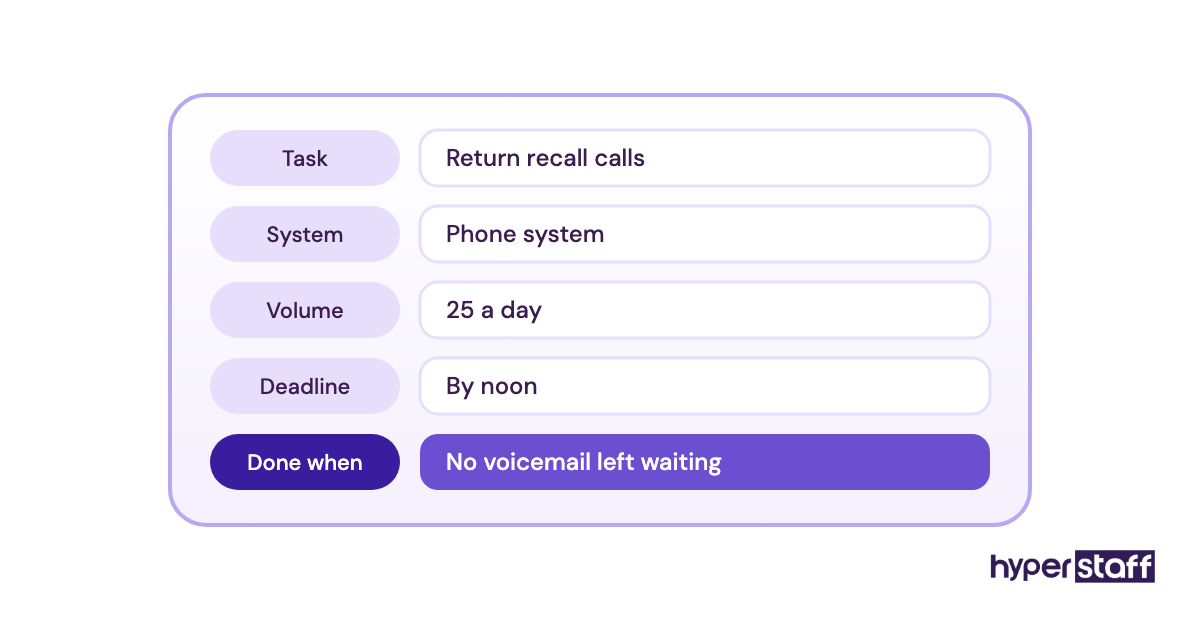
List each task with its system, volume and deadline, for example "verify 40 appointments a day in the payer portal by 3pm." Turn the list into a role brief using our medical VA job description template.
Step #2: Lock Down Compliance Before Access
Sign the BAA, decide which systems the VA needs, and set role-based permissions with MFA. Plan the offboarding steps now too.
Step #3: Screen With a Real Task
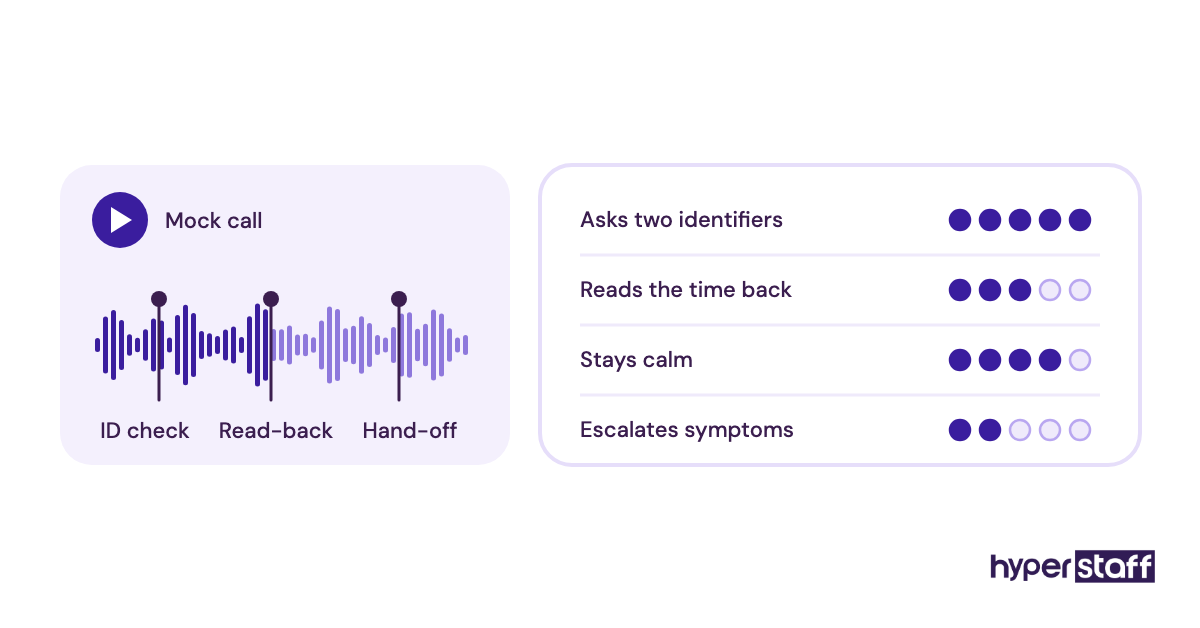
Résumés tell you little about phone tone or portal speed. Give shortlisted candidates a timed test that mirrors the job, such as a recorded mock scheduling call or a sample eligibility check.
Step #4: Interview for Judgment
Ask what they'd do when a caller describes chest pain, or when a payer rep gives conflicting answers. Our set of medical VA interview questions has more scenario prompts.
Step #5: Onboard With Written SOPs
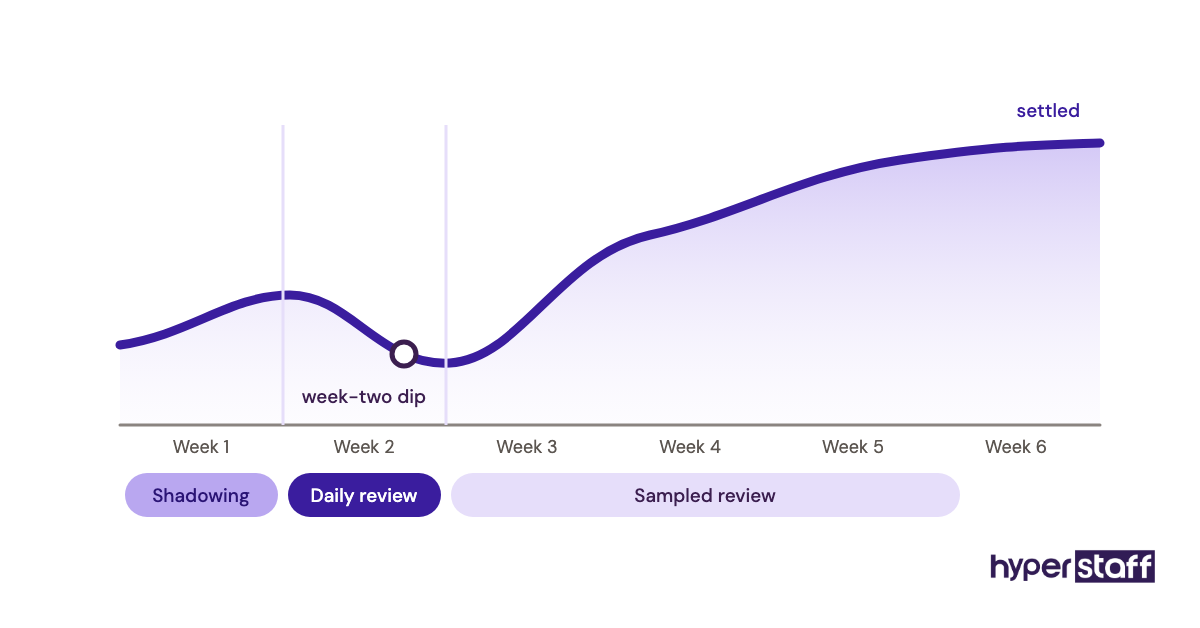
Week one is shadowing and checklist work; week two is owned tasks with daily review. Follow our guide to onboarding a medical virtual assistant for the full first-month sequence.
What Does an Effective Medical VA Hiring Strategy Look Like?
An effective medical VA hiring strategy starts narrow, documents everything, and expands the role only after accuracy is proven. Start with one queue, measure it for 30 days, then add the next task.
Practitioners disagree on whether the first hire should be patient-facing. Some argue the phones are the biggest revenue leak, so start there; others prefer a back-office queue first because errors stay internal while the VA learns your systems. For a practice with a stable front desk, back office first is the safer bet.
Which Tools and Software Does a Medical VA Need?
A medical VA needs access to your EHR or practice management system, a HIPAA-eligible phone and messaging setup, and a secure way to share credentials. Our roundup of medical virtual assistant tools goes deeper on each category.
Google Workspace and Microsoft 365 both sign BAAs on eligible business plans, which makes them workable for email and documents. For phones, cloud systems such as RingCentral offer HIPAA configurations, but the BAA has to be requested and the settings switched on.
A password manager with shared vaults, such as 1Password or Bitwarden, is worth setting up before day one. It lets you revoke a VA's access in one step instead of changing a dozen passwords.
9 Proven Tips for Hiring a Medical Virtual Assistant
These tips come from the hiring and onboarding steps that most often get skipped.
- Write the task list before the job post.
- Get the BAA signed before sharing a single patient name.
- Create individual logins for every system, never shared ones.
- Test with a real task, timed, on a mock patient record.
- Match working hours to your patients' calling peaks.
- Give the VA a clear escalation path for clinical questions.
- Record every training walkthrough and turn it into an SOP.
- Review a sample of the VA's work daily for the first two weeks.
- Expand the role one queue at a time.
Overcoming Common Medical VA Hiring Challenges
Most medical VA hiring problems trace back to access delays, unclear escalation rules or training that lives only in someone's head. Each one has a fix that costs a few hours upfront.
For access delays, request logins the same day the BAA is signed. For escalation, write a one-page "who to call" sheet covering clinical, billing and angry-patient situations.
How to Measure Medical VA Hiring Success
Medical VA hiring success shows up in task metrics within 30 to 60 days: answered-call rate, eligibility checks done before the visit, authorization turnaround and claim follow-up volume.
Track error rate too. A VA who verifies 50 patients a day with mistakes costs more than one who verifies 35 cleanly.
Ask your clinical staff how many admin hours they got back. That number is the one owners tend to remember.
How Long Does a Medical VA Hire Take to Work?
A medical VA hire usually takes two to six weeks to work well. Narrow, scripted roles like eligibility checks settle fastest; billing and authorization roles take longer because payer rules vary.
Expect a dip in week two, when the VA moves from shadowing to owning tasks. Daily review through that stretch is what gets them through it.
How Much Does It Cost to Hire a Medical Virtual Assistant?
Hiring a medical virtual assistant through Hyperstaff starts at $3/hour, compared with an in-house medical admin who earns a median of about $22/hour before benefits. Our full medical virtual assistant cost guide covers bundles and hidden costs.
| Option | Experience | Hourly rate | Monthly (160 hrs) |
|---|---|---|---|
| Hyperstaff Essential | 0–2 years | From $3 | From $480 |
| Hyperstaff Professional | 2–5 years | From $6 | From $960 |
| Hyperstaff Expert | 5+ years | From $12 | From $1,920 |
| In-house medical admin (U.S.) | Varies | About $22 wage, $27–$31 loaded | About $4,300–$5,000 |
Important: Hyperstaff prices shown are typical starting averages. Your final rate depends on the role, hours, experience tier and the specific work your practice needs.
Is Hiring a Medical Virtual Assistant Worth It?
Hiring a medical virtual assistant is worth it for most small and mid-size practices, and when the scope, BAA and SOPs are right, it ranks among the highest-return staffing moves a practice can make. The savings show up on payroll, and the bigger return often comes from calls answered and claims followed up.
Here's a rough calculation. A full-time Expert-tier VA at $12/hour costs about $1,920 a month, against roughly $4,600 for a loaded in-house admin, a gap near $2,700 a month or about $32,000 a year.
Then add revenue. If better call coverage books just two extra visits a week at a $120 average, that's about $1,000 a month on top. Our deeper look at whether a medical virtual assistant is worth it walks through cases where it isn't.
How Do You Choose a Medical Virtual Assistant Agency?
Choose a medical virtual assistant agency by checking four things: whether it signs a BAA, how it vets healthcare experience, whether you get a dedicated person or a rotating pool, and how fast it replaces a hire who doesn't fit.
Ask for the replacement terms in writing. Hyperstaff replaces a placement free within 5 to 7 business days, and the new hire is briefed from your Operations Vault, where your SOPs, tools and context are kept up to date for you.
Medical VA Hiring Statistics, Trends and Future Predictions
Demand for medical administrative staff keeps rising. BLS projects employment of medical secretaries and administrative assistants to grow about 5% over the next decade, while the broader secretary category shrinks.
That gap pushes more practices toward remote hires for back-office queues. Expect prior authorization and denial work to be the fastest-growing remote roles, since payer rules keep adding steps.
Compliance expectations will tighten too. HHS's sample business associate agreement provisions remain the baseline, and practices that skip them are taking on avoidable risk.
How Does AI Change Hiring a Medical Virtual Assistant?
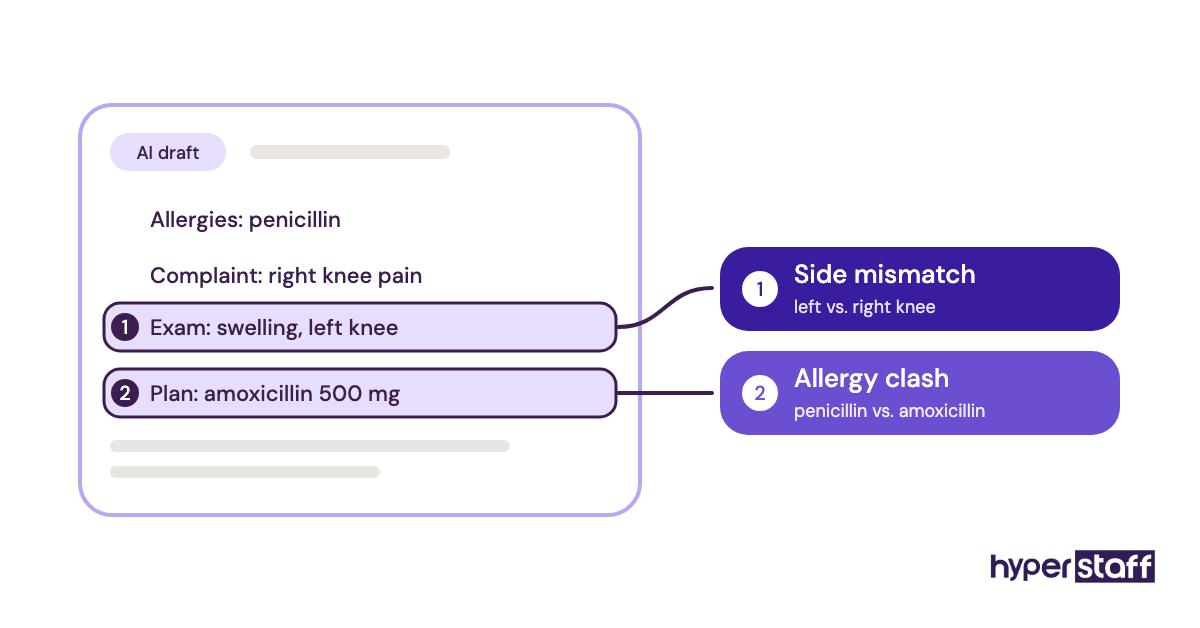
AI changes what you hire a medical VA for, shifting the role from typing toward checking. Ambient scribe tools draft notes and phone bots answer simple scheduling calls, but someone still has to review drafts, catch errors and handle the calls the bot can't.
When you hire now, test for review skills: give candidates an AI-drafted note with two planted errors and see if they catch them. Any AI tool that touches PHI also needs its own BAA.
Disclaimer: This article is for general information only and isn't legal, compliance, financial or medical advice. HIPAA obligations vary by practice, so consult a qualified professional before sharing patient data with any vendor. Pricing figures are estimates and may change.
Common questions
Do I need a BAA to hire a medical virtual assistant?
Yes. Any VA or agency that accesses PHI on your behalf is a business associate under HIPAA, so a signed BAA must be in place before they see patient data.
Can a medical virtual assistant work in my EHR?
You can give a medical VA EHR access with their own login and role-based permissions. Most cloud EHRs support remote users, though some require the vendor to add the account.
Should I hire a medical VA on Upwork or through an agency?
It depends on how much screening you want to do yourself. Marketplaces cost less upfront, but you handle vetting, HIPAA paperwork and replacement. An agency takes on those steps.
What qualifications should a medical virtual assistant have?
Look for healthcare admin experience, medical terminology, HIPAA training and hands-on time with an EHR or payer portal. Billing roles also need CPT and ICD-10 familiarity.
Can a medical virtual assistant work part-time?
Yes. Many practices start with 40 or 80 hours a month on one queue, then move to full-time once the role proves itself.
Book a free 15 min call
We place a pre-vetted specialist in 5 business days, fully managed, from $3/hour.