How to Onboard a Medical Virtual Assistant: A Step-by-Step Plan for Practices
How to onboard a medical virtual assistant so they reach independent, HIPAA-safe work in weeks, with a 90-day plan, tools and real costs.
On this page
- What Is Onboarding a Medical Virtual Assistant?
- Key Medical VA Onboarding Terms You Should Know
- Why Does Onboarding a Medical Virtual Assistant Matter So Much?
- How Does Onboarding a Medical Virtual Assistant Work?
- Which Onboarding Model Fits a Medical Practice?
- How Medical VA Onboarding Differs From Related Processes
- What Are the Benefits of Structured Medical VA Onboarding?
- What Are the Drawbacks of Onboarding a Medical Virtual Assistant?
- Who Needs a Formal Medical VA Onboarding Plan?
- Medical VA Onboarding Examples
- Creating a Medical VA Onboarding Plan, Step-by-Step
- What Does an Effective Medical VA Onboarding Strategy Look Like?
- Medical VA Onboarding Tools and Software
- 10 Proven Medical VA Onboarding Tips and Best Practices
- Overcoming Common Medical VA Onboarding Challenges
- How Do You Measure Medical VA Onboarding Success?
- How Long Does Medical VA Onboarding Take to Work?
- How Much Does Onboarding a Medical Virtual Assistant Cost?
- Is Onboarding a Medical Virtual Assistant Worth It?
- How to Choose a Medical Virtual Assistant Agency
- Medical VA Onboarding Statistics, Trends and Future Predictions
- How Does AI Change Medical VA Onboarding?
- FAQs
💡 Key Takeaways:
1) Onboarding a medical virtual assistant means signing a business associate agreement, setting up role-based EHR access, writing SOPs and releasing tasks one at a time as each one passes a quality check.
2) Most medical VAs handle low-risk work like reminders and recalls on their own within two to three weeks, and reach full independence on a defined role in 60 to 90 days.
3) The biggest onboarding failures are shared logins, giving the assistant every task in week one and having no single named supervisor to answer questions.
Faster Onboarding Means Faster Revenue Recovery
Each week a new assistant spends confused is a week you pay for twice, once in wages and once in staff time spent fixing work. Hyperstaff's medical virtual assistant services place pre-vetted assistants in 5 business days, from $3 an hour, with 70+ assistants already placed for 30+ clients and work starting the day after a 30-minute kickoff.
What Is Onboarding a Medical Virtual Assistant?
Onboarding a medical virtual assistant is the process of giving a remote healthcare assistant the access, training and written procedures they need to work in your practice safely and on their own. It covers HIPAA paperwork, EHR and phone logins, workflow training and a ramp-up period where their work is checked before it goes out unreviewed.
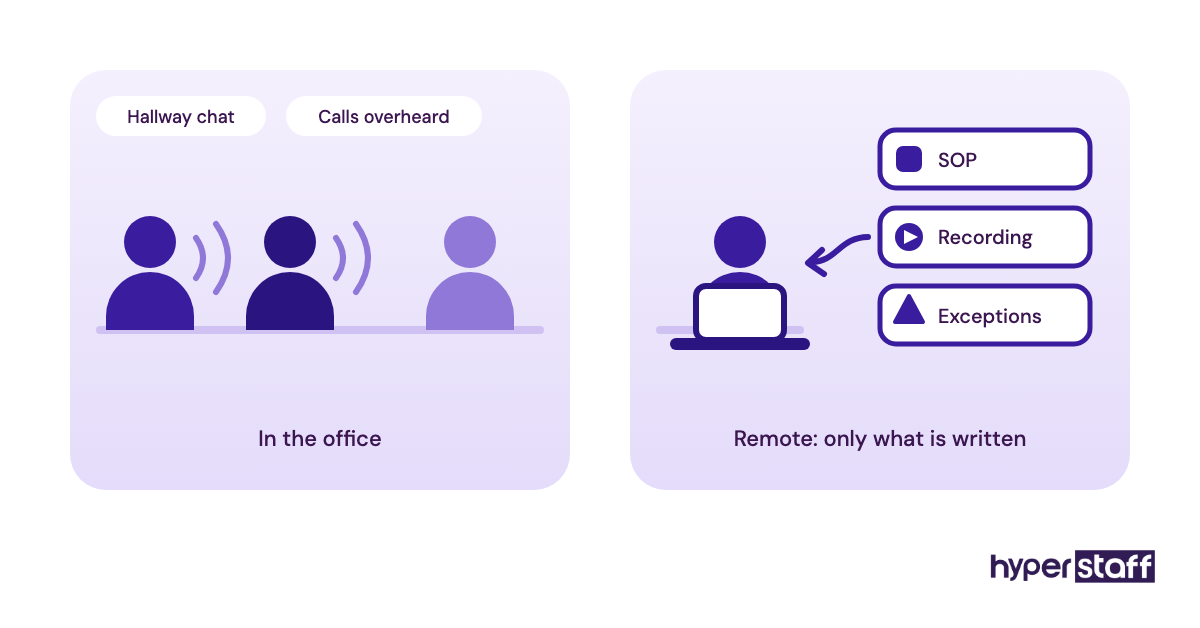
The part practices underestimate is the knowledge transfer. A remote assistant can't overhear the front desk explain why one provider's Tuesday slots are held for post-op checks, so every unwritten rule has to be written down before anyone can follow it.
If you're still working out what the role covers, start with what a medical virtual assistant does. Onboarding assumes the role is defined and the person is hired.
Key Medical VA Onboarding Terms You Should Know
- PHI = protected health information, meaning any health data tied to an identifiable patient.
- BAA = business associate agreement, the HIPAA contract that lets an outside party handle PHI on your behalf.
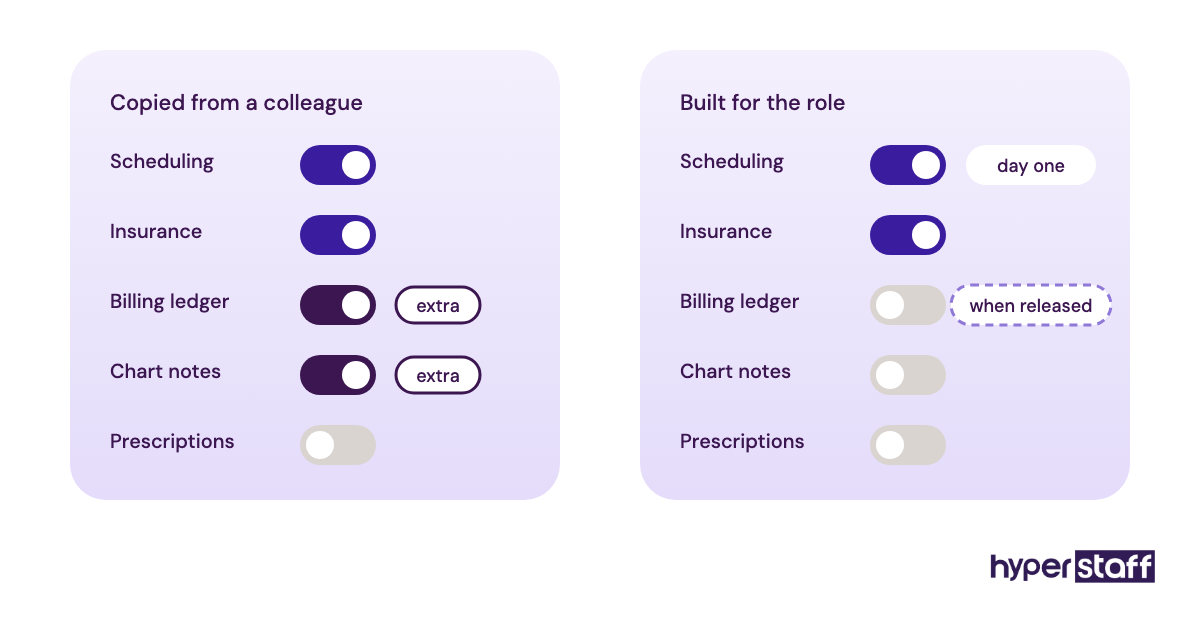
- Minimum necessary = the HIPAA standard of giving each person only the PHI access their tasks require.
- Role-based access = EHR permissions assigned by job function, built for the role instead of copied from a colleague.
- Unique user ID = a login that belongs to one person only, so every action in the EHR traces back to them.
- SOP = standard operating procedure, a written step-by-step instruction for one recurring task.
- Eligibility verification = checking a patient's insurance coverage and benefits before the visit.
- Shadowing = the assistant watching a staff member do a task live over screen share.
- Reverse shadowing = the staff member watching the assistant do the task and correcting in real time.
- QA sampling = reviewing a set share of completed work to catch errors after a task is released.
- Ramp-up period = the weeks between first login and fully independent work.
- Offboarding = removing every login and device permission on the day an engagement ends.
Why Does Onboarding a Medical Virtual Assistant Matter So Much?
Onboarding decides whether a medical virtual assistant becomes useful in weeks or stays a cost for months. It's also where most of your HIPAA exposure gets set, because access granted in a rush on day one tends to stay that way.
HIPAA's Security Rule requires a regulated entity to train all workforce members on its security policies and to apply sanctions when those policies are broken, according to the HHS summary of the Security Rule. A remote assistant who touches your patient data needs that training too, and you need a record that it happened.
The money side is plainer. An assistant who learned eligibility checks properly in week two saves front-desk time every day after, while one who learned them half-right creates denials your billing team chases weeks later.
Contracts, device rules and encryption get their own treatment in our guide to a HIPAA compliant virtual assistant. Here the focus stays on the onboarding sequence itself.
How Does Onboarding a Medical Virtual Assistant Work?
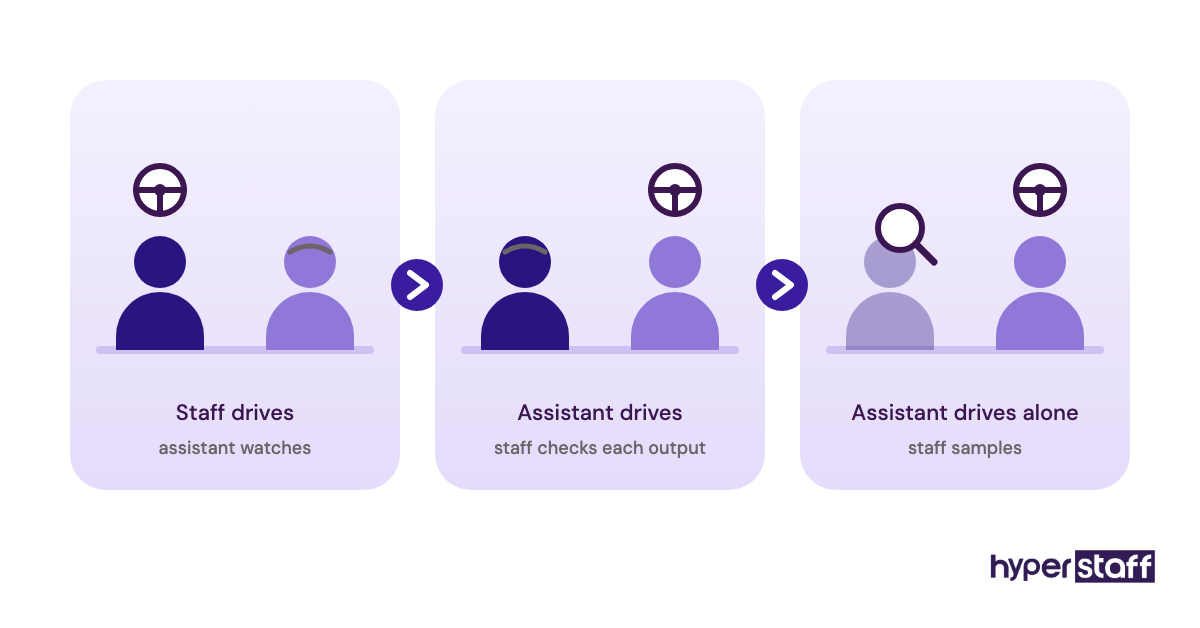
Medical VA onboarding usually runs in four phases: paperwork and access, observation, supervised work, then independent work with spot checks. The phases overlap a little, and skipping one almost always shows up later as rework.
Paperwork comes first and it's slower than people expect. EHR vendors and clearinghouses often need the practice admin to request a new user, and some take a day or two to provision it, so an assistant can sit idle on day one if nobody asked early.
Observation means screen-share shadowing on live tasks. Supervised work flips the roles: the assistant drives, a staff member watches, and every output is checked before it's final.
Independent work starts one task at a time. Phone scheduling might go unsupervised in week two while prior authorizations stay under review for a month, and that split is normal.
All of this sits after the hire. If you haven't made one yet, the process for hiring a medical virtual assistant comes first.
Which Onboarding Model Fits a Medical Practice?
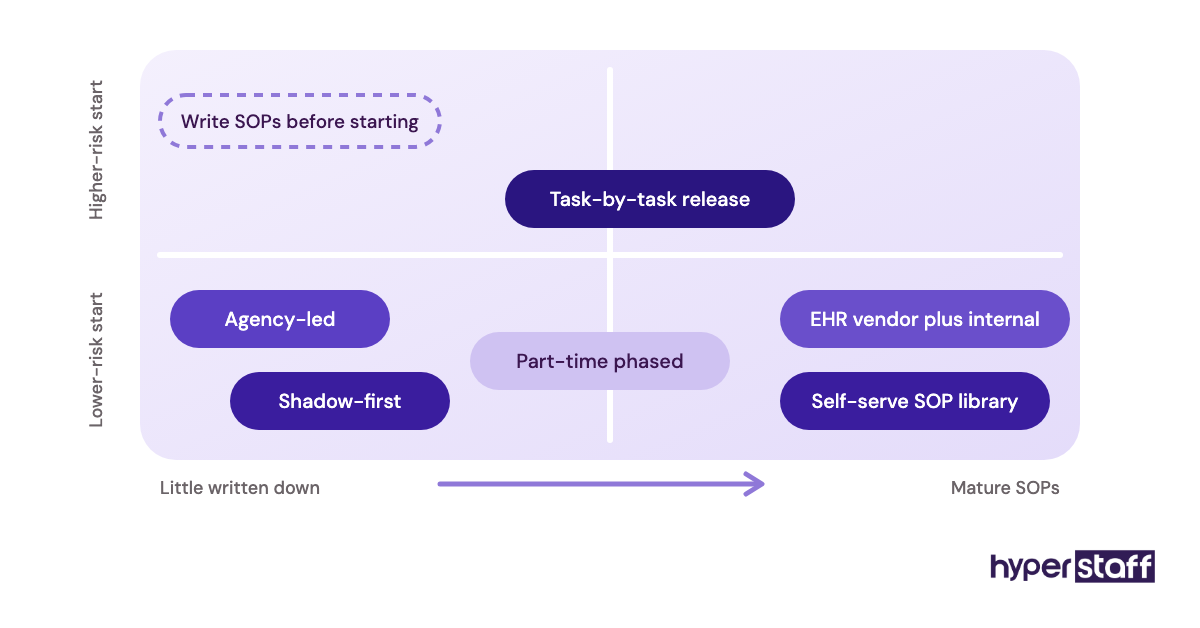
Medical practices onboard virtual assistants in a handful of distinct ways, and the right one depends on how much documentation you already have and how risky the first tasks are. The table compares seven common models.
| Onboarding model | How it works | Typical ramp-up | Best fit | Main risk |
|---|---|---|---|---|
| Self-serve SOP library | Assistant learns from written SOPs and recordings | 2–4 weeks | Practices with mature documentation | Gaps in the docs become errors |
| Shadow-first | Several days of live screen share with one staff member | 2–3 weeks | Front desk and scheduling roles | Ties up a senior staff member |
| Task-by-task release | One workflow at a time moves to independent work | 4–8 weeks | Billing, referrals, prior auth prep | Stalls if nobody tracks sign-offs |
| Agency-led | Staffing partner documents SOPs and briefs the assistant | 1–2 weeks to first tasks | Small practices with no spare office manager | Only as good as the partner |
| EHR vendor plus internal | Vendor modules for the software, practice training for workflows | 3–6 weeks | Practices on large EHRs | Vendor training ignores your rules |
| Cohort | Several assistants trained together | 3–5 weeks | Multi-location groups | Slowest learner sets the pace |
| Part-time phased | 40 to 80 hours a month with a longer ramp | 6–10 weeks | Solo practices testing the model | Fewer reps, slower learning |
Most practices end up blending two models, usually shadow-first for the front desk and task-by-task release for anything billing-adjacent. The medical virtual assistant tasks checklist sorts duties by type, which helps decide what gets released first.
How Medical VA Onboarding Differs From Related Processes
Onboarding overlaps with hiring, in-office orientation and ongoing training, but each one has a different finish line. Knowing where one stops keeps the wrong person from owning the wrong step.
Onboarding vs. Hiring
Hiring ends at a signed offer, and onboarding starts there. The screening you did with your medical VA interview questions tells you what the person can learn, while onboarding is where they learn your practice's version of it.
Remote Onboarding vs. In-House Orientation
In-office orientation leans on proximity, since a new hire picks up half the rules by hearing them. Remote onboarding has to put every one of those rules in writing or on a recording, which takes more effort up front and removes most of the guesswork later.
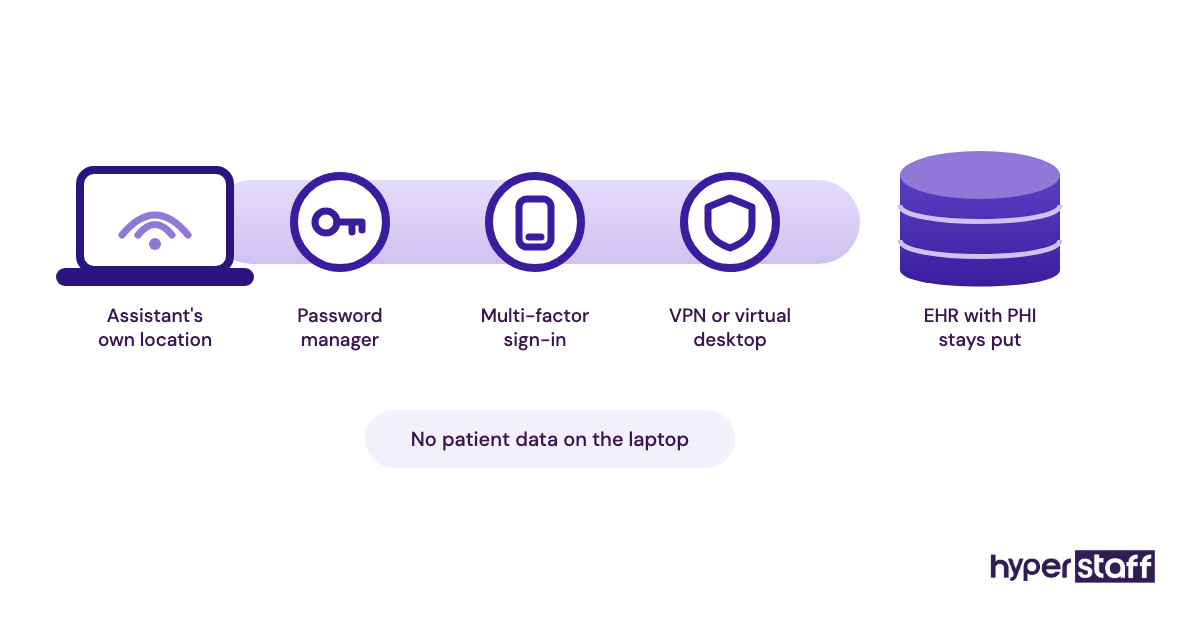
Security differs as well. A remote assistant logs in from their own location, so device rules, a password manager and VPN or virtual desktop access all belong in the onboarding plan.
Onboarding vs. Ongoing Training
Onboarding has an end point: the assistant handles the agreed tasks alone and passes QA checks. Ongoing training never ends, covering payer rule changes, new EHR features and yearly HIPAA refreshers, and it belongs on the calendar from month two so it doesn't lapse unnoticed.
What Are the Benefits of Structured Medical VA Onboarding?
A structured onboarding plan pays back in speed, accuracy and a cleaner compliance file.
- Faster time to independent work, since the assistant isn't guessing at rules nobody wrote down
- Fewer denials from front-end errors like wrong insurance details or missed referrals
- A written SOP set the whole practice can reuse, including for the next in-house hire
- Dated HIPAA training records ready if an auditor or payer asks
- Lower odds the assistant leaves early because they felt lost
What Are the Drawbacks of Onboarding a Medical Virtual Assistant?
The costs are real, and they land early, before the assistant gives much back.
- Staff time for shadowing, often a few hours a day in week one
- Documentation work if your SOPs only exist in people's heads
- A short dip in front-desk speed while someone checks the assistant's work
- Limited live overlap if the assistant works in a distant time zone
If those trade-offs give you pause, compare a medical virtual assistant vs in-house hire before deciding. In-house staff need onboarding too, just a different kind.
Who Needs a Formal Medical VA Onboarding Plan?
Any practice giving PHI access to a remote assistant needs a written onboarding plan, even for one part-time hire. The plan scales with the practice: a solo clinic can run it from a shared document, while a 12-provider group needs tracked sign-offs per task.
Solo and small practices feel the gap most because there's no office manager to absorb the training load. The physician ends up as the trainer by default, which is the most expensive hour in the building spent on password resets.
Multi-location groups need a plan for consistency. Two locations rarely book new patients the same way, and an assistant serving both will learn whichever version they saw first unless the plan names the correct one.
Specialty practices such as dermatology, orthopedics and behavioral health have payer and scheduling quirks that general VA training never touches. Prior authorization rules can change by payer and by procedure, so those workflows need SOPs of their own.
Medical VA Onboarding Examples
The patterns below describe how medical VA onboarding commonly goes right and wrong. Each one comes down to a single decision made in the first two weeks.
Good Medical VA Onboarding Examples
Access Requested a Week Early
The practice admin submits EHR, phone and email requests a week before the start date and tests each login with the assistant the day before. Day one starts with shadowing, and nobody spends the morning on hold with the EHR vendor.
A Small Starter Set of Tasks
The assistant starts with appointment reminders, voicemail triage, recall lists and new-patient intake forms, and nothing else for two weeks. Once those pass QA, eligibility verification gets added, then referrals.
Recorded Walkthroughs Linked to Each SOP
Every SOP links to a short screen recording of a staff member doing the task with a test patient. When the assistant gets stuck, they rewatch the clip instead of waiting for the one colleague who knows the answer.
Bad Medical VA Onboarding Examples
A Shared Login "Just to Get Started"
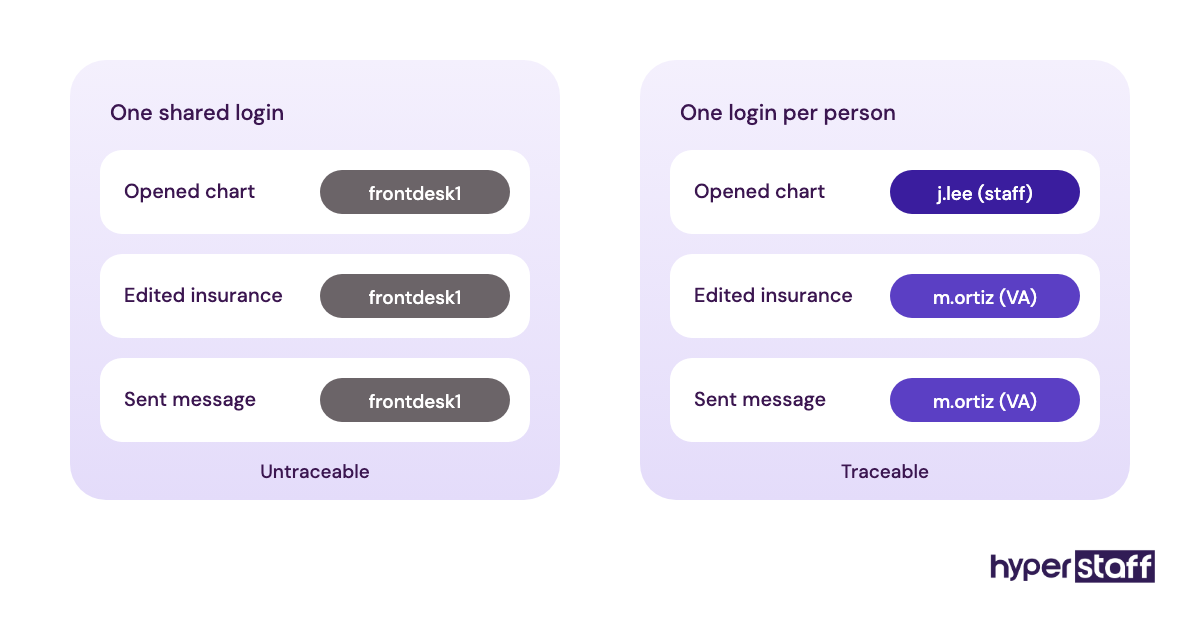
A staff member hands over their own EHR login so work can begin while the new account is pending. That breaks the Security Rule's unique user identification requirement, erases the audit trail and usually stays in place far longer than planned.
Every Task on Day One
The assistant gets scheduling, billing questions, refill requests and prior auths in the first week. Errors spread across all four, nobody can tell which gap caused which mistake, and confidence drops on both sides.
No Named Supervisor
Questions go to whoever happens to be free, so answers conflict and the assistant eventually stops asking. Our list of common medical VA mistakes covers this pattern and others like it.
Creating a Medical VA Onboarding Plan, Step-by-Step
A medical VA onboarding plan has five steps, and the first two happen before the assistant's first day.
Step #1: Define the Role and the First 30 Days of Tasks
Start from your medical VA job description and pick the tasks the assistant owns in the first month. Rank them by risk, and push anything that changes a claim, a chart or a prescription to later.
Write one supervisor's name next to each task. One name is enough.
Step #2: Sign the Paperwork and Set Up Access
Get the business associate agreement and a confidentiality agreement signed before any PHI access exists. HHS publishes sample business associate agreement provisions your attorney can adapt.
Next, create a unique EHR user with role-based permissions, a practice email, a phone extension and a password manager seat. Turn on multi-factor authentication everywhere it's offered.
Step #3: Document the SOPs
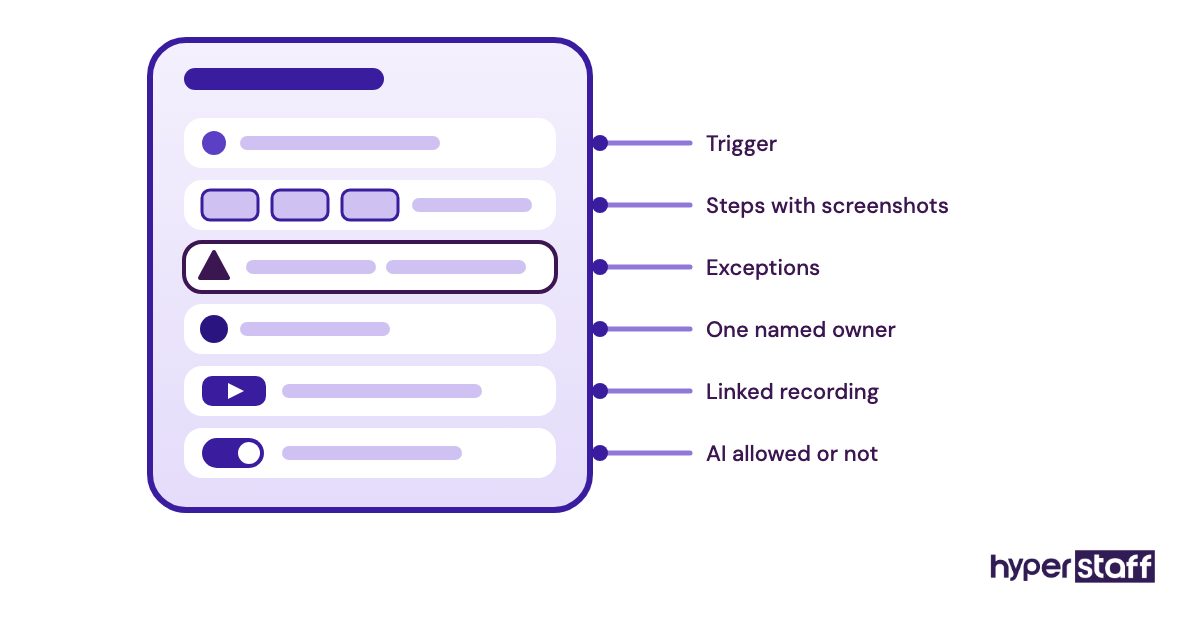
Write one SOP per recurring task, with screenshots and the exact fields to fill in. Add the exceptions, because exceptions are where remote assistants get stuck: the patient who needs an interpreter, the payer that still wants a fax, the provider who doesn't see new patients on Fridays.
If your team can't spare time to write SOPs, this is the step to hand off. Good SOPs also make any future replacement much quicker.
Step #4: Run Shadowing, Then Supervised Work
Plan three to five days of screen-share shadowing, then switch to reverse shadowing where the assistant drives. Check every output during supervised work for anything touching insurance or patient messages.
Hold a 15-minute check-in every day for the first two weeks. Short and daily works better than long and weekly at this stage.
Step #5: Release Tasks and Set QA Sampling
Move each task to independent work once it clears an error threshold you've written down, then drop review to a sample. Many practices go from checking everything to checking roughly one item in ten and stay there for higher-risk work.
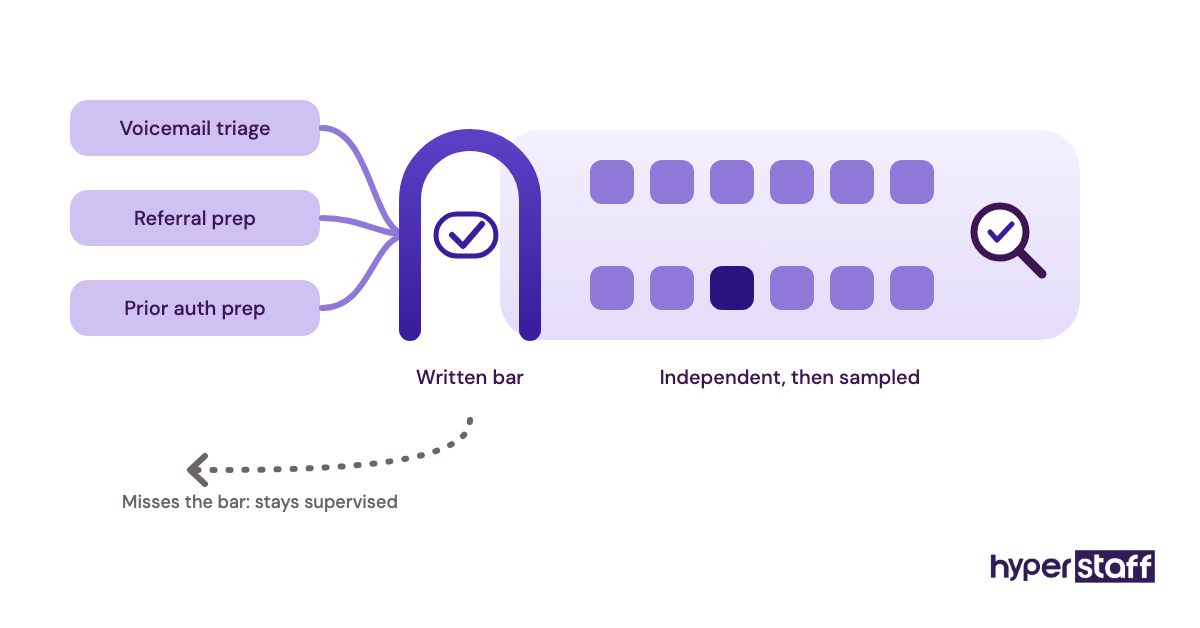
Date every sign-off. That log doubles as your HIPAA training documentation.
What Does an Effective Medical VA Onboarding Strategy Look Like?
An effective medical VA onboarding strategy pairs a written 30-60-90 day plan with one accountable supervisor, documented SOPs and a clear bar for releasing each task. Here's how those 90 days usually break down.
| Phase | Focus | Assistant handles alone | Review level |
|---|---|---|---|
| Days 1–5 | Access, HIPAA training, shadowing | Nothing yet | All work observed |
| Days 6–30 | Reverse shadowing, starter tasks | Reminders, recalls, voicemail triage | 100% at first, then daily spot checks |
| Days 31–60 | Insurance and scheduling depth | Scheduling, eligibility checks | 20–30% sample |
| Days 61–90 | Higher-risk workflows | Referrals, prior auth prep | About 10% sample |
Practice managers genuinely disagree on how long billing-adjacent work should stay under full review. Some release eligibility checks after two clean weeks, others hold them for a month, and the right call depends on how costly a single denial is for your payer mix.
Our view is that a written release threshold matters more than the exact number of weeks. An assistant who can see the bar will work toward it, and a supervisor working from gut feel will release tasks unevenly.
Medical VA Onboarding Tools and Software
The core onboarding stack for a medical VA is your EHR, a HIPAA-ready email tool, a password manager, a screen recorder and a phone system, with a BAA in place for anything that touches PHI. Prices below come from each vendor's own pricing page and change often, so recheck before you budget.
- Your EHR (athenaOne, eClinicalWorks, Tebra and others): the onboarding job is a unique, role-based user. Vendor training modules teach the software well and teach your workflows not at all, so pair them with your own SOPs.
- 1Password Business: $8.99 per user per month billed yearly, or the Teams Starter Pack at $24.95 a month for up to 10 users, per 1Password's pricing page. Shared vaults make it simple to revoke payer portal access the day an assistant leaves.
- Paubox Email Suite: Standard starts at $32 a month billed annually for 1 to 5 senders, with a BAA included on every plan, per Paubox pricing. Encrypted email that doesn't make patients log into a portal saves the assistant a lot of "I can't open your message" calls.
- Loom: the Business plan runs roughly $15 to $18 per creator per month depending on billing, and viewers watch free. Record with test patients unless your plan is covered by a BAA.
- A VoIP phone system with call recording and extensions: confirm the vendor will sign a BAA before the assistant handles patient calls on it.
For a wider comparison by category, see our roundup of medical virtual assistant tools.
10 Proven Medical VA Onboarding Tips and Best Practices
These ten practices cover most of what separates a smooth medical VA onboarding from a slow one.
- Request every login a week before the start date, and test them together the day before.
- Use a test patient or EHR training environment if your vendor offers one.
- Start with tasks that can't change a claim, a chart or a prescription.
- Name one supervisor per task and put that name inside the SOP.
- Record walkthroughs with test data unless your recording tool is covered by a BAA.
- Keep a running exceptions document the assistant adds to every time something surprises them.
- Hold a 15-minute daily check-in for two weeks, then move to twice a week.
- Release each task against a written error threshold the assistant can see.
- Log every training session and HIPAA sign-off with a date.
- Write the offboarding steps on day one, so removing access takes minutes if it's ever needed.
Overcoming Common Medical VA Onboarding Challenges
Time zones are the most common problem with offshore medical VAs. Three to four hours of overlap with your clinic day is enough for live shadowing, so schedule all real-time training inside that window and leave recorded work for the rest.
EHR access delays come next. Request accounts a week early and keep a list of tasks that need no PHI, such as SOP review and payer portal tutorials, ready in case access lags.
The hidden problem is an assistant who stops asking questions. A daily check-in that asks "what confused you today?" catches it before it turns into a pile of silent errors.
How Do You Measure Medical VA Onboarding Success?
Measure medical VA onboarding by the error rate on QA samples, the days each task takes to reach independent work and the share of tasks finished without escalation. A simple weekly sheet is enough to track all of it.
Downstream numbers matter more but lag behind. Denials tied to front-end errors, call abandonment and how fast intake forms get processed show the real effect, usually after the second month.
Ask your staff as well. If the front desk is still redoing the assistant's work in week six, the dashboard is missing something.
How Long Does Medical VA Onboarding Take to Work?
Most medical VAs handle low-risk tasks alone within two to three weeks and reach full independence on a defined role in 60 to 90 days. Billing and prior authorization work sits at the long end of that range.
Week one is a dead zone. Paperwork, access setup and shadowing produce almost no output, and practices that judge the hire in those five days usually judge wrong.
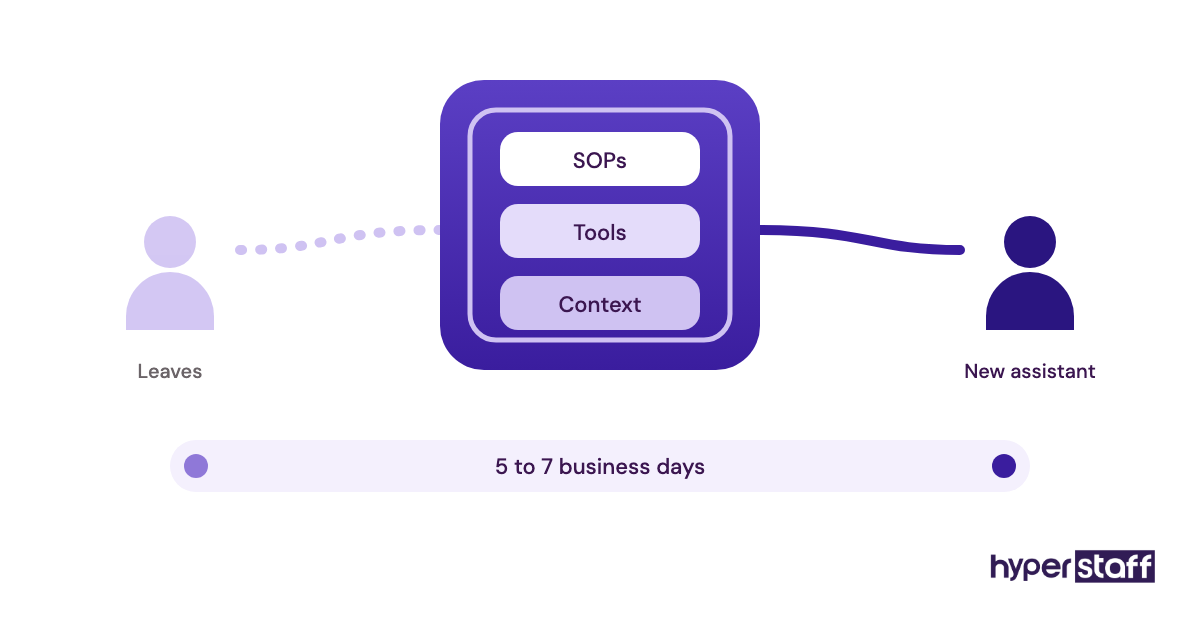
With Hyperstaff, the kickoff is a 30-minute call and work starts that day or the next morning. Your SOPs, tools and context go into an Operations Vault we write and maintain.
How Much Does Onboarding a Medical Virtual Assistant Cost?
Onboarding a medical virtual assistant costs mostly staff time plus a few software seats: roughly 15 to 30 hours of supervisor time in the first month and about $30 to $60 a month in per-user tools. The assistant's own hours during ramp-up are the bigger line, and that's where the in-house and remote numbers split.
| Cost item | Typical in-house medical admin hire | Hyperstaff medical VA |
|---|---|---|
| Hourly rate | Roughly $18–25, plus benefits and payroll tax | From $3 (Essential), $6 (Professional) or $12 (Expert) |
| 160 hours a month | About $2,880–4,000 before benefits | From $480, $960 or $1,920 |
| Time to start | Several weeks of recruiting | Placement in 5 business days |
| Kickoff | Days of in-office orientation | 30-minute call, work starts same day or next morning |
| SOP documentation | Written by your staff | Operations Vault, written and maintained for you |
| If the hire doesn't work out | Restart recruiting and onboarding | Free replacement in 5–7 business days, briefed from the Vault |
| Billing options | Payroll | 40, 80 or 160 hour bundles; save 10% paying quarterly |
Rates by role, region and experience level are broken down in our medical virtual assistant cost guide.
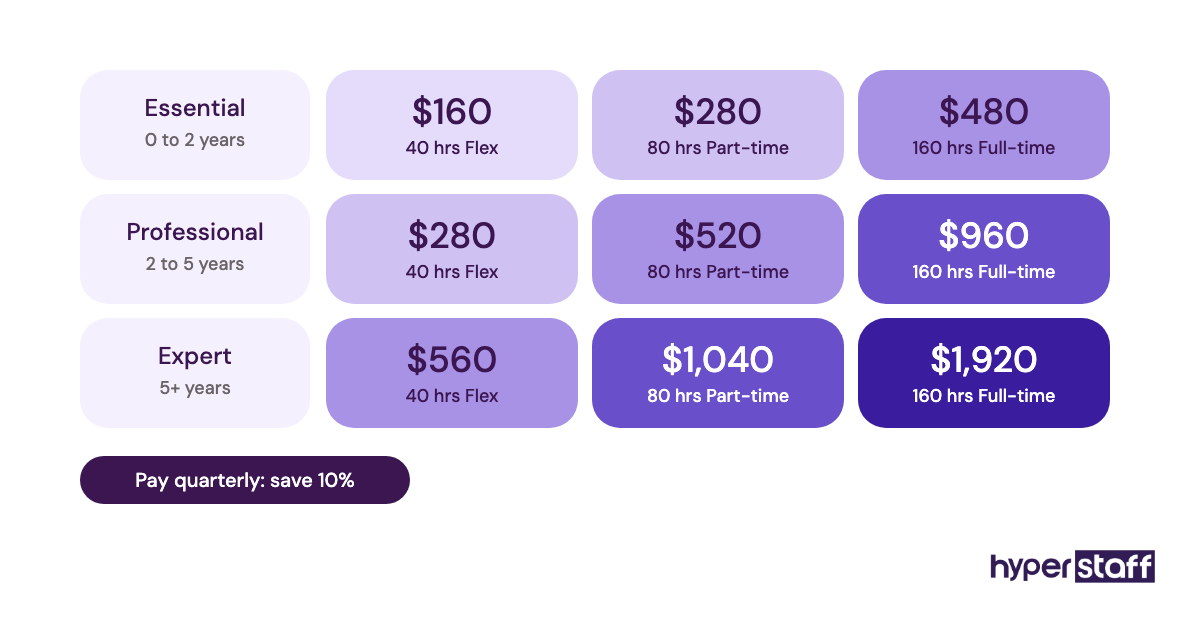
Important: Hyperstaff prices shown here are averages, not fixed quotes. Your actual cost depends on the tier, hours and tasks your practice needs, and we confirm it after a free discovery call.
Is Onboarding a Medical Virtual Assistant Worth It?
Yes. A well-onboarded medical virtual assistant is one of the most rewarding hires a practice can make, because the onboarding cost is paid once and the savings repeat every month the assistant stays.
Here's a sample calculation. Take 80 hours a month of scheduling, reminders and eligibility checks: an in-house hire at $20 an hour costs $1,600 before payroll taxes and benefits, while a Hyperstaff Professional assistant from $6 an hour costs $480.
That's a gap of $1,120 a month, or about $13,440 a year. If onboarding takes 25 hours of a $30-an-hour office manager's time, the $750 is recovered inside the first month, and paying quarterly cuts the $480 to $432.
The math only holds if onboarding is done properly. An assistant who never reaches independent work costs supervisor time indefinitely, which is why we wrote a separate look at whether a medical VA is worth it.
How to Choose a Medical Virtual Assistant Agency
Choose a medical virtual assistant agency by how it handles the parts onboarding depends on: BAAs, HIPAA training, SOP documentation and replacements. Hourly rate matters less, because a cheap placement that needs re-onboarding every few months ends up costing more.
Ask these questions before you sign anything:
- Will you sign a BAA, and what HIPAA training do your assistants complete before placement?
- Who writes our SOPs, and who keeps them current?
- How fast is a replacement, and how is the new person briefed?
- Is the assistant dedicated to our practice or shared across clients?
- Who do we call when something goes wrong?
- What's the minimum monthly commitment in hours?
At Hyperstaff, every client gets a dedicated assistant and a dedicated account manager, and monthly bundles start at 40 hours. If an assistant ever needs replacing, the new one is placed within 5 to 7 business days and briefed from your Operations Vault, so onboarding picks up where it left off.
Ask any agency, us included, to confirm BAA terms in writing before PHI access begins. A verbal yes doesn't hold up in an audit.
Medical VA Onboarding Statistics, Trends and Future Predictions
The fixed point is HIPAA training: the Security Rule already requires a security awareness and training program for the whole workforce, as the HHS summary linked above states. What's moving is the security bar around remote access.
HHS has proposed a Security Rule update that would make multi-factor authentication required instead of addressable, including for remote access to ePHI. The same proposal cites HHS data showing large breach reports rose 102% over a recent five-year window, while the number of people affected rose 1,002%.
Final action on that rule has slipped, with Fierce Healthcare reporting a later target on the federal regulatory agenda. Whether it lands as proposed is genuinely unclear, since large provider groups have pushed back on the cost.
We're more confident about the direction than the date. MFA on every remote login, a written asset list of the devices an assistant uses and same-day offboarding are already worth building into onboarding now, whatever the rule's final timing.
How Does AI Change Medical VA Onboarding?
AI shortens the documentation side of medical VA onboarding the most. Turning a recorded walkthrough into a draft SOP takes minutes with current AI tools, though a staff member still has to correct the draft line by line.
The HIPAA catch is simple: any AI tool that sees PHI needs a BAA, the same as any other vendor. Many consumer AI accounts don't offer one, so SOP drafts should use test patients or de-identified examples.
AI features inside EHRs and phone systems also change what the assistant does day to day. Onboarding now has to teach the assistant where AI output gets checked, because a confident wrong summary in a referral note is harder to spot than a typo.
Disclaimer: This article is for general information only and is not legal, compliance or medical advice. HIPAA obligations vary by organization and state, so consult a qualified attorney or compliance professional before making decisions. Tool prices and regulations change, and Hyperstaff is not responsible for actions taken based on this content.
Common questions
Can a medical virtual assistant start before the BAA is signed?
Not with PHI access. They can review SOPs, watch recorded walkthroughs and practice on test patients, but real records wait until the BAA and confidentiality agreement are signed.
Does my medical VA need full access to our EHR?
No. HIPAA's minimum necessary standard means giving the assistant only the modules and patient data their tasks require. Widen access as new tasks are released, and record each change.
What should a medical VA do in their first week?
Week one is HIPAA training, login checks and shadowing your staff on live tasks over screen share. By day four or five, most assistants can start on low-risk work like appointment reminders under full review.
Should a medical virtual assistant use their own computer?
It can work if your policy sets the device rules: full-disk encryption, an up-to-date operating system, a password manager and no shared users. Many practices prefer a virtual desktop so PHI never sits on the assistant's machine.
What do I do when a medical VA leaves?
Remove every login the same day: EHR, email, phone, payer portals and the password manager. A written offboarding checklist from day one makes this a ten-minute job instead of a hunt through old accounts.
Book a free 15 min call
We place a pre-vetted specialist in 5 business days, fully managed, from $3/hour.