Is a Small Business Virtual Assistant Worth It? The Real Math
A plain look at what a small business virtual assistant costs, what it returns, and the conditions that decide whether the hire pays off.
On this page
- What Is a Small Business Virtual Assistant, and When Is One Worth It?
- Key Small Business Virtual Assistant Terms You Should Know
- Why Does a Small Business Virtual Assistant Matter?
- How Does a Small Business Virtual Assistant Work?
- Types of Small Business Virtual Assistants
- How Is a Virtual Assistant Different From a Freelancer, Employee or AI Tool?
- Small business virtual assistant vs. freelancer
- Small business virtual assistant vs. in-house employee
- Small business virtual assistant vs. AI assistant tools
- What Are the Benefits of a Small Business Virtual Assistant?
- What Are the Drawbacks of a Small Business Virtual Assistant?
- Who Needs a Small Business Virtual Assistant?
- Small Business Virtual Assistant Examples
- Good Small Business Virtual Assistant Examples
- Bad Small Business Virtual Assistant Examples
- How Do You Build a Small Business Virtual Assistant Plan, Step by Step?
- Step #1
- Step #2
- Step #3
- Step #4
- Step #5
- What Does an Effective Small Business Virtual Assistant Strategy Look Like?
- Small Business Virtual Assistant Tools and Software
- 9 Tips to Get More From a Small Business Virtual Assistant
- How Do You Overcome Common Small Business Virtual Assistant Challenges?
- How Do You Measure Small Business Virtual Assistant Success?
- How Long Does a Small Business Virtual Assistant Take to Pay Off?
- How Much Does a Small Business Virtual Assistant Cost?
- Is a Small Business Virtual Assistant Worth It?
- How Do You Choose a Small Business Virtual Assistant Agency?
- Small Business Virtual Assistant Statistics, Trends and Future Predictions
- Will AI Replace a Small Business Virtual Assistant?
- FAQs
Buy Back the Hours That Earn Money
A good assistant pays for itself when your own week shifts toward sales, delivery and client work. Hyperstaff has placed 70+ pre-vetted assistants with 30+ clients, and our small business virtual assistant services start at $3/hour, with a dedicated specialist placed within 5 business days and working the day after a 30-minute kickoff call.
What Is a Small Business Virtual Assistant, and When Is One Worth It?
A small business virtual assistant is a remote team member who takes recurring work off an owner's plate, on a set number of hours each month. For most owners it's worth it once there are about 10 hours a week of delegable tasks and a revenue job waiting for the freed time.
The role reaches well past inbox and calendar admin. A VA can run customer support, chase leads, schedule social posts, prep books for your accountant or keep daily operations on track, and our guide to small business virtual assistant basics breaks the role down further.
Whether the hire is worth it comes down to one comparison. What do the hours cost, and what do your freed hours earn?
Key Small Business Virtual Assistant Terms You Should Know
- Dedicated VA = one specialist who works only on your account, so knowledge of your business builds month over month.
- Pooled VA = a rotating group of assistants splitting requests across many clients.
- Hour bundle = a fixed block of monthly hours, such as 40, 80 or 160.
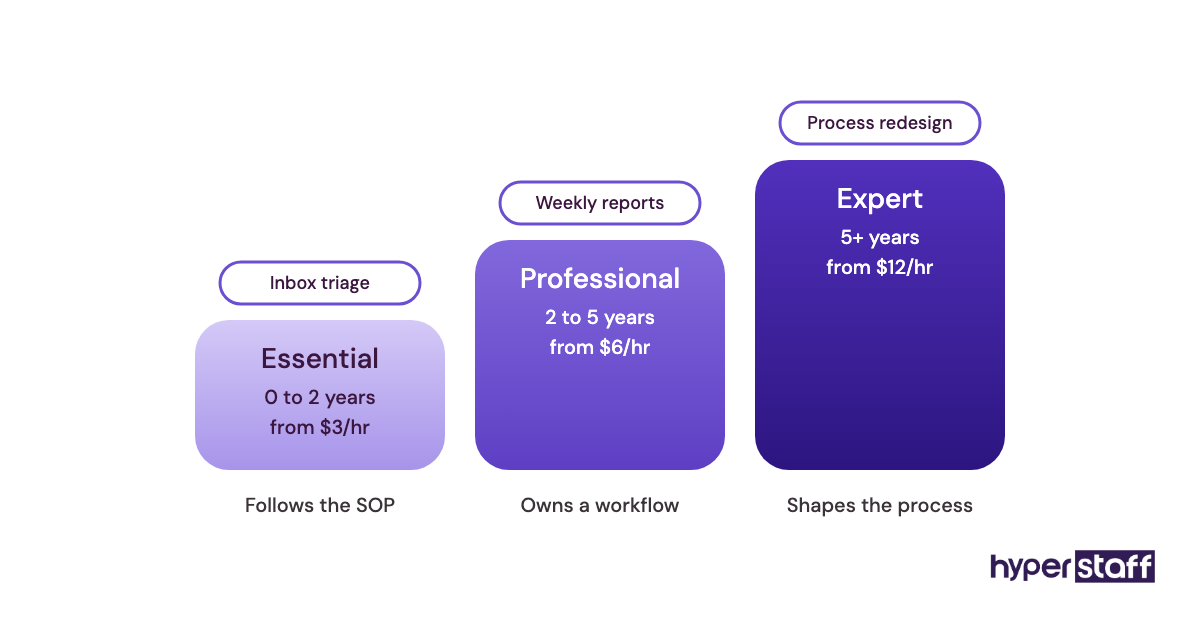
- Experience tier = a pricing band tied to years of experience.
- SOP = a standard operating procedure, written so anyone could repeat the task.
- Fully loaded cost = salary plus payroll taxes, benefits, equipment and software for an employee.
- Opportunity cost = the revenue an owner's hour could earn if it weren't spent on admin.
- Time zone overlap = the hours when you and your VA are both online.
- Replacement guarantee = an agency's promise to place a new assistant if the first one doesn't fit.
- Access management = how passwords and permissions get shared, tracked and revoked.
Why Does a Small Business Virtual Assistant Matter?
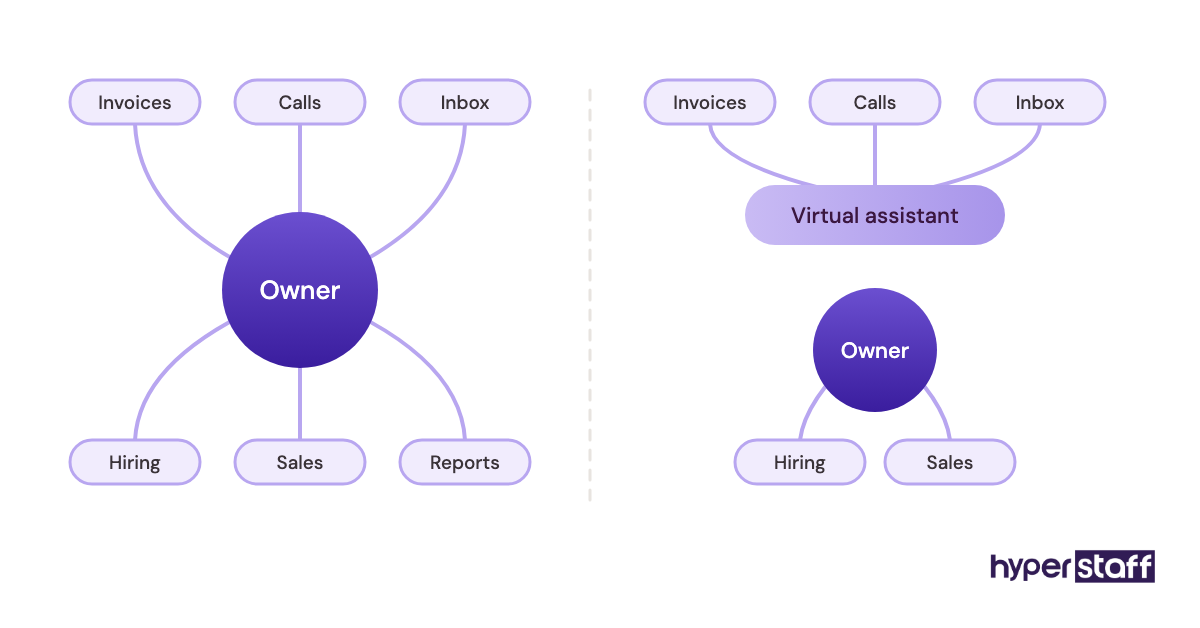
A small business virtual assistant matters because the owner's time is the scarcest resource in a small company. Every hour spent reconciling invoices or rescheduling calls comes out of sales, delivery or hiring.
Small teams feel it first. With no office manager and no support desk, admin lands on whoever is most senior, and that's often the founder.
Consistency is the second reason. A lead that waits three days for a reply often goes cold, while an assistant on set hours makes a same-day response routine.
How Does a Small Business Virtual Assistant Work?
A small business virtual assistant works remotely on agreed monthly hours, inside your tools and from your written processes. You assign tasks through a shared board or chat, and the assistant reports back on a fixed rhythm.
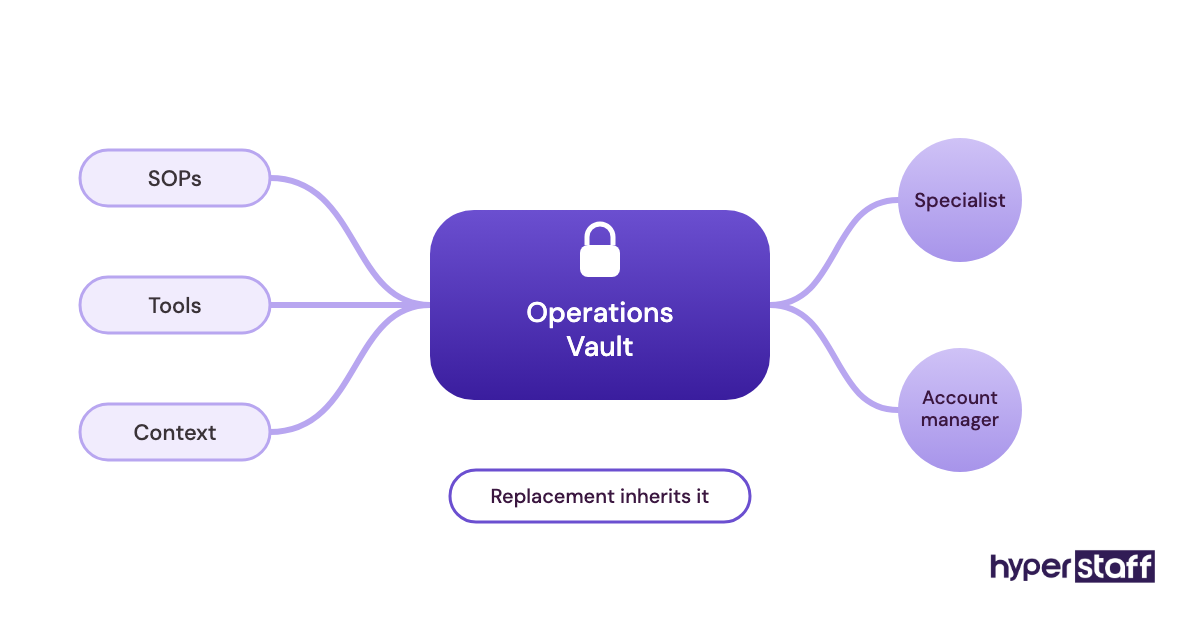
At Hyperstaff the sequence is short: a 30-minute kickoff call, then work starts that day or the next morning. Your SOPs, tools and context go into an Operations Vault that we write down and maintain for you, and a dedicated account manager stays on the account.
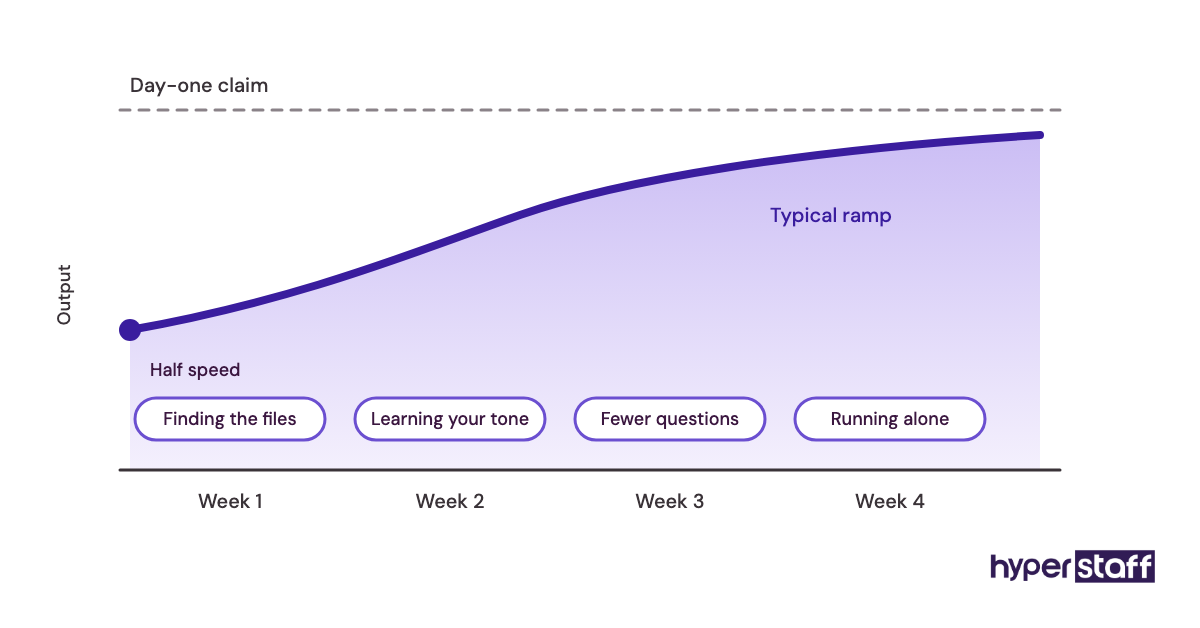
The official version says an assistant is productive from day one. In practice, the first week runs at maybe half speed while they learn where files live and how you like replies worded.
Types of Small Business Virtual Assistants
Small business virtual assistants fall into types based on the work they own. The full list of small business VA tasks runs much longer, but the roles below cover the most common hires.
| VA type | Typical tasks | Monthly hours that fit | Tier that fits |
|---|---|---|---|
| Administrative VA | Inbox triage, calendar, travel, document prep | 40 to 80 | Essential |
| Customer support VA | Ticket replies, live chat, order issues, refunds | 80 to 160 | Essential or Professional |
| Lead generation VA | List building, CRM updates, outreach follow-up | 80 to 160 | Professional |
| Bookkeeping support VA | Invoice entry, receipt matching, payment reminders | 40 to 80 | Professional |
| Digital marketing VA | Social scheduling, email campaigns, basic reporting | 40 to 80 | Professional |
| E-commerce VA | Product listings, inventory updates, order tracking | 80 to 160 | Essential or Professional |
| Recruiting coordinator VA | Job posts, candidate screening, interview scheduling | 40 to 80 | Professional |
| Operations VA or online business manager | Process docs, vendor coordination, team task tracking | 80 to 160 | Expert |
How Is a Virtual Assistant Different From a Freelancer, Employee or AI Tool?
A small business virtual assistant differs from related options in commitment and context. A dedicated VA works ongoing hours on your account, a freelancer delivers projects, an employee carries payroll costs, and an AI tool drafts without judgment.
| Factor | Dedicated VA | Freelancer | In-house employee | AI assistant tool |
|---|---|---|---|---|
| Pricing model | Hourly bundle | Per project or hour | Salary plus benefits | Monthly subscription |
| Learns your business | Yes, over months | Partly | Yes | Only what you paste in |
| Time to start | Days | Days | Weeks to months | Minutes |
| Judgment on edge cases | Grows with time | Varies | Strong | Weak |
| Cost of a bad fit | Low with a replacement policy | Low | High | Very low |
Small business virtual assistant vs. freelancer
Freelancers fit defined projects with an end date, like a website rebuild or a logo. A virtual assistant fits work that repeats every week and gets better as the person learns your customers.
Plenty of owners use both. The VA often ends up briefing and managing the freelancers.
Small business virtual assistant vs. in-house employee
An in-house hire brings live presence in your time zone and deep company knowledge, at a much higher fully loaded cost. We break down the numbers in our VA vs in-house hire comparison.
Practitioners genuinely disagree on culture. Some owners insist a first hire should sit in the same room, while others find a remote specialist with written processes builds a more resilient business.
Small business virtual assistant vs. AI assistant tools
AI tools draft emails and summarize calls in seconds. They don't notice that a client sounds upset, chase an unpaid invoice, or decide which request matters most today.
What Are the Benefits of a Small Business Virtual Assistant?
The benefits of a small business virtual assistant center on cost, owner time and response speed.
- Owner hours move from admin to revenue work.
- Hourly cost runs at a fraction of a local hire's fully loaded cost.
- Hours flex with demand through 40, 80 or 160 hour bundles.
- Leads and support tickets get faster, steadier replies.
- Offshore time zones can mean work gets done while you sleep.
- Processes get written down, so the business depends less on one person's memory.
What Are the Drawbacks of a Small Business Virtual Assistant?
The drawbacks of a small business virtual assistant are real but mostly manageable.
- The first two to four weeks take your time to explain and review work.
- Time zone gaps slow live back-and-forth.
- Access to sensitive accounts needs proper controls.
- Judgment-heavy calls, like pricing or a key client complaint, still land on you.
Who Needs a Small Business Virtual Assistant?
A small business virtual assistant fits owners with at least 10 hours a week of patterned, repeatable work and a clear use for the hours they get back. Service firms with inbound leads, online stores, agencies and consultancies tend to fit well.
A solo consultant usually buys back their own calendar. A 15-person company is more often buying coverage, like weekend support replies or CRM cleanup nobody else owns.
The fit is poor when every task needs your judgment or the work changes daily with no pattern. A VA in that setup spends more time asking than doing.
Small Business Virtual Assistant Examples
The examples below describe common setups by role, with the conditions that make each one succeed or fail.
Good Small Business Virtual Assistant Examples
Lead follow-up within one business day
The VA watches form submissions and the sales inbox, replies from approved templates and books qualified leads into the owner's calendar. It works because the rules are simple: who qualifies, which template, which booking link.
A support inbox run from a reply library
The assistant answers order and account questions from a shared library of approved replies. Anything outside the library gets flagged to the owner, and that answer gets added so the library grows every week.
Month-end bookkeeping prep
The VA matches receipts, chases unpaid invoices and hands the accountant a clean file each month. The accountant still reviews and files, but billed hours for cleanup usually drop.
Bad Small Business Virtual Assistant Examples
Handing over chaos with nothing written down
An owner gives a new VA twelve logins and says "just figure it out." It's the first item on our list of common small business VA mistakes, and it reliably turns a good hire into a frustrated one.
Paying for entry-level hours and expecting expert judgment
An Essential-tier assistant with 0 to 2 years of experience follows clear processes well. Asking that person to run vendor negotiations or redesign your operations is a tier mismatch, and it shows within weeks.
Four bosses giving one VA orders
When every team member assigns work directly, priorities collide and nothing finishes. One person needs to own the VA's queue.
How Do You Build a Small Business Virtual Assistant Plan, Step by Step?
A small business virtual assistant plan runs in five steps: measure your week, define the role, choose the person, hand over the processes, then review. Skip the first step and the rest gets guessed.
Step #1: Track your week before you hire
Log every task for two weeks with a rough time per task. Mark anything that repeats and could follow written steps.
Step #2: Write the role down
Turn the marked tasks into a short role definition with outcomes and tools. A clear VA job description template saves a lot of back-and-forth later.
Step #3: Pick the tier, the hours and the person
Match the tier to the judgment the work needs, and the bundle to the hours you logged. Our walkthrough on hiring a small business VA covers the selection side.
Step #4: Hand over the processes with the logins
Write or record each recurring task before day one, and start with the three or four that eat the most time. Our guide to onboarding a small business VA lays out the first two weeks.
Step #5: Review at 30, 60 and 90 days
Check hours used, tasks completed and how many items came back for rework. Add new task types only after the first set runs without you.
What Does an Effective Small Business Virtual Assistant Strategy Look Like?
An effective small business virtual assistant strategy gives the owner ownership of outcomes and gives the VA ownership of tasks, on a fixed weekly rhythm. One task board, one point of contact, and a scope that grows in stages.
We lean toward starting narrow. Owners who hand over twenty task types in week one tend to pull half of them back by week three.
Other operators prefer the opposite: a broad scope from day one to see quickly what the assistant can carry. It works with Expert-tier hires and strong documentation, and it burns out newer assistants.
Small Business Virtual Assistant Tools and Software
Small business virtual assistant tools come down to shared email, chat, a task board, a password manager and screen recording. We cover the full stack in our roundup of small business VA tools.
- Google Workspace: email, calendar and shared drives, with Business Starter listed at $7 per user per month on an annual plan on Google's pricing page.
- Slack: daily chat, with a free plan and Pro at $7.25 to $8.75 per active user per month depending on billing, per Slack's pricing.
- Asana: task assignment and status, free for small personal use and $10.99 to $13.49 per user per month on Starter, per Asana's pricing.
- 1Password: shared logins without sharing the actual passwords, with a Teams Starter Pack at $24.95 a month for up to 10 people on 1Password's pricing page.
- Loom: screen recordings for training, with a free tier and Business at roughly $15 to $18 per user per month, per Loom's pricing.
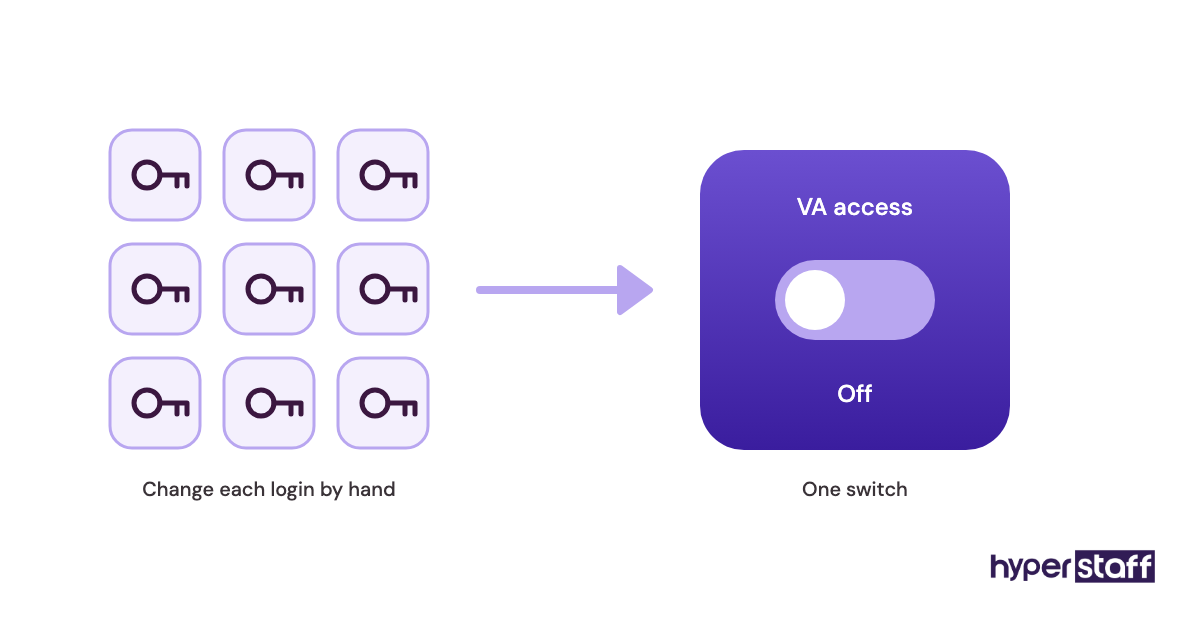
If we had to keep one tool, it'd be the password manager. Revoking a VA's access in one click beats changing twenty passwords by hand.
9 Tips to Get More From a Small Business Virtual Assistant
These tips come from what separates setups that pay off from setups that stall.
- Log two weeks of tasks before you write the role.
- Start with three or four task types, then add more each month.
- Record a short video for every recurring task.
- Give the VA one place to receive work, such as a single task board.
- Set a daily end-of-shift update with done, blocked and next.
- Protect at least two hours of time zone overlap.
- Share logins through a password manager only.
- Decide in advance what the VA may approve without asking.
- Book your freed hours for revenue work before they fill with other admin.
How Do You Overcome Common Small Business Virtual Assistant Challenges?
Most small business virtual assistant challenges trace back to unclear instructions, slow feedback or time zone friction. Each has a simple fix if you catch it in the first month.
Unclear instructions show up as rework. When the same task comes back wrong twice, the SOP is usually the problem, so rewrite it before blaming the person.
Slow feedback stalls a VA more than anything else. Answer blocking questions within a few hours, and move routine questions into the daily update so they don't interrupt your day.
How Do You Measure Small Business Virtual Assistant Success?
Small business virtual assistant success shows up in three places: owner hours freed, response times and rework rate. Track all three weekly for the first quarter.
Owner hours are the number that matters most. If your calendar still looks the same after 60 days, the VA is doing work you weren't doing anyway, or the freed time is leaking.
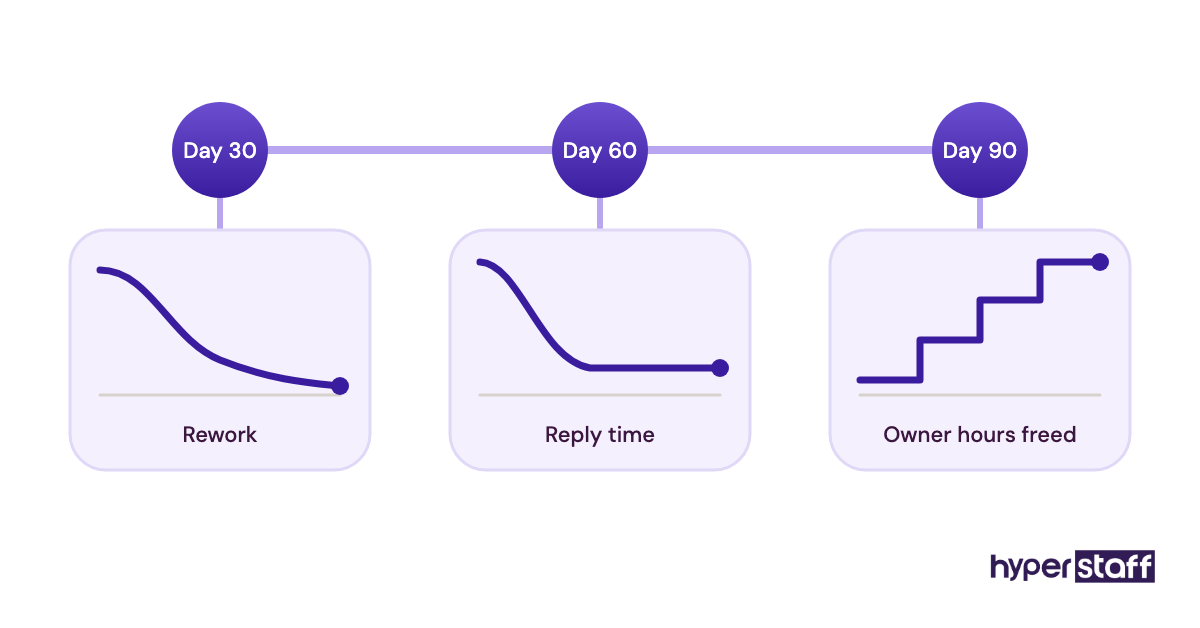
Response time to leads and tickets should drop and stay steady. Rework, meaning tasks you redo or send back, should fall toward near zero by month three.
How Long Does a Small Business Virtual Assistant Take to Pay Off?
A small business virtual assistant usually starts paying off in weeks 3 to 6, once the first task set runs without daily input. At Hyperstaff, placement takes 5 business days and work begins after a 30-minute kickoff call.
Expect a dip first. The first two weeks cost you time in explanations and reviews.
Returns tend to compound after month two. The assistant knows your customers and tools, so each new task takes less training than the last.
How Much Does a Small Business Virtual Assistant Cost?
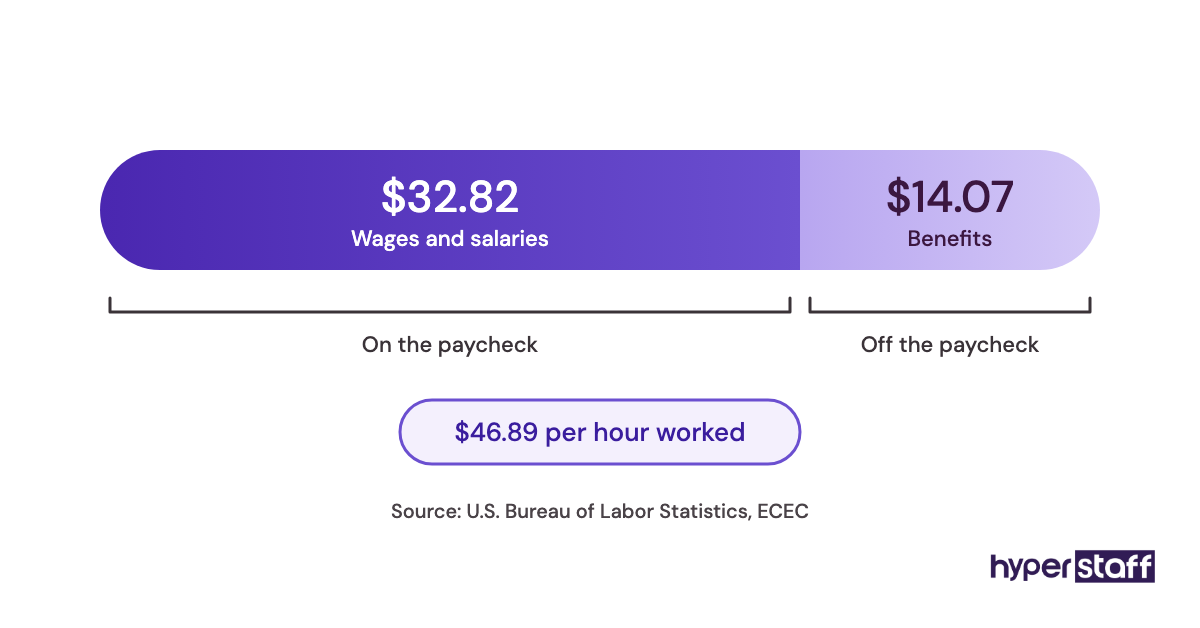
A small business virtual assistant from Hyperstaff costs from $3 to $12 per hour depending on experience, or $480 to $1,920 for a full-time month of 160 hours. A US administrative assistant earns a median of $48,310 a year in wages alone, per the US Bureau of Labor Statistics.
Wages aren't the full bill. Benefits make up about 31% of total employer compensation cost, according to BLS employer cost data, which puts that same hire near $70,000 a year, and our post on small business VA cost goes deeper.
| Option | Provider | Experience | Hourly rate | Monthly at 160 hours |
|---|---|---|---|---|
| Essential tier | Hyperstaff | 0 to 2 years | From $3 | From $480 |
| Professional tier | Hyperstaff | 2 to 5 years | From $6 | From $960 |
| Expert tier | Hyperstaff | 5+ years | From $12 | From $1,920 |
| In-house admin assistant, wages only | Direct hire (US median) | Varies | About $23 | About $4,026 |
| In-house admin assistant, with benefits | Direct hire (US median) | Varies | About $34 | About $5,800 |
Smaller bundles of 40 or 80 hours scale the Hyperstaff figures down in step, and paying quarterly saves 10%.
Important: Our rates above are starting averages. Your actual cost depends on the role, the experience level you need and the hours you book, so we confirm exact pricing on a free discovery call.
Is a Small Business Virtual Assistant Worth It?
Yes, a small business virtual assistant is worth it for most owners with steady, repeatable work, and it's one of the highest-return hires a small company can make when the handoff is done properly. The payback comes from what you do with the hours, so plan that part before you hire.
Here's a worked example with assumed numbers. A Professional-tier assistant on an 80-hour bundle costs $480 a month, or $432 when paid quarterly.
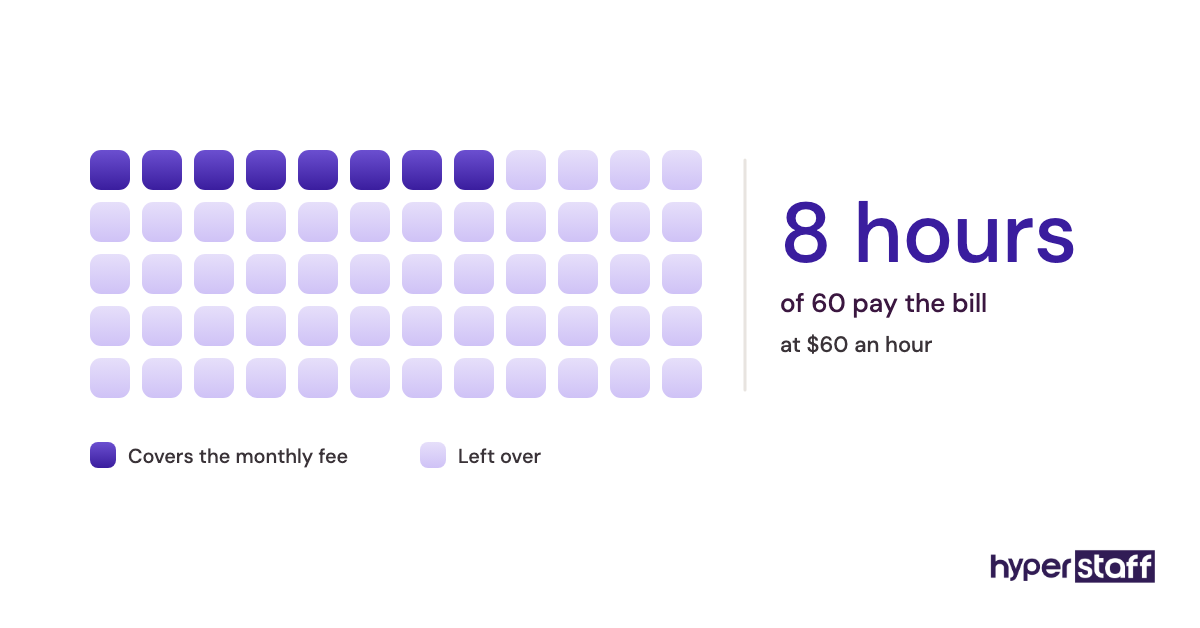
Say that VA takes 60 hours of your own work off your plate, and an hour of your sales or client time is worth $60. That's $3,600 of owner time each month for a $480 outlay.
Even if only a third of that time turns into revenue, you're at $1,200 against $480. The math breaks only when the freed hours drift into more admin, which is why tip nine above matters.
How Do You Choose a Small Business Virtual Assistant Agency?
Choose a small business virtual assistant agency by checking whether you get one dedicated person, how fast a replacement arrives, and who writes down your processes. Pricing transparency and a named account manager come next.
Ask how candidates are vetted and whether you can interview them yourself. Our list of VA interview questions gives you a starting script.
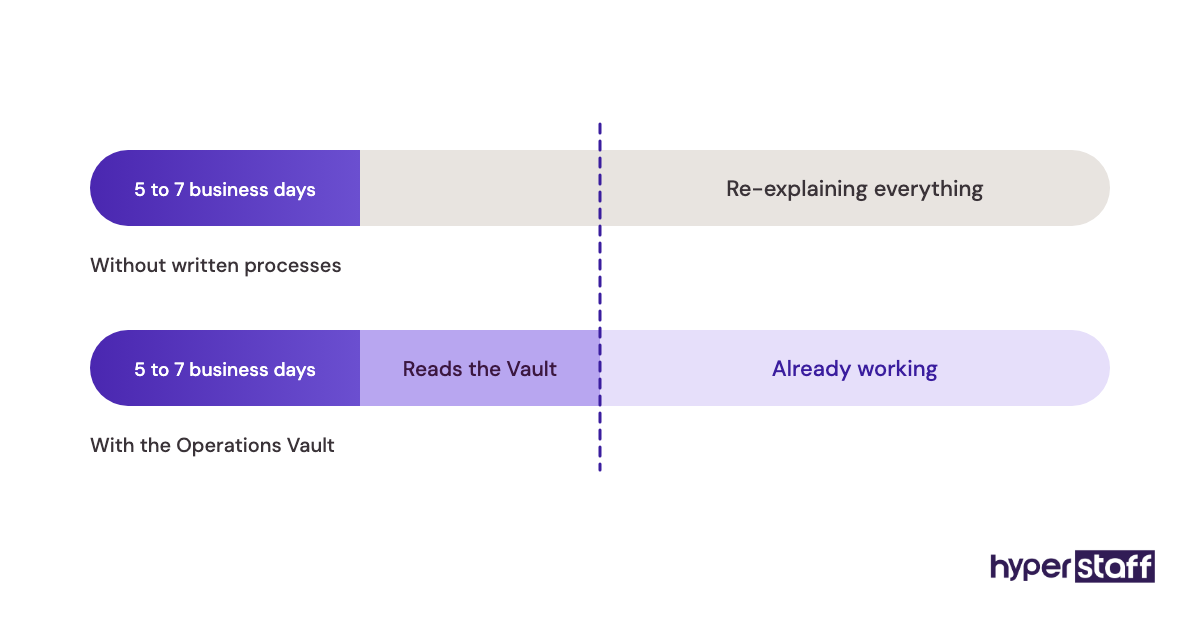
Replacement terms deserve a hard look. Hyperstaff replaces an assistant free in 5 to 7 business days, briefed from your Operations Vault, so a change doesn't restart training from zero.
Small Business Virtual Assistant Statistics, Trends and Future Predictions
Small business virtual assistant demand follows the wage gap between local and offshore roles. The BLS lists median pay of $47,440 for bookkeeping and accounting clerks and $39,680 for customer service representatives.
Both are roles a remote assistant commonly fills. Scope is also widening, with VAs moving from admin into lead generation, marketing ops and online business management.
Our prediction: AI will raise the bar on what one assistant can handle in a day. Owners will pay for judgment and context more than raw hours, which pushes demand toward the Professional and Expert tiers.
Will AI Replace a Small Business Virtual Assistant?
AI won't replace a good small business virtual assistant soon, though it changes the job. AI drafts, summarizes and sorts, while the assistant decides, follows up and owns the result.
A VA who uses AI well gets through more in the same hours. Ask candidates which AI tools they use daily and for what, and treat a vague answer as a yellow flag.
Disclaimer: This article is general information, not financial, legal or tax advice. Costs, savings and wage figures are estimates that vary by business and change over time. Verify details with qualified advisors and current sources before making hiring decisions.
Common questions
Is a virtual assistant worth it for a one-person business?
Often, yes, if you have 10 or more hours a week of repeatable tasks. A 40-hour monthly bundle is a low-risk way to test it.
Is a part-time virtual assistant worth it, or should I go full-time?
Start with the hours your task log supports. Many owners begin at 40 or 80 hours a month and move up once the first tasks run smoothly.
Is it safe to give a virtual assistant my passwords?
It's safe when you share access through a password manager and give only the permissions each task needs. Keep banking approvals with you, and revoke access the day someone leaves.
Do time zones make an offshore VA less worth it?
Not if you protect two or more hours of overlap for questions. The time difference can even help, since overnight work is ready when you start your day.
What if my small business virtual assistant doesn't work out?
Raise it early with your agency. Hyperstaff places a free replacement in 5 to 7 business days, briefed from your Operations Vault.
Book a free 15 min call
We place a pre-vetted specialist in 5 business days, fully managed, from $3/hour.