10 Small Business Virtual Assistant Mistakes That Cost Owners Money
Ten hiring, onboarding and management mistakes that make a virtual assistant cost more than they save, with a fix for each one.
On this page
- Mistake #1: Hiring a VA to soak up leftover tasks with no defined role
- Why owners start with a leftovers list
- What a scattered task list costs you
- Group the work into one lane first
- Mistake #2: Writing one job description for three different people
- Where the do-everything ad comes from
- The price of a unicorn listing
- Write the role around one primary skill
- Mistake #3: Hiring on interview polish instead of a paid test task
- Why the interview misleads you
- What a likable wrong hire costs
- Run a short paid trial before you decide
- Mistake #4: Training by screen share and never writing anything down
- Why documentation keeps getting skipped
- What happens when only one person knows the process
- Record it once, then turn it into a checklist
- Mistake #5: Sharing passwords in chat and handing out admin access
- Why access gets handled loosely
- The real risk of loose access
- Use a password manager and per-user roles
- Mistake #6: Picking the lowest hourly rate without matching experience to the work
- Why price becomes the deciding factor
- What a mismatched rate really costs
- Price the outcome, then pick the tier
- Mistake #7: Tracking hours and screenshots instead of output
- Why owners reach for trackers
- The hidden price of surveillance
- Define what "done" looks like for each task
- Mistake #8: Keeping the VA on calendar and inbox work only
- Why the role stays small
- What a narrow role leaves on the table
- Add one revenue task each quarter
- Mistake #9: Ignoring time zones and running without a check-in rhythm
- Why the time zone question gets skipped
- What constant lag costs
- Set overlap hours and one channel
- Mistake #10: Judging the hire after two weeks
- Why owners decide too early
- The cost of quitting at week two
- Set 30, 60 and 90-day checkpoints
- FAQs
Turn delegated hours into more revenue
Hyperstaff has placed 70+ virtual assistants with 30+ clients, and nearly every mistake below can be headed off in the first week. Our small business virtual assistant services match you with a pre-vetted specialist in 5 business days, from $3/hour, with a dedicated account manager watching the setup from the kickoff call onward.
Mistake #1: Hiring a VA to soak up leftover tasks with no defined role
The most common small business virtual assistant mistake is hiring someone to take "whatever's annoying" off your plate. The list looks long on paper, but it rarely adds up to a real job.
Why owners start with a leftovers list
- The hire gets triggered by one bad week
- Annoying tasks feel like the obvious ones to give away
- Nobody times how long each task takes
- A list feels like less of a commitment than a role
- Hiring advice says "start small" without saying small at what
What a scattered task list costs you
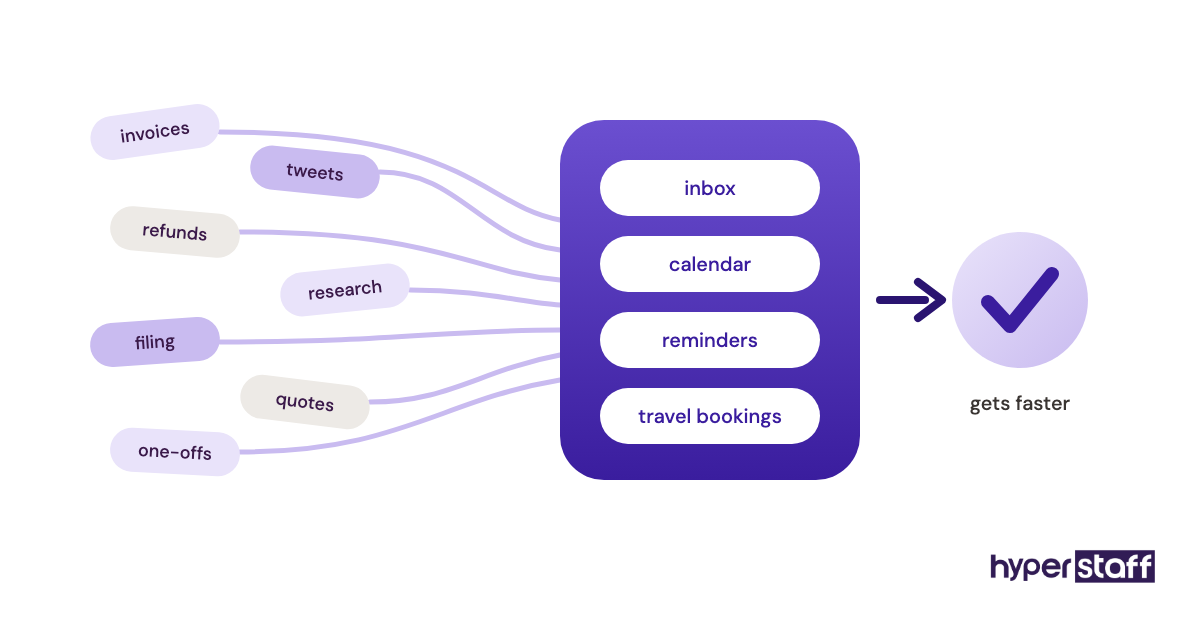
A leftovers list hands the VA a dozen unrelated jobs and no chance to get good at any of them. Context switching eats the hours you're paying for, and quality stays at beginner level because nothing repeats often enough to improve.
The bigger cost shows up around month two. Owners look at a pile of half-finished small things and decide virtual assistants don't work for them.
Group the work into one lane first
Pick a single lane, such as inbox and scheduling, customer support, lead research or bookkeeping prep, and fill it before adding a second. Our guide on how to hire a VA walks through sizing that lane into weekly hours.
Log a normal week before you post the role. Write down every task that fits the lane and how long it took, then round up, because owners almost always underestimate their own admin.
Mistake #2: Writing one job description for three different people
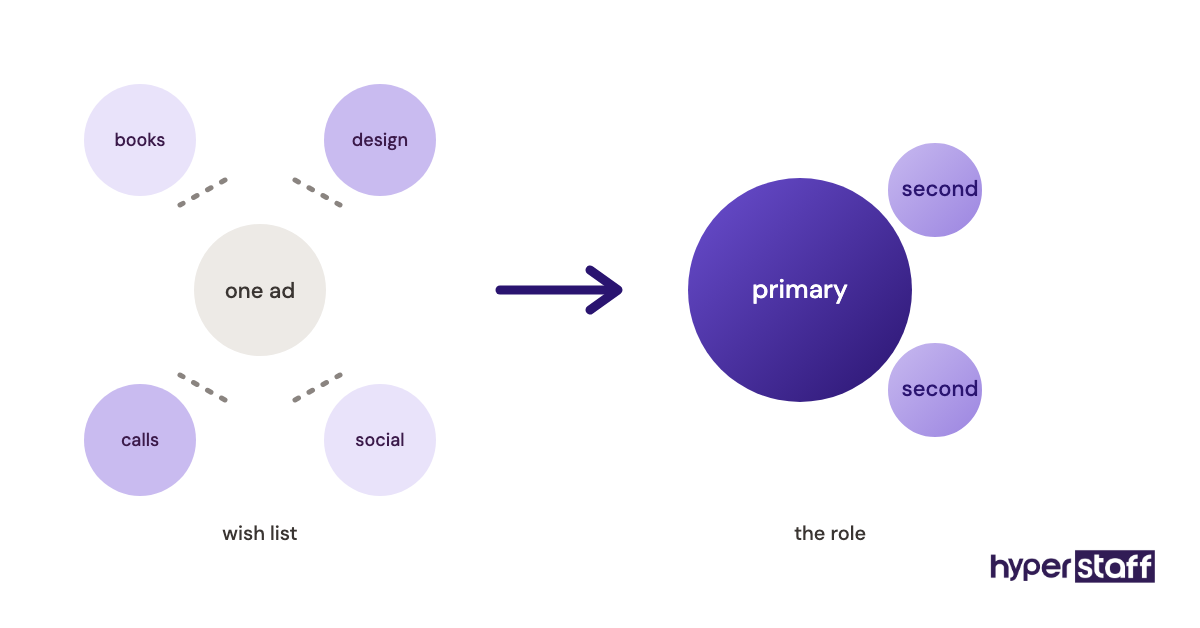
A posting that asks for bookkeeping, graphic design, cold calling and social media is a wish list for a whole team. Strong specialists skip it, and the applicants who stay tend to be average at most of it.
Where the do-everything ad comes from
- One budget, many gaps
- A generic template copied off a job board
- Fear of having to hire twice
- Not knowing which skills cost more
The price of a unicorn listing
Mixed listings attract generalists, and generalists tend to price for the hardest skill on the list while doing the easiest one well. You also lose any fair way to judge performance, since there's no single standard to measure against.
Write the role around one primary skill
Name one primary skill and at most two secondary ones. A clear VA job description template lists the daily tasks, the tools, the hours and the one result that marks a good week.
Practitioners genuinely disagree here. Some owners argue a generalist is the right first hire for a very small business, and they have a point when the total workload is light.
Our view: start with a specialist, then widen the role once the core skill is proven. Widening a strong hire is easier than narrowing a weak one.
Mistake #3: Hiring on interview polish instead of a paid test task
Remote interviews reward people who come across well on video. Good English and a confident manner say little about how someone handles a messy inbox at 7am their time.
Why the interview misleads you
- Video calls favor charm
- Generic questions get rehearsed answers
- The first likable person gets the job
- Nobody checks real work samples
- There's pressure to fill the seat fast
What a likable wrong hire costs
A wrong hire usually surfaces in week three or four, after you've already spent hours on training. Then you start over, and the second search feels more rushed than the first.
Run a short paid trial before you decide
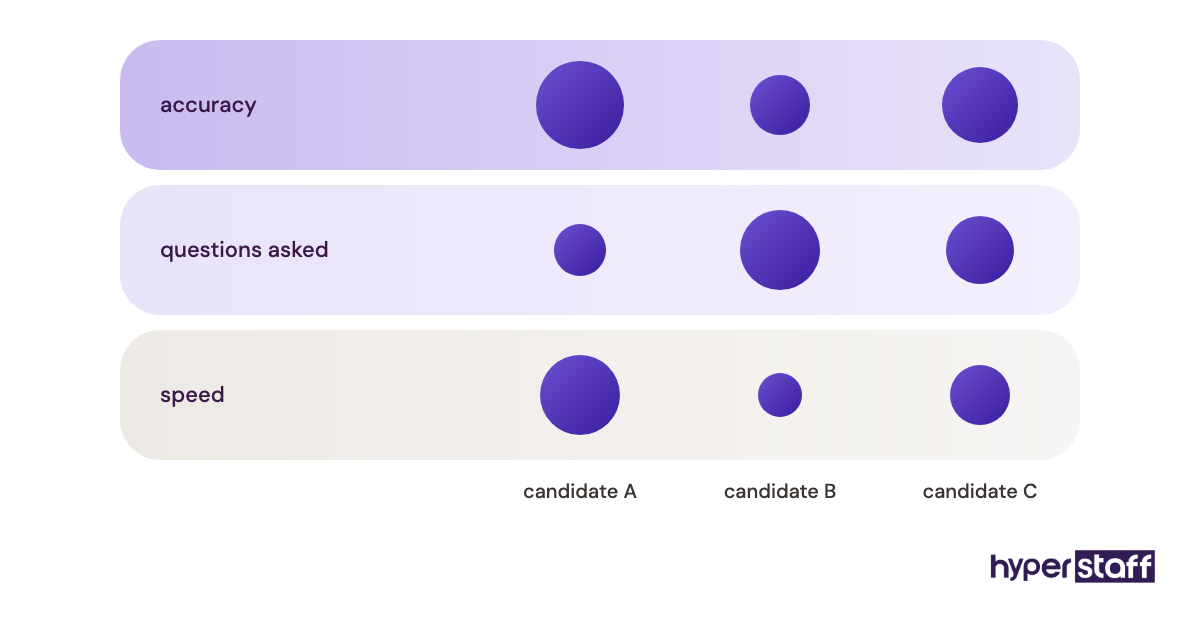
Give your top two or three candidates the same small, real task and pay them for it. Sorting a mock inbox or drafting replies to five old customer tickets works well.
Pair the trial with sharp VA interview questions about a mistake they once made. How they describe it tells you how they'll report problems to you later.
Score the trial on accuracy and on the questions the candidate asked before starting. Speed matters less than most owners expect.
Mistake #4: Training by screen share and never writing anything down
Showing a VA a process on a call feels faster than writing it up, and for the first week it is. The trouble lands later, when the knowledge lives in one person's head and nowhere else.
Why documentation keeps getting skipped
- Writing an SOP feels slower than doing the task
- The process changes often, so writing it seems pointless
- Owners assume the VA is taking notes
- Nobody owns keeping the docs current
What happens when only one person knows the process
Every question comes back to you, so the time you meant to save gets spent answering messages. If the VA leaves or gets sick, you rebuild the whole setup from memory.
Undocumented work also stops improving. A process nobody can see is a process nobody can fix.
Record it once, then turn it into a checklist
Record a Loom of yourself doing the task once, saying out loud why each step matters. Ask the VA to turn the recording into a written checklist, then correct their draft.
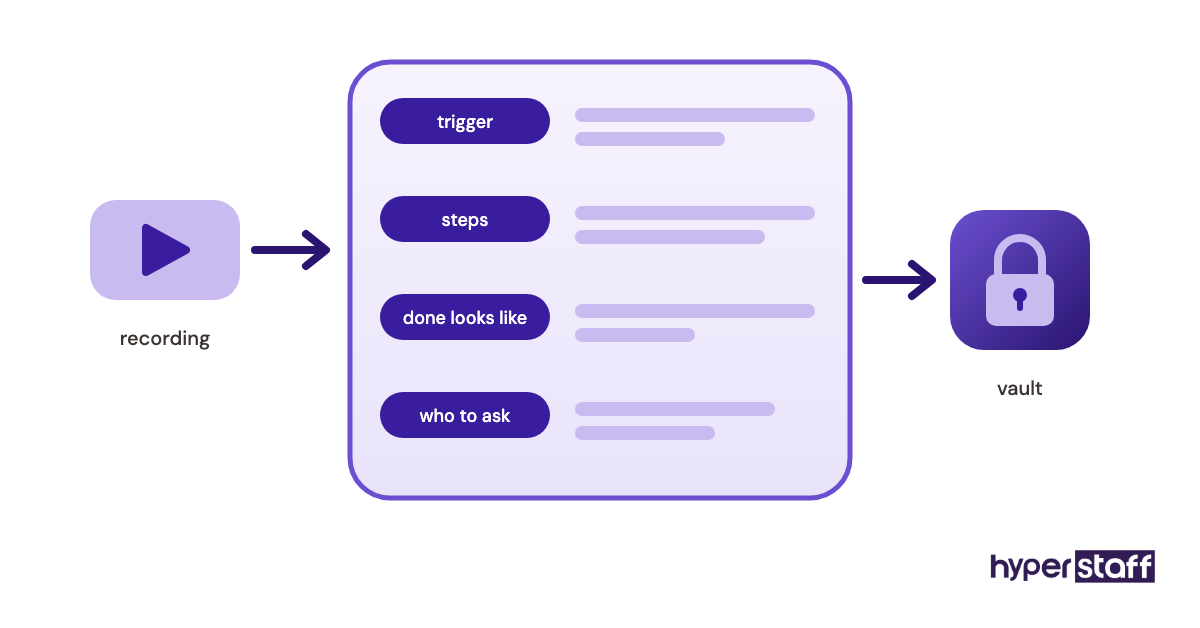
Our guide to onboarding a new VA lists what to document in week one. At Hyperstaff, your SOPs, tools and context go into an Operations Vault we write down and maintain for you, which is why a replacement can be briefed in 5 to 7 business days.
Mistake #5: Sharing passwords in chat and handing out admin access
Pasting a login into Slack or WhatsApp is the quickest way to get a VA started. It also leaves your email, store and customer data in a message history you don't fully control.
Why access gets handled loosely
- Day-one pressure to get work moving
- Not knowing most tools let you add a limited user
- One shared login used for everything
- Trusting the person, so skipping the system
- No list of what the VA can reach
The real risk of loose access
If a device is lost or an account gets phished, every password in that chat is exposed at once. Removing access later is painful too, since you have to change every shared password instead of switching off one user.
Admin rights add a second risk: honest mistakes. A VA with full rights in your store or CRM can delete records by accident while trying to tidy up.
Use a password manager and per-user roles
Put shared logins in a business password manager such as 1Password or Bitwarden, and share only the vault the VA needs. Wherever a tool allows it, give the VA their own user with the lowest role that still lets them work.
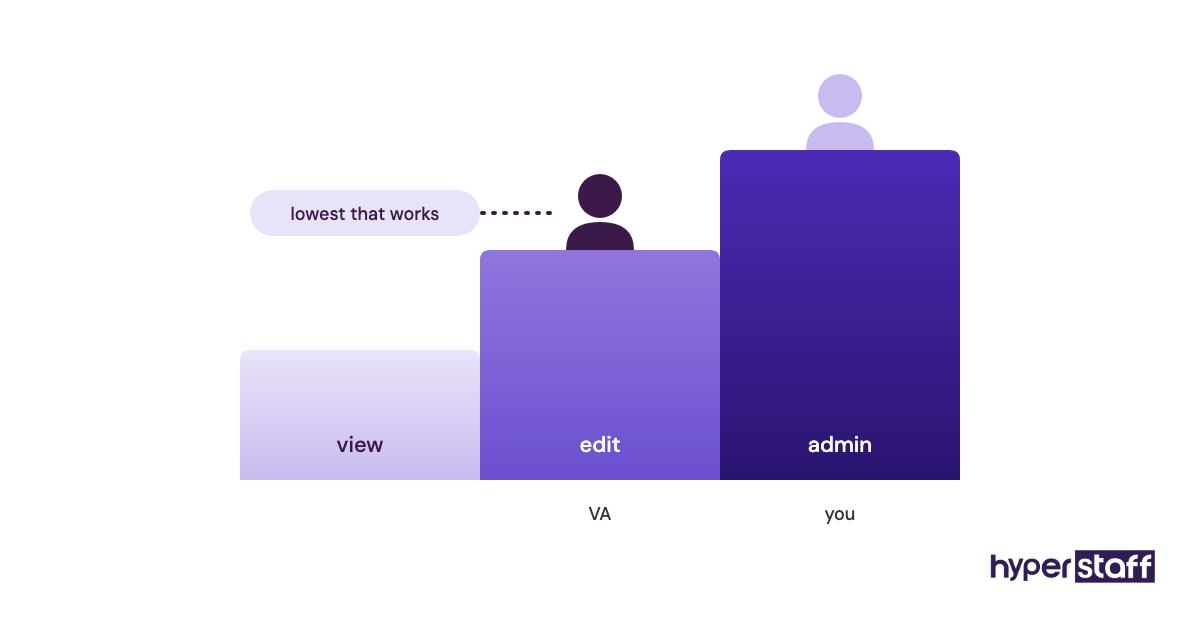
Turn on two-factor authentication everywhere and decide in advance who receives the codes. Our roundup of virtual assistant tools points out which apps make user roles easy to set up.
Mistake #6: Picking the lowest hourly rate without matching experience to the work
A $3/hour VA and a $12/hour VA buy you different things. Putting a beginner on work that needs judgment usually costs more in rework than the lower rate saves.
Why price becomes the deciding factor
- Rate is the only easy number to compare
- Offshore rates look interchangeable
- The first task list is mostly simple
- Experience is hard to judge from a résumé
What a mismatched rate really costs
A beginner on complex work needs more of your review time, and your hour is the expensive one. Mistakes in client-facing work, like a wrong quote or a missed follow-up, can cost you a customer outright.
| Experience tier | Years of experience | Rate | Typical fit |
|---|---|---|---|
| Essential | 0 to 2 years | From $3/hour | Data entry, inbox sorting, scheduling, list building |
| Professional | 2 to 5 years | From $6/hour | Customer support, CRM upkeep, social posting, bookkeeping prep |
| Expert | 5+ years | From $12/hour | Operations management, campaign management, coordinating other team members |
Price the outcome, then pick the tier
Work out what the task is worth to the business before you compare rates. Our breakdown of small business VA costs shows how monthly bundles of 40, 80 or 160 hours change the total.
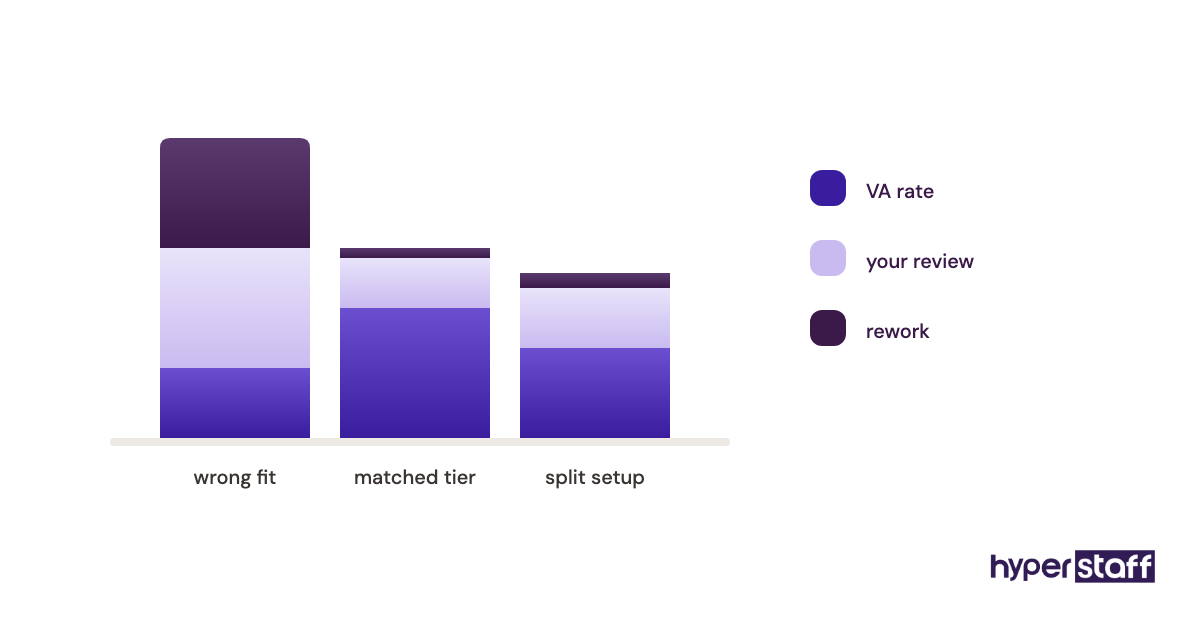
A split setup works for plenty of teams: an Essential-tier VA for volume work, with a senior person checking the judgment calls. Once you're sure of the fit, paying quarterly saves another 10%.
Mistake #7: Tracking hours and screenshots instead of output
Screenshot trackers and activity scores feel like control. They measure mouse movement, which tells you almost nothing about work quality.
Why owners reach for trackers
- Remote work feels invisible
- Hourly billing invites clock-watching
- Nobody agreed on what a finished task looks like
- A past freelancer burned them once
The hidden price of surveillance
Good VAs read heavy tracking as distrust, and some strong candidates turn down roles that require it. The ones who stay learn to look busy, which is a separate skill from being useful.
Define what "done" looks like for each task
Write one output measure per task, such as tickets answered within one business day or new leads added with a checked email. Review against those measures weekly for the first month, then every two weeks.
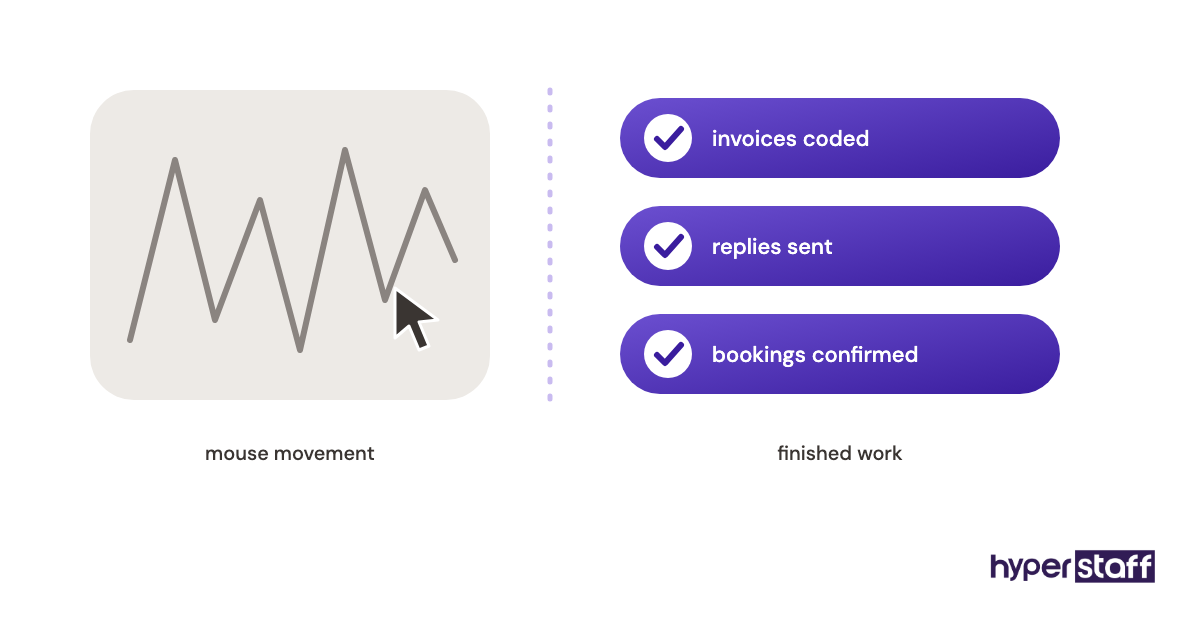
Asking whether a VA is worth it only gets a straight answer when you're measuring results. Hours logged can't settle it.
Time tracking still has a place for billing. A simple timer like Toggl or your bundle's hour log is enough, without screenshots every ten minutes.
Mistake #8: Keeping the VA on calendar and inbox work only
Plenty of owners picture a virtual assistant as someone who books meetings and clears email. In practice the role stretches to customer support, lead generation, digital marketing and operations management, as our explainer on what a small business VA is sets out.
Why the role stays small
- The job title sounds administrative
- Owners won't let anyone else near customers
- Revenue tasks feel too important to hand off
- Nobody revisits the role after month one
- The VA doesn't offer, because nobody asked
What a narrow role leaves on the table
Inbox work saves you time, but it rarely brings money in. Quote follow-ups, review requests and abandoned-cart emails are tasks a VA can run that touch revenue directly.
Owners who only delegate admin often file the VA under nice-to-have. Then cash gets tight and the role is the first thing cut.
Add one revenue task each quarter
Once the core lane runs without you, add one task closer to sales or customers. Our list of small business VA tasks sorts them by area so you can choose the next one.
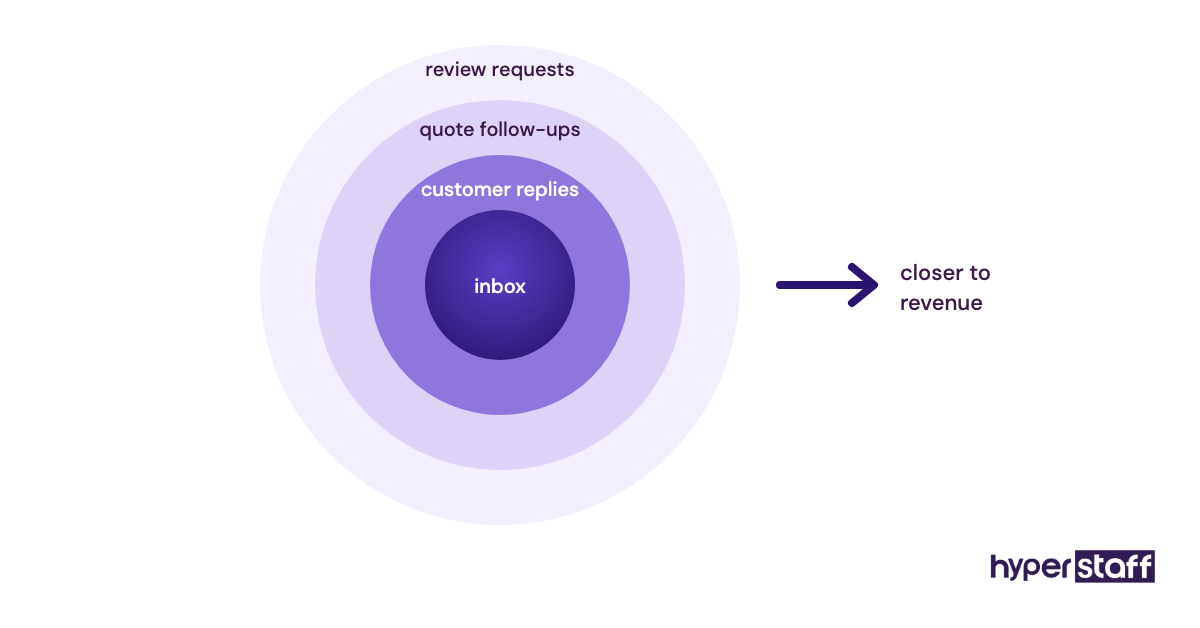
Start with work that follows a clear script, like following up on quotes after three days. Customer-facing tasks need written tone rules first, so budget about a week to set those up before the VA sends anything.
Mistake #9: Ignoring time zones and running without a check-in rhythm
A VA in Manila or Bogotá can be a real advantage, because work keeps moving while you sleep. Without overlap hours and a set check-in, the same gap turns into a day of lag on every question.
Why the time zone question gets skipped
- Price and skills get decided first
- Async sounds fine until something is urgent
- No rule exists for what counts as urgent
- Messages scatter across email, text and chat
What constant lag costs
A question sent at the end of the VA's shift can sit for 12 hours or more. Small blocks stack up, and the VA either waits or guesses.
Guessing is the worse outcome for anything a customer sees.
Set overlap hours and one channel
Agree on two to four hours of overlap each workday, even if the rest of the shift runs async. Keep work talk in one channel, usually Slack or Microsoft Teams, and leave email for outside contacts.
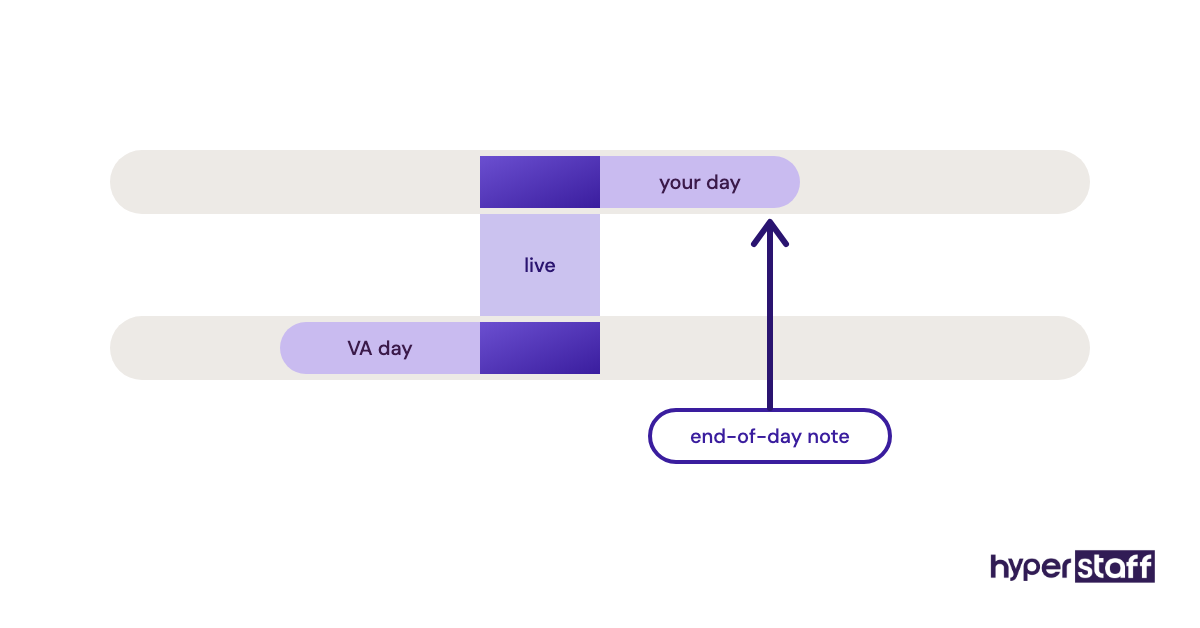
Ask for a short end-of-day note listing what got done and what's blocked. Region matters here: Latin America usually shares most of a US workday, while the Philippines and India often need a split or night shift to get real overlap.
Mistake #10: Judging the hire after two weeks
The first two weeks are the slowest a new VA will ever be. Owners who judge the arrangement then are really judging the setup period, before the VA has learned the business.
Why owners decide too early
- They expected an in-house pace from day one
- Training time feels like money lost
- Early mistakes stick in memory while early wins fade
- No milestones were set for the first 90 days
The cost of quitting at week two
You pay for the setup and leave right before the payoff. The next hire starts from zero, and the same ramp repeats.
A run of short hires can leave owners convinced remote help won't work for them. Most of the time the real culprit was the timeline.
Set 30, 60 and 90-day checkpoints
At 30 days, the core lane should run with light review. By 60 days the VA should spot problems before you do, and by 90 days you should be adding a second lane.
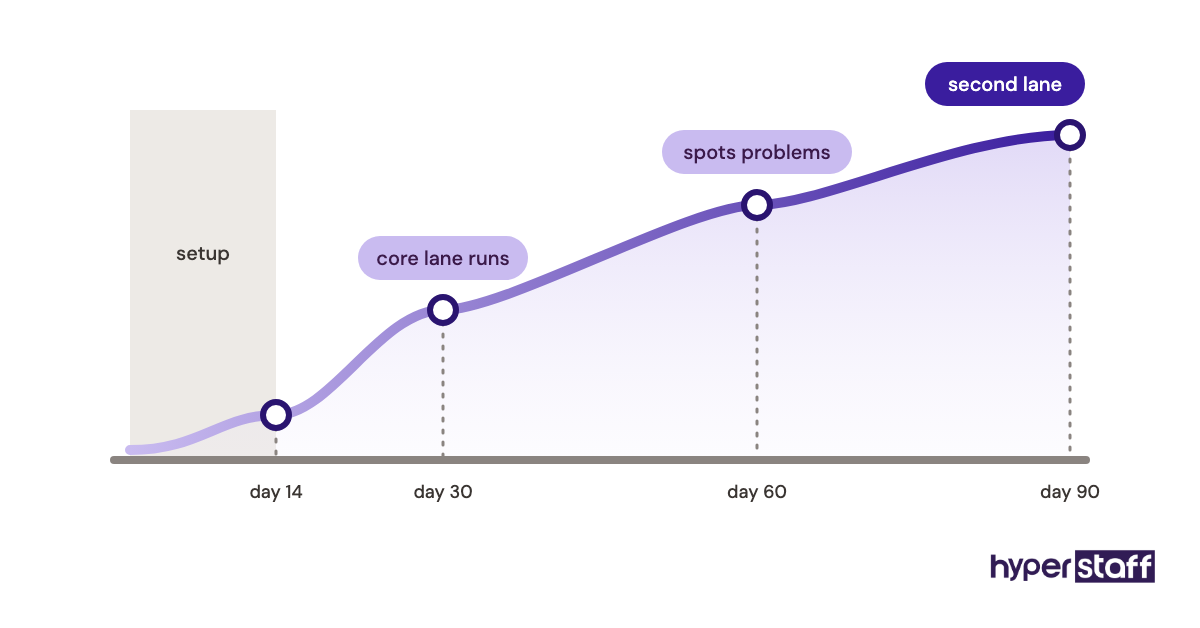
Act if the basics still aren't right at the 30-day mark, because patience has limits. With Hyperstaff, a free replacement arrives in 5 to 7 business days, briefed from your Operations Vault, so the new person starts with the full context.
Comparing a VA with an employee at the same 90-day point is the fair test. Our VA vs in-house comparison lays out where each option comes out ahead.
Disclaimer: This article is for general information only and is not legal, financial, security or employment advice. Results vary by business, so consult a qualified professional before making hiring or data-access decisions.
Common questions
What's the biggest mistake when hiring a VA for a small business?
Hiring without a defined role. A list of unrelated chores gives the VA nothing to master, so quality stays low and the person gets the blame.
How long should I give a new virtual assistant before deciding it's not working?
Give it 30 days for the core tasks and around 90 days for the full role. Act sooner if accuracy or communication on the basics is still off after the first month.
Should my VA have access to my business bank account?
View-only access is usually fine for reconciliation if your bank offers it. Keep payment approval with yourself or a partner, and store any shared logins in a password manager.
Is hiring a VA from a freelance marketplace a mistake?
It depends on how much screening you're willing to do yourself. Marketplaces can work, but vetting, trials and replacements all fall on you, while an agency takes those steps on.
Can a small business virtual assistant talk to my customers?
Yes, once tone rules and reply templates are written down. Start with low-risk replies like order status questions, then widen the scope after a few weeks of review.
Book a free 15 min call
We place a pre-vetted specialist in 5 business days, fully managed, from $3/hour.