Small Business Virtual Assistant vs In-House: Which One Fits Your Business?
A side-by-side look at a small business virtual assistant and an in-house hire, with real cost math and a clear verdict.
On this page
- What is the difference between a small business virtual assistant and an in-house hire?
- Key virtual assistant vs in-house terms you should know
- Small business virtual assistant vs in-house, side by side
- How does each hiring model work day to day?
- What types of remote and in-house support exist?
- How does a VA compare with freelancers, temps and part-timers?
- Virtual assistant vs freelancer
- Virtual assistant vs temp worker
- Virtual assistant vs part-time local employee
- What are the benefits and drawbacks of a virtual assistant?
- The benefits of a small business virtual assistant
- The drawbacks of a small business virtual assistant
- When does each option win?
- Virtual assistant vs in-house examples
- Good examples of choosing a virtual assistant
- Bad examples of choosing a virtual assistant
- How do you plan the hire, step by step?
- Step #1
- Step #2
- Step #3
- Step #4
- Step #5
- What does a good hybrid setup look like?
- Which tools does a remote assistant need?
- 9 proven tips for choosing between a VA and an in-house hire
- How do you overcome common virtual assistant challenges?
- How do you measure whether the hire is working?
- How long does a virtual assistant take to work?
- How much does a virtual assistant cost vs an in-house employee?
- Is a small business virtual assistant worth it over in-house?
- So which should a small business pick?
- How do you choose a virtual assistant agency?
- What do the numbers say about admin hiring costs?
- Can AI replace a virtual assistant or an in-house assistant?
- FAQs
Keep More Margin From Every Admin Hour
Hyperstaff places pre-vetted remote specialists who learn one business and stay with it, and our dedicated small business virtual assistants start from $3 an hour. We've placed 70+ assistants across 30+ clients, with talent in five regions, a placement in 5 business days and a free replacement if the fit is wrong.
What is the difference between a small business virtual assistant and an in-house hire?
A small business virtual assistant is a remote team member who does your admin, support, marketing or operations work from their own location, paid by the hour or in monthly blocks. An in-house hire does similar work from your premises, on your payroll, with benefits and equipment you supply.
The work itself overlaps more than most owners expect. If you want the full picture of what a virtual assistant does, it reaches well past inbox and calendar admin into customer support, lead generation, digital marketing and online business management.
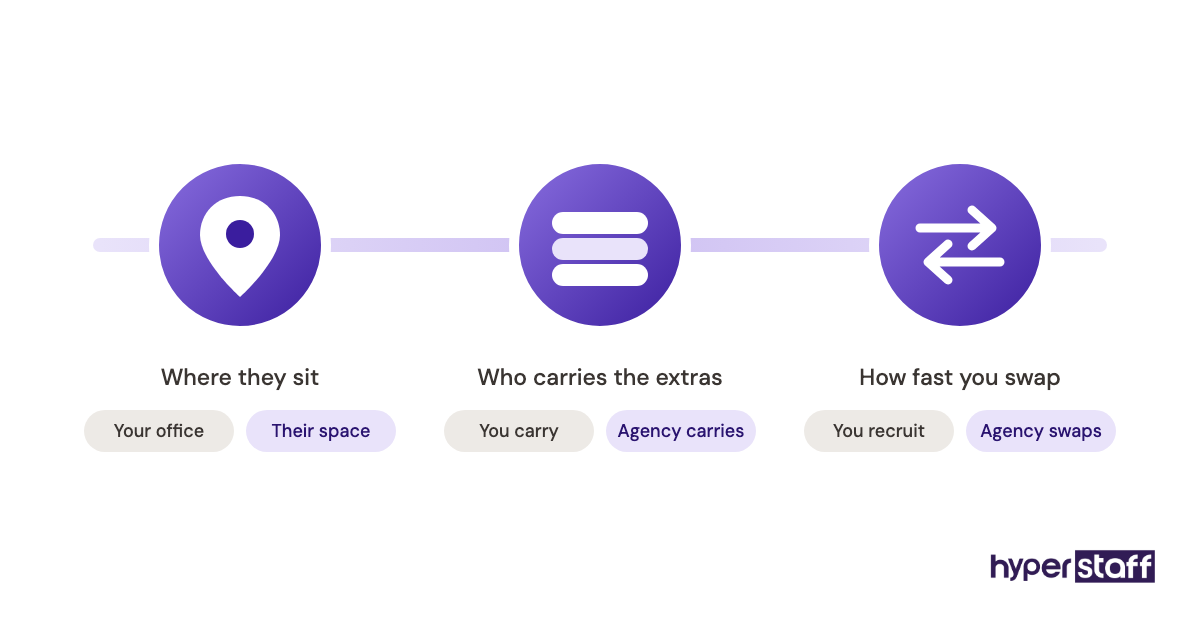
The real differences sit in three places: where the person sits, who carries the employment costs, and how fast you can replace them. Everything else in this comparison flows from those.
Key virtual assistant vs in-house terms you should know
- Dedicated assistant = one named person who works only on your business, as opposed to a shared pool.
- Fully loaded cost = wage plus benefits, payroll taxes, equipment, software and office space.
- Employer of record = the company legally responsible for payroll, tax and compliance for a worker.
- Hourly bundle = a prepaid monthly block of hours, such as 40, 80 or 160.
- Time-zone overlap = the hours both of you are working at the same time.
- SOP = standard operating procedure, a written how-to for a repeated task.
- Replacement window = how long it takes to swap in a new person if the first one leaves.
- Ramp-up period = the weeks before a new hire works without close supervision.
- Offshore staffing = hiring talent based in another country through an agency.
- Turnover cost = what you spend recruiting and training again when someone quits.
Small business virtual assistant vs in-house, side by side
A side-by-side view settles most of the decision before you get into edge cases. The figures below are typical ranges, and the in-house column assumes a US-based administrative hire.
| Factor | Virtual assistant | In-house employee |
|---|---|---|
| Typical hourly cost | $3 to $15+ offshore | About $23 median wage, before benefits |
| Benefits and payroll tax | Built into the rate | Roughly 30% of total compensation |
| Time to hire | Days to 2 weeks | 4 to 8 weeks is common |
| Hours | Part-time or full-time blocks | Usually full-time |
| Equipment | Their own | You buy it |
| Physical tasks | No | Yes |
| Replacement if it fails | Agency replaces | You recruit again |
| Best for | Screen-based, repeatable work | On-site, hands-on work |
How does each hiring model work day to day?
An in-house assistant works your office hours, sits near the team and picks up tasks by being present. A virtual assistant works through shared tools, written instructions and scheduled check-ins, so work moves through task boards and messages instead of hallway requests.
That gap shapes everything. In-house staff absorb context by overhearing it; a remote assistant only knows what is written down or said on a call.
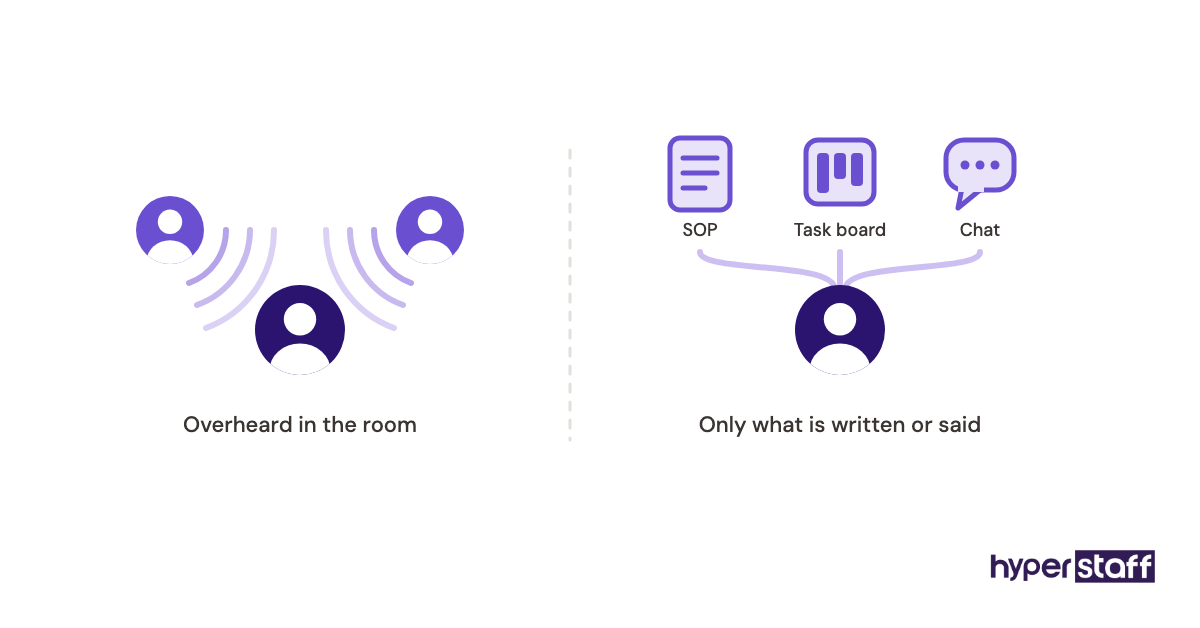
The written-process requirement is where remote setups succeed or stall. Owners who already keep notes on how they quote, invoice or answer support tickets get value within days, and owners who keep it all in their heads spend the first month explaining.
What types of remote and in-house support exist?
Support arrangements range from a full-time employee on site to a few hours a month from a freelancer. Most small businesses choose between five common forms, and each has a different cost, commitment and level of control.
| Form | Where they work | Commitment | Who manages payroll | Good fit for |
|---|---|---|---|---|
| Full-time in-house employee | Your office | Ongoing, 40 hours a week | You | Front desk, physical operations |
| Part-time local employee | Your office or hybrid | Ongoing, 15 to 30 hours | You | Steady but light on-site work |
| Dedicated agency virtual assistant | Remote | Monthly hour blocks | The agency | Ongoing admin, support, marketing |
| Freelance virtual assistant | Remote | Per project or hourly | The freelancer | One-off or overflow tasks |
| Temp from a local staffing firm | Your office | Weeks to months | The staffing firm | Leave cover, seasonal peaks |
How does a VA compare with freelancers, temps and part-timers?
A dedicated virtual assistant sits between a freelancer and an employee. You get one consistent person who learns your business, without carrying the employment costs yourself.
Virtual assistant vs freelancer
Freelancers from marketplaces like Upwork are flexible but split their time across several clients. Availability drops the week another client gets busy, and if they leave you start the search again with no backup.
Virtual assistant vs temp worker
A temp worker fits a short, on-site gap like parental leave cover. For ongoing work, the agency markup on local temps usually lands well above an offshore dedicated assistant, and the temp leaves just as they learn the job.
Virtual assistant vs part-time local employee
A part-time local hire still brings payroll, tax filings and scheduling rules, even at 20 hours a week. Pick the part-timer when someone needs to physically open mail, greet visitors or handle stock.
What are the benefits and drawbacks of a virtual assistant?
The benefits of a virtual assistant over an in-house hire mostly come down to cost, speed and flexibility. The drawbacks are real but narrower: no physical presence, a reliance on written process, and the need to manage across time zones.
The benefits of a small business virtual assistant
- A much lower hourly cost, with benefits and payroll handled by the agency
- Hours that scale up or down in monthly blocks
- No office space, desk or laptop to buy
- A wider talent pool across regions instead of one commuting radius
- Faster placement and a replacement if the fit fails
- Work that can continue after your office closes, thanks to time-zone spread
The drawbacks of a small business virtual assistant
- No physical tasks, such as mail, stock or reception
- Thin results if your processes live only in your head
- Less casual context from office conversations
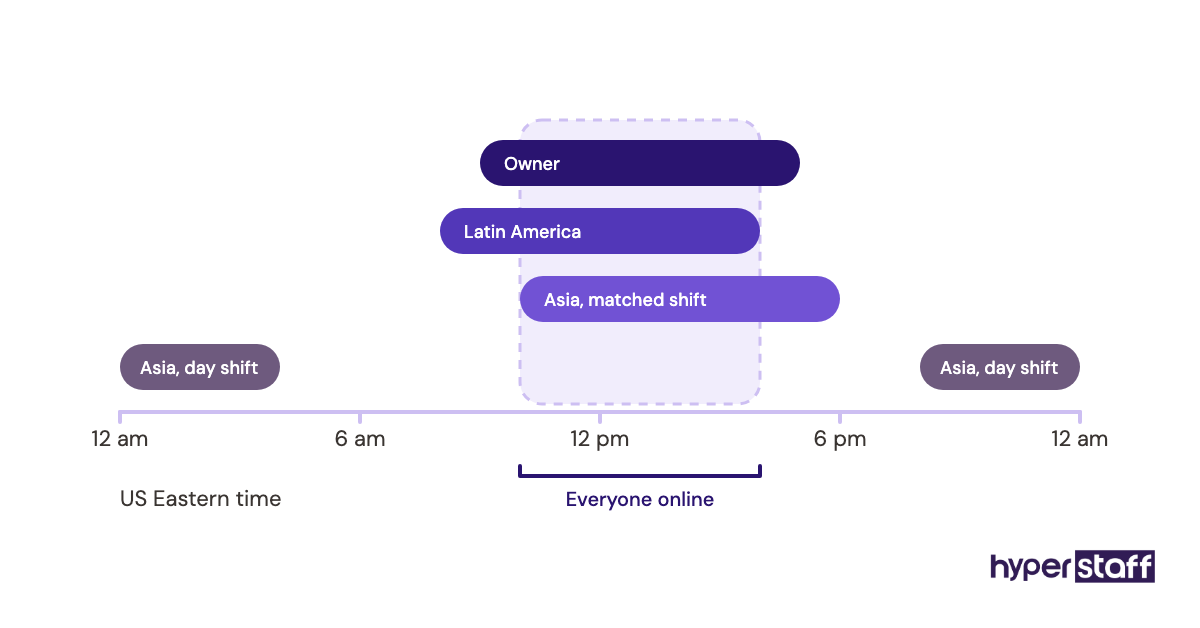
- Time-zone overlap that needs planning
When does each option win?
An in-house hire wins when the job needs hands or a face in the room. A virtual assistant wins whenever the work happens on a screen, which for most service businesses, online shops and agencies is the bulk of admin and support.
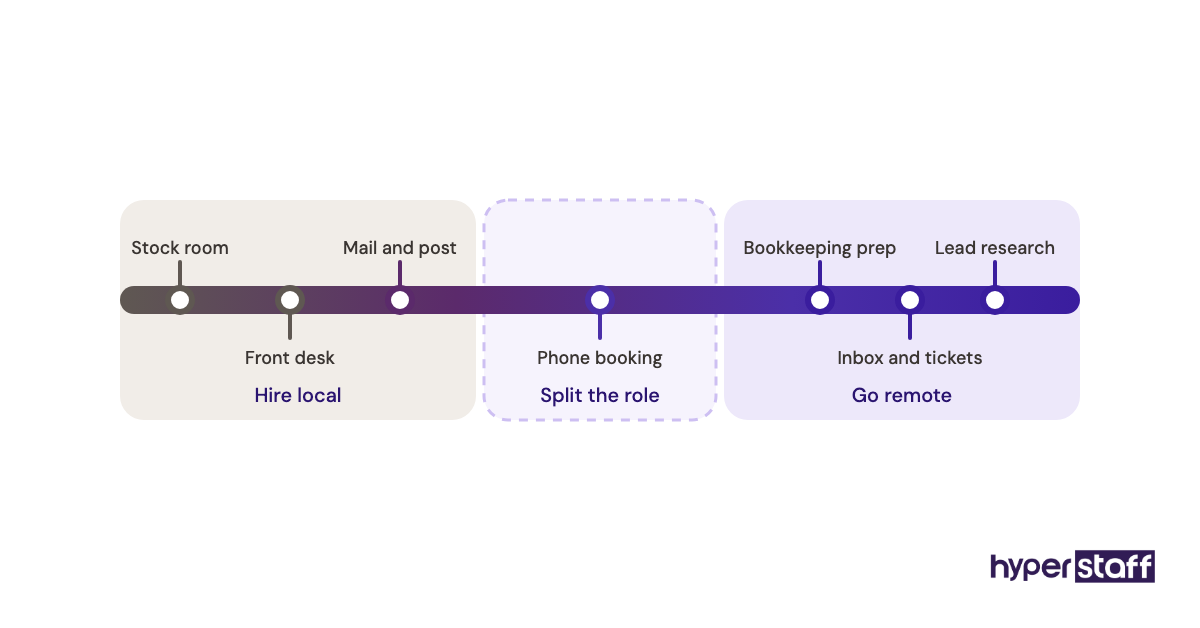
Practitioners genuinely disagree on the first hire. One camp says the first employee should be local so culture forms in person; the other says the first hire should be the cheapest way to buy back the owner's hours, and remote wins that on cost.
Our view leans remote for the first admin hire, with one condition: you need at least an hour a day to brief and review in the first two weeks. Owners who can't give that hour struggle with any hire, local or remote.
Virtual assistant vs in-house examples
The task mix decides which model works. These patterns come up again and again when owners compare the two options.
Good examples of choosing a virtual assistant
Inbox and support for an online store
Order questions, returns and shipping updates all happen in a helpdesk and email. A remote assistant in a different time zone can clear overnight tickets before the owner wakes up.
Lead research and CRM upkeep
Building prospect lists, cleaning duplicates and logging calls in a CRM is screen work with clear rules. It suits an assistant on an 80-hour monthly block.
Bookkeeping prep for a service firm
Matching receipts, chasing unpaid invoices and preparing records for an accountant needs accuracy more than presence. Shared accounting software keeps the trail visible.
Bad examples of choosing a virtual assistant
Front desk at a clinic or salon
Greeting walk-ins and taking payments at a counter needs a person on site. A remote assistant can run phone booking alongside, but cannot replace the desk.
Warehouse or stock handling
Packing orders and counting inventory are physical jobs. Remote help can manage the inventory system, while someone local still does the lifting.
A role with no written process and no time to write one
If the owner can't spare time to explain tasks, a remote hire stalls. An in-house person might pick things up by watching; a remote one has nothing to watch.
How do you plan the hire, step by step?
Planning the choice between a virtual assistant and an in-house hire takes five steps, and most owners can finish the first three in a single afternoon. The order matters, because each step feeds the next.
Step #1: List and sort the work
Write out every task you'd hand over and tag each as on-site or screen-based. A ready list of tasks to delegate saves you from missing the small recurring ones.
Step #2: Estimate the hours
Time the tasks over one normal week, then multiply by four. Owners usually guess low, so add a fifth on top before choosing 40, 80 or 160 hours.
Step #3: Define the role in writing
A clear role description stops scope arguments later. Use it to write a clear job description that names tools, hours and the skill level you need.
Step #4: Interview for the real work
Ask candidates to talk through a task you actually do, step by step. Our set of virtual assistant interview questions leans on that kind of practical prompt. When you're ready to move, the full guide to hiring a virtual assistant walks through each stage.
Step #5: Run a 30-day check
Set two or three measures before day one and review them at day 30. If they're off, fix the brief first, then the person.
What does a good hybrid setup look like?
A hybrid setup pairs one on-site person for physical work with a remote assistant for screen work. For many small businesses this beats either option alone, because each person spends their hours on the tasks only they can do.
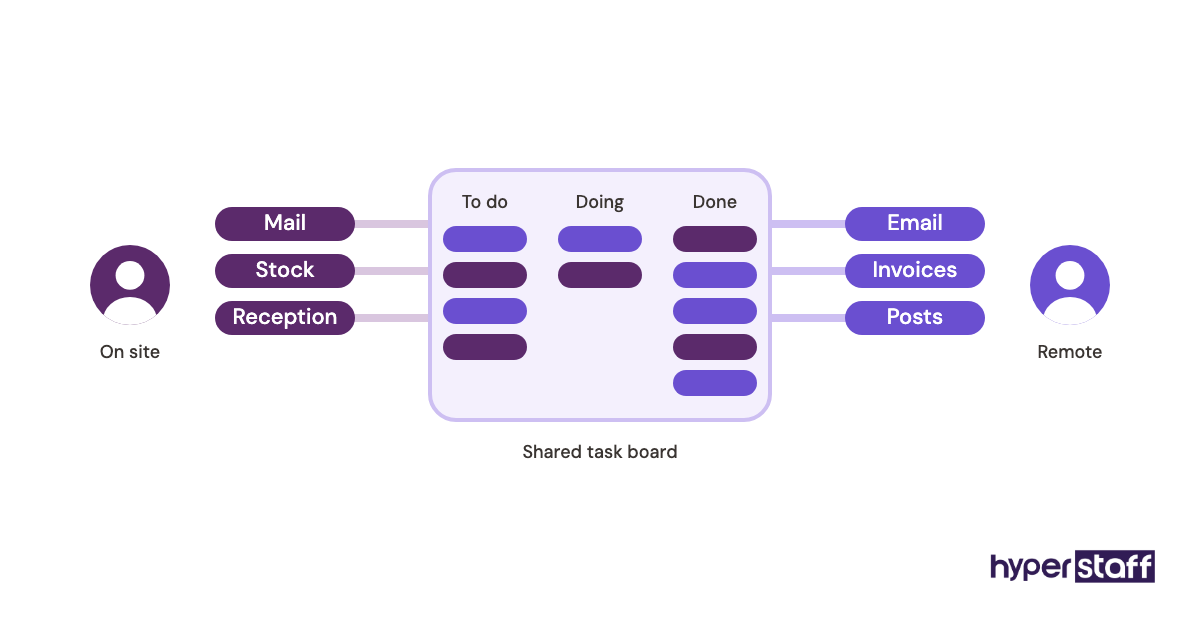
A typical split: the local hire runs reception and stock, while the virtual assistant takes email, scheduling, invoicing and social posts. The handoff point is a shared task board, so nothing depends on memory.
Which tools does a remote assistant need?
A remote assistant needs shared email and documents, a chat channel, a task manager and a password manager. Most small businesses already pay for some of these, so the extra cost is a seat or two.
- Google Workspace for shared email, calendar and documents, priced per user per month and varying by region
- Slack for daily chat, with a free plan and paid plans priced per user
- Asana for task boards, free for up to 2 users, with paid plans from $10.99 per user per month billed yearly
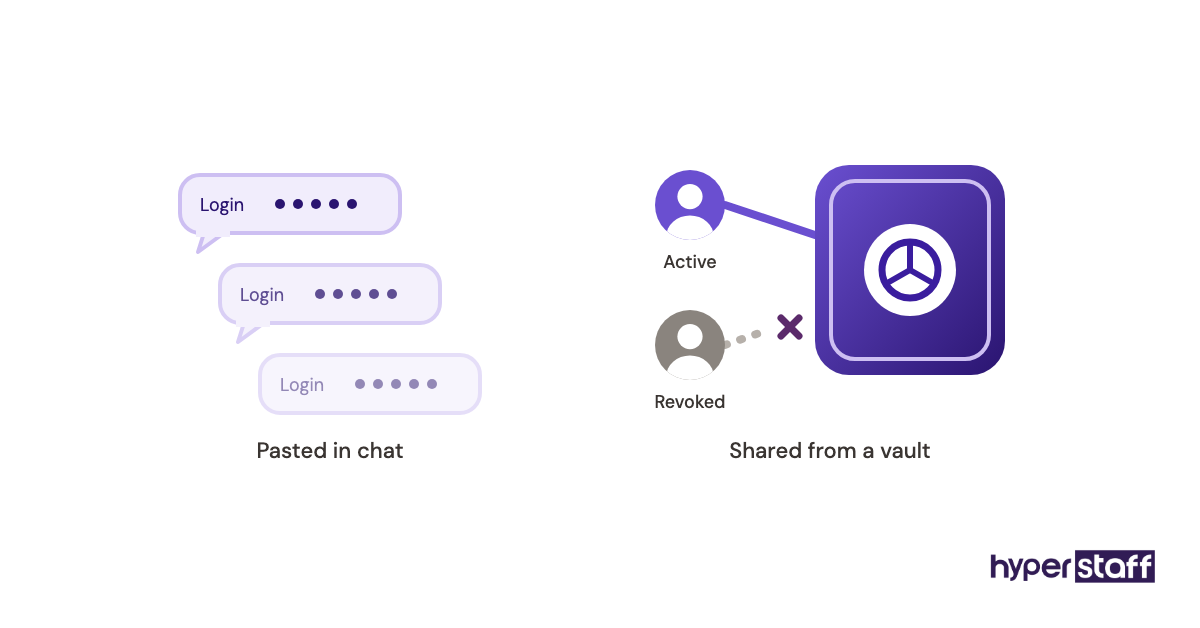
- 1Password for sharing logins without sending passwords in chat, with a Teams Starter Pack at $24.95 a month for up to 10 people
Our earned opinion: the password manager matters more than the task tool. Owners who paste logins into chat create a security cleanup job every time someone leaves. Our guide to virtual assistant tools goes deeper on each category.
9 proven tips for choosing between a VA and an in-house hire
These tips come from the patterns that decide whether either hire pays off.
- Sort tasks by on-site or screen-based before comparing prices.
- Compare fully loaded cost, never wage against hourly rate.
- Start remote work on a smaller hour block, then scale.
- Insist on a dedicated person rather than a rotating pool.
- Plan at least two hours of daily time-zone overlap.
- Write SOPs for the five tasks you repeat most.
- Use a password manager from day one.
- Ask what happens if the person leaves, and how fast.
- Review results at 30 days, not after a week.
How do you overcome common virtual assistant challenges?
Most virtual assistant problems trace back to unclear briefs, missing access or too little overlap time. Fix those three and the bulk of complaints go away.
Communication gaps show up first, usually as tasks done slightly wrong. A short daily check-in plus a written end-of-day update closes most of them within two weeks.
The second pattern is scope creep, where new tasks arrive without priorities. Our write-up of common virtual assistant mistakes lists the rest, and nearly all of them are owner-side.
How do you measure whether the hire is working?
Measure a virtual assistant or in-house hire by owner hours freed, task turnaround time and error rate. Pick two or three measures before day one so you're comparing against a baseline.
The simplest is owner hours: track how many hours a week you spend on admin before and after. If that number hasn't dropped by week four, something in the setup needs fixing.
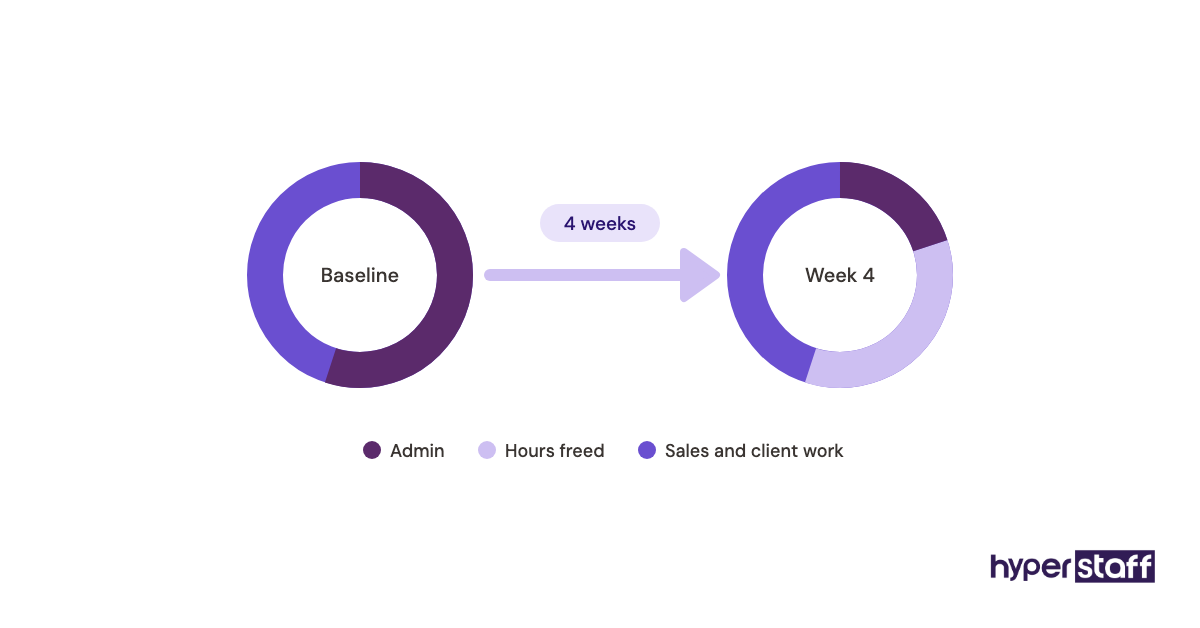
Revenue-side measures like response time to leads or overdue invoices collected tell you whether the freed time is turning into money.
How long does a virtual assistant take to work?
A virtual assistant usually handles simple tasks within the first few days and reaches steady, low-supervision output in three to six weeks. An in-house hire follows a similar curve after a longer recruiting stretch.
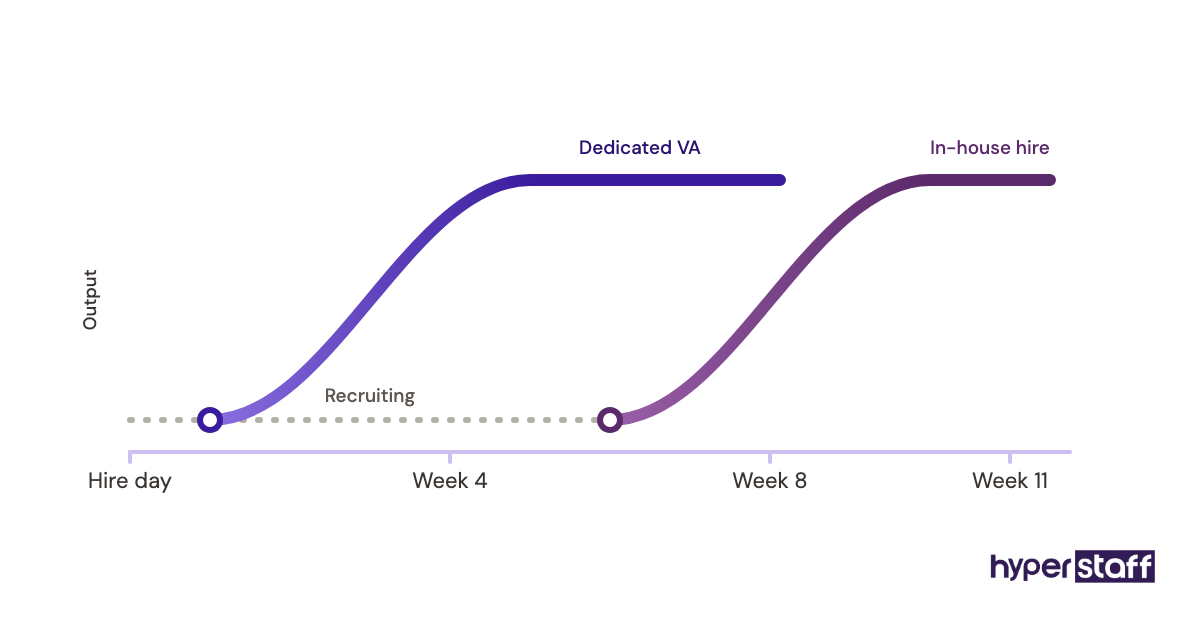
With us, placement takes 5 business days and work starts the day of the 30-minute kickoff call or the next morning. The slower part is your side: onboarding a virtual assistant well means sharing access, SOPs and examples early.
How much does a virtual assistant cost vs an in-house employee?
A full-time in-house administrative assistant in the US costs roughly $69,000 a year once benefits are added to the median wage, before hiring and equipment. A full-time Hyperstaff assistant at 160 hours a month costs from $5,760 to $23,040 a year depending on tier.
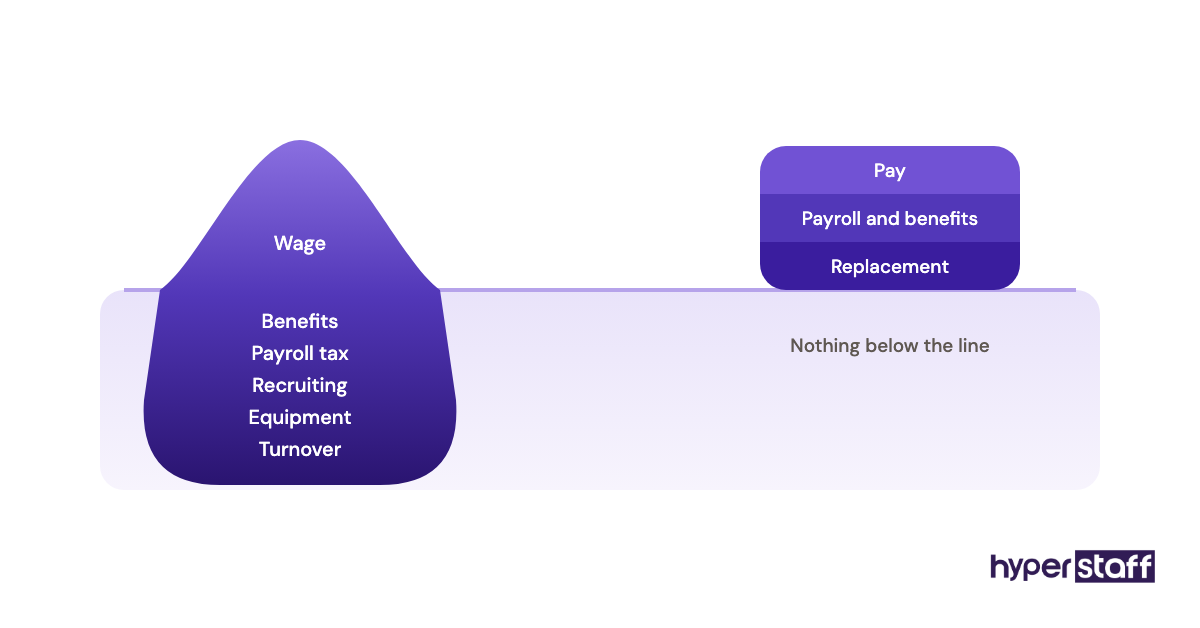
The US Bureau of Labor Statistics puts the median wage for secretaries and administrative assistants at $48,310 a year, or $23.23 an hour. In private industry, BLS employer cost data shows benefits at $13.68 per hour on top of $32.37 in wages, so benefits run close to 30% of total compensation.
| Cost item | In-house admin assistant (US) | Hyperstaff Essential | Hyperstaff Professional | Hyperstaff Expert |
|---|---|---|---|---|
| Experience | Varies | 0 to 2 years | 2 to 5 years | 5+ years |
| Hourly rate | About $23 median wage | From $3 | From $6 | From $12 |
| Monthly, full-time | About $4,025 wage | From $480 | From $960 | From $1,920 |
| Benefits and payroll tax | Roughly 30% of total pay | Included | Included | Included |
| Recruiting cost | Often a few thousand dollars | None extra | None extra | None extra |
| Equipment and desk | $1,000 to $3,000 to start | None | None | None |
| Yearly estimate | About $69,000+ | From $5,760 | From $11,520 | From $23,040 |
Paying quarterly saves 10% on Hyperstaff rates. For a deeper breakdown by tier and hours, see our full virtual assistant cost breakdown.
Important: Our prices above are starting averages, not fixed quotes. Your final cost depends on the tier, hours and type of work your business needs.
Is a small business virtual assistant worth it over in-house?
Yes, for screen-based work a virtual assistant is one of the highest-return hires a small business can make, because it frees the owner's most expensive hours at a fraction of in-house cost. The return depends on handing over real work and briefing it well.
Here's an example calculation. A Professional-tier assistant at 160 hours a month costs from $960, or $864 with quarterly billing.
The in-house equivalent at the BLS median wage is about $4,025 a month in wages alone, and close to $5,750 once benefits are counted. That's a monthly gap of roughly $4,800, or around $57,000 a year, before recruiting or equipment.
The bigger number is the owner's time. If 80 freed hours a month go into sales or client work, even a modest value on those hours dwarfs the assistant's cost, and our guide on whether a VA is worth it works through that math in more detail.
So which should a small business pick?
Pick a virtual assistant if most of the work happens on a screen, and pick an in-house hire if most of it needs hands or a face on site. When the work splits both ways, hire locally for the physical part only and put everything else with a remote assistant.
For a business under 20 people with no front desk, our verdict is remote first. The cost gap is too large to ignore, and the documentation you write along the way makes every later hire easier.
How do you choose a virtual assistant agency?
Choose a virtual assistant agency by checking whether you get one dedicated person, how vetting works, what replacement terms look like and who manages the relationship. Price matters, but a cheap rate with a rotating pool costs more in rework.
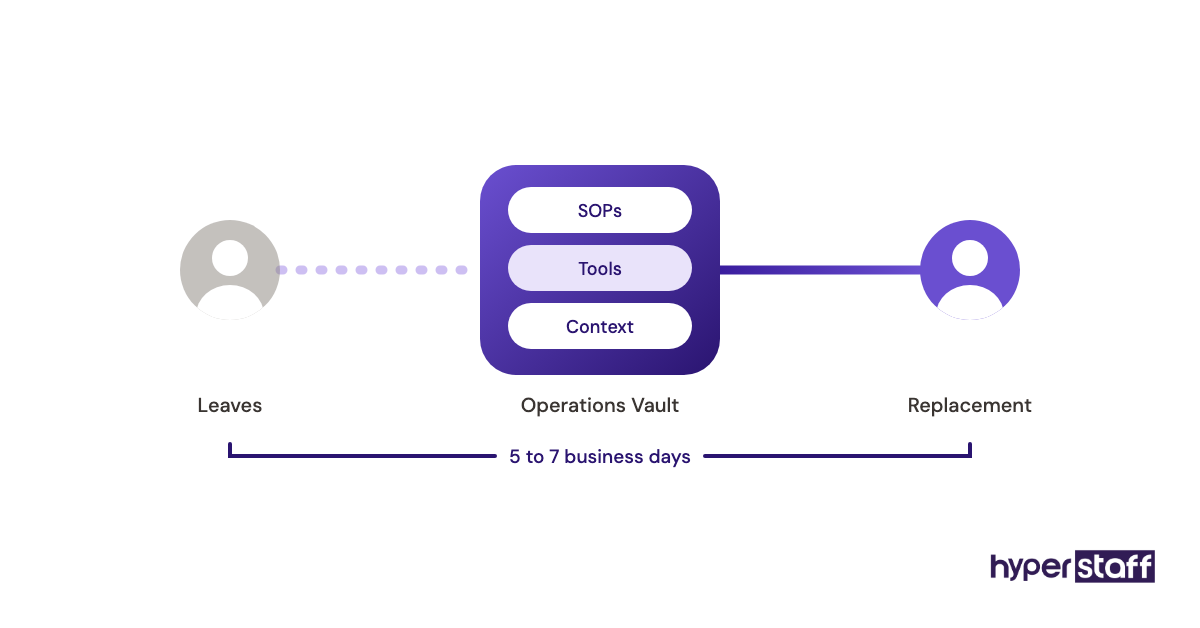
Ask each agency these questions before signing:
- Is the assistant dedicated to my business alone?
- How fast can you replace someone, and is it free?
- Who keeps my SOPs if the assistant changes?
- Do I get a named account manager?
- Can I change my hour block month to month?
What do the numbers say about admin hiring costs?
Admin hiring costs in the US keep rising with wages and benefits. The BLS median pay for administrative assistants sits at $23.23 an hour, and benefits add close to 30% on top in private industry.
Two trends stand out from our side of the market. More small firms now split roles, keeping one local person and moving screen work remote, and more owners ask for specialists in support or marketing instead of a generalist who does a bit of everything.
We're less certain where rates go next. Offshore pay in the Philippines, Latin America and India has crept up for experienced talent, while entry-level rates have stayed fairly flat.
Can AI replace a virtual assistant or an in-house assistant?
AI can draft emails, summarize calls and sort data, but it can't own a task end to end inside your business. A human assistant who uses AI tools gets more done per hour, which widens the cost gap with an in-house hire doing the same work manually.
In practice, AI shifts what a virtual assistant spends time on. Less typing, more checking, and more of the judgment calls that tools still get wrong, like a refund request with a tricky backstory.
Disclaimer: This article is for general information only and is not legal, tax, financial or employment advice. Costs, wages and tool prices change and vary by location. Check figures with the original sources and speak to a qualified advisor before making hiring decisions.
Common questions
Can a virtual assistant work my office hours?
Yes, many do. Assistants in Latin America share most US business hours, while assistants in Asia often work an evening or night shift to match yours. Agree on the overlap before placement.
Is my data safe with a remote assistant?
It can be as safe as with an in-house hire if you set it up well. Use a password manager, give each person their own login, and remove access the day someone leaves.
Do I have to pay taxes or benefits for a virtual assistant?
Not when you hire through an agency, because the agency pays its own talent. You pay the hourly or bundle rate, and the agency carries payroll and compliance on its side.
Can I switch from a virtual assistant to an in-house hire later?
You can, and the move is easier than going the other way. The SOPs your remote assistant used become the training material for the new in-house person.
Is a part-time virtual assistant better than a part-time employee?
For screen-based work, usually yes. A 40-hour or 80-hour monthly block costs far less than a local part-timer and skips payroll setup, though a part-time employee still wins for on-site tasks.
Book a free 15 min call
We place a pre-vetted specialist in 5 business days, fully managed, from $3/hour.