What Is a Small Business Virtual Assistant?
A small business virtual assistant is a remote specialist who takes over recurring admin, support, sales or operations work for a small team.
On this page
- What Is a Small Business Virtual Assistant?
- Key Small Business VA Terms You Should Know
- Why Does a Small Business Virtual Assistant Matter?
- How Does a Small Business Virtual Assistant Work?
- Types of Small Business Virtual Assistants
- How a Small Business VA Differs From Related Roles
- Small Business VA vs. In-House Office Assistant
- Small Business VA vs. Marketplace Freelancer
- Small Business VA vs. AI Assistant Tools
- What Are the Benefits of a Small Business Virtual Assistant?
- What Are the Drawbacks of a Small Business Virtual Assistant?
- Who Needs a Small Business Virtual Assistant?
- Small Business Virtual Assistant Examples
- Small Business VA Good Examples
- Small Business VA Bad Examples
- Creating a Small Business Virtual Assistant Plan, Step-by-Step
- Step #1
- Step #2
- Step #3
- Step #4
- Step #5
- What Does an Effective Small Business VA Strategy Look Like?
- Small Business Virtual Assistant Tools and Software
- 9 Proven Small Business VA Tips and Best Practices
- Overcoming Common Small Business VA Challenges
- How Do You Measure Small Business VA Success?
- How Long Does a Small Business VA Take to Work?
- How Much Does a Small Business Virtual Assistant Cost?
- Is a Small Business Virtual Assistant Worth It?
- How to Choose a Small Business Virtual Assistant Agency
- Small Business VA Statistics, Trends and Future Predictions
- Small Business Virtual Assistants and AI
- FAQs
Turn Admin Hours Into Revenue Hours
Hyperstaff places pre-vetted remote specialists inside small businesses, one dedicated person per role, and we've placed 70+ virtual assistants across 30+ clients with talent in five regions and rates from $3/hour. Our small business virtual assistant services match you with a specialist in five business days, and it starts with a free discovery call.
What Is a Small Business Virtual Assistant?
A small business virtual assistant is a remote worker who takes over recurring business tasks for a company too small to justify a full in-house support team. They work from their own location, log into your tools, and report to the owner or a manager on a set schedule.
The role reaches well past inbox and calendar admin. A small business VA can run a customer support queue, qualify leads, schedule social posts, match receipts or chase suppliers, and the full range is laid out in our list of small business virtual assistant tasks.
The market splits two ways. Freelance VAs juggle several clients at once, while a dedicated VA works one schedule for one company and builds context about it week after week.
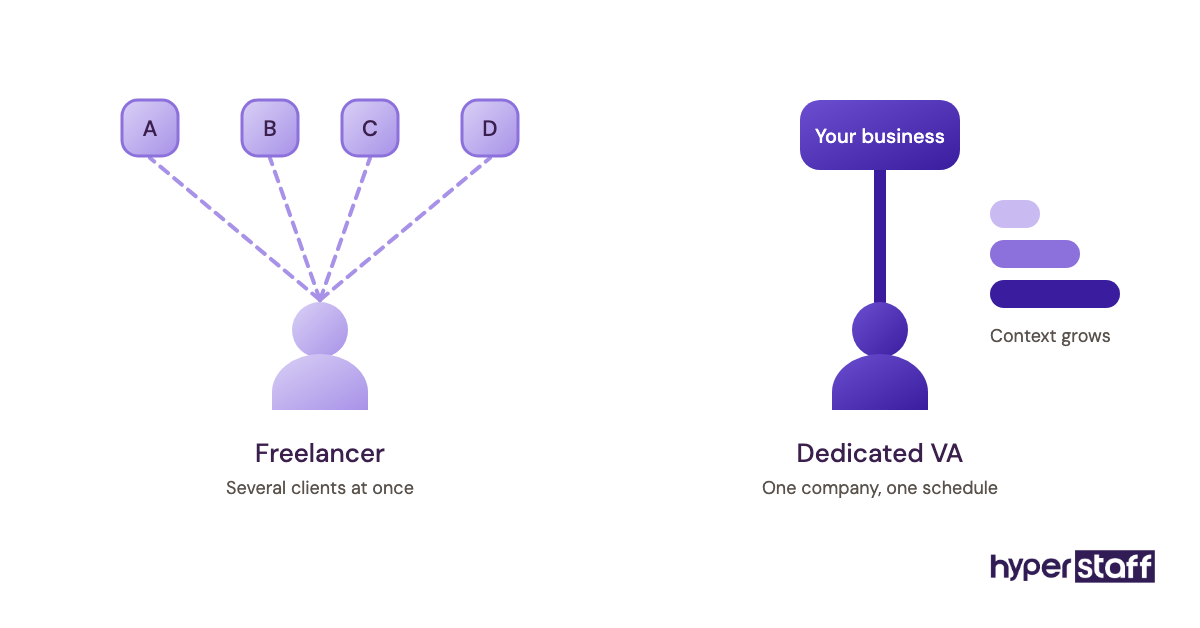
We think the dedicated version is the one worth paying for. Context is what you're buying: a VA who knows your pricing exceptions and your most demanding customers saves more time than a faster typist who has to ask about both.
Key Small Business VA Terms You Should Know
- Virtual assistant (VA) = a remote worker who performs admin, support, sales or operations tasks for a business from their own location.
- Dedicated VA = a VA assigned to one client's hours and accounts, as opposed to a shared pool.
- Offshore staffing = hiring talent based in another country, often where living costs are lower.
- Nearshore = offshore talent in a time zone close to yours, such as Latin America for US companies.
- SOP = standard operating procedure, a written step-by-step instruction for a recurring task.
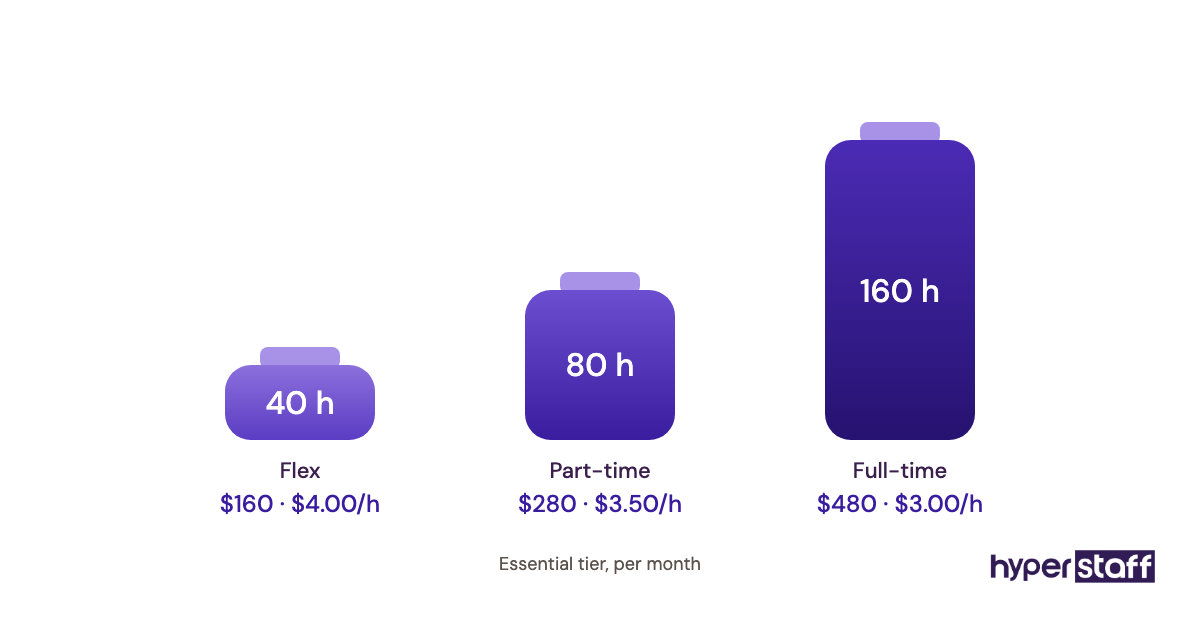
- Hour bundle = a prepaid block of monthly hours, commonly 40, 80 or 160.
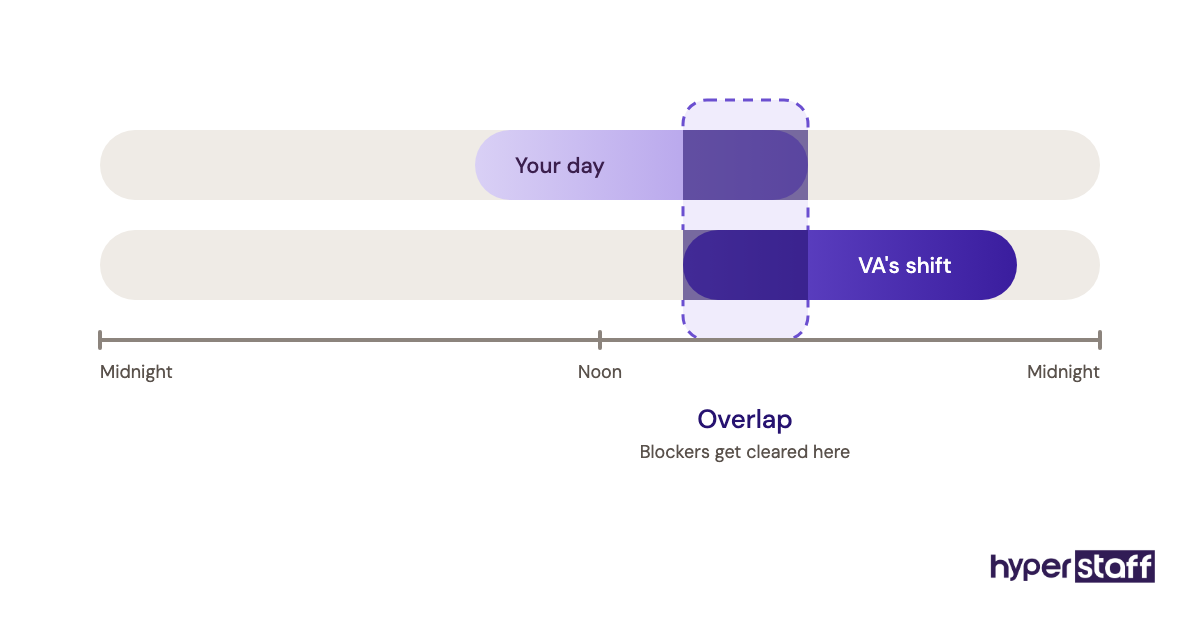
- Time zone overlap = the hours both you and your VA are online at once.
- Replacement guarantee = an agency's promise to supply a new VA if the first one isn't a fit.
- Worker classification = whether the VA is an independent contractor or engaged through an agency, which decides who handles their pay and tax paperwork.
- Access management = controlling which logins and data a VA can reach, usually through a password manager.
- Online business manager (OBM) = a senior VA who owns operations, projects and the workflows of other team members.
Why Does a Small Business Virtual Assistant Matter?
A small business virtual assistant matters because in a company of a handful of people, admin work lands on whoever is left, and that's often the owner. Handing it to a specialist frees the most expensive hours in the business.
Cost matters as well. The US Bureau of Labor Statistics puts the median pay for administrative assistants at $48,310 a year, and benefits account for about 31% of what employers spend on compensation.
A remote specialist changes that math for a small team. Part-time hours become possible, which matters more than the hourly rate when the real workload is 15 hours a week.
Documentation is a less obvious gain. Once your tasks are written down for someone else, the business depends less on the owner's memory, and those documents keep their value even if the VA moves on.
How Does a Small Business Virtual Assistant Work?
A small business virtual assistant works through shared software. They log into your email, CRM, help desk or accounting tool with their own credentials, complete tasks from a written list, and report progress in a chat channel or a weekly call.
Hiring through an agency follows a fairly fixed sequence: discovery call, role definition, matching, a short kickoff, then live work. The agency handles vetting, pay and replacements.
At Hyperstaff, placement takes five business days. After a 30-minute kickoff call, the specialist starts that day or the next morning, and a dedicated account manager stays on the account.
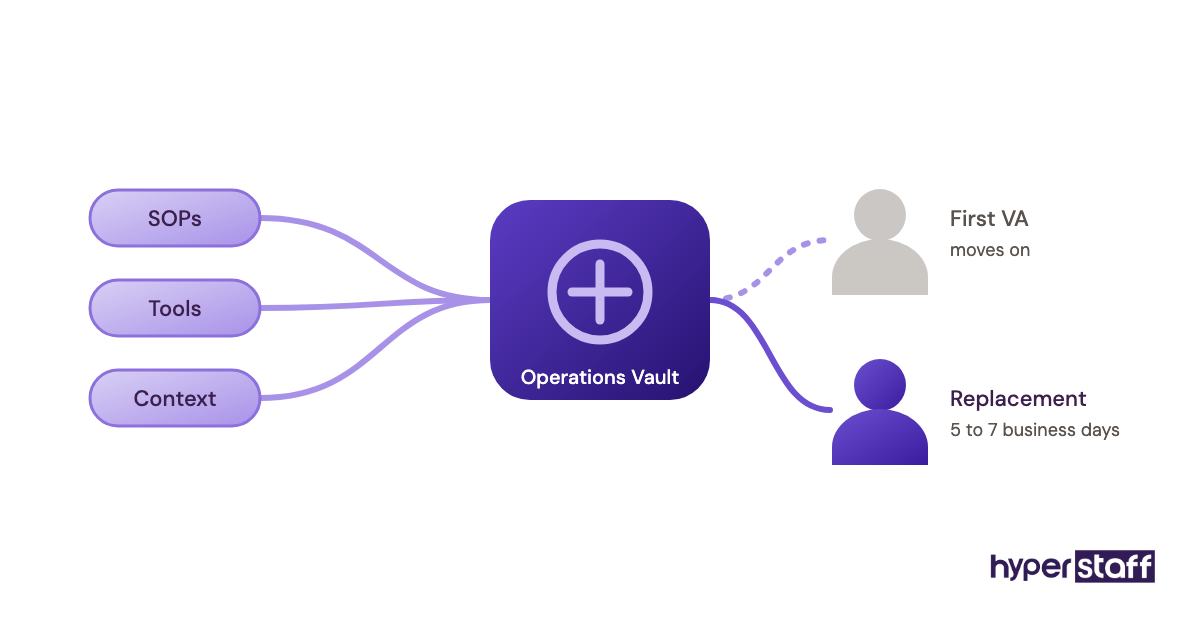
Most guides skip the documentation. Our Operations Vault holds your SOPs, tools and context, written down and maintained for you, so if a replacement is ever needed, they're briefed from the same file within 5 to 7 business days.
Types of Small Business Virtual Assistants
Small business virtual assistants fall into about eight types, sorted by the work they own. Most small firms start with one general admin or support role, then add a specialist once volume justifies it.
| Type | Common tasks | Good fit when | Usual starting tier |
|---|---|---|---|
| Admin assistant | Inbox triage, scheduling, data entry, document prep | The owner spends hours a day on email and calendar | Essential |
| Customer support VA | Email and chat replies, order questions, returns | Ticket volume is steady and replies follow patterns | Essential or Professional |
| Lead generation VA | Prospect research, list building, CRM updates, outreach | Sales depends on a steady pipeline of new contacts | Professional |
| Bookkeeping support VA | Receipt matching, invoicing, payment follow-ups | An accountant reviews the books but needs clean inputs | Professional |
| Digital marketing VA | Social scheduling, newsletters, basic graphics, reporting | Content exists but publishing keeps slipping | Professional |
| E-commerce VA | Product listings, inventory updates, order processing | A store runs on Shopify, Amazon or similar platforms | Essential or Professional |
| Recruiting coordinator VA | Job posts, applicant screening, interview scheduling | Hiring happens several times a year | Professional |
| Online business manager | Process design, project tracking, managing other VAs | Two or more VAs need one point of coordination | Expert |
Blended roles are common in a first hire. A VA splitting time between inbox triage and social posting works at 80 hours a month, but past that the two jobs start competing for the same morning.
How a Small Business VA Differs From Related Roles
A small business VA differs from related roles mainly in commitment and context: one person, working remotely, learning your business over time. These are the comparisons owners weigh most often.
Small Business VA vs. In-House Office Assistant
An in-house assistant sits in your office, works your hours and costs a full salary plus benefits. A VA works remotely and can start at 40 hours a month, and when you hire through an agency you take on no payroll setup or equipment cost.
In-house still wins for physical work like signing for deliveries or staffing a front desk. We break down the full trade-off in our virtual assistant vs in-house comparison.
Small Business VA vs. Marketplace Freelancer
A marketplace freelancer bills per task or per hour and often serves several clients at once. For a one-off project, such as cleaning up a spreadsheet or designing a flyer, that's often the right call.
Recurring work is where it breaks down. Availability shifts as a freelancer's client list changes, and nobody replaces them if they disappear mid-month.
Small Business VA vs. AI Assistant Tools
AI assistants like ChatGPT or Gemini draft emails, summarize calls and sort data in seconds. What they lack is ownership: no AI tool will notice that a supplier slipped a price increase into an invoice or that a client's card has bounced twice.
In practice the two stack. A capable VA uses AI to finish routine drafts faster, and you're paying for the judgment and follow-through around them.
What Are the Benefits of a Small Business Virtual Assistant?
The biggest benefit of a small business virtual assistant is paying for exactly the hours your workload needs, from someone who already has the skills. These are the gains owners notice first.
- Lower cost per hour, with no benefits, desk or equipment to fund
- Flexible hours, from a 40-hour monthly bundle up to full time
- Skills your local market prices out of reach, such as CRM admin or bookkeeping support
- Coverage across time zones, so inquiries get answered outside your own working day
- Written processes that stay with the business after any one person leaves
- Faster hiring than a local search, measured in days
What Are the Drawbacks of a Small Business Virtual Assistant?
The drawbacks of a small business virtual assistant come down to distance and setup effort. None of them is a deal-breaker, but each one needs a plan before day one.
- Onboarding takes owner time, usually a few hours of documentation in week one
- Limited live overlap if you hire in a region far from your time zone
- Security risk when logins are shared carelessly
- No physical presence for mail, deliveries or in-person meetings
Who Needs a Small Business Virtual Assistant?
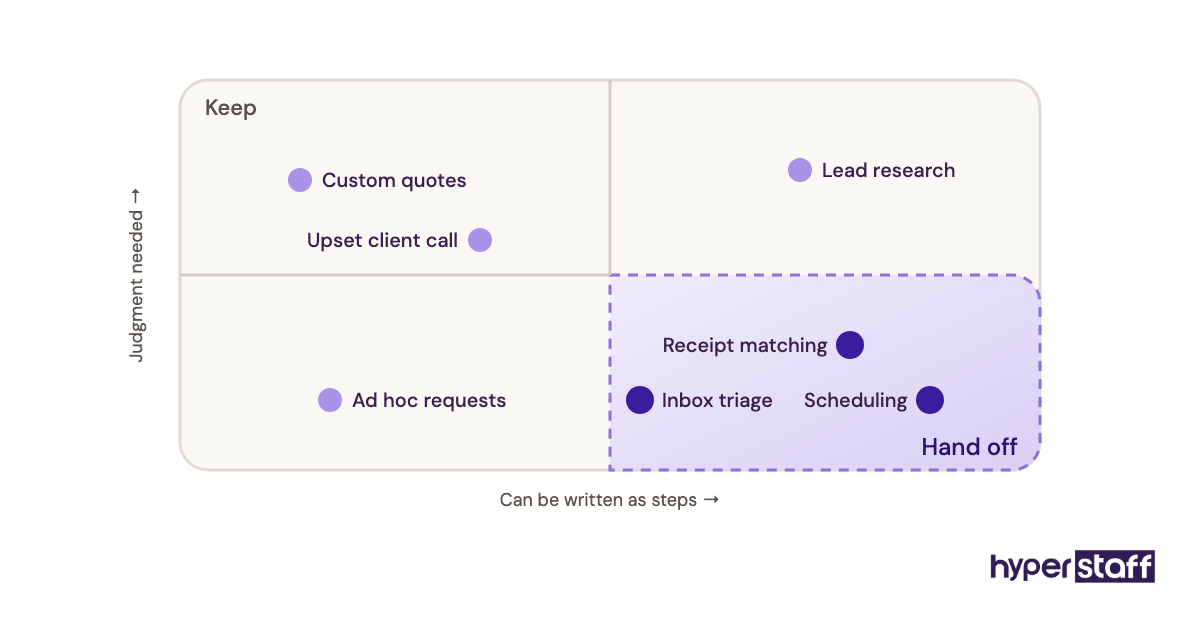
A small business virtual assistant suits owners and small teams whose recurring, computer-based tasks add up to roughly 10 hours a week or more. Below that line, a good app or a freelancer is usually cheaper.
Typical fits include service businesses with heavy email and scheduling volume, online stores fielding order questions, agencies with weekly client reporting, and professional practices like bookkeeping firms or real estate teams. What they share is repeatable work that can be written down.
Poor fits matter just as much. If the work changes every day and nobody could describe it in a checklist, a VA will struggle, and so will the person managing them.
Small Business Virtual Assistant Examples
Small business virtual assistant setups succeed or fail on a short list of conditions: clear scope, written steps and a fixed check-in. The patterns below show how each plays out.
Small Business VA Good Examples
A Support VA Working From a Reply Library
The VA handles first-line customer email using saved replies the owner approved in week one. Refund requests above a set amount go to the owner, flagged in a shared channel.
It works because the decision rules are written. The VA spends judgment on tone and speed, and the owner only sees exceptions.
A Lead Research VA With a Defined Target
The owner describes the ideal customer in one paragraph: industry, company size, location and the job title that signs contracts. The VA builds and verifies contacts in the CRM each week, and the owner spot-checks 20 records every Friday.
An Operations VA Owning Month-End Admin
Invoices, receipt matching and supplier follow-ups run from a dated checklist. The VA prepares everything, the owner or accountant approves, and nothing moves money without a second pair of eyes.
Small Business VA Bad Examples
These failures repeat often enough that we cover them in detail in our guide to common small business VA mistakes.
The "Do Whatever Comes Up" Hire
The VA starts with no task list and waits for instructions that arrive in bursts. A month later the owner decides VAs don't work, when the missing piece was a scope.
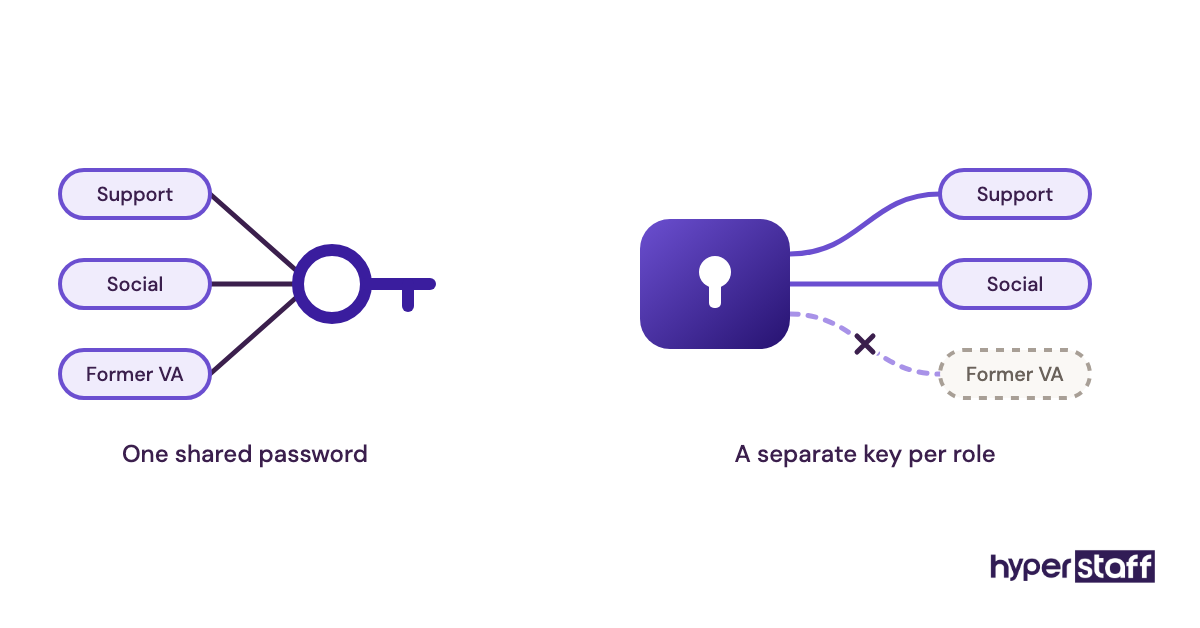
One Master Password Shared in Chat
Logins get pasted into a chat thread, and nobody can revoke access cleanly later. A password manager with per-person access fixes this in an afternoon.
An Expert Hired for Data Entry
An owner pays senior rates for copy-paste work, then gets frustrated when the VA pushes for more strategic tasks. Matching the experience tier to the task keeps the cost sensible and the VA engaged.
Creating a Small Business Virtual Assistant Plan, Step-by-Step
A small business VA plan has five stages: audit the work, write the role, pick a hiring route, onboard with context, and review on a schedule. Rushing the audit causes most of the trouble later.
Step #1: Audit Where Your Hours Go
Track every task for one working week, with rough minutes beside each. Mark the ones that recur, follow rules and happen on a computer.
Those marked tasks are your first job scope. The list is usually longer than the owner guessed.
Step #2: Write the Role Down
Turn the audit into a short scope covering tasks, tools, weekly hours, overlap window and how success gets measured. Our small business VA job description template is a fair starting point.
Step #3: Pick a Hiring Route and Vet Properly
An agency, a marketplace or a direct hire each change who does the vetting and who covers you if it goes wrong. The full comparison sits in our guide on how to hire a small business VA.
Whichever route you choose, run a short paid test task. Scenario-based VA interview questions reveal judgment far better than a résumé does.
Step #4: Onboard With Written Context
Grant access through a password manager, share an SOP or screen recording for each recurring task, and name the channel for questions. A structured first fortnight matters more than the hire itself, so we wrote a full guide to onboarding a small business VA.
Step #5: Review Weekly, Then Expand
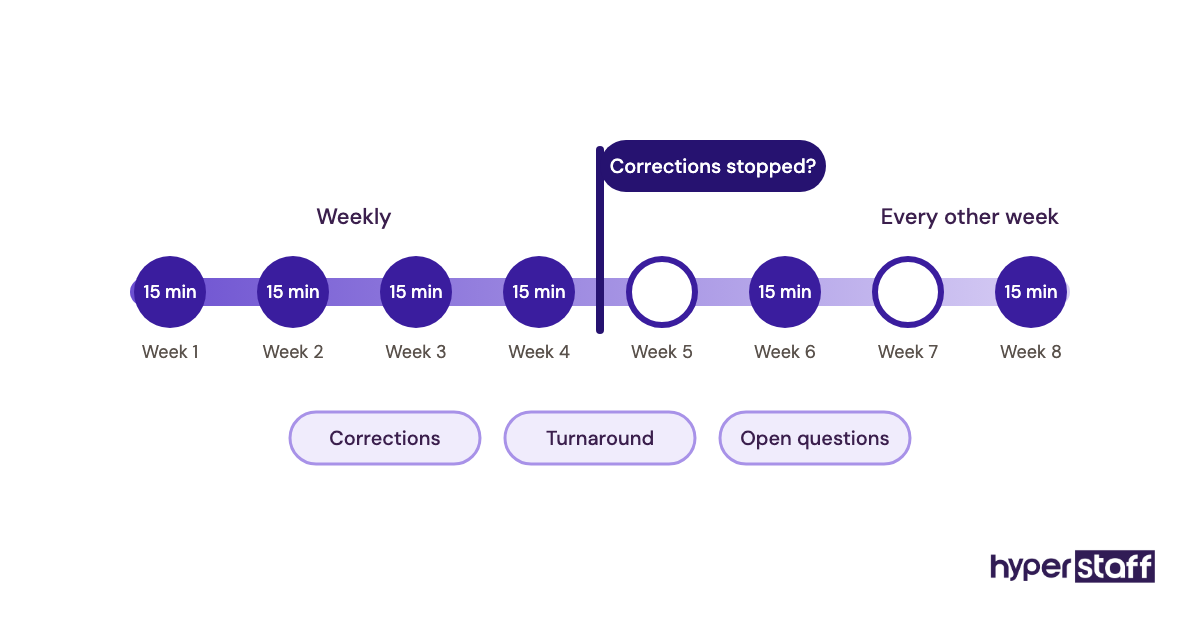
Hold a 15-minute check-in every week for the first month, then move to every other week. Add new tasks only once the current ones run without corrections.
What Does an Effective Small Business VA Strategy Look Like?
An effective small business VA strategy treats the role as a permanent seat with a growing scope, held by one person who keeps learning the business. Hours start small and rise as documentation and trust build.
Owners and agencies genuinely disagree on how to begin. One camp starts with a narrow, single-function role and expands slowly, and the other hires a generalist and lets the role find its shape.
We side with narrow first. A generalist with no anchor task tends to drift between requests, while a VA who owns one function well earns the next one with evidence.
Time zone is the other strategic call. Latin America overlaps most of the US working day, Philippine VAs commonly work US hours on a night shift, and Eastern Europe lines up best with UK and EU businesses.
Small Business Virtual Assistant Tools and Software
Small business virtual assistant tools cover communication, task tracking, documents, password security and time tracking. Our roundup of the best small business VA tools goes deeper, and the list prices below come from each vendor and change often.
| Tool | Job | Free plan | Paid price (USD) |
|---|---|---|---|
| Google Workspace | Email, docs, calendar | Trial only | About $7 to $14 per user/month (Starter to Standard, annual) |
| Slack | Team chat | Yes | $7.25 to $8.75 per user/month (Pro) |
| Asana | Task tracking | Yes | About $11 to $13.50 per user/month (Starter) |
| 1Password | Password sharing | No | $24.95/month for up to 10 users, or $8.99 per user/month (Business) |
| Loom | Screen-recorded SOPs | Yes | About $15 to $18 per user/month (Business) |
| Hubstaff | Time tracking | One seat | About $5 to $9 per seat/month |
The password manager and the screen recorder pay off fastest. A two-minute recording of a task replaces a page of written steps, and per-person vault access means offboarding takes minutes.
Screenshot-based time tracking is a real debate. Some owners want it as billing proof, but with an experienced VA we find it erodes trust, and agreed output targets measure the work more honestly.
9 Proven Small Business VA Tips and Best Practices
These small business VA practices separate a placement that lasts from one that fizzles out after two months.
- Start with one function and a written task list.
- Record your screen the next time you do each recurring task.
- Give access through a password manager, one vault per role.
- Set a fixed overlap window of at least two hours a day.
- Agree on a response-time rule for questions in both directions.
- Define what the VA can decide alone, like refunds under a set amount.
- Review output weekly for the first month, then less often.
- Update the SOP the same day a process changes.
- Match the experience tier to the work, and move up a tier when the scope grows.
Overcoming Common Small Business VA Challenges
The most common small business VA challenges are unclear instructions, slow replies across time zones and quality that drifts after the first month. Each one traces back to something written down, or missing.
Unclear instructions fade once every task has a short SOP or video. Time zone friction eases with a fixed daily overlap window and one shared channel for blockers.
Quality drift is subtler. It usually starts when the owner stops reviewing, so keep a light weekly spot-check even after things run well.
How Do You Measure Small Business VA Success?
Small business VA success shows up in numbers you can count: owner hours returned, task turnaround, error rate and response time to customers or leads. Pick two or three per role before day one.
For a support VA, that might be first-reply time and tickets closed per week. Lead research is judged on verified contacts added and email bounce rate.
The gut check is simpler. If you'd feel the gap within a day of the VA taking leave, the role is working.
How Long Does a Small Business VA Take to Work?
A small business virtual assistant usually takes two to six weeks to reach full speed, depending on how much is documented on day one. Rules-based tasks run well inside the first week.
With Hyperstaff, matching takes five business days and work starts the day of the kickoff or the next morning. Judgment-heavy work, like handling escalations or managing suppliers, often needs a full month of feedback.
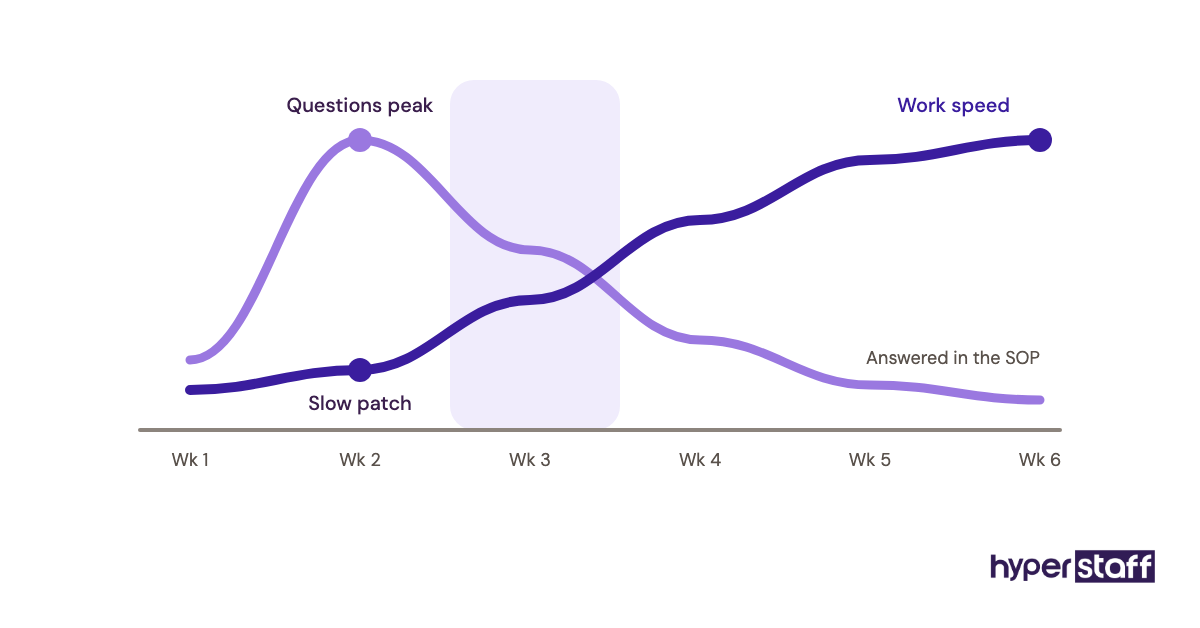
Week two is the usual slow patch. Questions peak as the VA hits edge cases, then drop once the answers go into the SOPs.
How Much Does a Small Business Virtual Assistant Cost?
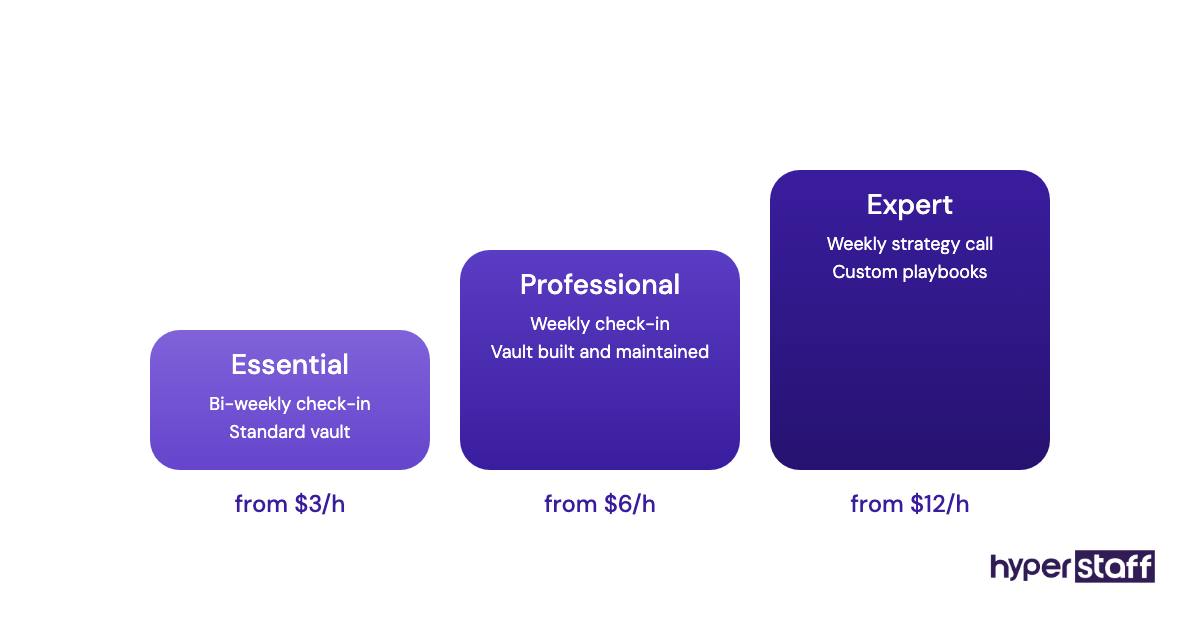
A small business virtual assistant through Hyperstaff costs from $3 to $12 an hour depending on experience tier, so a full-time month of 160 hours starts at $480. A median-paid US administrative assistant costs roughly twelve times that once benefits are counted, and our guide to small business virtual assistant cost has the full breakdown.
| Option | Experience | Hourly cost | 160 hours a month |
|---|---|---|---|
| Hyperstaff Essential | 0 to 2 years | From $3 | From $480 |
| Hyperstaff Professional | 2 to 5 years | From $6 | From $960 |
| Hyperstaff Expert | 5+ years | From $12 | From $1,920 |
| In-house admin assistant, wages only | Varies | About $23 | About $4,030 |
| In-house admin assistant, wages plus benefits | Varies | About $34 | About $5,830 |
In-house figures use the BLS median of $48,310 a year, with benefits at about 31% of total compensation, and leave out office space, equipment and recruiting time. Hyperstaff also sells bundles of 40, 80 or 160 hours a month, and paying quarterly saves 10%.
Important: Our Hyperstaff prices are starting averages, and your final rate depends on the role, the skills it needs, the region you hire from and the hours you book each month.
Is a Small Business Virtual Assistant Worth It?
Yes, a small business virtual assistant is worth it for most owners with ten or more hours a week of repeatable work, and set up well it's one of the highest-return hires a small company can make. The payoff arrives twice: a lower cost per hour, and owner time moved back to selling and delivering.
Here's the arithmetic on a full-time Professional-tier VA. 160 hours at $6 comes to $960 a month, or $11,520 a year, against roughly $70,000 a year in wages and benefits for a median-paid US administrative assistant.
Now the owner's side. If the VA frees 8 hours of your week and your time bills at $90 an hour, that's about $2,880 a month of capacity across four weeks, three times the VA's monthly cost.
The catch is that freed capacity only turns into revenue if you fill it with paid work. We look at the cases where it doesn't add up in our piece on whether a small business VA is worth it.
How to Choose a Small Business Virtual Assistant Agency
To choose a small business virtual assistant agency, compare how it vets talent, how fast it replaces a poor fit, who documents your processes, and whether you get one dedicated person or a rotating pool. Those four answers matter more than the hourly rate.
Ask for specifics in writing: days to placement, days to replacement, and what happens to your SOPs if the VA leaves. Vague answers on any of them are a warning.
Our own answers are five business days to placement, a free replacement in 5 to 7 business days briefed from your Operations Vault, and a dedicated account manager throughout. A free discovery call is a low-risk way to test any agency, ours included.
Small Business VA Statistics, Trends and Future Predictions
The firmest small business VA statistics come from US wage and adoption data. BLS puts median administrative assistant pay at $48,310 a year, and its compensation survey shows benefits at about 31% of employer compensation costs.
AI adoption among the smallest firms is still low. In the Census Bureau's Business Trends and Outlook Survey, under 20% of firms with four or fewer employees reported using AI, against 37% of firms with 250 or more employees.
Our predictions, flagged as forecasts: specialist roles will keep gaining ground on the general assistant, because a VA who already knows a CRM or bookkeeping platform needs less onboarding.
We also expect that nearshore hiring from Latin America will keep growing among US firms that need live phone coverage, since overlap matters more for calls than for back-office work. Pure data-entry roles will shrink as AI absorbs them, and demand will shift toward VAs who check and act on AI output.
Small Business Virtual Assistants and AI
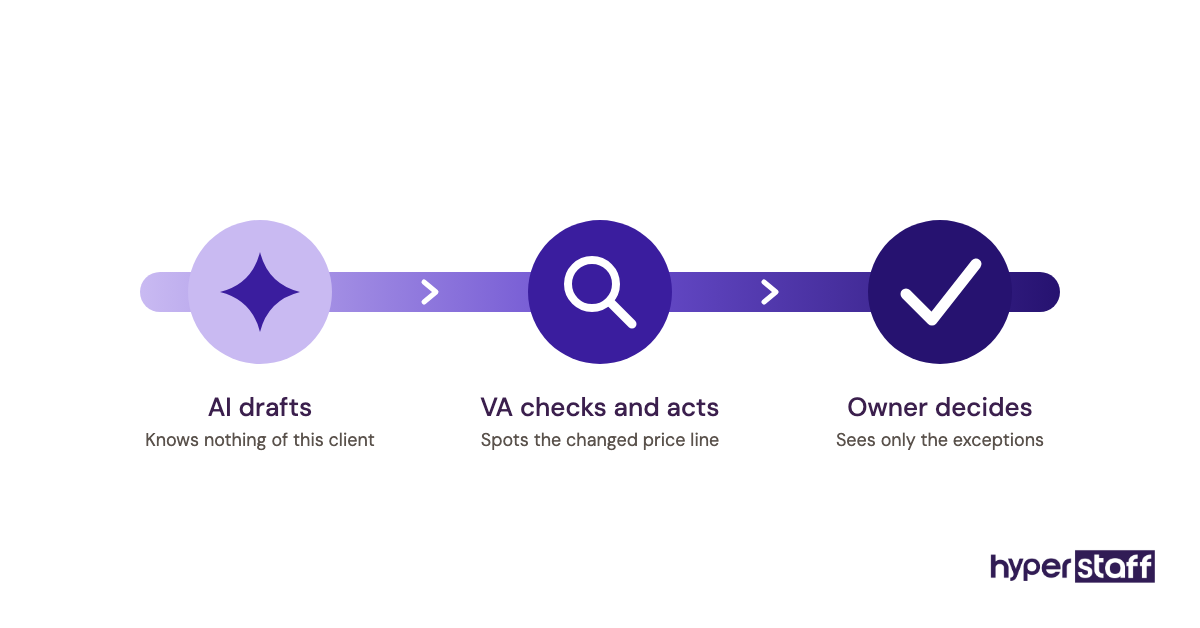
Small business virtual assistants and AI work best as a pair: AI drafts, sorts and summarizes, and the VA checks the output, applies context and acts on it. A VA who uses AI well gets noticeably more done inside the same 80-hour bundle.
AI falls short on judgment tied to your business. It can draft a reply to an upset client, but it has no way of knowing that this particular client always gets a phone call from the owner.
Our practical rule is to let the VA choose AI tools freely while banning customer data in any tool the business hasn't approved. The FTC's guidance on data security for businesses is a sensible baseline for writing that policy.
Disclaimer: This article is for general information only and is not legal, tax or financial advice. Prices, third-party tool plans and statistics change over time, so verify current details with each provider and consult a qualified professional before making hiring decisions.
Common questions
Is a small business virtual assistant an employee or a contractor?
It depends on how you hire. Through an agency, the VA is engaged and paid by the agency, while a direct hire is usually an independent contractor subject to your local classification rules.
Can a virtual assistant answer my business phone?
Yes. VAs take calls through a cloud phone app on their computer, and a nearshore VA gives the widest overlap with US business hours.
Should a small business virtual assistant sign an NDA?
Yes, for anything touching client data or finances. Check whether the agency contract already covers confidentiality, and add your own NDA for regulated information.
Can two people in my business share one virtual assistant?
You can. Name one person who sets priorities, keep a shared task board, and size the hour bundle for both workloads.
What skills should a small business virtual assistant have?
Clear written English, comfort learning new software and sound judgment about when to ask. Role-specific skills come next, such as CRM data entry, bookkeeping software or social scheduling tools.
Book a free 15 min call
We place a pre-vetted specialist in 5 business days, fully managed, from $3/hour.