Onboarding a Small Business Virtual Assistant: The First 30 Days, Planned
Onboarding a small business virtual assistant well comes down to access, written context and a paced first month of handovers.
On this page
- What Is Onboarding a Small Business Virtual Assistant?
- Key VA Onboarding Terms You Should Know
- Why Is Onboarding a Virtual Assistant Important?
- How Does VA Onboarding Work?
- Types and Forms of Virtual Assistant Onboarding
- How VA Onboarding Differs From Related Processes
- Onboarding vs. Hiring
- Onboarding vs. Training
- Onboarding a VA vs. Onboarding an In-House Employee
- The Benefits of a Planned VA Onboarding
- The Drawbacks of a Planned VA Onboarding
- Who Needs a Structured VA Onboarding?
- Small Business VA Onboarding Examples
- Good Onboarding Examples
- Bad Onboarding Examples
- Creating a VA Onboarding Plan, Step-by-Step
- Step #1
- Step #2
- Step #3
- Step #4
- Step #5
- What Does an Effective VA Onboarding Strategy Look Like?
- VA Onboarding Tools and Software
- 8 Proven VA Onboarding Tips and Best Practices
- Overcoming Common VA Onboarding Challenges
- How to Measure VA Onboarding Success
- How Long Does VA Onboarding Take to Work?
- How Much Does Onboarding a Virtual Assistant Cost?
- Is a Proper VA Onboarding Worth It?
- How to Choose a VA Agency That Handles Onboarding
- VA Onboarding Statistics, Trends and Future Predictions
- VA Onboarding and AI
- FAQs
Onboard faster, start earning back your hours sooner
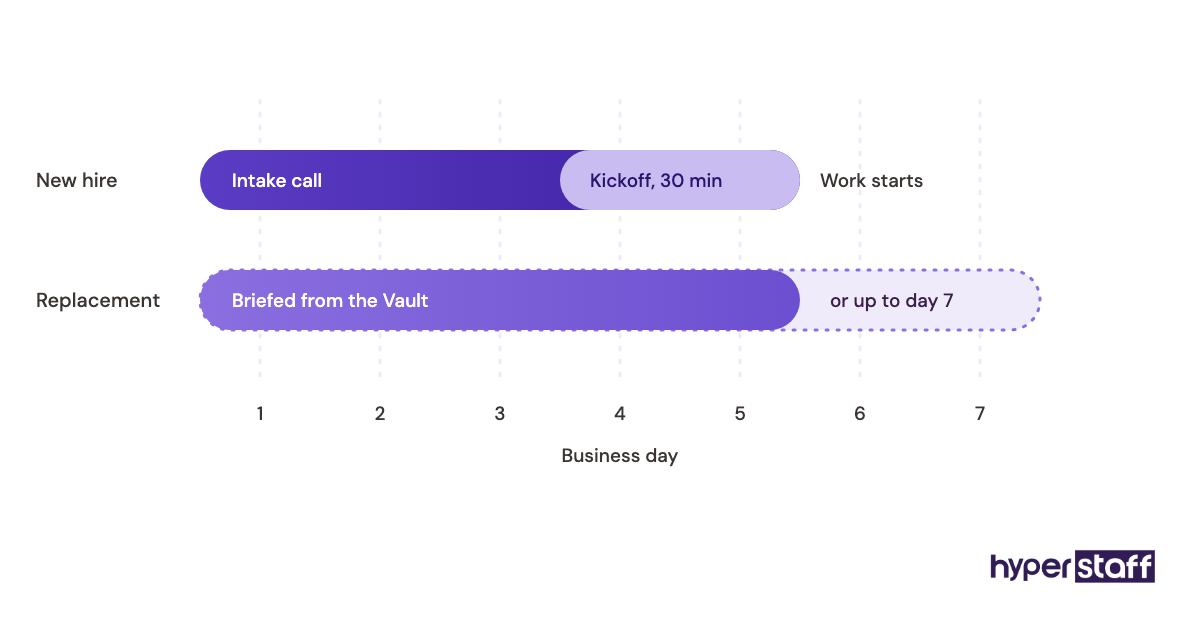
Hyperstaff runs onboarding for every placement in its small business virtual assistant services, with a 30-minute kickoff call and work that starts that day or the next morning. We've placed 70+ virtual assistants across 30+ clients, and each client gets a dedicated account manager plus an Operations Vault holding their SOPs, tools and context.
What Is Onboarding a Small Business Virtual Assistant?
Onboarding a small business virtual assistant is the process of moving a newly hired remote assistant from "has a login" to "runs tasks on their own." It covers tool access, written procedures, communication rules and a schedule for handing over work.
The definition matters because a VA does far more than inbox and calendar work. A small business assistant might handle customer support tickets, lead research, social posting, bookkeeping prep or order processing, and each of those needs its own handover. If you're still mapping the role itself, our guide on what a small business virtual assistant does covers the scope first.
Key VA Onboarding Terms You Should Know
- SOP = a standard operating procedure, the written steps for one recurring task.
- Access audit = a list of every tool, inbox and account the assistant needs, with the permission level for each.
- Password manager = software that shares logins without revealing the raw password.
- Least-privilege access = giving the minimum permissions a task needs, and adding more later.
- Shadowing = the assistant watches the owner do a task, live or on a recording, before trying it.
- Reverse shadowing = the owner watches the assistant do the task and corrects in real time.
- Handover = the point where a task's ownership moves fully to the assistant.
- Escalation rule = a written line on which decisions the assistant makes alone and which go to the owner.
- Time zone overlap = the hours both of you are online at once, used for questions and reviews.
- Ramp-up period = the weeks before the assistant reaches normal speed and accuracy.
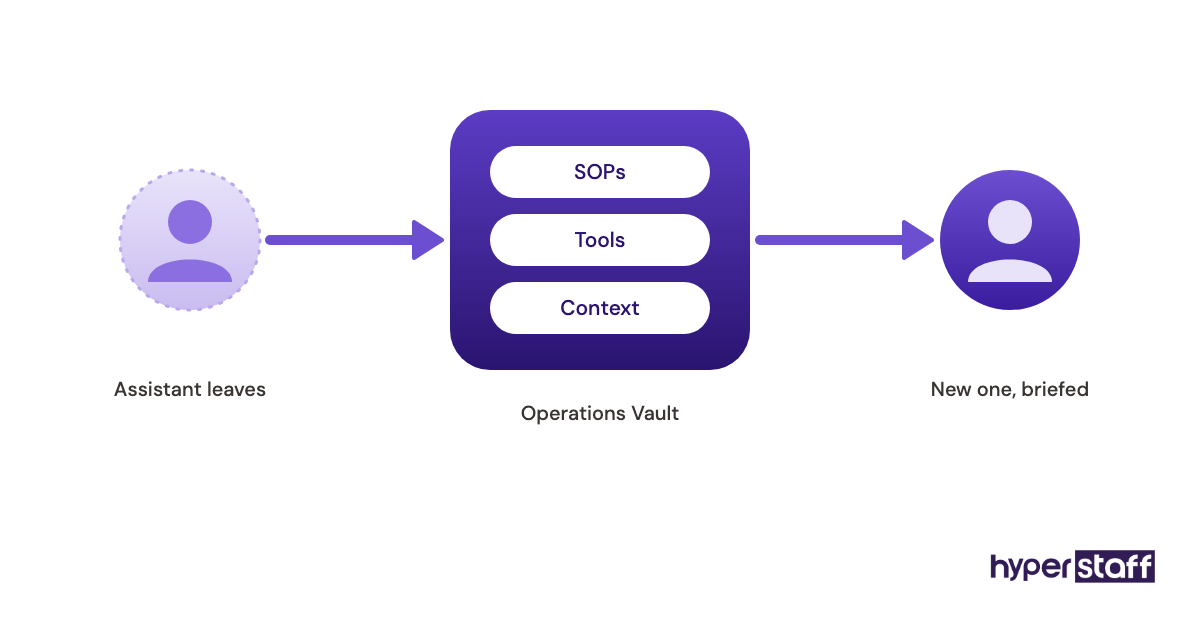
- Operations Vault = Hyperstaff's maintained record of a client's SOPs, tools and context.
Why Is Onboarding a Virtual Assistant Important?
VA onboarding decides how fast the hire pays for itself. A well-onboarded assistant can take real work within days, while a poorly onboarded one sends questions all day, and the owner ends up doing the task anyway.
Weak onboarding is common across every kind of hire. Gallup found that only 12% of employees strongly agree their organization does a great job onboarding new employees, and remote assistants get even less structure because nobody sits next to them.
There's a second cost people miss. When a placement fails, the next person starts from zero unless the first onboarding was written down, which is the reason we brief replacements from the Operations Vault.
How Does VA Onboarding Work?
Virtual assistant onboarding works in phases: preparation before day one, a kickoff, supervised work and then independent ownership. Each phase has its own checks, and skipping one usually shows up as errors two weeks later.
| Phase | Timing | What happens | Owner time |
|---|---|---|---|
| Preparation | 2 to 3 days before start | Access audit, SOPs, accounts created | 2 to 4 hours |
| Kickoff | Day 1 | 30 to 60 minute call, priorities, escalation rules | 1 hour |
| Shadowing | Days 1 to 5 | Recorded walkthroughs, first low-risk tasks | 30 to 60 minutes a day |
| Reverse shadowing | Week 2 | Assistant runs tasks, owner reviews output | 20 to 40 minutes a day |
| Handover | Weeks 3 to 4 | Tasks move to full ownership | 2 to 3 check-ins a week |
| Review | Day 30 | Scope check, new tasks added | 1 hour |
Types and Forms of Virtual Assistant Onboarding
Onboarding formats differ by who builds the material and how much structure exists before the assistant starts. The right format depends on how documented your business already is.
| Onboarding type | Who runs it | Best for | Main risk |
|---|---|---|---|
| Owner-led, unstructured | Business owner | One or two simple tasks | Knowledge stays in the owner's head |
| Owner-led with SOPs | Business owner | Owners who already document processes | Owner time in week one |
| Agency-assisted | Agency account manager plus owner | First-time VA hires | Owner still has to supply business context |
| Freelancer self-onboarding | The assistant | Experienced specialists on narrow tasks | Gaps in process nobody checks |
| Phased by task risk | Owner or agency | Roles touching customers or money | Slower first two weeks |
| Recording-first (async) | Owner via screen recordings | Small overlap in time zones | Recordings go stale when tools change |
| Team handover | Existing staff member | Businesses with 3+ employees | Staff train the VA on bad habits |
How VA Onboarding Differs From Related Processes
Onboarding sits between hiring and long-term management, and people often blur them. Separating them clarifies who does what and when.
Onboarding vs. Hiring
Hiring ends when someone accepts the role, and onboarding starts there. The hiring stage sets onboarding up: a clear VA job description becomes your first task list, and good interview questions for VAs tell you early which tools the person already knows.
For the full selection process, see how to hire a virtual assistant. Onboarding is easier when hiring checked for the exact software you use.
Onboarding vs. Training
Training teaches a skill, and onboarding teaches your business. A VA who already knows QuickBooks still needs to learn your chart of accounts, your approval rules and which clients pay late.
Onboarding a VA vs. Onboarding an In-House Employee
In-house onboarding leans on proximity: questions get answered across a desk. A remote assistant needs written answers instead, and the comparison of a virtual assistant vs in-house staff often comes down to whether the owner will write things down.
The trade-off cuts both ways. Remote onboarding takes more prep, but the documents it produces outlast the hire.
The Benefits of a Planned VA Onboarding
- Your assistant handles real tasks in the first week instead of the third.
- Written SOPs make a replacement or a second hire much faster.
- Staged access limits the damage of any early mistake.
- Clear escalation rules cut the number of messages you get each day.
- You find out within 30 days whether the role scope fits.
The Drawbacks of a Planned VA Onboarding
- Expect 6 to 10 hours of owner time across the first two weeks.
- Writing SOPs feels slow when you could just do the task yourself.
- Output in week one is lower while access and handovers are staged.
Who Needs a Structured VA Onboarding?
Any small business handing a VA more than one recurring task needs a structured onboarding. A single, simple task can survive a quick call, but two or more tasks with different tools will not.
The need is sharpest in three cases: first-time VA hires, roles that touch customer conversations or payments, and owners in a time zone far from the assistant. Solo founders gain the most, since nobody else in the business can answer the assistant's questions.
Small Business VA Onboarding Examples
The patterns below come up repeatedly in small business placements. They're described by role and process, since the details change per business.
Good Onboarding Examples
Support Inbox Handover With Saved Replies
The owner exports the 15 to 25 most common customer questions and writes the approved answer for each as a saved reply. The assistant answers only those types in week one and flags everything else, so first replies go out fast without risky judgment calls.
Lead Research Started on a Sample List
Before any outreach, the assistant researches 20 sample leads and the owner marks each one as a fit or not. The marked sample becomes the written criteria, and the assistant's later lists need far fewer corrections.
Bookkeeping Prep With View-Only Access First
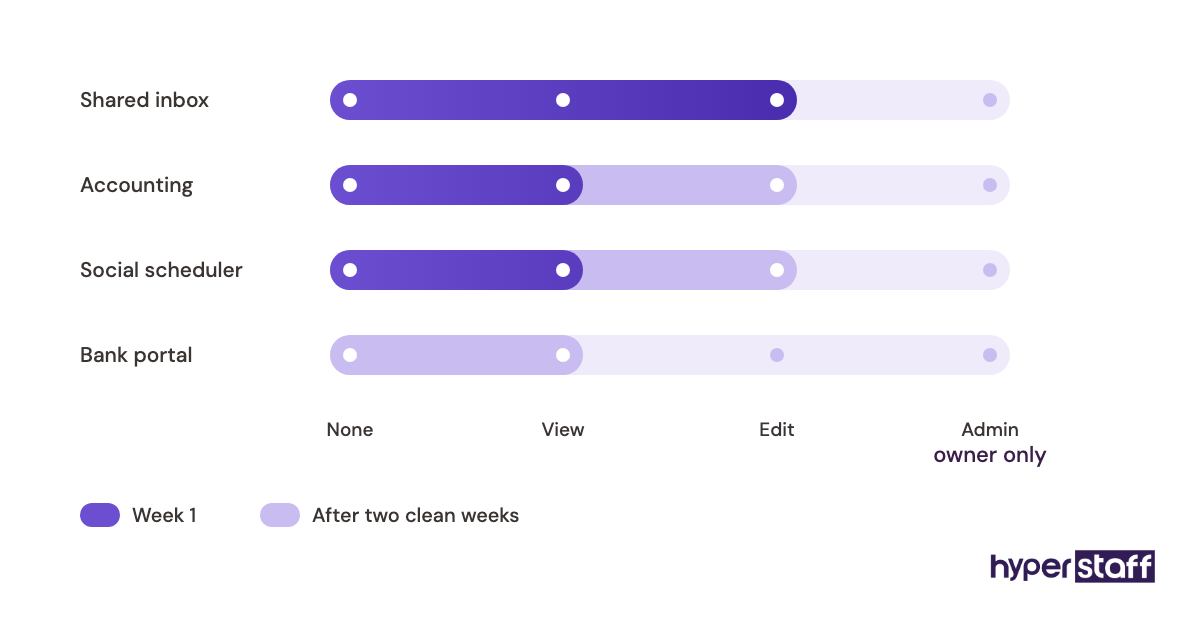
The assistant starts with view-only access to the accounting tool and categorizes transactions in a spreadsheet for review. Edit rights come after two weeks of clean categories, which keeps errors out of the live books.
Bad Onboarding Examples
Ten Tasks on Day One
An owner relieved to finally have help hands over the full task list on the first call. The assistant spreads thin, quality drops on everything at once, and the owner can't tell which task is causing the problem.
Passwords Sent in Chat
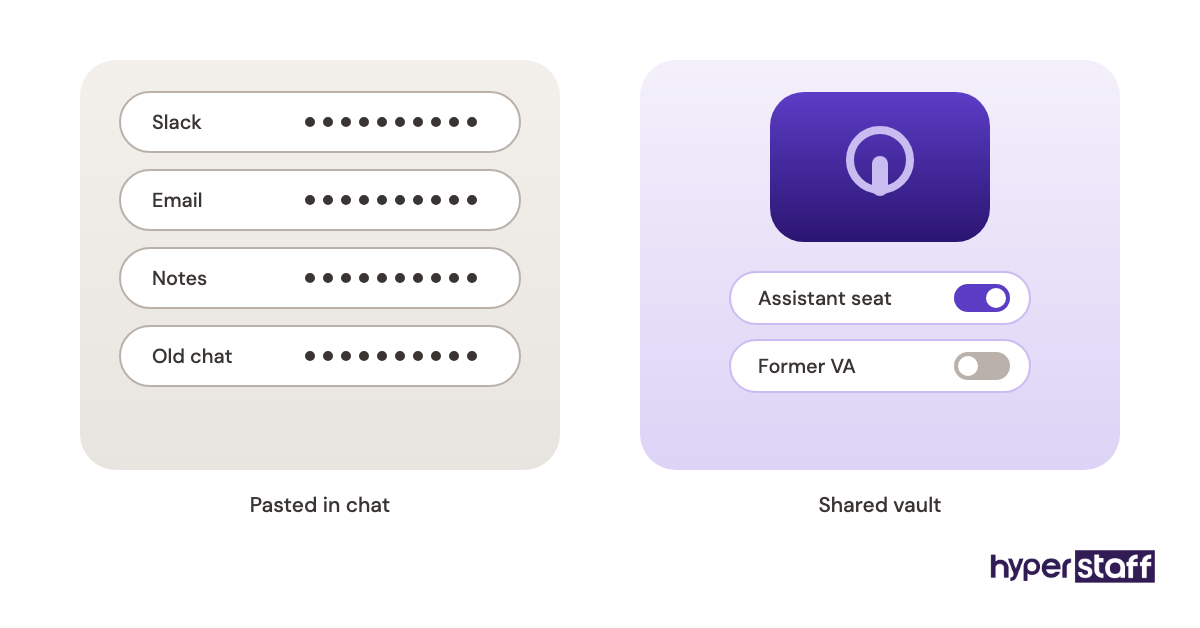
Raw logins pasted into Slack or email stay in message history forever. When the assistant leaves, nobody knows which passwords to change, and some accounts lock the owner out after a reset.
No Escalation Line
Without a written rule, the assistant either asks about everything or decides things they shouldn't, like issuing a refund. More cases like these are in our list of common VA mistakes.
Creating a VA Onboarding Plan, Step-by-Step
A VA onboarding plan fits on one page. The five steps below cover what to prepare, in the order it needs to happen.
Step #1: List and Rank the Tasks
Write every task you want to hand over, then rank them by risk and frequency. Our list of small business VA tasks helps fill gaps, and the daily low-risk ones go first.
Step #2: Run an Access Audit
An access audit lists every account the assistant needs, with the permission level for each one. Create user seats instead of sharing your own login, and set up two-factor codes the assistant can receive without texting you at 3 a.m.
Step #3: Record the First Five Tasks
Screen-record yourself doing each of the first five tasks while talking through the reasons behind each choice. The assistant turns each recording into a written SOP, which also proves they understood it.
Step #4: Set Communication and Escalation Rules
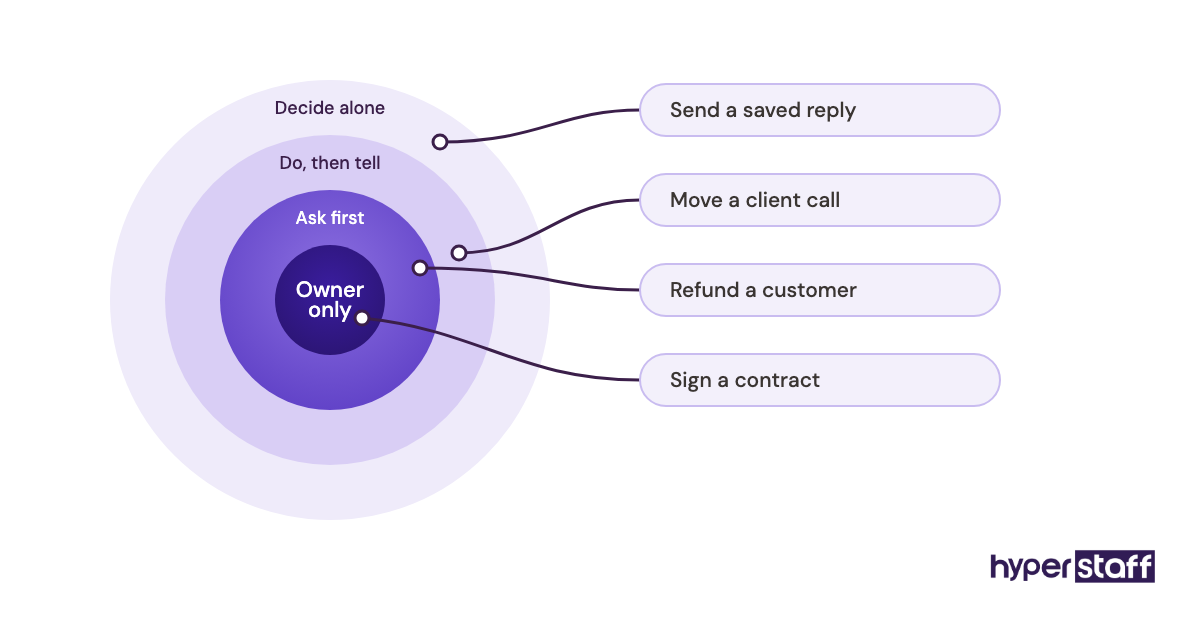
Decide which channel handles urgent issues, which handles routine updates and when you're reachable. Write down the decisions the assistant owns, plus a spending or refund limit that needs your approval.
Step #5: Schedule the 30-Day Reviews
Put short reviews on the calendar at day 3, day 10 and day 30 before the assistant starts. Reviews that aren't booked tend not to happen once work gets busy.
What Does an Effective VA Onboarding Strategy Look Like?
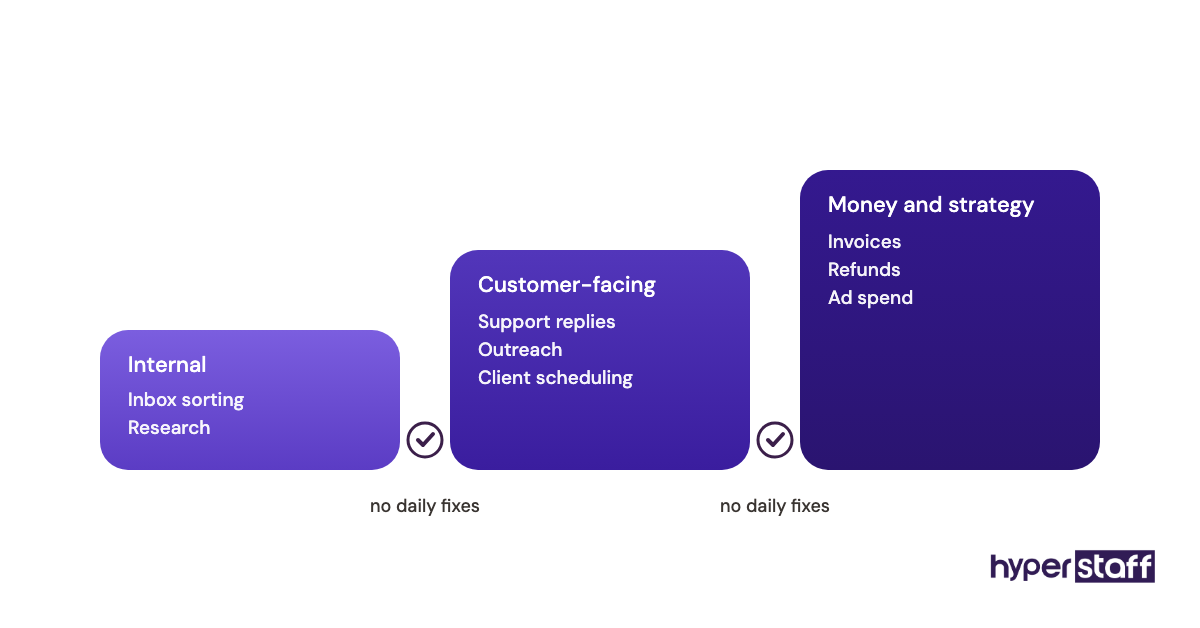
An effective onboarding strategy adds work in layers: low-risk internal tasks first, then customer-facing tasks, then anything touching money or strategy. Each layer starts only after the previous one runs without daily corrections.
Practitioners disagree on pacing. Some owners prefer throwing the assistant into the full role and fixing problems as they appear, and that can work with a senior specialist on a narrow scope. For a generalist touching several tools, the layered approach usually wins because errors stay traceable to one task.
VA Onboarding Tools and Software
Onboarding software falls into a few jobs: sharing logins, recording processes, storing SOPs, assigning tasks and talking. A small stack covers it, and most of these tools offer a free plan or trial to start.
- 1Password or Bitwarden for shared vaults. Both let you share a login without exposing the password and remove access in one click when someone leaves.
- Loom for recorded walkthroughs. For first-week handovers, a recording tends to beat a written SOP because tone and reasoning come through.
- Notion or Google Docs for the SOP library. Pick one home for documents, since two half-used systems confuse a new hire more than either tool alone.
- Asana, Trello or ClickUp for task assignment and due dates.
- Slack for daily communication, with separate channels for urgent and routine messages.
- Toggl Track or Clockify for time tracking on hourly bundles.
For a fuller comparison by role, see our roundup of virtual assistant tools.
8 Proven VA Onboarding Tips and Best Practices
These tips address the problems that come up most during the first month with a new assistant.
- Create the assistant's accounts two days before the start date, then test each login.
- Give them a company email address, never a shared personal one.
- Start with daily tasks, since repetition builds speed faster than weekly ones.
- Ask the assistant to write the SOP from your recording.
- Agree on an end-of-day update covering done, blocked and next.
- Answer blocking questions within your overlap hours, even briefly.
- Correct the process, then the person, when errors repeat.
- Add one new task a week after the first handover is stable.
Overcoming Common VA Onboarding Challenges
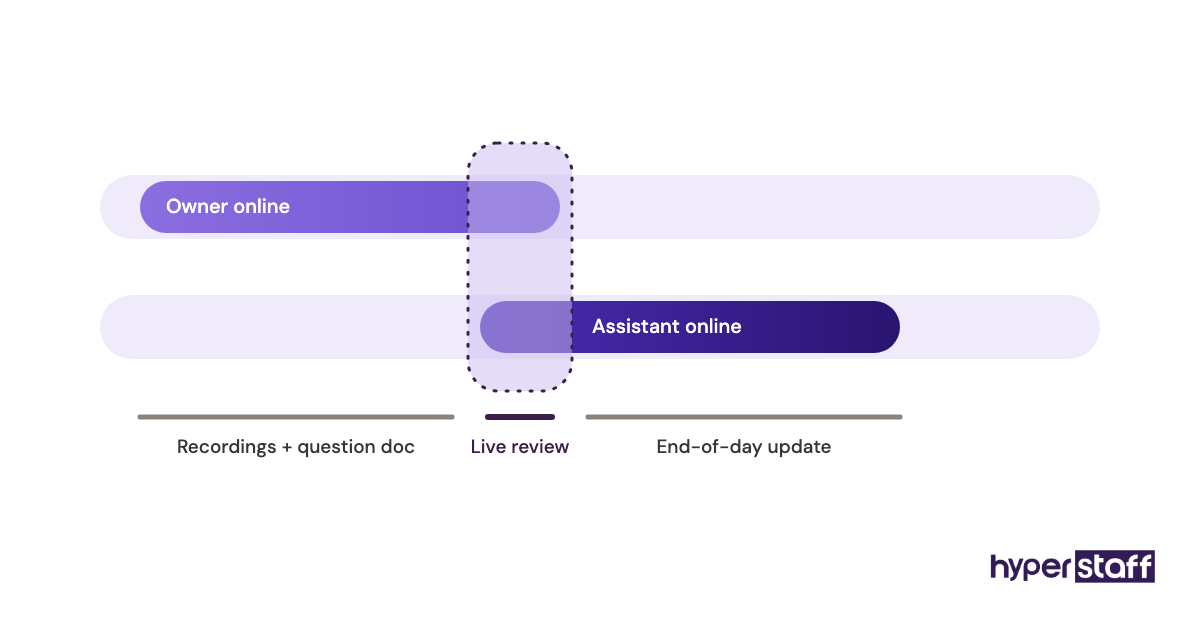
Time zone gaps are the first challenge most owners hit. Fix them with a fixed one- to two-hour overlap and a shared doc for non-urgent questions, answered once a day.
Undocumented processes come next. Recording a task as you do it takes almost no extra time, while writing from memory rarely gets done.
The last challenge is owner hesitation, when tasks stay with you "until things calm down." Book the handover date on the calendar on day one.
How to Measure VA Onboarding Success
VA onboarding success shows up in three numbers: how many tasks the assistant fully owns, how often their work needs correction and how many questions reach you per day. All three should improve week over week.
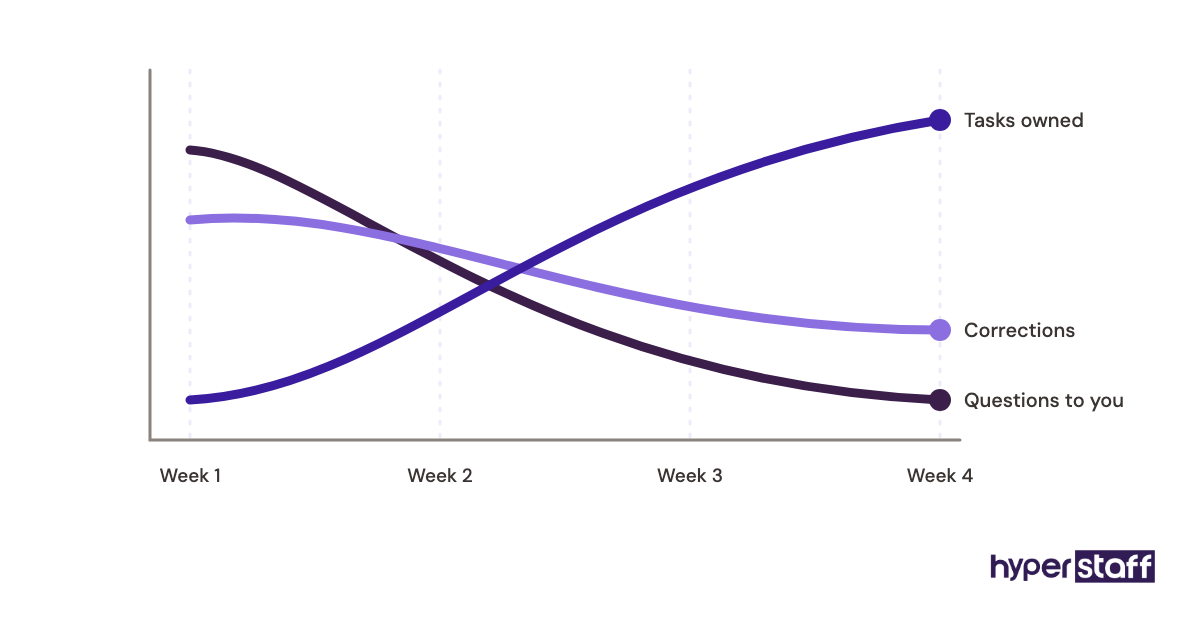
By day 30, a healthy onboarding usually means the first task layer runs without daily review. Questions should shift from "how do I do this" toward "which option do you prefer," which signals the assistant understands the process and is now asking about judgment.
How Long Does VA Onboarding Take to Work?
Most VA onboarding takes 2 to 6 weeks to reach steady output. Simple task sets settle in about two weeks, while roles mixing support, bookkeeping and marketing take closer to six.
The first week always feels slow. Owner time drops noticeably in weeks two and three, once SOPs exist and the assistant stops waiting on access.
How Much Does Onboarding a Virtual Assistant Cost?
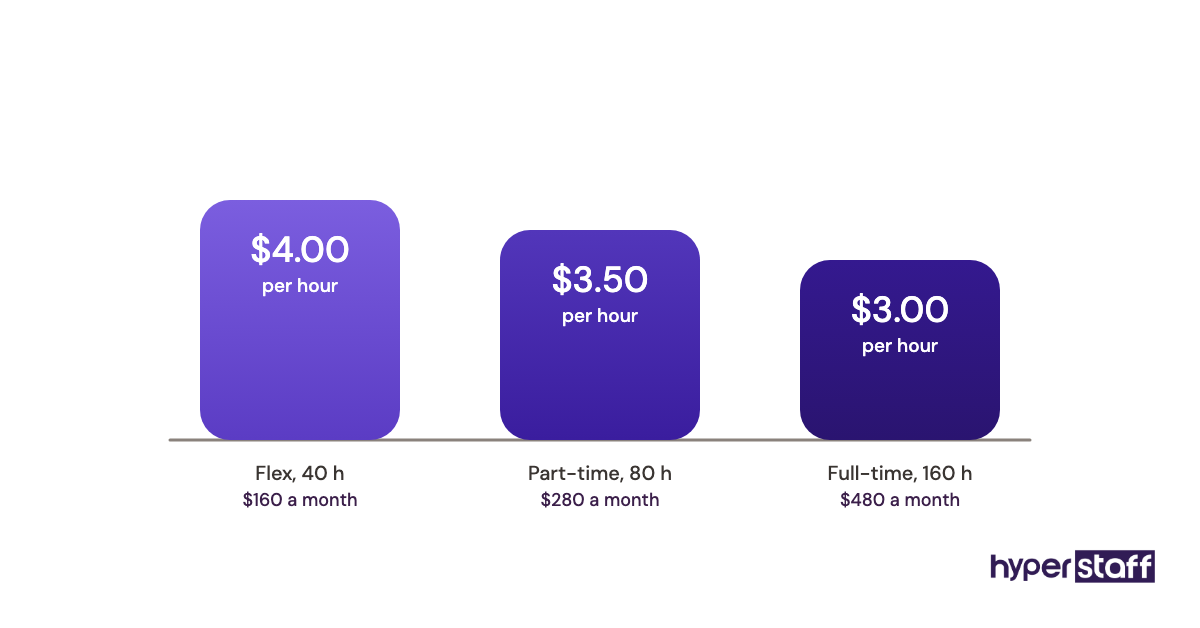
Onboarding cost is mostly owner time plus the assistant's paid hours during ramp-up. The bigger cost question is the hire itself, so the table compares Hyperstaff's published rates with a typical in-house hire. Our VA cost breakdown goes deeper.
| Cost item | Hyperstaff | Typical in-house hire |
|---|---|---|
| Hourly rate, entry level | From $3/hour (Essential, 0 to 2 years) | $18 to $25/hour plus taxes and benefits |
| Hourly rate, mid level | From $6/hour (Professional, 2 to 5 years) | $25 to $35/hour plus taxes and benefits |
| Hourly rate, senior | From $12/hour (Expert, 5+ years) | $35 to $50/hour plus taxes and benefits |
| Time to place | 5 business days | 4 to 8 weeks |
| Onboarding setup | 30-minute kickoff, Operations Vault | Owner or HR builds it |
| Replacement if it fails | Free, 5 to 7 business days | New search from scratch |
| Hours | Bundles of 40, 80 or 160 a month | Usually full-time |
| Discount | 10% off when paid quarterly | None |
Important: Hyperstaff prices shown are starting averages. Your final cost depends on the role, experience tier and hours your work needs.
Is a Proper VA Onboarding Worth It?
Yes, and a planned onboarding is one of the highest-return hours an owner can spend, because each hour of setup gets repaid every week the assistant runs the task alone.
Here's a sample calculation. Say onboarding takes 10 owner hours and the assistant then takes over 12 hours of your weekly admin; at a value of $60 an hour on your time, the setup costs $600 and the handover returns about $720 a week.
The assistant's cost belongs in the math too. A Professional-tier assistant on an 80-hour bundle starts from about $480 a month, which is why the deeper question of whether a small business VA is worth it usually turns on onboarding quality rather than price.
How to Choose a VA Agency That Handles Onboarding
Choose a VA agency by asking exactly what it does after placement, since many agencies stop at the introduction. Ask who runs the kickoff, where your processes get written down and what happens to that knowledge if the assistant leaves.
Ask how fast a replacement starts and whether they arrive briefed. An agency that keeps your SOPs can brief a new person in days, while one that doesn't sends you back to recording every task again.
VA Onboarding Statistics, Trends and Future Predictions
Onboarding quality remains a weak spot for employers, with Gallup's 12% figure showing how rarely staff rate it highly. Remote roles carry the same problem with fewer informal fixes.
Two shifts are visible in small business hiring. Async onboarding through recorded walkthroughs has become the default for offshore roles, and more owners now hire part-time bundles first, then expand hours once the first tasks are handed over.
We expect SOP libraries to become an expected deliverable of any staffing arrangement. Our confidence is lower on timing, since many small businesses still run on undocumented habits.
VA Onboarding and AI
AI tools speed up VA onboarding mainly by turning recordings into draft SOPs. Loom and similar tools can generate a written summary from a walkthrough, which the assistant then corrects against what they saw.
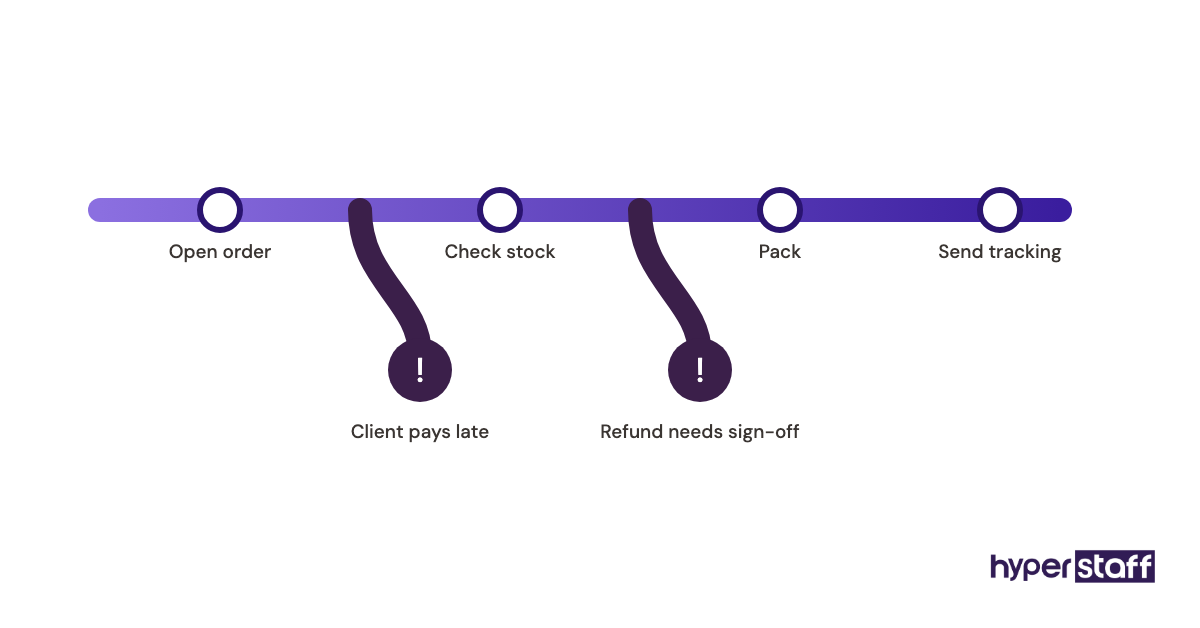
AI drafts still miss the exceptions and judgment calls that matter most. A summary lists the steps, but it won't know that one client always pays late or that a refund needs your sign-off.
Disclaimer: This article is for general information only and is not legal, financial or HR advice. Costs, tools and results vary by business, and Hyperstaff is not responsible for decisions made based on this content.
Common questions
What should a VA do on their first day?
A virtual assistant's first day should cover the kickoff call, testing every login and completing one or two low-risk tasks. Ending day one with a finished task builds confidence on both sides.
How many hours should I spend onboarding my VA?
Plan for 6 to 10 hours across the first two weeks. Most of that goes into recordings and reviews, and it drops sharply once SOPs exist.
Should my VA have access to my email?
Your VA should get delegated or shared inbox access, never your password. Gmail and Outlook both support delegation, and you can remove it in seconds.
How do I onboard a VA in a different time zone?
Set a fixed overlap of one to two hours and move everything else to recordings and a shared question doc. Batch non-urgent questions into one daily reply.
What if my virtual assistant isn't working out after onboarding?
Check the process first, since unclear SOPs cause many early errors. If the fit is still wrong, an agency replacement briefed from your existing documentation restarts the work faster than a new search.
Book a free 15 min call
We place a pre-vetted specialist in 5 business days, fully managed, from $3/hour.