Small Business Virtual Assistant Tasks: A 9-Point Handoff Checklist
A practical checklist for choosing which tasks to hand a virtual assistant, how much access to give, and how to tell when each handoff is finished.
On this page
- Checkbox 1: Where do your hours actually go each week?
- What to log before you delegate
- Why the log beats a wish list
- You can tick this box when
- Checkbox 2: Which tasks can a VA own without your sign-off?
- What to decide for each task
- Why vague permissions slow everything down
- Ready to move on when
- Checkbox 3: Can a VA run your inbox and calendar safely?
- What to set up for the handoff
- Why the rules have to be on paper
- Tick it off once
- Checkbox 4: Which support tickets can a VA close on day one?
- What to check before support goes live
- Why saved replies matter more than the help desk
- Finished looks like
- Checkbox 5: How much bookkeeping access should a VA have?
- What to lock down first
- Why access rules come before the work
- Done when
- Checkbox 6: Is your CRM clean enough for a VA to work leads?
- What to check in your pipeline
- Why lead work stalls in a messy CRM
- Check it off when
- Checkbox 7: Marketing tasks with a working approval loop
- What to set up for marketing work
- How much should you approve?
- Ready when
- Checkbox 8: Are your processes written where a new VA can find them?
- What a usable SOP includes
- Why SOPs pay off later than you expect
- You're done when
- Checkbox 9: Does your task list fit the hours you're paying for?
- What to add up
- Why the hour match drives cost
- Signed off when
- FAQs
Win back the hours that should earn money
Hyperstaff has placed 70+ virtual assistants with 30+ clients, all drawn from pre-vetted talent in five regions, and every client has a dedicated account manager. If you're looking at small business virtual assistant services, the checklist below is the one we'd go through with you on a free discovery call.
Checkbox 1: Where do your hours actually go each week?
A two-week time log is the first item on any list of small business virtual assistant tasks, because memory does a poor job of tracking where hours go. Owners tend to remember the big projects and forget the five-minute repeats.
Log more than admin work, too. A small business virtual assistant can take on customer support, lead generation, marketing ops and bookkeeping prep, so time spent on any of those belongs in the log.
What to log before you delegate
Keep the log simple enough that you'll fill it in every day. A notes app or a spreadsheet works fine.
- Every task over five minutes, with start and end times
- How often it repeats: daily, weekly or monthly
- Whether it needs your judgment or only your login
- Which tools you opened to do it
- Whether it drained you or felt fine
Why the log beats a wish list
Owners who skip the log usually delegate the tasks they hate, and those are often the hard, judgment-heavy ones. The log shows the repeatable work instead: reminders, data entry and follow-ups that use up whole afternoons.
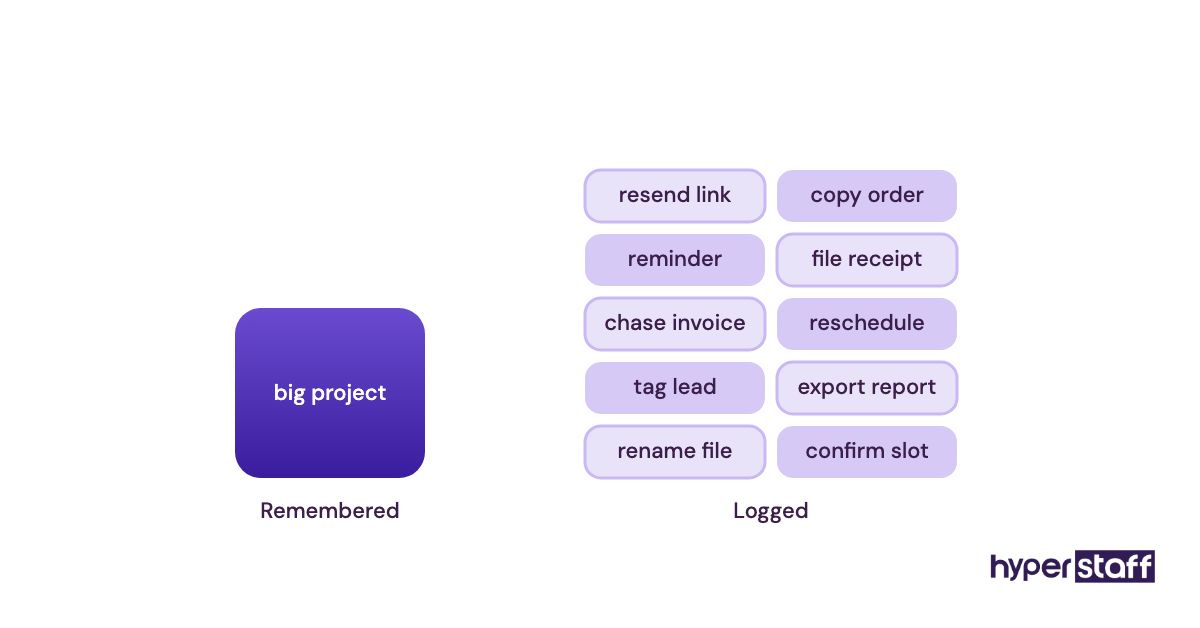
If you're still deciding whether a VA is worth it, the log gives you a real hour count to decide with. Guessed hours are how owners end up buying the wrong bundle.
Worth knowing: Most owners log the big tasks and skip the two-minute ones, like copying an order into a spreadsheet or resending a calendar link, yet those small repeats often add up to more hours each week than any single project on the list.
You can tick this box when
You have 10 working days of entries and a shortlist of tasks that repeat at least once a week. Each one is tagged "needs me" or "needs my login."
Checkbox 2: Which tasks can a VA own without your sign-off?
Every delegated task needs a permission level before day one. We use four: own it, draft it, flag it or hands off. When an early handoff goes wrong, a missing permission level is usually the cause.
What to decide for each task
Go down your log and give each task one label. Then write down the move you expect it to make.
- Own: the VA does it and reports afterwards
- Draft: the VA prepares it and you approve it
- Flag: the VA spots it and passes it to you
- Hands off: the VA never touches it
| Task | Starting level | Where it usually ends up |
|---|---|---|
| Booking and moving meetings | Own | Stays at Own |
| Small refunds or credits | Draft | Own, up to a set amount |
| Supplier bill payments | Flag | Draft, with you releasing payment |
| Social posts | Draft | Own, with weekly batch approval |
| Hiring or firing decisions | Hands off | Stays hands off |
Why vague permissions slow everything down
When a new VA seems slow, unclear permission is the cause we spot most often. The VA asks about everything because nothing says what's safe, and the owner decides delegation costs more time than it saves.
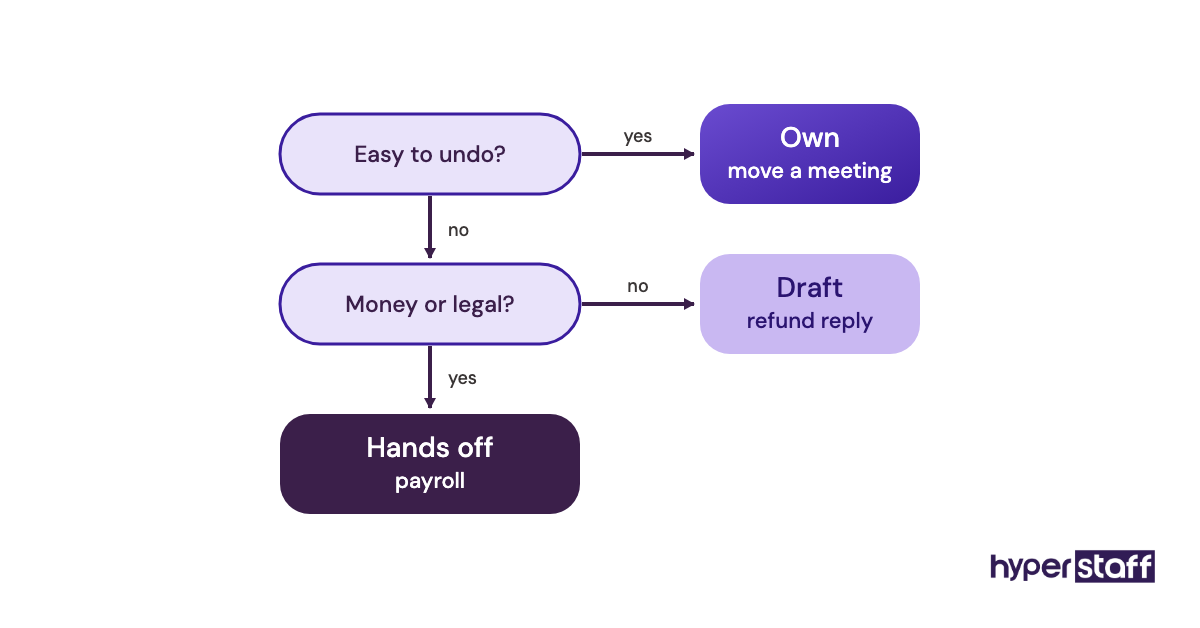
Labels should move over time. Once a VA has handled a Draft task cleanly for a few weeks, promote it to Own. When labels never change, it's one of the common VA mistakes that keeps an owner stuck as the approver.
Ready to move on when
Every task in the log has one label, and the VA can see the list. The Hands off items are written down too, so nobody has to guess.
Checkbox 3: Can a VA run your inbox and calendar safely?
Yes. A VA can run your inbox and calendar safely once the triage rules are written down. Delegated access in Gmail or Outlook takes minutes to set up, but the rules about what gets answered, archived or escalated take longer to agree.
Owners usually hand over the inbox first, and it's also the task they most often take back. The usual cause is an unwritten rule, like a client who always expects a reply from the owner personally.
What to set up for the handoff
Give the VA delegated access so they work from their own login. Then build the structure they'll work in.
- Delegated access in Gmail or Outlook, without sharing your password
- Labels or folders: To reply, Waiting, For you, Done
- A VIP list of senders who always go straight to you
- Calendar rules: buffers, no-meeting blocks and how far out to book
- A booking link, such as Calendly, that the VA manages
Why the rules have to be on paper
A new VA has no way of knowing which sender is your biggest client, or which meeting you'd drop for a sales call. Written triage rules give the VA that knowledge on day two instead of month two.
Gmail filters do much of the sorting before anyone reads a message. In our experience, a solid set of filters cuts triage time more than any inbox add-on. Put both in the first week of your VA onboarding plan.
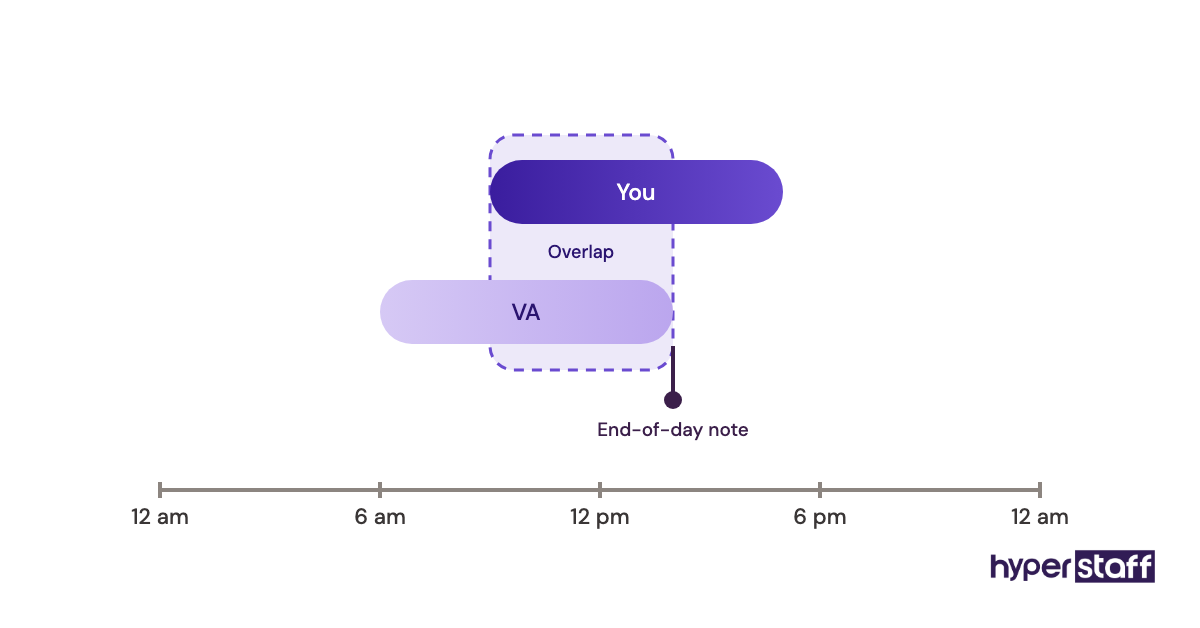
Tip: Ask the VA for a short end-of-day note listing anything still sitting in the For you folder, so nothing waits there unseen, and after two or three weeks you'll know whether the VIP list needs more names.
Tick it off once
The VA has cleared the inbox to your rules for a full week, and the only messages you opened were in For you. Your calendar has no double bookings and nothing in protected blocks.
Checkbox 4: Which support tickets can a VA close on day one?
On day one, a VA can close support tickets that already have a known answer: order status, password resets, shipping times and booking changes. Refunds, complaints and anything with legal risk should start at Draft or Flag.
For many small businesses, customer support is where a VA pays off fastest, because response time shows up in reviews and repeat sales. A wrong answer also costs the most here, so the setup deserves care.
What to check before support goes live
Pull your last 50 or so tickets and sort them by question.
- The 10 to 15 questions customers ask most
- A saved reply for each one, written in your voice
- A refund or credit limit the VA can approve alone
- Who gets escalated tickets, and how quickly
- Which tool the VA works in: Help Scout, Zendesk, Gorgias or a shared Gmail inbox with templates
Why saved replies matter more than the help desk
A help desk tool can't speed up answers nobody knows. Saved replies hold that knowledge, and they let a new VA match your tone from the first ticket.
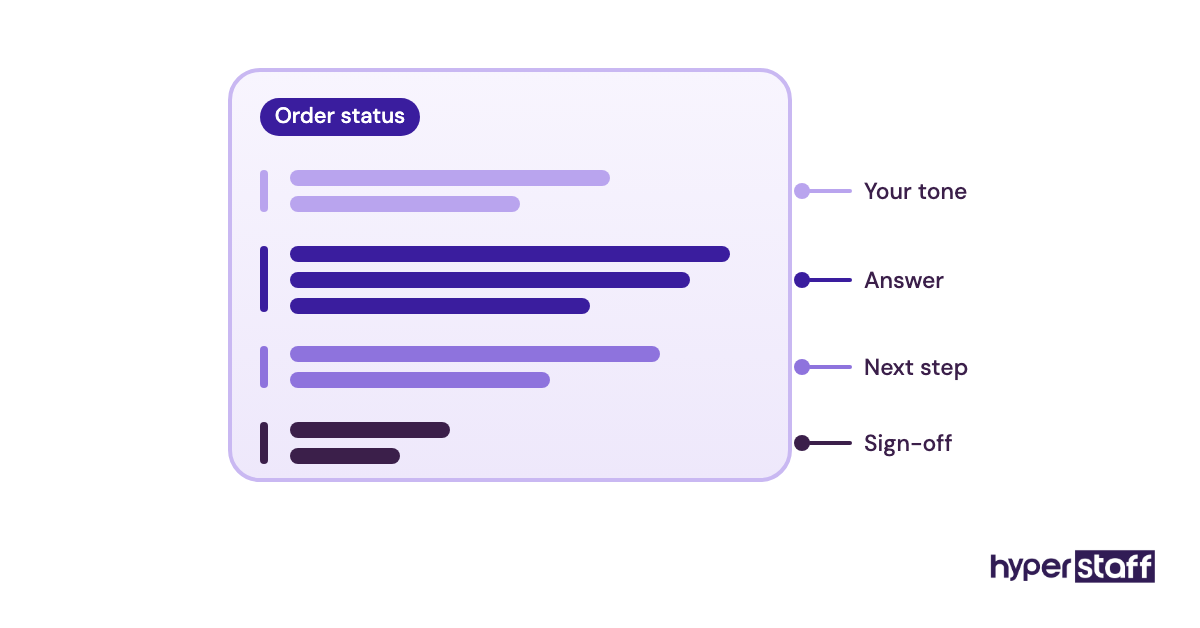
Choosing the tool is a closer call than vendors admit. Gorgias suits Shopify stores because order details show up inside the ticket, while Help Scout feels lighter for service businesses that mostly get email.
When you screen candidates, a mock ticket shows more than a résumé, and our list of VA interview questions includes a few that work well.
Finished looks like
The VA answers the common questions without help, and you only see Flagged tickets. First-reply time is as fast as when you ran support yourself, or faster.
Checkbox 5: How much bookkeeping access should a VA have?
A VA doing bookkeeping prep needs enough access to enter and match transactions, but no power to move money. QuickBooks Online and Xero both have user roles that limit what each person can see and do.
Owners often hand over finance tasks last, even though they're some of the most useful to hand over. Sending invoices on time and chasing late payments has a direct effect on cash in the bank.
What to lock down first
Set up access before you hand over any of the work.
- A limited user role in your accounting software
- Logins shared through a password manager such as 1Password or Bitwarden
- Two-factor codes stored in the shared vault and never on a personal phone
- A payment rule: the VA prepares, you approve and release
Why access rules come before the work
When finance goes wrong with remote staff, it's usually access that was set up in a hurry, like a shared owner login nobody revoked later. Role-based access limits the damage if something slips and makes switching people out a quick job.
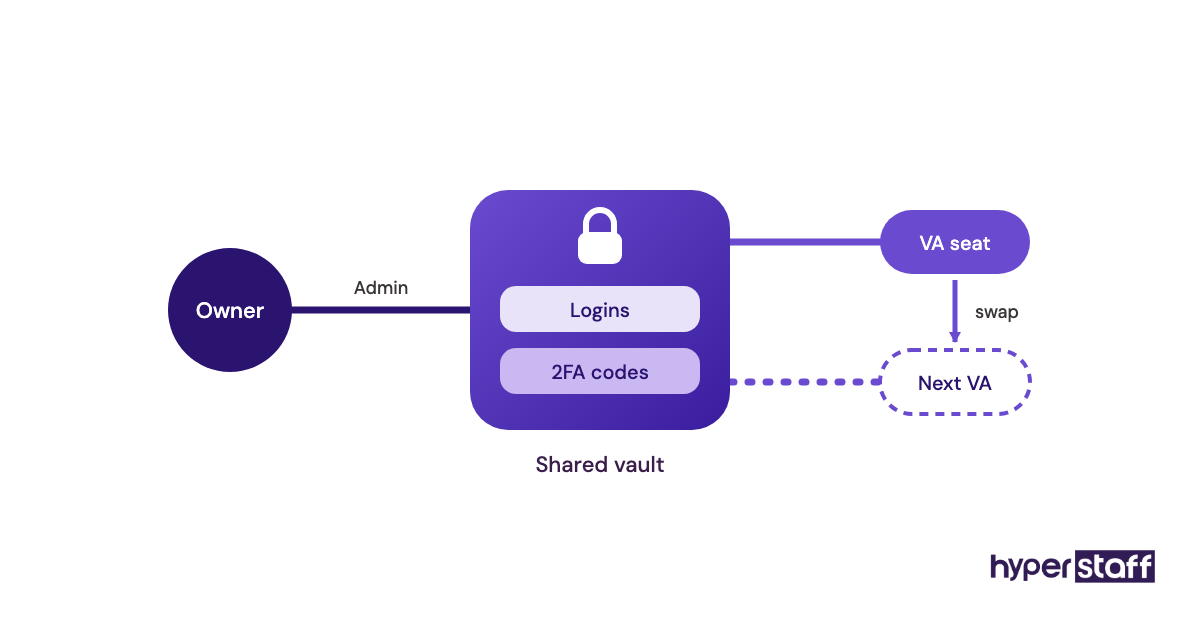
Password managers and the rest of the software a VA uses are covered in our VA tools roundup.
Done when
The VA's login can create invoices and match bank lines, but can't pay a bill or add a payee. You've gone through the role settings line by line with the VA on a call.
Checkbox 6: Is your CRM clean enough for a VA to work leads?
A VA can handle lead generation, follow-ups and appointment setting well only if the CRM has one set of stages and every lead has an owner. If your pipeline is spread across spreadsheets and your inbox, the VA's first job is the cleanup.
What to check in your pipeline
Spend an hour in the CRM before you hand over a single lead.
- Pipeline stages, each with a plain definition
- Required fields: source, next step and next-step date
- Duplicate contacts merged
- A written follow-up cadence (day 1, day 3, day 7 and so on)
- Which lead sources the VA may prospect from, and which are off limits
- Who books the call, and whose calendar it goes on
Why lead work stalls in a messy CRM
A VA working from a messy CRM ends up chasing people who already bought and missing the ones who asked for a call back. Next-step dates are the field that matters most, because they turn the pipeline into a daily to-do list.
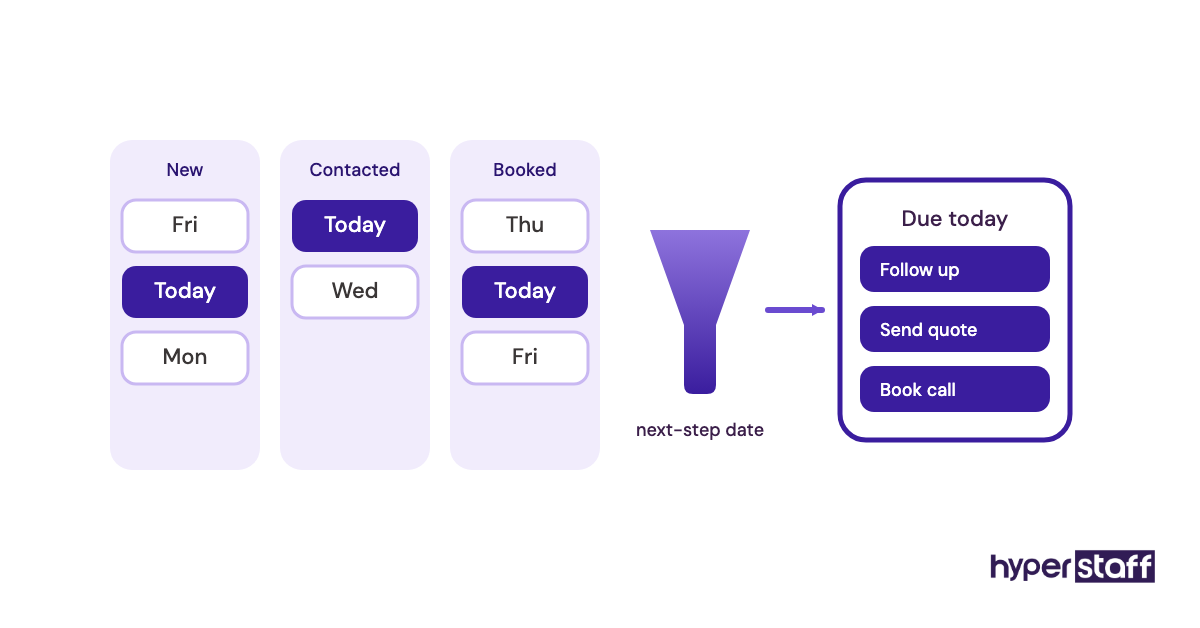
HubSpot's free CRM is enough for most small teams starting out. Pipedrive suits sales-led businesses because its stage view is easier to work in all day, but the rules you set matter far more than which tool you pick.
Keep in mind: Cold outreach rules vary by country, such as CAN-SPAM in the US and GDPR in the EU, so agree on which lists and channels the VA may use before the first email goes out.
Check it off when
Every open lead has a stage and a next-step date, and the VA starts each morning from a filtered view. No lead sits longer than your cadence allows without a note.
Checkbox 7: Marketing tasks with a working approval loop
Marketing work suits a VA when you have a content calendar and a clear approval step. Scheduling posts, resizing graphics, answering comments, updating directory listings and pulling monthly numbers are all fair game.
Brand voice is the part owners worry about, and the worry is reasonable. A VA can learn your voice, but only from approved examples you've already published.
What to set up for marketing work
Keep the approval loop short, or it stalls.
- A content calendar the VA fills two weeks ahead
- A folder of approved posts to use as voice examples
- One approval channel, plus a rule for what happens if you don't reply within 24 hours
- A list of which comments the VA answers and which get flagged
How much should you approve?
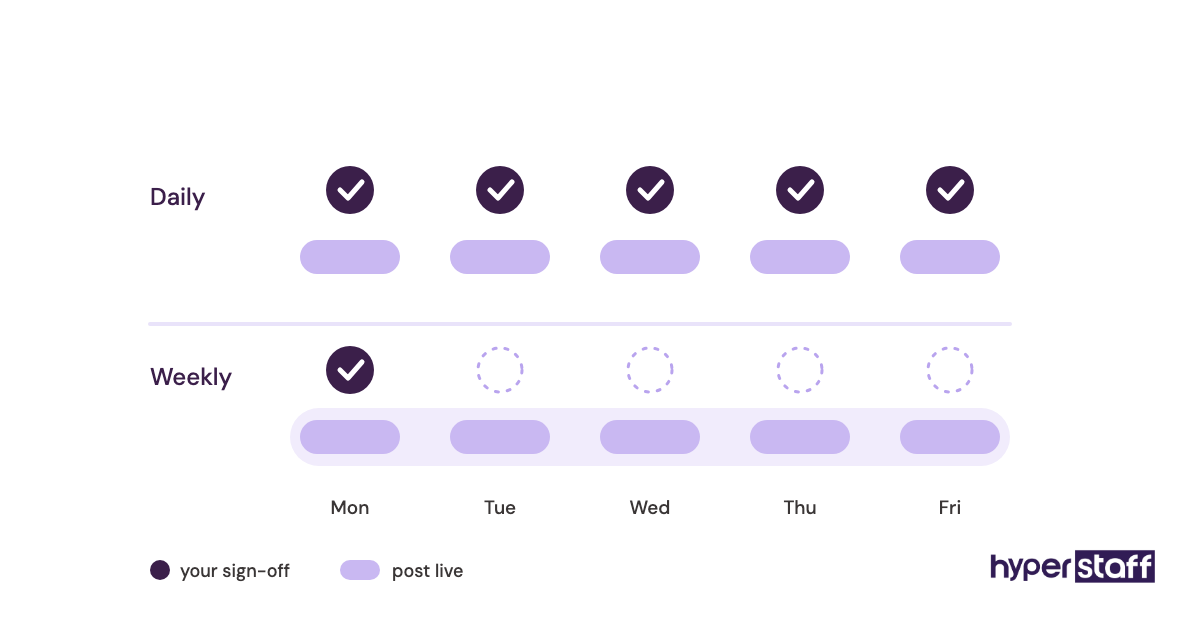
Owners disagree on this. Some check every post indefinitely, while others approve the calendar once a week and let the VA publish.
We lean toward the weekly batch once the VA has a month of approved examples. Daily approvals put the owner back in the bottleneck the VA was hired to remove.
Ready when
Two weeks of posts get scheduled and approved in one sitting. The VA answers routine comments and flags the rest within a day.
Checkbox 8: Are your processes written where a new VA can find them?
Written SOPs protect every other box on this list, because a task that only lives in someone's head leaves when they do. Every recurring task you delegate needs a short process doc that a stranger could follow.
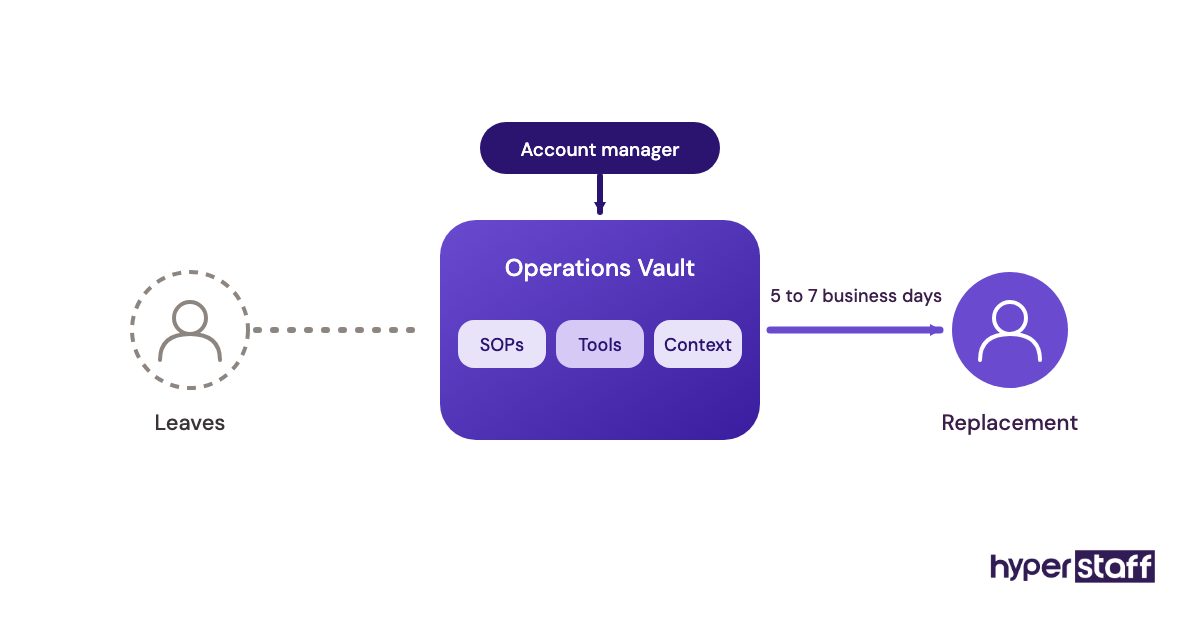
At Hyperstaff, that record is the Operations Vault: your SOPs, tools and context, written down and maintained for you. It's also what we use to brief a replacement VA within 5 to 7 business days, if you ever need one.
What a usable SOP includes
Keep each SOP short. A current one-page SOP is more useful than a long one nobody updates.
- The trigger: what starts the task
- The steps, with screenshots or a Loom recording
- Where the logins and files are
- What done looks like
- Who to ask when something's off
Why SOPs pay off later than you expect
In week one, SOPs feel like extra work. The payoff shows up around month three, when the VA is covering tasks you'd forgotten you delegated and a sick day doesn't stop anything.
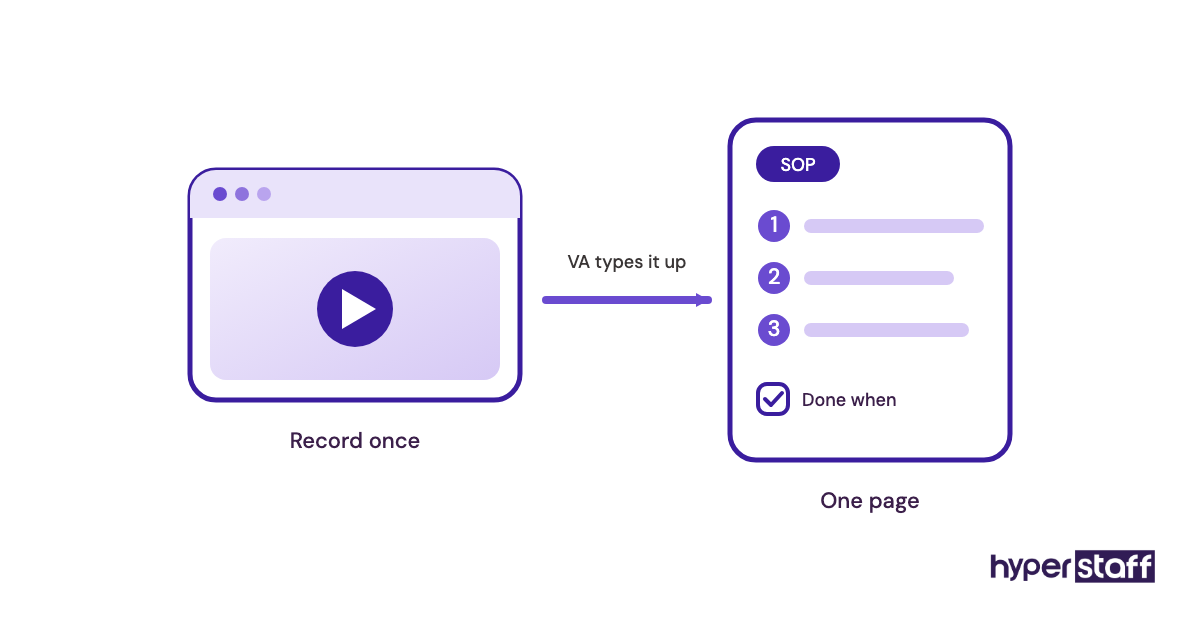
Recording a Loom while you do a task once is usually faster than writing the steps out, and the VA can turn the video into a written SOP. If you're writing the VA job description now, list SOP upkeep as a duty so it's expected from the start.
Heads-up: Most SOPs drift within a few months as tools, prices and suppliers change, so give the VA a standing monthly task to fix any SOP they used and found out of date.
You're done when
Every task labelled Own or Draft has an SOP, and the VA has edited at least one of them. A new person could run a week of the work from the docs alone.
Checkbox 9: Does your task list fit the hours you're paying for?
Your task list fits when the logged time for delegated tasks, plus a buffer, lands close to a 40, 80 or 160-hour monthly bundle. Add up the weekly minutes from Checkbox 1 and multiply by about 4.3 to get a monthly figure.
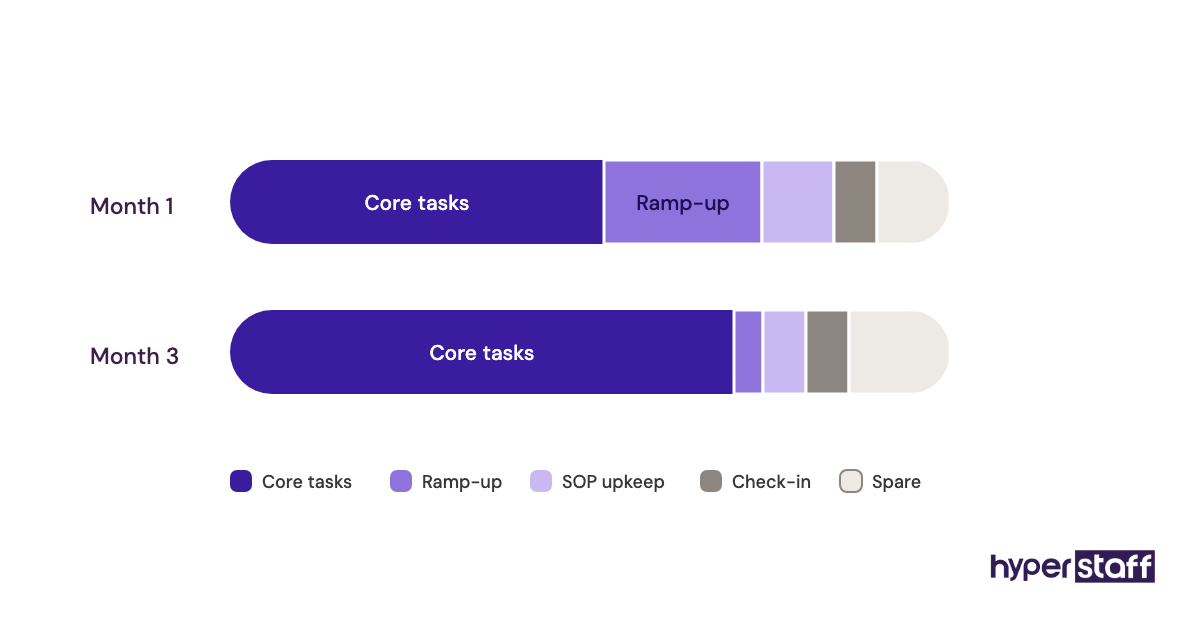
First estimates usually come in low. A new VA works more slowly for the first few weeks while learning your tools, so leave room for that.
What to add up
Work from the log, not your gut.
- Weekly minutes for every task labelled Own or Draft
- A ramp-up buffer for the first month
- Time to write and update SOPs
- A weekly check-in with you, 15 to 30 minutes long
Why the hour match drives cost
Buy too few hours and the VA rushes or drops tasks. Buying too many is the less obvious problem: you pay for hours with nothing on the list.
Hyperstaff rates start from $3 an hour for Essential, $6 for Professional and $12 for Expert, and our VA cost breakdown shows how that adds up per bundle. If you're comparing against a local hire, the VA vs in-house comparison covers benefits, overhead and management time.
Signed off when
Delegated tasks fill 80 to 90 percent of the bundle, which leaves room for one-off requests. You've chosen the experience tier that matches the hardest task on the list, because that task sets the skill bar.
Once the numbers hold up, our guide to hiring a small business VA covers everything from the brief to day one.
Disclaimer: This article is general information only and is not legal, financial or tax advice. Rates and terms may change, so confirm current details with Hyperstaff and consult a qualified professional before making business decisions.
Common questions
What tasks should I give my VA first?
Start with weekly tasks that need your login but not your judgment: inbox triage, calendar booking, data entry and invoice prep. They're easy to check, so trust builds quickly before you move on to support or lead follow-up.
Can one virtual assistant handle admin and marketing?
Yes, for most small businesses using 80 hours a month or fewer. Above that, two specialists often work better, because social media and bookkeeping prep call for different skills.
What shouldn't a small business virtual assistant do?
Keep hiring decisions, final payment approvals, legal sign-offs and anything that needs a professional licence with you or a qualified expert. A VA can still prepare the paperwork for all of them.
How many hours a week do VA tasks usually take?
It depends on your time log. Many small businesses start at 40 or 80 hours a month, roughly 10 to 20 hours a week, and add more once SOPs are in place.
How fast can a VA start on my task list?
Hyperstaff places a pre-vetted VA within 5 business days. After a 30-minute kickoff call, work starts the same day or the next morning, beginning with the tasks you've labelled Own.
Book a free 15 min call
We place a pre-vetted specialist in 5 business days, fully managed, from $3/hour.